Mouse not working after SP1 update

AODfan

New member
Local time
2:36 PM
Messages
2
Hello all,

I currently have Win7 64-bit Ultimate, I did the SP1 update last night and all was well, until it was finished, upon logging in after the last reboot my Logitech MX mouse no longer responded to clicks or movement. I tried navigating with the keyboard and downloaded the setpoint drivers for the mouse and installed, but didn't do anything, I tried different USB ports, nothing. Keyboard works though and it is USB. I tried going to the restore point, but once I got there it said there was not one available, even though before the SP1 install it said it did one...

So I have not tried another mouse option yet due to, 1, I was up til 2am working on the issue, and 2, I did not have another mouse available until I could borrow one from work. Weird thing really, mouse was working perfectly before the update.

Wondering if anyone else has heard of this issue?
 

My Computer

Computer Manufacturer/Model Number
Custom Build
OS
Win7 64-bit
CPU
AMD Phenom II X4 925 @ 3.4GHz
Graphics Card(s)
ATI Raedon HD 4890
I've never heard of that happening. I suggest you go to the Logitech website and create an account on their support forums, and post your question there. While you might get some responses here, you definitely will get more responses over there. I also suggest opening a support ticket with them.
 

My Computer

Computer Manufacturer/Model Number
Dell XPS 15 L502x
OS
Windows 7 Ultimate x64 SP1
CPU
Core i7-2670QM
Memory
8GB DDR3 PC3-10600
Graphics Card(s)
Intel HD Graphics 3000 + GeForce GT 540M
Screen Resolution
1920x1080
Hard Drives
1TB 5400RPM Seagate
Hello AODfan, and welcome to Seven Forums.

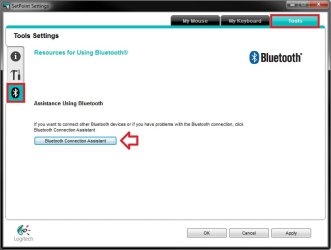
You might see if using the Bluetooth connection Assistant option in the SetPoint Settings may be able to help get the mouse connected.

SetPoint.jpg

Hope this helps,
Shawn
 

My Computer

Computer type
PC/Desktop
Computer Manufacturer/Model Number
Self built custom
OS
64-bit Windows 11 Pro for Workstations
CPU
Intel i7-8700K OC'd to 5 GHz
Motherboard
ASUS ROG Maximus XI Formula Z390
Memory
64 GB (4x16GB) G.SKILL TridentZ RGB DDR4 3600 MHz
Graphics Card(s)
ASUS ROG-STRIX-GTX1080TI-O11G-GAMING
Sound Card
Integrated
Monitor(s) Displays
2 x Samsung Odyssey G7 27"
Screen Resolution
2560x1440
Hard Drives
1TB Samsung 990 PRO M.2,
4TB Samsung 990 PRO PRO M.2,
TerraMaster F8 SSD Plus NAS
PSU
Seasonic Prime Titanium 850W
Case
Thermaltake Core P3
Cooling
Corsair Hydro H115i
Keyboard
Logitech wireless K800
Mouse
Logitech MX Master 4
Internet Speed
2 Gb/s Download and 100 Mb/s Upload
Antivirus
Malwarebyte Anti-Malware Premium
Browser
Google Chrome
Other Info
Logitech Z625 speaker system,
Logitech BRIO 4K Pro webcam,
HP Color LaserJet Pro MFP M477fdn,
APC SMART-UPS RT 1000 XL - SURT1000XLI,
Galaxy S23 Plus phone
Hello! AODfan.

I own a Razer mouse and I had the same problem with Windows not recognizing the mouse. I couldn't get to the source of the problem. But this is what I did :
Uninstalled the driver.( Through the application's uninstaller)
> Uninsatlled it through the device manager.<
Restarted and reinstalled the driver.

Hope this helps.
YBL
 

My Computer

Computer Manufacturer/Model Number
AMD _(Assembled)_
OS
Dual Booting Windows 7 64-Bit Ultimate Edition and Fedora 16.
CPU
AMD Phenom X4 925
Motherboard
MSI 785g-E53
Memory
4gb DDR3 G.skill RipJaws
Graphics Card(s)
ATI Radeon HD 6770
Sound Card
Realtek
Monitor(s) Displays
Dell IN2020M LED
Screen Resolution
1600*900 20"
Hard Drives
Seagate 500 Gibs
External 320 Gb Western Digital(Got Glitchy)
PSU
Cooler Master
Case
Cooler Master
Cooling
Cooler Master
Keyboard
Logitech K100
Mouse
Razor Death Adder v2 3500 dPi (Razer Goliathus Pad)
Internet Speed
Back to college Internet with Cyberroam X|
Well, my Wife sent me a text and advised that another Logitech mouse what we have works fine. So I am wondering if it has to do with the MX Performance mouse and the Unifying software/drivers....if it is not that then it is the mouse. Bummer.
 

My Computer

Computer Manufacturer/Model Number
Custom Build
OS
Win7 64-bit
CPU
AMD Phenom II X4 925 @ 3.4GHz
Graphics Card(s)
ATI Raedon HD 4890
Back
Top