
Solved Mouse pointer freezes

rundwald

New member
Member
VIP
Local time
11:35 AM
Messages
394
Location
UK, Hampshire
I use a standard Dell optical mouse. Intermittently it will freeze on the screen, more often than not a few minutes after boot.

The only way to resume is to close down by the computer box's front button and reboot. Sometimes that too is a problem and I have too power off and on at the wall, then power on the computer.

A day or so back the box light was yellow and the computer was beeping when I attempted the power off on routine, but a further power off and on again after the evening meal cured ( temporarily?) the problem.

I have run diagnostics and symptom tree and nothing amiss is reported.

Ideas folks? :)
 

My Computer

Computer type
PC/Desktop
Computer Manufacturer/Model Number
Dell Inspiron 560MT
OS
Home Premium 64 bit
CPU
2.9 gigahertz Intel Core2 Duo 64 kilobyte primary memory cac
Motherboard
Board: Dell Inc. 0K83V0 A00 Serial Number: ..CN750939CP069B
Memory
4096 Megabytes Usable Installed Memory Slot 'DIMM0' has 102
Graphics Card(s)
ATI Radeon HD 4300/4500 Series
Sound Card
High Definition Audio Device NVIDIA High Definition Audio (
Monitor(s) Displays
DELL ST2210 [Monitor] (21.7"vis, s/n P479R01Q0VCU, January 2
Screen Resolution
1920x1080
Hard Drives
628.58 Gigabytes Usable Hard Drive Capacity
554.78 Gigabytes Hard Drive Free Space
Keyboard
Std Dell UK
Mouse
KEYBOARD, 105, UNITED KINGDOM, KWE9C0
Internet Speed
~8000 kbps
Antivirus
Avast Free
Browser
Chrome
Other Info
Office 2007: Photo Editing; Serif PhotoPlus X7
Hi rundwald,

Please check if the system freezes up while using a specific application; try to notice if any such pattern is evident. You referred to some 'beep sounds' from the computer; also capture and share the number of beeps and their repeat pattern. (Number of beeps may help us determine if it is hardware failure)

Since the 'Hardware Diagnostics' have passed, a software issue/conflict is likely. You may perform the following steps for more clarity:

1. Check the computer functionality in 'Safe Mode'; see if it still freezes up
2. You may also perform a clean boot and see if that helps: How to perform a clean boot to troubleshoot a problem in Windows Vista, Windows 7, or Windows 8
3. If the issue persists, you may also ensure that all power cables are securely connected to the system board; also ensure that the main power cable and front panel cable are also securely connected (Steady amber Power light indicator may point at a 'system fault' error)
You may want to refer to the 'service manual' of Inspiron 560: Documentation Note: Please follow all safe measures mentioned in the document while working on the computer.

Please share the details of 'security software(s)' installed in the system; system may freeze up intermittently due to a conflict between 2 security applications. Also check if you encountered any error message(s) in the system.

Do reply with the findings; would be glad to assist.
 

My Computer

OS
Windows 7 64bit
Thanks for response!

The freezes are just after start-up, when most often I enter the Chrome browser or Thunderbird email client.

Your point #1. Can you expand on that, how to do? When the glitch occurs and I reboot the normal functionality is seemingly regained, so I am a bit puzzled what Safe Mode will tell me.

Error messages: a zip of the errors .evix files at last evening's crash is attached.

Security Software: Windows Firewall, Windows Security Essentials, Malwarebytes Pro. Iobit Advances System Care (I do not scan for malware removal).

Clean boot to be done asap.
 

My Computer

Computer type
PC/Desktop
Computer Manufacturer/Model Number
Dell Inspiron 560MT
OS
Home Premium 64 bit
CPU
2.9 gigahertz Intel Core2 Duo 64 kilobyte primary memory cac
Motherboard
Board: Dell Inc. 0K83V0 A00 Serial Number: ..CN750939CP069B
Memory
4096 Megabytes Usable Installed Memory Slot 'DIMM0' has 102
Graphics Card(s)
ATI Radeon HD 4300/4500 Series
Sound Card
High Definition Audio Device NVIDIA High Definition Audio (
Monitor(s) Displays
DELL ST2210 [Monitor] (21.7"vis, s/n P479R01Q0VCU, January 2
Screen Resolution
1920x1080
Hard Drives
628.58 Gigabytes Usable Hard Drive Capacity
554.78 Gigabytes Hard Drive Free Space
Keyboard
Std Dell UK
Mouse
KEYBOARD, 105, UNITED KINGDOM, KWE9C0
Internet Speed
~8000 kbps
Antivirus
Avast Free
Browser
Chrome
Other Info
Office 2007: Photo Editing; Serif PhotoPlus X7
Replace your mouse. I had this issue a while ago on my machine at work (also a Dell), whereby the mouse would freeze at random and only a reboot would fix. Since replacing the mouse, the issue has been resolved. Another thing to try (if it is a USB mouse) is to see if an alternative USB port works any better.
 

My Computer

Computer type
PC/Desktop
Computer Manufacturer/Model Number
Dwarf Dwf/11/2012 r09/2013
OS
Windows 8.1 Pro RTM x64
CPU
Intel Core-i5-3570K 4-core @ 3.4GHz (Ivy Bridge) (OC 4.4GHz)
Motherboard
ASRock Z77 Extreme4-M
Memory
4 x 4GB DDR3-1600 Corsair Vengeance CMZ8GX3M2A1600C9B (16GB)
Graphics Card(s)
MSI GeForce GTX770 Gaming OC 2GB
Sound Card
Realtek High Definition on board solution (ALC 898)
Monitor(s) Displays
ViewSonic VA1912w Widescreen (VGA)
Screen Resolution
1440x900
Hard Drives
OCZ Agility 3 SSD 120GB SATA III x2 (RAID 0)
Samsung HD501LJ 500GB SATA II x2
Hitachi HDS721010CLA332 1TB SATA II
Iomega 1.5TB Ext USB 2.0
WD 2.0TB Ext USB 3.0
PSU
XFX Pro Series 850W Semi-Modular
Case
Gigabyte IF233
Cooling
1 x 120mm Front Inlet 1 x 120mm Rear Exhaust
Keyboard
Microsoft Comfort Curve Keyboard 3000 (USB)
Mouse
Microsoft Comfort Mouse 3000 for Business (USB)
Internet Speed
NetGear DG834Gv3 ADSL Modem/Router (Ethernet) ~4.0 Mb/s (O2)
Antivirus
Avast! 8.0.1497
Browser
IE 11
Other Info
Optical Drive: HL-DT-ST BD-RE BH10LS30 SATA Bluray
Lexmark S305 Printer/Scanner/Copier (USB)
WEI Score: 8.1/8.1/8.5/8.5/8.25
Asus Eee PC 1011PX Netbook (Windows 7 x86 Starter)
Hi rundwald,

'Safe mode' starts 'Windows' with a limited set of 'files and drivers'. 'Start-up programs' do not run in safe mode, and only the basic drivers needed to start 'Windows' are installed. Trying to use the system in 'Safe Mode' may help us to isolate if any 'program' is causing the mouse to freeze up. To get into 'Safe Mode' you may follow these steps: 'Power off the computer' > Power it back on > At 'Dell splash screen' repeatedly tap 'F8 key' > Use 'arrow key' on the keyboard to highlight 'Safe Mode' and tap 'Enter' > Check if the mouse still 'freezes up'

Yes, clean boot may certainly help; you may give it a shot.

As suggested by Dwarf, you may try using the mouse with a known-good 'USB port' in the computer; you may also try using another mouse with the computer, if available. (Or try using this mouse with another computer). You may also try tapping 'Windows key' (on the keyboard) when the mouse cursor 'freezes'. Check if it is only the 'mouse cursor' that is frozen, or the computer itself.

I could not find the attached 'zipped folder' with 'errors'; please re-check and post again if needed.

Hope this helps. Do reply with the findings; would be glad to assist.
 

My Computer

OS
Windows 7 64bit
Hi there!:)

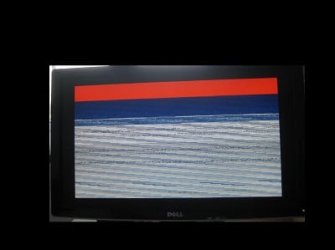
The folder is now attached, but since then it has become much worse. Booting is very problematical. I have seen screen (IMG 1192); attempted another StartUp repair that failed (IMG 1196); BSOD (IMG1197), that after over an hour was still showing same state as when the shot was first taken,of which there is no dump (presumably as I had abandonned it before its finish. (Lawks, surely it can't take that long produce a dump!)

Tried further Dell Diagnostic which yielded "Error Code: 4400:11A
Msg: SCSI_0-000_DISK_GENERIC-_SD/MMC - Target not ready".

TBH my head is spinning, and I hope I have put all in correct sequence. Anything involving man handling I will need assistance with as anno domini rules.

What else can you suggest, could it come to a clean install, or even a rest to factory condition?:(
 

Attachments

  • selected events.zip
    selected events.zip
    20.5 KB · Views: 3
  • IMG_1192MOD.jpg
    IMG_1192MOD.jpg
    27.1 KB · Views: 28
  • IMG_1196MOD.jpg
    IMG_1196MOD.jpg
    30.2 KB · Views: 30
  • 1197MOD.jpg
    1197MOD.jpg
    815.6 KB · Views: 1

My Computer

Computer type
PC/Desktop
Computer Manufacturer/Model Number
Dell Inspiron 560MT
OS
Home Premium 64 bit
CPU
2.9 gigahertz Intel Core2 Duo 64 kilobyte primary memory cac
Motherboard
Board: Dell Inc. 0K83V0 A00 Serial Number: ..CN750939CP069B
Memory
4096 Megabytes Usable Installed Memory Slot 'DIMM0' has 102
Graphics Card(s)
ATI Radeon HD 4300/4500 Series
Sound Card
High Definition Audio Device NVIDIA High Definition Audio (
Monitor(s) Displays
DELL ST2210 [Monitor] (21.7"vis, s/n P479R01Q0VCU, January 2
Screen Resolution
1920x1080
Hard Drives
628.58 Gigabytes Usable Hard Drive Capacity
554.78 Gigabytes Hard Drive Free Space
Keyboard
Std Dell UK
Mouse
KEYBOARD, 105, UNITED KINGDOM, KWE9C0
Internet Speed
~8000 kbps
Antivirus
Avast Free
Browser
Chrome
Other Info
Office 2007: Photo Editing; Serif PhotoPlus X7
Another BSOD and unfortunately the dump facility had rest to Kernel, not Mini

Event log is attached. Mouse changed so that is not cause of problems.

Tech detail from BSOD: 0x000000iE (0xFFFFFFFFC0000005, 0xFFFFF8002C7366A, 0x0000000000000001, 0x0000000000000001)
 

Attachments

Last edited:

My Computer

Computer type
PC/Desktop
Computer Manufacturer/Model Number
Dell Inspiron 560MT
OS
Home Premium 64 bit
CPU
2.9 gigahertz Intel Core2 Duo 64 kilobyte primary memory cac
Motherboard
Board: Dell Inc. 0K83V0 A00 Serial Number: ..CN750939CP069B
Memory
4096 Megabytes Usable Installed Memory Slot 'DIMM0' has 102
Graphics Card(s)
ATI Radeon HD 4300/4500 Series
Sound Card
High Definition Audio Device NVIDIA High Definition Audio (
Monitor(s) Displays
DELL ST2210 [Monitor] (21.7"vis, s/n P479R01Q0VCU, January 2
Screen Resolution
1920x1080
Hard Drives
628.58 Gigabytes Usable Hard Drive Capacity
554.78 Gigabytes Hard Drive Free Space
Keyboard
Std Dell UK
Mouse
KEYBOARD, 105, UNITED KINGDOM, KWE9C0
Internet Speed
~8000 kbps
Antivirus
Avast Free
Browser
Chrome
Other Info
Office 2007: Photo Editing; Serif PhotoPlus X7
Hi rundwald,

Apologies for the delay in response; was away from work.

Good, you've isolated that 'mouse' is not instrumental in this issue. The attached 'error logs' indicate an issue with the 'DHCP settings' on the router. Please share if you manually assign an 'IP address' to the 'network card' or does it 'automatically obtain it'? If you manually assign it, try to automate it and check results.

You can also manually release and renew the 'IP address of the client' by following these steps:
- Click 'Start' > In 'Search Programs and Files' textbox, type 'cmd' (without quotations) > Right click 'cmd' and tap 'Run as an administrator' > Click 'Enter' (Command prompt appears)
- Type 'ipconfig /release' > Tap 'Enter'
- Type 'ipconfig /renew' > Tap 'Enter'

If the issue persists, please check the 'start address' of the 'DHCP server on the router' (Check the DHCP lease setting); you may try changing it to see if that works. In case of ambiguity, please share the make/model of the 'Router' and the 'Modem'. Also share if you are using any other system on this network. If yes, have you experienced any similar issues?

Another 'error message' suggested an issue with 'Microsoft Security Client OOBE'. Try the following:
Disable the 'Microsoft Anti-malware Service' > Restart the system > Navigate to the following location: C:\ProgramData\Microsoft\Microsoft Security Client\Support\EppOobe.etl > Delete the file 'EppOobe.etl' (Ensure that the 'folder options' are set to 'view file') > Restart the unit > Enable the 'Microsoft Anti-malware Service' > Re-check results.

If you still experience issues, you may also try to disable 'IPv6' in 'NIC': Go to 'Network and Sharing Center' > 'Change adapter settings' > 'Right click' the 'network adapter' > 'Properties' > Un-check 'Internet Protocol Version 6 (TCP/IPv6)' > Press 'OK' > Restart the computer and check results. (Share the details of internet connection be ign used - Wired or Wireless; In case of a wireless connection, apply these changes on the 'wireless adapter; if on wired, use the 'network adapter')

If any issue still persists, please share the 'mini-dump' for further analysis: You may follow the following tutorial: http://www.sevenforums.com/crashes-debugging/96879-blue-screen-death-bsod-posting-instructions.html

Hope this helps. Do reply with the results; would be glad to assist.
 

My Computer

OS
Windows 7 64bit
Sorry for the rambling reply and hope all is relevant and I've done nothing naughty. TBH honest I have a feeling I will end up with a factory reset.

Good, you've isolated that ‘mouse’ is not instrumental in this issue. The attached ‘error logs’ indicate an issue with the ‘DHCP settings’ on the router.
Please share if you manually assign an ‘IP address’ to the ‘network card’ or does it ‘automatically obtain it’? If you manually assign it, try to automate it and check results.
Settings are auto

You can also manually release and renew the ‘IP address of the client’ by following these steps:

Click ‘Start’ > In ‘Search Programs and Files’ textbox, type ‘cmd’ (without quotations) > Right click ‘cmd’ and tap ‘Run as an administrator’ > Click ‘Enter’ (Command prompt appears)

Type ‘ipconfig /release’ > Tap ‘Enter’

Type ‘ipconfig /renew’ > Tap ‘Enter’
Done

If the issue persists, please check the ‘start address’ of the ‘DHCP server on the router’ (Check the DHCP lease setting); you may try changing it to see if that works. In case of ambiguity, please share the make/model of the ‘Router’ and the ‘Modem’. Also share if you are using any other system on this network. If yes, have you experienced any similar issues?

No other system in use
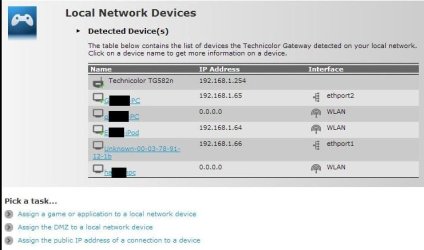
Modem router is Plusnet version of Technicolor TG582N 8.4.4.J Router access is192.168.1.254. Not sure what you mean/ how I check start address of DHCP server, if above not the same thing. IP addresses are dynamic, changing with each PPP session, as per this from Plusnet Forums:
[ FYI, IPs given out on dial/dsl either static or dynamic are assigned via PPP and not DHCP, there is no "lease time", if the IP is dynamic then the RADIUS (Remote Authentication Dial In User Server) will take the first free IP from the configured pool and assign it to the end user.It could be made to have a lease time but there isnt much point, when the PPP session terminates the IP is free and hence can be used by anyone trying to connect.]

Another ‘error message’ suggested an issue with ‘Microsoft Security Client OOBE’. Please navigate to the following location: C:\ProgramData\Microsoft\Microsoft Security Client\Support\EppOobe.etl > Delete the file ‘EppOobe.etl’ (Ensure that the ‘folder options’ are set to ‘view file’) > Restart the unit and recheck results.
Deleted and automatically restored on re-start

If you still experience issues, you may also try to disable ‘IPv6’ in ‘NIC’: Go to ‘Network and Sharing Center’ > ‘Change adapter settings’ > ‘Right click’ the ‘network adapter’ > ‘Properties’ > Un-check ‘Internet Protocol Version 6 (TCP/IPv6)’ > Press ‘OK’ > Restart the computer and check results. (Share the details of internet connection be ign used – Wired or Wireless; In case of a wireless connection, apply these changes on the ‘wireless adapter; if on wired, use the 'network adapter’)
I will remember that, but FYI see att. In case it tells something.

If any issue still persists, please share the ‘mini-dump’ for further analysis: You may follow the following tutorial: http://www.sevenforums.com/crashes-debugging/96879-blue-screen-death-bsod-posting-instructions.html
I seem to have trouble with minidumps. For whatever reason, even though I have tried many times and just now followed the link’s Method 1 instructions, it always reverts to Kernel Dump. Not sure if relevant but sometimes ( not necessarily with this aspect) I get error message that a file cannot be opened because rtl20.bpl is missing. I haven’t found how to restore it.

Hope this helps. Do reply with the results; would be glad to assist. .
 

Attachments

Last edited:

My Computer

Computer type
PC/Desktop
Computer Manufacturer/Model Number
Dell Inspiron 560MT
OS
Home Premium 64 bit
CPU
2.9 gigahertz Intel Core2 Duo 64 kilobyte primary memory cac
Motherboard
Board: Dell Inc. 0K83V0 A00 Serial Number: ..CN750939CP069B
Memory
4096 Megabytes Usable Installed Memory Slot 'DIMM0' has 102
Graphics Card(s)
ATI Radeon HD 4300/4500 Series
Sound Card
High Definition Audio Device NVIDIA High Definition Audio (
Monitor(s) Displays
DELL ST2210 [Monitor] (21.7"vis, s/n P479R01Q0VCU, January 2
Screen Resolution
1920x1080
Hard Drives
628.58 Gigabytes Usable Hard Drive Capacity
554.78 Gigabytes Hard Drive Free Space
Keyboard
Std Dell UK
Mouse
KEYBOARD, 105, UNITED KINGDOM, KWE9C0
Internet Speed
~8000 kbps
Antivirus
Avast Free
Browser
Chrome
Other Info
Office 2007: Photo Editing; Serif PhotoPlus X7
See edit above
 

My Computer

Computer type
PC/Desktop
Computer Manufacturer/Model Number
Dell Inspiron 560MT
OS
Home Premium 64 bit
CPU
2.9 gigahertz Intel Core2 Duo 64 kilobyte primary memory cac
Motherboard
Board: Dell Inc. 0K83V0 A00 Serial Number: ..CN750939CP069B
Memory
4096 Megabytes Usable Installed Memory Slot 'DIMM0' has 102
Graphics Card(s)
ATI Radeon HD 4300/4500 Series
Sound Card
High Definition Audio Device NVIDIA High Definition Audio (
Monitor(s) Displays
DELL ST2210 [Monitor] (21.7"vis, s/n P479R01Q0VCU, January 2
Screen Resolution
1920x1080
Hard Drives
628.58 Gigabytes Usable Hard Drive Capacity
554.78 Gigabytes Hard Drive Free Space
Keyboard
Std Dell UK
Mouse
KEYBOARD, 105, UNITED KINGDOM, KWE9C0
Internet Speed
~8000 kbps
Antivirus
Avast Free
Browser
Chrome
Other Info
Office 2007: Photo Editing; Serif PhotoPlus X7
Further BSOD diagnostics folder attached
 

Attachments

My Computer

Computer type
PC/Desktop
Computer Manufacturer/Model Number
Dell Inspiron 560MT
OS
Home Premium 64 bit
CPU
2.9 gigahertz Intel Core2 Duo 64 kilobyte primary memory cac
Motherboard
Board: Dell Inc. 0K83V0 A00 Serial Number: ..CN750939CP069B
Memory
4096 Megabytes Usable Installed Memory Slot 'DIMM0' has 102
Graphics Card(s)
ATI Radeon HD 4300/4500 Series
Sound Card
High Definition Audio Device NVIDIA High Definition Audio (
Monitor(s) Displays
DELL ST2210 [Monitor] (21.7"vis, s/n P479R01Q0VCU, January 2
Screen Resolution
1920x1080
Hard Drives
628.58 Gigabytes Usable Hard Drive Capacity
554.78 Gigabytes Hard Drive Free Space
Keyboard
Std Dell UK
Mouse
KEYBOARD, 105, UNITED KINGDOM, KWE9C0
Internet Speed
~8000 kbps
Antivirus
Avast Free
Browser
Chrome
Other Info
Office 2007: Photo Editing; Serif PhotoPlus X7
My Computer

Computer type
PC/Desktop
Computer Manufacturer/Model Number
Bruce ... somewhere in his 40's
OS
Windows 7 Ultimate 32bit SP1
CPU
Intel(R) Core(TM)2 Quad CPU @ 2.40GHz, 2400 MHz
Motherboard
INTEL/D975XBX2
Memory
4 GB
Graphics Card(s)
ATI Radeon HD 2600 Pro
Monitor(s) Displays
Samsung SyncMaster 914v
Screen Resolution
1280 x 1024
Hard Drives
2/500GB each ... ST3500630AS ATA Device.
One is not connected
PSU
Rocketfish 700 W
Case
G.Skill Gigabyte Chassis
Keyboard
Standard PS/2 Keyboard
Mouse
Microsoft PS/2 Mouse
Internet Speed
DSL
Antivirus
Avira Internet Security
Browser
IE 11
Other Info
ATI HDMI Audio
Hi rundwald,

Please try updating the 'network drivers'.
- Click Driver Details | Dell United States to update the 'Ethernet driver'
- Click Driver Details | Dell United States to update 'Wireless drivers'

If the issue persists, you may also try performing 'Windows Updates'. Also share is you tried 'Clean Boot': How to perform a clean boot to troubleshoot a problem in Windows Vista, Windows 7, or Windows 8; would suggest to try this step if it works.

I also recommend you to run 'Hardware Diagnostics' to check 'Hardware functionality': http://dell.to/OUGnqT

Do reply with the findings; would be glad to assist.
 

My Computer

OS
Windows 7 64bit
After the suggested updates I thought for a day that matters had got better. But eventually I had a BSOD "irq not less or equal" and other oddities. I decided to bite the bullet and re-install windows. I may be back for advice if it still goes pear shaped. :)

Incidentally the express diagnostic test found nothing, but with extended twice got (?part?) through the keyboard section and without warning flipped back to the test options. Had the test actually failed?
The DHCP problems arose from my inadvertently having both a wired and wireless connection open from computer to router.

Thanks for the time and help given.
 
Last edited:

My Computer

Computer type
PC/Desktop
Computer Manufacturer/Model Number
Dell Inspiron 560MT
OS
Home Premium 64 bit
CPU
2.9 gigahertz Intel Core2 Duo 64 kilobyte primary memory cac
Motherboard
Board: Dell Inc. 0K83V0 A00 Serial Number: ..CN750939CP069B
Memory
4096 Megabytes Usable Installed Memory Slot 'DIMM0' has 102
Graphics Card(s)
ATI Radeon HD 4300/4500 Series
Sound Card
High Definition Audio Device NVIDIA High Definition Audio (
Monitor(s) Displays
DELL ST2210 [Monitor] (21.7"vis, s/n P479R01Q0VCU, January 2
Screen Resolution
1920x1080
Hard Drives
628.58 Gigabytes Usable Hard Drive Capacity
554.78 Gigabytes Hard Drive Free Space
Keyboard
Std Dell UK
Mouse
KEYBOARD, 105, UNITED KINGDOM, KWE9C0
Internet Speed
~8000 kbps
Antivirus
Avast Free
Browser
Chrome
Other Info
Office 2007: Photo Editing; Serif PhotoPlus X7
Hi rundwald,

Glad that the issue is fixed.
It appears that the 'hardware diagnostics' passed successfully. In case of a failure, you may've been prompted with an 'error code/message'. The 'extended test' may return to the 'Test Options' menu (without any notification) to confirm a successful completion.

Do reply if yo have any further questions; would be glad to assist.
 

My Computer

OS
Windows 7 64bit
One solution to frozen mouse and beeping

OK,
So my mouse was freezing (at first briefly, but then permanently requiring me to go to sleep mode and come out to regain control). It was accompanied by two beeps that would repeat randomly.

I read the post to replace the mouse or change the USB port. Upon changing the port, I discovered the beeping noise I was hearing (two beeps, second one lower than the first) was actually the sound you hear when an accessory is removed from the PC.

I tried a different mouse and no issues. After plugging the original mouse into a new USB port on the same PC, I found the issue went away (for now). Hopefully your issues is this easy.

Bergie
 

My Computer

Computer type
PC/Desktop
OS
Windows 7
I have a similar problem. I dual boot Windows 7 and Ubuntu Linux on a rebuilt computer with an AS Rock motherboard.. If I use Windows and Windows only, fine, no problems. If I run Linux (Two different hard drives BTW), then shut off the computer and try to go back to Windows, the mouse doesn't move.

What I have to do is go into UEFI (BIOS), run driver update, and problem solved.

It seems that I have to do this every time after i run Linux.
 

My Computer

Computer type
PC/Desktop
Computer Manufacturer/Model Number
Gateway
OS
Windows 7
CPU
Core i3
Motherboard
AS Rock
Memory
16 GB
Graphics Card(s)
Built in
Hard Drives
1 TB
Browser
Windows Explorer
Back
Top