Solved mouse pointer

gabrieldragonro

New member
Local time
7:56 AM
Messages
11
HI!
i sreach this site but could find my answer so i make this tread

-the mouse pointer turn automaticly sometime in to a scrool bar,sometime on y-axis and sometime on both axis.

how do i turn this option off?

p.s.many people that i know hate window 7 because of that pointer with a atitude probleme
 

My Computer

Computer type
PC/Desktop
Computer Manufacturer/Model Number
Micro-Star International Co., Ltd.
OS
Microsoft Windows*7 Édition Intégrale Version 6.1.7601 Service Pack 1 Build 7601
CPU
CX700
Motherboard
Intel(R) Core(TM) i7-3610QM CPU @ 2.30GHz, 2301*M
Memory
8 go
Graphics Card(s)
NVIDIA GeForce GT 640M
Sound Card
Realtek High Definition Audio
Hello!

Assuming you are using a touchpad, the scroll bar appears at the right zone of your touchpad to use that as a scroll bar. You can turn that off by going to "Configuration Panel" --> "Mouse" --> "Hardware/Device Settings" (assuming you have a Synaptics touchpad. Then go to scrolling zones.

Could you please provide us more info about your PC? Here is how:

---------------------------------------------
UPDATE YOUR SEVENFORUMS SYSTEM SPECS


Go to your "User CP" (3rd item in the top menu bar)

In the left-hand column, under Your Profile, click "Edit System Spec".


Use Speccy - System Information - Free Download
and/or SIW to gather info for filling in the blanks.

"system manufacturer” block : please add if it is a Desktop or Laptop

Provide full windows version info, such as provided by Speccy:
MS Windows 7 Ultimate 64-bit SP1

Use the “Other Info” block for Optical Reader, Mouse, touchpad, wifi adapter, speakers, monitor

Scroll down and click on the SAVE CHANGES button.
---------------------------------------------

If you are using a desktop this is a whole other story.

I would also move this post to the "general questions" forum since this is a hardware issue and has nothing to do with theming/customization.

Grtz
Martin
 

My Computer

Computer type
Laptop
Computer Manufacturer/Model Number
HP Probook 4710s
OS
Windows 7 Home Premium 32 bit
Hard Drives
Fujitsu
Mouse
Touchpad
i try to do what you say but i don't have a "Configuration Panel" i got a control panel in stead.
i look in the mouse properties and the only thing i find out that could be close to what i need is "enhance pointer precision"click box
may be that it

ah..it happen when you around a scroll bar,than the pointer change and the thing that bug me the most it:sometime change the size of of what i see in the screen
and it does that when it want not when i ask.
it somekind of reconition software that ack when it found a scroll possibility.
 

My Computer

Computer type
PC/Desktop
Computer Manufacturer/Model Number
Micro-Star International Co., Ltd.
OS
Microsoft Windows*7 Édition Intégrale Version 6.1.7601 Service Pack 1 Build 7601
CPU
CX700
Motherboard
Intel(R) Core(TM) i7-3610QM CPU @ 2.30GHz, 2301*M
Memory
8 go
Graphics Card(s)
NVIDIA GeForce GT 640M
Sound Card
Realtek High Definition Audio
Sorry - I'm from Belgium, speaking dutch - it is indeed "control panel" :-)

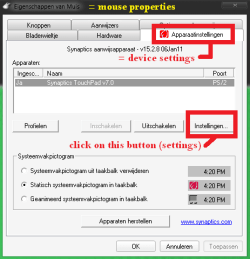
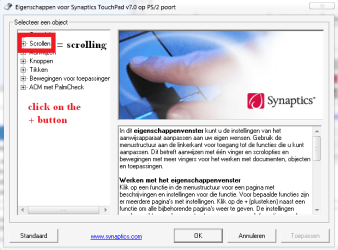
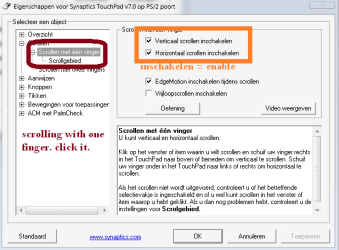
Please check this screenshots.

Help.png
Help 2.png
help 3.png

Martin
 

My Computer

Computer type
Laptop
Computer Manufacturer/Model Number
HP Probook 4710s
OS
Windows 7 Home Premium 32 bit
Hard Drives
Fujitsu
Mouse
Touchpad
O.K. HARD TO FIND... but the first window it just mouse(not mouse propreties).and the box is diffrent looking.but i find what you say and it dig deep it in the layer of option but I FOUND IT.ill see if that work in the near future
thank really hard to find
:party:
 

My Computer

Computer type
PC/Desktop
Computer Manufacturer/Model Number
Micro-Star International Co., Ltd.
OS
Microsoft Windows*7 Édition Intégrale Version 6.1.7601 Service Pack 1 Build 7601
CPU
CX700
Motherboard
Intel(R) Core(TM) i7-3610QM CPU @ 2.30GHz, 2301*M
Memory
8 go
Graphics Card(s)
NVIDIA GeForce GT 640M
Sound Card
Realtek High Definition Audio
O.K. HARD TO FIND... but the first window it just mouse(not mouse propreties).and the box is diffrent looking.but i find what you say and it dig deep it in the layer of option but I FOUND IT.ill see if that work in the near future
thank really hard to find
:party:

You can close this thread by clicking on the green buttom at the bottom of this post.
 

My Computer

Computer type
Laptop
Computer Manufacturer/Model Number
HP Probook 4710s
OS
Windows 7 Home Premium 32 bit
Hard Drives
Fujitsu
Mouse
Touchpad
ill mark it solve but... it still do it just a lot less than before.now it just when my headphone cord touch my touch pad it do it.something about metal connection nothing to do with software anymore.
thanks
 

My Computer

Computer type
PC/Desktop
Computer Manufacturer/Model Number
Micro-Star International Co., Ltd.
OS
Microsoft Windows*7 Édition Intégrale Version 6.1.7601 Service Pack 1 Build 7601
CPU
CX700
Motherboard
Intel(R) Core(TM) i7-3610QM CPU @ 2.30GHz, 2301*M
Memory
8 go
Graphics Card(s)
NVIDIA GeForce GT 640M
Sound Card
Realtek High Definition Audio
Back
Top