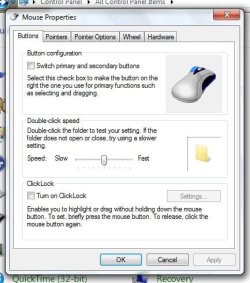
Hello, I have an incredibly annoying problem with my mouse/touch pad, when my display turns off (power save) and I move my mouse to turn it on, I have no control over what the cursor does, the screen comes on, and if I leave the mouse alone nothing will happen but if I try to move the mouse, the cursor keeps flickering across the screen and clicking on random items on the screen. After a minute I can control the mouse normally again, I presume it is a driver problem but I am not sure. I have an inspiron 1501 dell laptop (see my system specs) I am not sure what the mouse is but it is the touch pad that is built into the dell inspiron 1501.
Also the scroll function on the touch pad doesn't work, when I try to use the scroll bars at the side and bottom of the touch pad it just acts like I'm touching the middle bit of the touch pad, this is probably a driver problem but no matter where i search i cannot find suitable drivers.
Any help on either of these problems will be appreciated. Thanks in advanced
My Computer
Computer Manufacturer/Model Number
Custom Build
OS
Windows 7 Ultimate 64-bit
CPU
AMD Athlon II 3.2GHz Triple Core 1.5 MB Cache AM3
Motherboard
ASUS M5A78L-M/USB3
Memory
2 x 4GB KomputerBay DDR3 1333Mhz
Graphics Card(s)
Motherboard Intergrated ATI Radeon HD 3000
Sound Card
Motherboard Intergrated VIA VT1708S
Monitor(s) Displays
Generic PnP Monitor
Screen Resolution
1360x768
Hard Drives
Hitachi HTS541680J9SA00 ATA Device + 1500.30GB SAMSUNG HD154UI USB Device (External)
PSU
Unknown Make/Model 350W
Case
CiT 2206 Black Midi Case
Cooling
Heat sink & Fan came with current AMD processor & Case fan
Keyboard
Kensington 1500109 A
Mouse
Trust EasyClick Wireless Mouse
Internet Speed
Download: 7.79Mbps Upload: 0.75Mbps
Other Info
External Hard Drive is only plugged in when used.
BIOS info:
16 Mb Flash ROM, AMI BIOS, PnP, DMI v2.0, WfM2.0, SM BIOS V2.5, ACPI V2.0a
PCI SATA adapter used to plug in IDE hard drive.
I am working on getting windows 7.
Hitachi HTS541680J9SA00 ATA Device + 1500.30GB SAMSUNG HD154UI USB Device (External)
PSU
Unknown Make/Model 350W
Case
CiT 2206 Black Midi Case
Cooling
Heat sink & Fan came with current AMD processor & Case fan
Keyboard
Kensington 1500109 A
Mouse
Trust EasyClick Wireless Mouse
Internet Speed
Download: 7.79Mbps Upload: 0.75Mbps
Other Info
External Hard Drive is only plugged in when used.
BIOS info:
16 Mb Flash ROM, AMI BIOS, PnP, DMI v2.0, WfM2.0, SM BIOS V2.5, ACPI V2.0a
PCI SATA adapter used to plug in IDE hard drive.
I am working on getting windows 7.
OK I have installed and restarted and the scroll isn't working (yet) and I'm waiting for my screen saver to test the other problem
My Computer
Computer Manufacturer/Model Number
Custom Build
OS
Windows 7 Ultimate 64-bit
CPU
AMD Athlon II 3.2GHz Triple Core 1.5 MB Cache AM3
Motherboard
ASUS M5A78L-M/USB3
Memory
2 x 4GB KomputerBay DDR3 1333Mhz
Graphics Card(s)
Motherboard Intergrated ATI Radeon HD 3000
Sound Card
Motherboard Intergrated VIA VT1708S
Monitor(s) Displays
Generic PnP Monitor
Screen Resolution
1360x768
Hard Drives
Hitachi HTS541680J9SA00 ATA Device + 1500.30GB SAMSUNG HD154UI USB Device (External)
PSU
Unknown Make/Model 350W
Case
CiT 2206 Black Midi Case
Cooling
Heat sink & Fan came with current AMD processor & Case fan
Keyboard
Kensington 1500109 A
Mouse
Trust EasyClick Wireless Mouse
Internet Speed
Download: 7.79Mbps Upload: 0.75Mbps
Other Info
External Hard Drive is only plugged in when used.
BIOS info:
16 Mb Flash ROM, AMI BIOS, PnP, DMI v2.0, WfM2.0, SM BIOS V2.5, ACPI V2.0a
PCI SATA adapter used to plug in IDE hard drive.
I am working on getting windows 7.
doesn't seem to be playing up, hopefully it has fixed it thanks I won't put this thread as solved until it definitely works
My Computer
Computer Manufacturer/Model Number
Custom Build
OS
Windows 7 Ultimate 64-bit
CPU
AMD Athlon II 3.2GHz Triple Core 1.5 MB Cache AM3
Motherboard
ASUS M5A78L-M/USB3
Memory
2 x 4GB KomputerBay DDR3 1333Mhz
Graphics Card(s)
Motherboard Intergrated ATI Radeon HD 3000
Sound Card
Motherboard Intergrated VIA VT1708S
Monitor(s) Displays
Generic PnP Monitor
Screen Resolution
1360x768
Hard Drives
Hitachi HTS541680J9SA00 ATA Device + 1500.30GB SAMSUNG HD154UI USB Device (External)
PSU
Unknown Make/Model 350W
Case
CiT 2206 Black Midi Case
Cooling
Heat sink & Fan came with current AMD processor & Case fan
Keyboard
Kensington 1500109 A
Mouse
Trust EasyClick Wireless Mouse
Internet Speed
Download: 7.79Mbps Upload: 0.75Mbps
Other Info
External Hard Drive is only plugged in when used.
BIOS info:
16 Mb Flash ROM, AMI BIOS, PnP, DMI v2.0, WfM2.0, SM BIOS V2.5, ACPI V2.0a
PCI SATA adapter used to plug in IDE hard drive.
I am working on getting windows 7.
what settings are there to enable the scroll bars? I can't find them anywhere
My Computer
Computer Manufacturer/Model Number
Custom Build
OS
Windows 7 Ultimate 64-bit
CPU
AMD Athlon II 3.2GHz Triple Core 1.5 MB Cache AM3
Motherboard
ASUS M5A78L-M/USB3
Memory
2 x 4GB KomputerBay DDR3 1333Mhz
Graphics Card(s)
Motherboard Intergrated ATI Radeon HD 3000
Sound Card
Motherboard Intergrated VIA VT1708S
Monitor(s) Displays
Generic PnP Monitor
Screen Resolution
1360x768
Hard Drives
Hitachi HTS541680J9SA00 ATA Device + 1500.30GB SAMSUNG HD154UI USB Device (External)
PSU
Unknown Make/Model 350W
Case
CiT 2206 Black Midi Case
Cooling
Heat sink & Fan came with current AMD processor & Case fan
Keyboard
Kensington 1500109 A
Mouse
Trust EasyClick Wireless Mouse
Internet Speed
Download: 7.79Mbps Upload: 0.75Mbps
Other Info
External Hard Drive is only plugged in when used.
BIOS info:
16 Mb Flash ROM, AMI BIOS, PnP, DMI v2.0, WfM2.0, SM BIOS V2.5, ACPI V2.0a
PCI SATA adapter used to plug in IDE hard drive.
I am working on getting windows 7.
You can find them by going to Control Panel and double clicking Mouse. Click the picture of a touchpad. That will take you to the touchpad settings. It should be easy to figure out from there.
Hitachi HTS541680J9SA00 ATA Device + 1500.30GB SAMSUNG HD154UI USB Device (External)
PSU
Unknown Make/Model 350W
Case
CiT 2206 Black Midi Case
Cooling
Heat sink & Fan came with current AMD processor & Case fan
Keyboard
Kensington 1500109 A
Mouse
Trust EasyClick Wireless Mouse
Internet Speed
Download: 7.79Mbps Upload: 0.75Mbps
Other Info
External Hard Drive is only plugged in when used.
BIOS info:
16 Mb Flash ROM, AMI BIOS, PnP, DMI v2.0, WfM2.0, SM BIOS V2.5, ACPI V2.0a
PCI SATA adapter used to plug in IDE hard drive.
I am working on getting windows 7.
Hitachi HTS541680J9SA00 ATA Device + 1500.30GB SAMSUNG HD154UI USB Device (External)
PSU
Unknown Make/Model 350W
Case
CiT 2206 Black Midi Case
Cooling
Heat sink & Fan came with current AMD processor & Case fan
Keyboard
Kensington 1500109 A
Mouse
Trust EasyClick Wireless Mouse
Internet Speed
Download: 7.79Mbps Upload: 0.75Mbps
Other Info
External Hard Drive is only plugged in when used.
BIOS info:
16 Mb Flash ROM, AMI BIOS, PnP, DMI v2.0, WfM2.0, SM BIOS V2.5, ACPI V2.0a
PCI SATA adapter used to plug in IDE hard drive.
I am working on getting windows 7.
Not sure, I've tried a few, I'll uninstall them all, restart my computer, then install your one and restart it again
EDIT: Can't find any to uninstall, I'll try just restarting again
My Computer
Computer Manufacturer/Model Number
Custom Build
OS
Windows 7 Ultimate 64-bit
CPU
AMD Athlon II 3.2GHz Triple Core 1.5 MB Cache AM3
Motherboard
ASUS M5A78L-M/USB3
Memory
2 x 4GB KomputerBay DDR3 1333Mhz
Graphics Card(s)
Motherboard Intergrated ATI Radeon HD 3000
Sound Card
Motherboard Intergrated VIA VT1708S
Monitor(s) Displays
Generic PnP Monitor
Screen Resolution
1360x768
Hard Drives
Hitachi HTS541680J9SA00 ATA Device + 1500.30GB SAMSUNG HD154UI USB Device (External)
PSU
Unknown Make/Model 350W
Case
CiT 2206 Black Midi Case
Cooling
Heat sink & Fan came with current AMD processor & Case fan
Keyboard
Kensington 1500109 A
Mouse
Trust EasyClick Wireless Mouse
Internet Speed
Download: 7.79Mbps Upload: 0.75Mbps
Other Info
External Hard Drive is only plugged in when used.
BIOS info:
16 Mb Flash ROM, AMI BIOS, PnP, DMI v2.0, WfM2.0, SM BIOS V2.5, ACPI V2.0a
PCI SATA adapter used to plug in IDE hard drive.
I am working on getting windows 7.
the new driver has done something, when I press down both mouse buttons (left + right click) it acts as pressing the middle button on a mouse
My Computer
Computer Manufacturer/Model Number
Custom Build
OS
Windows 7 Ultimate 64-bit
CPU
AMD Athlon II 3.2GHz Triple Core 1.5 MB Cache AM3
Motherboard
ASUS M5A78L-M/USB3
Memory
2 x 4GB KomputerBay DDR3 1333Mhz
Graphics Card(s)
Motherboard Intergrated ATI Radeon HD 3000
Sound Card
Motherboard Intergrated VIA VT1708S
Monitor(s) Displays
Generic PnP Monitor
Screen Resolution
1360x768
Hard Drives
Hitachi HTS541680J9SA00 ATA Device + 1500.30GB SAMSUNG HD154UI USB Device (External)
PSU
Unknown Make/Model 350W
Case
CiT 2206 Black Midi Case
Cooling
Heat sink & Fan came with current AMD processor & Case fan
Keyboard
Kensington 1500109 A
Mouse
Trust EasyClick Wireless Mouse
Internet Speed
Download: 7.79Mbps Upload: 0.75Mbps
Other Info
External Hard Drive is only plugged in when used.
BIOS info:
16 Mb Flash ROM, AMI BIOS, PnP, DMI v2.0, WfM2.0, SM BIOS V2.5, ACPI V2.0a
PCI SATA adapter used to plug in IDE hard drive.
I am working on getting windows 7.
Thanks for all of the help you have given me but I am going to get some sleep now.
If you think of anything please let me know and I'll try it later today
My Computer
Computer Manufacturer/Model Number
Custom Build
OS
Windows 7 Ultimate 64-bit
CPU
AMD Athlon II 3.2GHz Triple Core 1.5 MB Cache AM3
Motherboard
ASUS M5A78L-M/USB3
Memory
2 x 4GB KomputerBay DDR3 1333Mhz
Graphics Card(s)
Motherboard Intergrated ATI Radeon HD 3000
Sound Card
Motherboard Intergrated VIA VT1708S
Monitor(s) Displays
Generic PnP Monitor
Screen Resolution
1360x768
Hard Drives
Hitachi HTS541680J9SA00 ATA Device + 1500.30GB SAMSUNG HD154UI USB Device (External)
PSU
Unknown Make/Model 350W
Case
CiT 2206 Black Midi Case
Cooling
Heat sink & Fan came with current AMD processor & Case fan
Keyboard
Kensington 1500109 A
Mouse
Trust EasyClick Wireless Mouse
Internet Speed
Download: 7.79Mbps Upload: 0.75Mbps
Other Info
External Hard Drive is only plugged in when used.
BIOS info:
16 Mb Flash ROM, AMI BIOS, PnP, DMI v2.0, WfM2.0, SM BIOS V2.5, ACPI V2.0a
PCI SATA adapter used to plug in IDE hard drive.
I am working on getting windows 7.