Mouse wheel button settings - how to change???

Davesanae

New member
Hi All,

Would anyone be able to tell me how to change the settings of the wheel mouse click function so that it doesn't switch the screen between between open applications?

The Devices and Printers option in Windows 7 opens up a picture of a mouse called 'USB Optical Mouse'. Fine - but when I right click and choose the 'Mouse Settings' option, then go into either the 'Buttons' or 'Wheel' tabs, there are no options to control what the damn thing actually does (I need it to pan in AutoCAD) - just the rate of scroll, click speed etc.

So HOW can you change what clicking the middle mouse button does??

Many thanks from a hugely frustrated user!!
 

My Computer

OS
Windows 7 Professional 64 bit
Hi dave and welcome to seven forums,
im using an arc touch mouse so i dont know if the mouse properties window will be different for you.
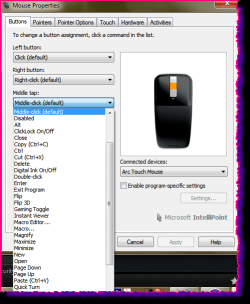
try this, type "mouse settings" in the windows start search, in the window that opens there will /should be a middle click button tab and a dropdown to select what you want the middle click to do.

mouse.png
 

My Computer

Computer Manufacturer/Model Number
Hewlett packard/p6512uk
OS
Microsoft Windows 7 Home Premium 64-bit 7600
CPU
IIx4 amd athelon 635 processor
Motherboard
FOXCONN 2AA9
Memory
2x2gb
Graphics Card(s)
ati radeon HD 5450
Sound Card
(1) Realtek High Definition Audio (2) AMD High Definition
Monitor(s) Displays
samsung lcd tv 32"
Screen Resolution
1360x 768
Hard Drives
(1) WDC WD10 01FAES-60Z2A0 SATA Disk Device (2) Maxtor OneTouch USB Device (3) ST310003 33AS USB Device (4) WD My Book 1111 USB Device
PSU
?
Cooling
air!
Keyboard
wireless hp
Mouse
wireless Hp,optical
Internet Speed
1.10mb/s
Antivirus
MSE
Browser
Firefox
Hi Boobah,

Many thanks for your reply. I have just now installed the Intellipoint software from Microsoft and that has seemingly updated the Mouse dialogue box under the Devices and Printers option in Windows 7 Start menu.

I now get the options you mention and the dropdown showing what you want the middle wheel click to do - trouble is there is no option for pan!! There is everything else but not pan. So I have had to set it to 'middle click'. I have also set it up so that it is 'application specific' for AutoCAD but STILL no luck when AutoCAD is open - it zooms in and out when you turn the wheel but nothing at all happens when you press the wheel. Grrrr!

I have literally spent months trying to resolve this issue and still no luck! So many variables - Windows version, type of mouse, drivers installed, settings in AutoCAD etc. make it almost impossible to sort this out.

I lose the will to live with computers sometimes, great though they are....
 

My Computer

OS
Windows 7 Professional 64 bit
shame that didnt do it for you, i dont suppose there is a setting in Autocad to pan the scroll wheel?

sorry, i didnt realize you needed the intellipoint for the dropdown contents, thats good to know for future advice.

i just had a google and spotted this, i suppose you tried this already.
Go into CAD program and ensure mbuttonpan is set to (1)
 

My Computer

Computer Manufacturer/Model Number
Hewlett packard/p6512uk
OS
Microsoft Windows 7 Home Premium 64-bit 7600
CPU
IIx4 amd athelon 635 processor
Motherboard
FOXCONN 2AA9
Memory
2x2gb
Graphics Card(s)
ati radeon HD 5450
Sound Card
(1) Realtek High Definition Audio (2) AMD High Definition
Monitor(s) Displays
samsung lcd tv 32"
Screen Resolution
1360x 768
Hard Drives
(1) WDC WD10 01FAES-60Z2A0 SATA Disk Device (2) Maxtor OneTouch USB Device (3) ST310003 33AS USB Device (4) WD My Book 1111 USB Device
PSU
?
Cooling
air!
Keyboard
wireless hp
Mouse
wireless Hp,optical
Internet Speed
1.10mb/s
Antivirus
MSE
Browser
Firefox
Hi,

Setting MBUTTONPAN to either 1 or 0 does nothing! Typical AutoCAD - their help information about this just says to change that and the world will be fine, but when it doesn't work they offer little other information to try.

I now have little option than to change my mouse for a branded one such as a logitech model and see if it has its own driver settings that can be linked with either AutoCAD or Win7 to try and resolve this. Can't think of any other way to sort this out.

Thanks for your replies though.
 

My Computer

OS
Windows 7 Professional 64 bit
ok no prob ,good luck. :)
 

My Computer

Computer Manufacturer/Model Number
Hewlett packard/p6512uk
OS
Microsoft Windows 7 Home Premium 64-bit 7600
CPU
IIx4 amd athelon 635 processor
Motherboard
FOXCONN 2AA9
Memory
2x2gb
Graphics Card(s)
ati radeon HD 5450
Sound Card
(1) Realtek High Definition Audio (2) AMD High Definition
Monitor(s) Displays
samsung lcd tv 32"
Screen Resolution
1360x 768
Hard Drives
(1) WDC WD10 01FAES-60Z2A0 SATA Disk Device (2) Maxtor OneTouch USB Device (3) ST310003 33AS USB Device (4) WD My Book 1111 USB Device
PSU
?
Cooling
air!
Keyboard
wireless hp
Mouse
wireless Hp,optical
Internet Speed
1.10mb/s
Antivirus
MSE
Browser
Firefox
Autocad Pan solution

Hey I know this was a while back, and (don't shoot me,) I use a mac and LT at home, but I just noticed that if I doubletap and hold the center touchpad scroll it allows me to pan as if I had clicked the center scrollwheel. Hope this helps someone, it drove me crazy for a minute there!!
 

My Computer

Computer type
Laptop
OS
OSX
Back
Top