
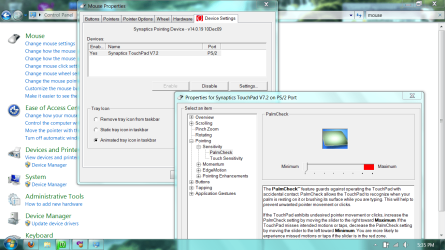
Here's a screen shot of the menus on my computer to get the mouse to work while you're typing.
The top line of the command center search results, then the "settings" button on the active tab of the first dialogue box. Then the branches opened and minimum palm check...because windows thinks we're too stupid to avoid the mouse when we don't want it, and if there's a key pressed we CAN'T POSSIBLY want the mouse:sarc:...only NEED such for majority of decent games in existence.
The top line of the command center search results, then the "settings" button on the active tab of the first dialogue box. Then the branches opened and minimum palm check...because windows thinks we're too stupid to avoid the mouse when we don't want it, and if there's a key pressed we CAN'T POSSIBLY want the mouse:sarc:...only NEED such for majority of decent games in existence.
Attachments
My Computer
- OS
- Windows 7 Home Premium 64
