Move a Large Branch - Don't Dig a Bigger Hole

baumgrenze

New member
Member
VIP
Local time
2:04 PM
Messages
300
Location
Charlottesville, VA
I am running Win7/Pro x64.

I recently managed to unwittingly move a large branch (multiple levels of branching and many files) into my "My Documents" folder. I would like to undo what I did, but I have no idea how I did it. My guess is that I made a massive misuse of drag-and-drop

Said another way, I had a directory (very large, multi-branched folder) called "MyImageFiles" at the same level on my data drive as "My Documents." Now it is buried one level down in "My Documents."

What is the simplest way to undo this?

Thanks

baumgrenze
 

My Computer My Computer

At a glance

Win 7 Pro 64Intel Core 2 Quad Q6600 (2.4 GHz) Quad Core2 x Crucial 4GB Kit (2GBx2) DDR2 CT2KIT25664A...Sapphire Radeon HD 3870 PCIe 512 Mb
Computer type
PC/Desktop
Computer Manufacturer/Model Number
Custom built by GamePC/Solid Electric - Palo Alto - on 03/10/08
OS
Win 7 Pro 64
CPU
Intel Core 2 Quad Q6600 (2.4 GHz) Quad Core
Motherboard
Gigabyte GA-P35-DS3P Intel P35 ATX (rev. 2.1)
Memory
2 x Crucial 4GB Kit (2GBx2) DDR2 CT2KIT25664AA800
Graphics Card(s)
Sapphire Radeon HD 3870 PCIe 512 Mb
Sound Card
RealTek audio on MOBO + EDIROL UA-1EX
Monitor(s) Displays
Samsung S24A450BW 24" LED monitor
Screen Resolution
1600 x 1200 at 75 Hz
Hard Drives
2 Crucial 128 Gb SSD (CT128M550SSD1)
one mounted and running Win7/Pro x64
one disconnected containing only Win10/Pro upgrade - in process
1 1TB WD Caviar Black (WD1003FZEX-00MK2A0) (Data drive)
1 2TB Seagate 2TB (PN/ 9JB1N3-576 - ST2000DM001-1ER
PSU
Seasonic S12-HT 650W 80% Efficiency Power Supply
Case
Lian Li PC-B25B
Cooling
Gigabyte Silent-Pipe
Keyboard
Dell MS Comfort
Mouse
HP x4000 wireless
Internet Speed
Sonic FTTN @ 23 Mbps
Antivirus
Avast
Browser
SeaMonkey
Other Info
BIOS: Award Software International, Inc. F6 06/18/2009

System Specs - Updated on 09//16/19
Are you just trying to move the folder back and you know where it is? If so then you right click the highest lvl folder of the branch and choose cut then paste that into where you want it to be and if it is to the same hdd it will just show up in correct location and be moved. If it is another drive it will move it to that new location. If you can not find that folder now but know the name of it or a file in it you can use the program "everything" to find it super quickly. Everything Search Engine I personally use this program daily for my file needs.
 

Attachments

  • evrything.PNG
    evrything.PNG
    105.3 KB · Views: 1

My Computer My Computer

At a glance

10 Pro x64Ryzen 9 3900X64GB(4x16GB) DDR4EVGA 1080ti FTW3
Computer type
PC/Desktop
Computer Manufacturer/Model Number
Custom
OS
10 Pro x64
CPU
Ryzen 9 3900X
Motherboard
Asrock x370 Tachi
Memory
64GB(4x16GB) DDR4
Graphics Card(s)
EVGA 1080ti FTW3
Sound Card
ASUS Xonar Essence STX (V4 Bursons), ODAC rev B, NFB-11, O2
Monitor(s) Displays
3xASUS PB278Q/R, Optoma HD142X
Screen Resolution
3x1440p, 1080p
Hard Drives
512GB 850 EVO(OS, Programs)
4TB (Movies)
3TB (Downloads)
3TB (Programs)
1TB HDD (Games)
2x6TB R1 (videos)
PSU
AX760
Case
Fractal Define R5
Cooling
NH-D15S
Keyboard
Massdrop Ctrl with Box Navy's
Mouse
G903, Alioth XXL Mat
Internet Speed
280/40
Antivirus
MBAM, ESET
Browser
Canary 64 Bit
Other Info
I also own a Thinkpad P50 Xeon 4K, X220T, X1C5
I just checked. My System Specs are 'up-to-date' in my Profile Folder. Did I do something stupid to prevent others from viewing them?

Back in the 1980's I discovered a DOS utility called XTree which saved my ass at work many times. We used a terminal emulator called EMU-TEK on our PCs to search remote databases like the American Chemical Society's Chemical Abstracts or the many databases maintained by Dialog. It featured the ability to log the emulation session, thus storing the search results in a text file. Every once in a while it would arbitrarily send the file to the wrong directory. The file was easy to find using XTree's "Show All" command which quickly logged a hard disk and offered, as one option, a date sorted list of all the files on the disk. Since the 'lost' file was recent it was always near the top. This powerful utility was recreated by Kim Henkel as ZTreeWin:

https://en.wikipedia.org/wiki/ZTreeWin

It is not longer freeware, but it is shareware worthy of subscription every day.

I thought it should offer a simple solution. It does. The 'graft' function allows the identification of a directory branch and moving it to another location is very simple. If the new location is on a second drive the process is a bit more involved but equally straightforward.

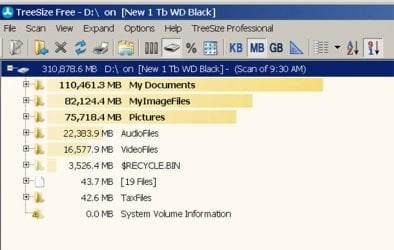
This whole exercise pointed out another 'space waster' feature of Windows 7. I resisted the 'Libraries' concept for a while and then succumbed to following the instructions a tutorial. Now TreeSizeFree tells me that I have been maintaining duplicate copies of every image I've saved, one in a directory I elected to call "MyImageFiles" which I've given some branching structure, and another called "Pictures." Unfortunately they are not the same size. Now I need to find out why. It is pretty clear that "Pictures" is an obligatory part of "Libraries."

D:\MyImageFiles 82,124.4 MB
D:\Pictures 75,718.4 MB

Thank you for your suggestions,

baumgrenze


Oh the joys of the "luxury of convenience."
 

My Computer My Computer

At a glance

Win 7 Pro 64Intel Core 2 Quad Q6600 (2.4 GHz) Quad Core2 x Crucial 4GB Kit (2GBx2) DDR2 CT2KIT25664A...Sapphire Radeon HD 3870 PCIe 512 Mb
Computer type
PC/Desktop
Computer Manufacturer/Model Number
Custom built by GamePC/Solid Electric - Palo Alto - on 03/10/08
OS
Win 7 Pro 64
CPU
Intel Core 2 Quad Q6600 (2.4 GHz) Quad Core
Motherboard
Gigabyte GA-P35-DS3P Intel P35 ATX (rev. 2.1)
Memory
2 x Crucial 4GB Kit (2GBx2) DDR2 CT2KIT25664AA800
Graphics Card(s)
Sapphire Radeon HD 3870 PCIe 512 Mb
Sound Card
RealTek audio on MOBO + EDIROL UA-1EX
Monitor(s) Displays
Samsung S24A450BW 24" LED monitor
Screen Resolution
1600 x 1200 at 75 Hz
Hard Drives
2 Crucial 128 Gb SSD (CT128M550SSD1)
one mounted and running Win7/Pro x64
one disconnected containing only Win10/Pro upgrade - in process
1 1TB WD Caviar Black (WD1003FZEX-00MK2A0) (Data drive)
1 2TB Seagate 2TB (PN/ 9JB1N3-576 - ST2000DM001-1ER
PSU
Seasonic S12-HT 650W 80% Efficiency Power Supply
Case
Lian Li PC-B25B
Cooling
Gigabyte Silent-Pipe
Keyboard
Dell MS Comfort
Mouse
HP x4000 wireless
Internet Speed
Sonic FTTN @ 23 Mbps
Antivirus
Avast
Browser
SeaMonkey
Other Info
BIOS: Award Software International, Inc. F6 06/18/2009

System Specs - Updated on 09//16/19
That is odd the library should only keep an index and point to those files not duplicate them.
 

My Computer My Computer

At a glance

10 Pro x64Ryzen 9 3900X64GB(4x16GB) DDR4EVGA 1080ti FTW3
Computer type
PC/Desktop
Computer Manufacturer/Model Number
Custom
OS
10 Pro x64
CPU
Ryzen 9 3900X
Motherboard
Asrock x370 Tachi
Memory
64GB(4x16GB) DDR4
Graphics Card(s)
EVGA 1080ti FTW3
Sound Card
ASUS Xonar Essence STX (V4 Bursons), ODAC rev B, NFB-11, O2
Monitor(s) Displays
3xASUS PB278Q/R, Optoma HD142X
Screen Resolution
3x1440p, 1080p
Hard Drives
512GB 850 EVO(OS, Programs)
4TB (Movies)
3TB (Downloads)
3TB (Programs)
1TB HDD (Games)
2x6TB R1 (videos)
PSU
AX760
Case
Fractal Define R5
Cooling
NH-D15S
Keyboard
Massdrop Ctrl with Box Navy's
Mouse
G903, Alioth XXL Mat
Internet Speed
280/40
Antivirus
MBAM, ESET
Browser
Canary 64 Bit
Other Info
I also own a Thinkpad P50 Xeon 4K, X220T, X1C5
Thank you, rvcjew, for persisting with me.

I've uploaded a screenshot image of the relevant part of the TreeSizeFree display.

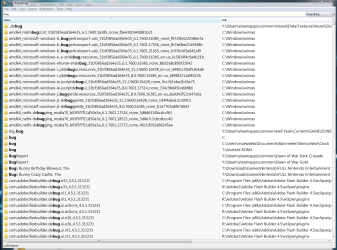
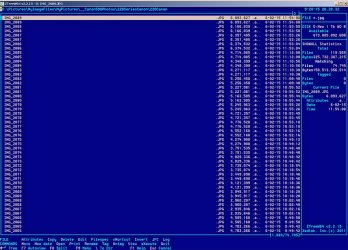
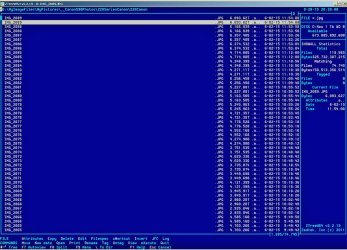
I've also included 2 screenshots from part of a ZTreeWin 'show all' display of my data disk. The display is limited to *.jpg files sorted by date. It is clear that there are 2 adjacent files for each camera assigned file name. The only difference is in the path which is displayed on the second line from the top starting from the left.

I looked for 'documentation' of when and what I did to implement the use of the 'Pictures' Library function of Win 7. I know I used one of Shawn's many detailed tutorials. I vaguely remember that I was tired and wanted to get it done. There is probably a 'log' of what I did, or a 'settings' display I could open and capture in a screenshot. I won't do anything to try to 'undo' the Libraries settings until I am convinced that the 'Pictures' branch does not contain any unique information that is not in 'MyImageFiles.'

Have you any quick suggestions for what to look for (log or settings) that I could post?

thanks

baumgrenze
 

Attachments

  • TreeSizeFree&ImageFiles0915.jpg
    TreeSizeFree&ImageFiles0915.jpg
    59.6 KB · Views: 1
  • PicturesInMyImageFilesExample.jpg
    PicturesInMyImageFilesExample.jpg
    158.4 KB · Views: 1
  • PicturesInPicturesExample.jpg
    PicturesInPicturesExample.jpg
    161.4 KB · Views: 2

My Computer My Computer

At a glance

Win 7 Pro 64Intel Core 2 Quad Q6600 (2.4 GHz) Quad Core2 x Crucial 4GB Kit (2GBx2) DDR2 CT2KIT25664A...Sapphire Radeon HD 3870 PCIe 512 Mb
Computer type
PC/Desktop
Computer Manufacturer/Model Number
Custom built by GamePC/Solid Electric - Palo Alto - on 03/10/08
OS
Win 7 Pro 64
CPU
Intel Core 2 Quad Q6600 (2.4 GHz) Quad Core
Motherboard
Gigabyte GA-P35-DS3P Intel P35 ATX (rev. 2.1)
Memory
2 x Crucial 4GB Kit (2GBx2) DDR2 CT2KIT25664AA800
Graphics Card(s)
Sapphire Radeon HD 3870 PCIe 512 Mb
Sound Card
RealTek audio on MOBO + EDIROL UA-1EX
Monitor(s) Displays
Samsung S24A450BW 24" LED monitor
Screen Resolution
1600 x 1200 at 75 Hz
Hard Drives
2 Crucial 128 Gb SSD (CT128M550SSD1)
one mounted and running Win7/Pro x64
one disconnected containing only Win10/Pro upgrade - in process
1 1TB WD Caviar Black (WD1003FZEX-00MK2A0) (Data drive)
1 2TB Seagate 2TB (PN/ 9JB1N3-576 - ST2000DM001-1ER
PSU
Seasonic S12-HT 650W 80% Efficiency Power Supply
Case
Lian Li PC-B25B
Cooling
Gigabyte Silent-Pipe
Keyboard
Dell MS Comfort
Mouse
HP x4000 wireless
Internet Speed
Sonic FTTN @ 23 Mbps
Antivirus
Avast
Browser
SeaMonkey
Other Info
BIOS: Award Software International, Inc. F6 06/18/2009

System Specs - Updated on 09//16/19
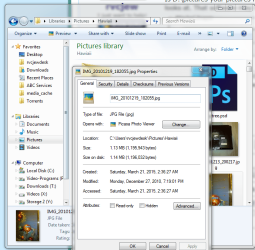
Is D:\pictures your pictures library location? If you right click the library and pick properties it will show you what it looks at. That software may not realize it is looking at a library (symlink's) of the original files.If you look at the properties of an image in the library does it then point to its true location like below?
 

Attachments

  • pic.PNG
    pic.PNG
    8.8 KB · Views: 22
  • pic2.PNG
    pic2.PNG
    60.9 KB · Views: 22

My Computer My Computer

At a glance

10 Pro x64Ryzen 9 3900X64GB(4x16GB) DDR4EVGA 1080ti FTW3
Computer type
PC/Desktop
Computer Manufacturer/Model Number
Custom
OS
10 Pro x64
CPU
Ryzen 9 3900X
Motherboard
Asrock x370 Tachi
Memory
64GB(4x16GB) DDR4
Graphics Card(s)
EVGA 1080ti FTW3
Sound Card
ASUS Xonar Essence STX (V4 Bursons), ODAC rev B, NFB-11, O2
Monitor(s) Displays
3xASUS PB278Q/R, Optoma HD142X
Screen Resolution
3x1440p, 1080p
Hard Drives
512GB 850 EVO(OS, Programs)
4TB (Movies)
3TB (Downloads)
3TB (Programs)
1TB HDD (Games)
2x6TB R1 (videos)
PSU
AX760
Case
Fractal Define R5
Cooling
NH-D15S
Keyboard
Massdrop Ctrl with Box Navy's
Mouse
G903, Alioth XXL Mat
Internet Speed
280/40
Antivirus
MBAM, ESET
Browser
Canary 64 Bit
Other Info
I also own a Thinkpad P50 Xeon 4K, X220T, X1C5
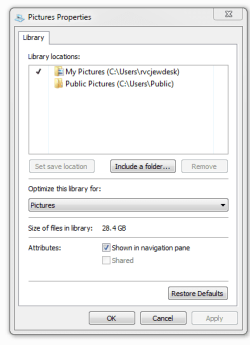
When I right click the Pictures Library I see the attached image.

I can't get a screen that matches your second image.

Life got more complicated today. Ugh! I decided to charge my iPhone 5 (my son's cast-off) using a USB port on my desktop and trusted the desktop. No new photos were found. Later on I decided it must be charged enough and unplugged it. I then reran ZTreeWin and did a ShowAll for all *.jpg files under "MyImageFiles" and discovered that 34,866 of 36,936 files were marked as "Modified On" with this morning's date and a time during which the iPhone was on the USB port. The files were accessed and marked in an order I do not yet understand. The rate of change seems to be size related.

I do not keep a copy of iTunes on my PC. I find maintaining it way too cumbersome. Perhaps they no longer force Safari as part of the install routine, but it all just seems too bloated. Clearly the iPhone has a copy of iTunes on it. Could it have examined each file in turn, which process then required the file to be marked with a new "Modified On" stamp?

But things are still more bizarre. When I use Windows Explorer and navigate to the two major folders I've described I find that in D:\Pictures\MyImageFiles\MyPictures\__Canon590Photos\220SeriesCanon\222Canon the file IMG_2200 creation on 8/19/15, modification on 8/21/15 whereas for D:\MyImageFiles\MyPictures\__Canon590Photos\220SeriesCanon\222Canon the same file name shows creation on 8/21/15 and modification on 9/29/15. The EXIF information from Irfanview for both images reads DateTimeOriginal - 2015:05:23 14:24:58). So, for 2 copies of the same image I have an 'original date' of 5/23/15, two different 'creation' dates and 'modification' dates. It seems as though the dates tracked by the Windows filing system are unreliable and that perhaps iTunes on a cell phone can thoroughly muck up dates on photos.

Is this date ambiguity a well documented phenomenon that Microsoft can't manage. By that I mean that the File Properties created dates are different for two copies of the same file and the 'real' date is something altogether different.

Also, I think this clearly establishes that I presently have 2 copies of most of my photos on my data drive. How that happened is still a mystery. Since these are jpg files, I wonder if they are lossless copies or if I have to worry about image degradation and which is better. If modification causes image degradation this also suggests the creation of a backup archive of images downloaded from the camera memory to prevent that loss.

I've probed the web a bit. I've seen other reports of wholesale changes in modification dates on files, but what I found involved 'cloud storage' and similar phenomena. Is there a 'creation date certain' that remains the constant for files like *.doc and *.xls files. Come to think of it, I think I've seen different 'created' dates using File>Properties on a Word document between the "General" tab and the "Statistics" tab.

I am ready to start getting less confused with each passing day. I have other things I want to do.

thanks

baumgrenze
 

Attachments

  • PicturePropertiesWin7Library092915.jpg
    PicturePropertiesWin7Library092915.jpg
    53.6 KB · Views: 2

My Computer My Computer

At a glance

Win 7 Pro 64Intel Core 2 Quad Q6600 (2.4 GHz) Quad Core2 x Crucial 4GB Kit (2GBx2) DDR2 CT2KIT25664A...Sapphire Radeon HD 3870 PCIe 512 Mb
Computer type
PC/Desktop
Computer Manufacturer/Model Number
Custom built by GamePC/Solid Electric - Palo Alto - on 03/10/08
OS
Win 7 Pro 64
CPU
Intel Core 2 Quad Q6600 (2.4 GHz) Quad Core
Motherboard
Gigabyte GA-P35-DS3P Intel P35 ATX (rev. 2.1)
Memory
2 x Crucial 4GB Kit (2GBx2) DDR2 CT2KIT25664AA800
Graphics Card(s)
Sapphire Radeon HD 3870 PCIe 512 Mb
Sound Card
RealTek audio on MOBO + EDIROL UA-1EX
Monitor(s) Displays
Samsung S24A450BW 24" LED monitor
Screen Resolution
1600 x 1200 at 75 Hz
Hard Drives
2 Crucial 128 Gb SSD (CT128M550SSD1)
one mounted and running Win7/Pro x64
one disconnected containing only Win10/Pro upgrade - in process
1 1TB WD Caviar Black (WD1003FZEX-00MK2A0) (Data drive)
1 2TB Seagate 2TB (PN/ 9JB1N3-576 - ST2000DM001-1ER
PSU
Seasonic S12-HT 650W 80% Efficiency Power Supply
Case
Lian Li PC-B25B
Cooling
Gigabyte Silent-Pipe
Keyboard
Dell MS Comfort
Mouse
HP x4000 wireless
Internet Speed
Sonic FTTN @ 23 Mbps
Antivirus
Avast
Browser
SeaMonkey
Other Info
BIOS: Award Software International, Inc. F6 06/18/2009

System Specs - Updated on 09//16/19
Yes I agree you now have two separate folders and anytime something touches but not necessarily changes your files it will have a different modified date. It does look like you have some how duplicated your files, but also looks like since your library is looking for the image files folder in D:\mydocuments that you may have moved that folder from that location to the root of the D: drive and it used to reside there?
 

My Computer My Computer

At a glance

10 Pro x64Ryzen 9 3900X64GB(4x16GB) DDR4EVGA 1080ti FTW3
Computer type
PC/Desktop
Computer Manufacturer/Model Number
Custom
OS
10 Pro x64
CPU
Ryzen 9 3900X
Motherboard
Asrock x370 Tachi
Memory
64GB(4x16GB) DDR4
Graphics Card(s)
EVGA 1080ti FTW3
Sound Card
ASUS Xonar Essence STX (V4 Bursons), ODAC rev B, NFB-11, O2
Monitor(s) Displays
3xASUS PB278Q/R, Optoma HD142X
Screen Resolution
3x1440p, 1080p
Hard Drives
512GB 850 EVO(OS, Programs)
4TB (Movies)
3TB (Downloads)
3TB (Programs)
1TB HDD (Games)
2x6TB R1 (videos)
PSU
AX760
Case
Fractal Define R5
Cooling
NH-D15S
Keyboard
Massdrop Ctrl with Box Navy's
Mouse
G903, Alioth XXL Mat
Internet Speed
280/40
Antivirus
MBAM, ESET
Browser
Canary 64 Bit
Other Info
I also own a Thinkpad P50 Xeon 4K, X220T, X1C5
Thanks again for persisting,

Yes, for years "MyImageFiles" resided at D:\, then, very recently, I found that it was all under "My Documents." Only this week I learned that the 'graft' command in ZTreeWin would painlessly move it back where it belongs. Things are 'better' but I still have the duplicate files. It appears that it is a 'blessing in disguise" since I think I can use the bulk of it to repair the 'damage' to "MyImageFiles" with regard to the new "modified" dates assigned this morning. I will explore the "Compare" function of ZTreeWin and see if it can be used to undo the new dates.

Do you, or anyone reading this, know if duplicating files in this manner invokes the 'lossy' character of *.jpg files, or do they need to be 'manipulated' in an editing program? I'm 'troubled' because Irfan Skilling went to the trouble to create a 'lossless jpg rotation routine" for irfanview.

I would also like to know what, if anything, I can do to avoid another of these unwanted intrusions on the 'Properties' of my files. Searching by date is important to me. Was this the iPhone and iTunes? If so, I need to learn a less intrusive way to download image files from an iPhone.

thanks,

baumgrenze
 

My Computer My Computer

At a glance

Win 7 Pro 64Intel Core 2 Quad Q6600 (2.4 GHz) Quad Core2 x Crucial 4GB Kit (2GBx2) DDR2 CT2KIT25664A...Sapphire Radeon HD 3870 PCIe 512 Mb
Computer type
PC/Desktop
Computer Manufacturer/Model Number
Custom built by GamePC/Solid Electric - Palo Alto - on 03/10/08
OS
Win 7 Pro 64
CPU
Intel Core 2 Quad Q6600 (2.4 GHz) Quad Core
Motherboard
Gigabyte GA-P35-DS3P Intel P35 ATX (rev. 2.1)
Memory
2 x Crucial 4GB Kit (2GBx2) DDR2 CT2KIT25664AA800
Graphics Card(s)
Sapphire Radeon HD 3870 PCIe 512 Mb
Sound Card
RealTek audio on MOBO + EDIROL UA-1EX
Monitor(s) Displays
Samsung S24A450BW 24" LED monitor
Screen Resolution
1600 x 1200 at 75 Hz
Hard Drives
2 Crucial 128 Gb SSD (CT128M550SSD1)
one mounted and running Win7/Pro x64
one disconnected containing only Win10/Pro upgrade - in process
1 1TB WD Caviar Black (WD1003FZEX-00MK2A0) (Data drive)
1 2TB Seagate 2TB (PN/ 9JB1N3-576 - ST2000DM001-1ER
PSU
Seasonic S12-HT 650W 80% Efficiency Power Supply
Case
Lian Li PC-B25B
Cooling
Gigabyte Silent-Pipe
Keyboard
Dell MS Comfort
Mouse
HP x4000 wireless
Internet Speed
Sonic FTTN @ 23 Mbps
Antivirus
Avast
Browser
SeaMonkey
Other Info
BIOS: Award Software International, Inc. F6 06/18/2009

System Specs - Updated on 09//16/19
I do not use an Iphone but the dups would have the new modified dates of when the dups were created. I don't know by what you mean by invoking the lossy character of .jpg as that format is always lossy. jpg2000 on the other hand can be jpgLS which is lossless, put if you want lossless you really should use .tiff or .png. If the files are true copies then they are the same file and will still be lossless if your using jpg2000, the only thing that has changed with them is some metadata.
 

My Computer My Computer

At a glance

10 Pro x64Ryzen 9 3900X64GB(4x16GB) DDR4EVGA 1080ti FTW3
Computer type
PC/Desktop
Computer Manufacturer/Model Number
Custom
OS
10 Pro x64
CPU
Ryzen 9 3900X
Motherboard
Asrock x370 Tachi
Memory
64GB(4x16GB) DDR4
Graphics Card(s)
EVGA 1080ti FTW3
Sound Card
ASUS Xonar Essence STX (V4 Bursons), ODAC rev B, NFB-11, O2
Monitor(s) Displays
3xASUS PB278Q/R, Optoma HD142X
Screen Resolution
3x1440p, 1080p
Hard Drives
512GB 850 EVO(OS, Programs)
4TB (Movies)
3TB (Downloads)
3TB (Programs)
1TB HDD (Games)
2x6TB R1 (videos)
PSU
AX760
Case
Fractal Define R5
Cooling
NH-D15S
Keyboard
Massdrop Ctrl with Box Navy's
Mouse
G903, Alioth XXL Mat
Internet Speed
280/40
Antivirus
MBAM, ESET
Browser
Canary 64 Bit
Other Info
I also own a Thinkpad P50 Xeon 4K, X220T, X1C5
Back
Top