Move files back and forth

blockie

New member
Member
VIP
Local time
8:06 PM
Messages
605
Location
in Assisted Care facility, Calif
I have a virtual xp mode drive in addition to my regular system drive. On the virtual drive I have Canopus, a video editing program. On the system drive is Windows Movie Maker that I am using to create a small movie clip. I woulds like to copy my video camera file from the system drive to the virtual driver, use the editor on it and then copy it back to the system drive so I can use Movie Maker,
How do I do this?
 

My Computer

Computer type
Laptop
Computer Manufacturer/Model Number
Asus
OS
W7 Ultimate
CPU
2.2 bh Intel Core i3-2330M
Motherboard
Asustek Computer Inc. P53E 1.0
Memory
4MB
Graphics Card(s)
On Board
Sound Card
On Board
Monitor(s) Displays
On Board
Screen Resolution
1366 X 768
Hard Drives
ST9500423AS
ST2000DM USB Backup Drive External
I've just started using virtualbox. Can't figure out how yet to get ubuntu to see my window drives. As a work around I'm using usb. Plug it in then go to devices on virtualbox & enable the usb drive.
 

My Computer

Computer Manufacturer/Model Number
Custom
OS
Windows 7 Pro x64 -- PCLinuxOS KDE4 FullMonty 2011
CPU
i7-875k @ Turbo - 7,6,5,5 - 3.6ghz
Motherboard
Asus P7P55D-E Deluxe
Memory
Corsair CMD8GX3M4A1600C8 8gb
Graphics Card(s)
Asus EAH5850 DirectCU/2DIS/1GD5
Sound Card
On Board
Monitor(s) Displays
Samsung SyncMaster T220 - Panasonic VT30a 50"
Screen Resolution
1680x1050 -
Hard Drives
Corsair Force 3 SSD 120GB x 2 ::
WD VelociRaptor 150GB WD1500HLFS x 2
PSU
Corsair HX-850 Power Supply
Case
Coolmaster HAF 932
Cooling
Corsair H50
Keyboard
Logitech Wireless MK700
Mouse
Logitech Wireless MX620
Internet Speed
Good enough for now
Other Info
Voip. Insanely cheap phone calls.
I've just started using virtualbox. Can't figure out how yet to get ubuntu to see my window drives. As a work around I'm using usb. Plug it in then go to devices on virtualbox & enable the usb drive.
Yeah, that is the way I fo it too. I have not yet figured out how to share files between the vBox system and the host system. Have to ask Kari one day. He probably knows.
 

My Computer

Computer Manufacturer/Model Number
HP, Dell, Gateway, Toshiba - 4 laptops and 2 desktops
OS
Vista, Windows7, Mint Mate, Zorin, Windows 8
CPU
from 1.6GHz Duo to i7
Monitor(s) Displays
2x HP w2207
Hard Drives
5x HDD, 7x SSD, 12x Externals
Keyboard
with trackball - no mices
Mouse
Trackball mice
Internet Speed
DSL 6000
I have a virtual xp mode drive in addition to my regular system drive. On the virtual drive I have Canopus, a video editing program. On the system drive is Windows Movie Maker that I am using to create a small movie clip. I woulds like to copy my video camera file from the system drive to the virtual driver, use the editor on it and then copy it back to the system drive so I can use Movie Maker,
How do I do this?

This should help,

http://www.sevenforums.com/tutorials/102215-windows-virtual-pc-select-host-devices-share.html


My Computer

Computer type
PC/Desktop
Computer Manufacturer/Model Number
Self Built
OS
Win 10 Pro x64
CPU
Intel I5-2500K @3.3GHz
Motherboard
Asrock P67 Extreme4
Memory
16GB G.Skill Ripjaws X (4x4GB)
Graphics Card(s)
EVGA GeForce 750 Ti SC 2GB
Sound Card
ASUS Xonar DG 5.1 Channels 24-bit 96KHz PCI Interface Sound
Monitor(s) Displays
auria eq2367
Screen Resolution
1920 x 1080
Hard Drives
250GB Samsung 850 EVO SSD
1TB WD Blue
1TB Hitachi
PSU
SeaSonic X 650W 80 Plus Gold
Case
Corsair Obsidian 750D
Cooling
Corsair H60, Three 140mm case fans
Keyboard
Logitech Wireless Keyboard K520
Mouse
Logitech Wireless Mouse M310
Internet Speed
Wave Broadband ~ 100 dn 5 up
Antivirus
Windows Defender, Malwarebytes Premium
Browser
Edge, IE11, Chrome
Other Info
Laptop specs: HP g7-1365dx /
CPU: AMD A6-3420M APU with Radeon(tm) HD Graphics /
RAM: Crucial 8Gb (2x4Gb) /
SSD: Crucial M4-CT128M4SSD2 ATA Device/ FW 000F /
GFX: AMD Radeon HD 6520G /
OS: Windows 10 Pro x64
I've just started using virtualbox. Can't figure out how yet to get ubuntu to see my window drives. As a work around I'm using usb. Plug it in then go to devices on virtualbox & enable the usb drive.
Yeah, that is the way I fo it too. I have not yet figured out how to share files between the vBox system and the host system. Have to ask Kari one day. He probably knows.


Hi there

for Windows to share files with Linux (doesn't matter if it's a VM or real machine) install SAMBA on the Linux machine -- it's bog standard networking. Linux kernels these days can also READ AND WRITE to NTFS Windows files. Your Linux VM will also be able to access the Windows files.

Set it up : plenty of documentation and links here (BTW all FREE software too as most Linux stuff is open source anyway).


Samba - opening windows to a wider world

Some basic commands

SAMBA Windows Linux file sharing notes

Cheers
jimbo
 

My Computer

Computer type
PC/Desktop
Computer Manufacturer/Model Number
Custom built, several laptops HP/ASUS
OS
Linux CENTOS 7 / various Windows OS'es and servers
CPU
Intel i7 Intel i5
Memory
8GB, 16GB
Graphics Card(s)
On Motherboard
Sound Card
Realtek HD audio
Monitor(s) Displays
Apple Cinema display, Samsung LCD
Screen Resolution
1920 X 1080
Hard Drives
4 X 1TB SATA
Mouse
Toshiba wireless laser
Internet Speed
> 20MB up
I've just started using virtualbox. Can't figure out how yet to get ubuntu to see my window drives. As a work around I'm using usb. Plug it in then go to devices on virtualbox & enable the usb drive.
Yeah, that is the way I fo it too. I have not yet figured out how to share files between the vBox system and the host system. Have to ask Kari one day. He probably knows.

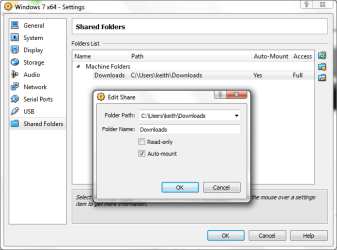
You can set up Windows folders to share in the VBox settings for the VM. You can do this with any guest OS. Here it's a Windows guest.

screenshot77_2011-12-13.png


This facility is also available with VMWare Player.
 

My Computer

Computer type
Laptop
Computer Manufacturer/Model Number
Hewlett-Packard/G62-107SA Notebook
OS
Microsoft Windows 7 Home Premium 64-bit Service Pack 1
CPU
Intel(R) Core(TM) i3 CPU M 330 @ 2.13GHz
Motherboard
Hewlett-Packard 1425
Memory
8 GB DDR3
Graphics Card(s)
Intel(R) HD Graphics
Sound Card
Realtek High Definition Audio
Monitor(s) Displays
Builtin
Screen Resolution
1366 x 768 x 32 bits (4294967296 colors) @ 60 Hz
Hard Drives
250 GB SATA Hard Disk Drive 7200 rpm
2TB Seagate GoFlex USB 2 Drive
1TB Iomega Prestige USB 2 Drive
1.5TB Iomega Prestige USB 2 Drive (Samsung)
2TB WD MyBook Live NAS.
Mouse
Logitech Anywhere MX
Internet Speed
152 Mbs download 10 Mbs upload
Antivirus
Norton 360
Browser
Chrome
I've just started using virtualbox. Can't figure out how yet to get ubuntu to see my window drives. As a work around I'm using usb. Plug it in then go to devices on virtualbox & enable the usb drive.
Yeah, that is the way I fo it too. I have not yet figured out how to share files between the vBox system and the host system. Have to ask Kari one day. He probably knows.

You can set up Windows folders to share in the VBox settings for the VM. You can do this with any guest OS. Here it's a Windows guest.

View attachment 188054


This facility is also available with VMWare Player.

Hi there
I think the OP wanted the LINUX system to see the Windows files -- this will OPTIONALLY need SAMBA or equivalent on the Linux VM for Windows to access the Linux files - only if you want Windows to share the Linux files too -- and for the Linux system to access the Windows directories these WINDOWS shared drives need to be to be MOUNTED on the Linux system usually in etc/fstab.

Welcome to JustLinux: Wanna learn Linux?

Sharing HOST Windows with Windows Guests is fairly trivial just mount as Network drive.

The OP was referring to his UBUNTU system to see Windows files.
These need to be mounted either automatically into the etc/fstab when the vm is powered on or you'll have to do it manually.

Cheers
jimbo
 

My Computer

Computer type
PC/Desktop
Computer Manufacturer/Model Number
Custom built, several laptops HP/ASUS
OS
Linux CENTOS 7 / various Windows OS'es and servers
CPU
Intel i7 Intel i5
Memory
8GB, 16GB
Graphics Card(s)
On Motherboard
Sound Card
Realtek HD audio
Monitor(s) Displays
Apple Cinema display, Samsung LCD
Screen Resolution
1920 X 1080
Hard Drives
4 X 1TB SATA
Mouse
Toshiba wireless laser
Internet Speed
> 20MB up
Yes. VBox shared folders work with Linux.
 

My Computer

Computer type
Laptop
Computer Manufacturer/Model Number
Hewlett-Packard/G62-107SA Notebook
OS
Microsoft Windows 7 Home Premium 64-bit Service Pack 1
CPU
Intel(R) Core(TM) i3 CPU M 330 @ 2.13GHz
Motherboard
Hewlett-Packard 1425
Memory
8 GB DDR3
Graphics Card(s)
Intel(R) HD Graphics
Sound Card
Realtek High Definition Audio
Monitor(s) Displays
Builtin
Screen Resolution
1366 x 768 x 32 bits (4294967296 colors) @ 60 Hz
Hard Drives
250 GB SATA Hard Disk Drive 7200 rpm
2TB Seagate GoFlex USB 2 Drive
1TB Iomega Prestige USB 2 Drive
1.5TB Iomega Prestige USB 2 Drive (Samsung)
2TB WD MyBook Live NAS.
Mouse
Logitech Anywhere MX
Internet Speed
152 Mbs download 10 Mbs upload
Antivirus
Norton 360
Browser
Chrome
Lots of good some suggestions. Thanks guys. I have to try those out again. The normal sharing I have tried but for some reason it did not work. The Samba is new to me.
 

My Computer

Computer Manufacturer/Model Number
HP, Dell, Gateway, Toshiba - 4 laptops and 2 desktops
OS
Vista, Windows7, Mint Mate, Zorin, Windows 8
CPU
from 1.6GHz Duo to i7
Monitor(s) Displays
2x HP w2207
Hard Drives
5x HDD, 7x SSD, 12x Externals
Keyboard
with trackball - no mices
Mouse
Trackball mice
Internet Speed
DSL 6000
Lots of good some suggestions. Thanks guys. I have to try those out again. The normal sharing I have tried but for some reason it did not work. The Samba is new to me.

You need to belong to the Linux vboxsf group to access the shared folders.
 

My Computer

Computer type
Laptop
Computer Manufacturer/Model Number
Hewlett-Packard/G62-107SA Notebook
OS
Microsoft Windows 7 Home Premium 64-bit Service Pack 1
CPU
Intel(R) Core(TM) i3 CPU M 330 @ 2.13GHz
Motherboard
Hewlett-Packard 1425
Memory
8 GB DDR3
Graphics Card(s)
Intel(R) HD Graphics
Sound Card
Realtek High Definition Audio
Monitor(s) Displays
Builtin
Screen Resolution
1366 x 768 x 32 bits (4294967296 colors) @ 60 Hz
Hard Drives
250 GB SATA Hard Disk Drive 7200 rpm
2TB Seagate GoFlex USB 2 Drive
1TB Iomega Prestige USB 2 Drive
1.5TB Iomega Prestige USB 2 Drive (Samsung)
2TB WD MyBook Live NAS.
Mouse
Logitech Anywhere MX
Internet Speed
152 Mbs download 10 Mbs upload
Antivirus
Norton 360
Browser
Chrome
Kado, are you pulling my leg - lol.
 

My Computer

Computer Manufacturer/Model Number
HP, Dell, Gateway, Toshiba - 4 laptops and 2 desktops
OS
Vista, Windows7, Mint Mate, Zorin, Windows 8
CPU
from 1.6GHz Duo to i7
Monitor(s) Displays
2x HP w2207
Hard Drives
5x HDD, 7x SSD, 12x Externals
Keyboard
with trackball - no mices
Mouse
Trackball mice
Internet Speed
DSL 6000
Kado, are you pulling my leg - lol.

Would I do that. No if you want the VBox shared folders to work in Linux your Linux userid must be in the vboxsf group in the guest otherwise you get an access violation.
 

My Computer

Computer type
Laptop
Computer Manufacturer/Model Number
Hewlett-Packard/G62-107SA Notebook
OS
Microsoft Windows 7 Home Premium 64-bit Service Pack 1
CPU
Intel(R) Core(TM) i3 CPU M 330 @ 2.13GHz
Motherboard
Hewlett-Packard 1425
Memory
8 GB DDR3
Graphics Card(s)
Intel(R) HD Graphics
Sound Card
Realtek High Definition Audio
Monitor(s) Displays
Builtin
Screen Resolution
1366 x 768 x 32 bits (4294967296 colors) @ 60 Hz
Hard Drives
250 GB SATA Hard Disk Drive 7200 rpm
2TB Seagate GoFlex USB 2 Drive
1TB Iomega Prestige USB 2 Drive
1.5TB Iomega Prestige USB 2 Drive (Samsung)
2TB WD MyBook Live NAS.
Mouse
Logitech Anywhere MX
Internet Speed
152 Mbs download 10 Mbs upload
Antivirus
Norton 360
Browser
Chrome
OK, got it. And I thought that was some user group forum or something like that.

I will try all that when I get my new machjne after Christmas. Then I have to setup everything from scratch anyhow.
 

My Computer

Computer Manufacturer/Model Number
HP, Dell, Gateway, Toshiba - 4 laptops and 2 desktops
OS
Vista, Windows7, Mint Mate, Zorin, Windows 8
CPU
from 1.6GHz Duo to i7
Monitor(s) Displays
2x HP w2207
Hard Drives
5x HDD, 7x SSD, 12x Externals
Keyboard
with trackball - no mices
Mouse
Trackball mice
Internet Speed
DSL 6000
I have a virtual xp mode drive in addition to my regular system drive. On the virtual drive I have Canopus, a video editing program. On the system drive is Windows Movie Maker that I am using to create a small movie clip. I woulds like to copy my video camera file from the system drive to the virtual driver, use the editor on it and then copy it back to the system drive so I can use Movie Maker,
How do I do this?

Yeah, that is the way I fo it too. I have not yet figured out how to share files between the vBox system and the host system. Have to ask Kari one day. He probably knows.

You can set up Windows folders to share in the VBox settings for the VM. You can do this with any guest OS. Here it's a Windows guest.

View attachment 188054


This facility is also available with VMWare Player.

Hi there
I think the OP wanted the LINUX system to see the Windows files -- this will OPTIONALLY need SAMBA or equivalent on the Linux VM for Windows to access the Linux files - only if you want Windows to share the Linux files too -- and for the Linux system to access the Windows directories these WINDOWS shared drives need to be to be MOUNTED on the Linux system usually in etc/fstab.

Welcome to JustLinux: Wanna learn Linux?

Sharing HOST Windows with Windows Guests is fairly trivial just mount as Network drive.

The OP was referring to his UBUNTU system to see Windows files.
These need to be mounted either automatically into the etc/fstab when the vm is powered on or you'll have to do it manually.

Cheers
jimbo

Great information, but the thread starting OP did say "Virtual XP Mode"
 

My Computer

Computer type
PC/Desktop
Computer Manufacturer/Model Number
Self Built
OS
Win 10 Pro x64
CPU
Intel I5-2500K @3.3GHz
Motherboard
Asrock P67 Extreme4
Memory
16GB G.Skill Ripjaws X (4x4GB)
Graphics Card(s)
EVGA GeForce 750 Ti SC 2GB
Sound Card
ASUS Xonar DG 5.1 Channels 24-bit 96KHz PCI Interface Sound
Monitor(s) Displays
auria eq2367
Screen Resolution
1920 x 1080
Hard Drives
250GB Samsung 850 EVO SSD
1TB WD Blue
1TB Hitachi
PSU
SeaSonic X 650W 80 Plus Gold
Case
Corsair Obsidian 750D
Cooling
Corsair H60, Three 140mm case fans
Keyboard
Logitech Wireless Keyboard K520
Mouse
Logitech Wireless Mouse M310
Internet Speed
Wave Broadband ~ 100 dn 5 up
Antivirus
Windows Defender, Malwarebytes Premium
Browser
Edge, IE11, Chrome
Other Info
Laptop specs: HP g7-1365dx /
CPU: AMD A6-3420M APU with Radeon(tm) HD Graphics /
RAM: Crucial 8Gb (2x4Gb) /
SSD: Crucial M4-CT128M4SSD2 ATA Device/ FW 000F /
GFX: AMD Radeon HD 6520G /
OS: Windows 10 Pro x64
Great information, but the thread starting OP did say "Virtual XP Mode"
Precisely. Your response (post #4) already gave the best answer.

I would do it "my way" ;); first set up XP Mode guest < > Seven host network settings so both can see each other (same workgroup etc.).

Then simply move XP Mode My Documents folder to Seven host as told in this post: http://www.sevenforums.com/virtualization/137514-change-my-documents-folder-xpmode.html#post1181192. This way your XP Mode documents can be accessed directly from host, even when XP Mode is not running.

Now you can open the file on XP Mode, edit and save it, close XP Mode and open file from host with Windows Movie Maker.

Kari

EDIT: To get my tip working, you might want to read this fine tutorial of ours: http://www.sevenforums.com/tutorials/96184-windows-virtual-pc-connect-virtual-machine-network.html
 
Last edited:

My Computer

Computer type
Laptop
Computer Manufacturer/Model Number
HP ENVY 17-1150eg
OS
Windows 10 Pro x64 EN-GB
CPU
1.6 GHz Intel Core i7-720QM Processor
Memory
6 GB
Graphics Card(s)
ATI Mobility Radeon HD 5850 Graphics
Sound Card
Beats sound system with integrated subwoofer
Monitor(s) Displays
17" laptop display, 22" LED and 32" Full HD TV through HDMI
Screen Resolution
1600*900 (1), 1920*1080 (2&3)
Hard Drives
Internal: 2 x 500 GB SATA Hard Disk Drive 7200 rpm
External: 2TB for backups, 3TB USB3 network drive for media
Cooling
As Envy runs a bit warm, I have it on a Cooler Master pad
Keyboard
Logitech diNovo Media Desktop Laser (bluetooth)
Mouse
Logitech Performance Mouse MX
Internet Speed
50/10 Mbps VDSL
Antivirus
Windows Defender 4.3.9431.0
Browser
Maxthon 3.5.2., IE11
Back
Top