Move files from host computer to guest computer?

Wiisper

New member
Member
Local time
7:02 PM
Messages
95
How can i move files from my host computer to my guest computer?

In the VPC 2007 i could drag them from host to guest but that isn't working now, or i'm doing something wrong.

,Wiisper
 

My Computer

Computer Manufacturer/Model Number
compaq presario v6700
OS
windows 7 build 7600
CPU
AMD turion 64 X2 mobile TL-60
Motherboard
NVIDIA nForce 560
Memory
3gb
Graphics Card(s)
Nvidia GeForce 7150M/nForce 630
Copy & Paste, or do it through the Virtuals PC's Explorer. Your guest os will show the host drives are networked drives.
 

My Computer

OS
7264x64/7260x86
Noone of the above options is working, i can't copy/paste and my host drives aren't showing.
Any other ideas.

,Wiisper
 

My Computer

Computer Manufacturer/Model Number
compaq presario v6700
OS
windows 7 build 7600
CPU
AMD turion 64 X2 mobile TL-60
Motherboard
NVIDIA nForce 560
Memory
3gb
Graphics Card(s)
Nvidia GeForce 7150M/nForce 630
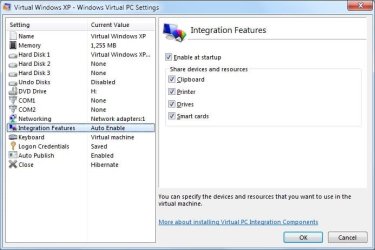
Did you check the VPC options to allow copy/paste?

Check to see if you haven't accidently turned off Tools > Disable Integration Functions as well.
 

Attachments

  • vpcsettings.jpg
    vpcsettings.jpg
    56 KB · Views: 584

My Computer

OS
7264x64/7260x86
Ah that might be it, Thanks

,Wiisper
 

My Computer

Computer Manufacturer/Model Number
compaq presario v6700
OS
windows 7 build 7600
CPU
AMD turion 64 X2 mobile TL-60
Motherboard
NVIDIA nForce 560
Memory
3gb
Graphics Card(s)
Nvidia GeForce 7150M/nForce 630
Nop that isn't it, i had it enabled already.

,Wiisper
 

My Computer

Computer Manufacturer/Model Number
compaq presario v6700
OS
windows 7 build 7600
CPU
AMD turion 64 X2 mobile TL-60
Motherboard
NVIDIA nForce 560
Memory
3gb
Graphics Card(s)
Nvidia GeForce 7150M/nForce 630
Networking and file sharing would be my first method. Second, if you have done a System Image from your host using Win7 Backup and Restore, you could try this method to extract all the files you need to your guest virtual machine. Third method is to copy files you need to move to guest machine to an external HD, open virtual machines USB-menu and attach this to your virtual machine.

Kari
 

My Computer

Computer type
Laptop
Computer Manufacturer/Model Number
HP ENVY 17-1150eg
OS
Windows 10 Pro x64 EN-GB
CPU
1.6 GHz Intel Core i7-720QM Processor
Memory
6 GB
Graphics Card(s)
ATI Mobility Radeon HD 5850 Graphics
Sound Card
Beats sound system with integrated subwoofer
Monitor(s) Displays
17" laptop display, 22" LED and 32" Full HD TV through HDMI
Screen Resolution
1600*900 (1), 1920*1080 (2&3)
Hard Drives
Internal: 2 x 500 GB SATA Hard Disk Drive 7200 rpm
External: 2TB for backups, 3TB USB3 network drive for media
Cooling
As Envy runs a bit warm, I have it on a Cooler Master pad
Keyboard
Logitech diNovo Media Desktop Laser (bluetooth)
Mouse
Logitech Performance Mouse MX
Internet Speed
50/10 Mbps VDSL
Antivirus
Windows Defender 4.3.9431.0
Browser
Maxthon 3.5.2., IE11
Hi there
another "Boot and Braces" approach is to Turn off (temporarily) Desktop integration.

Now enable HOST ONLY networking in the Virtual PC virtual machine configuration file and you should find you can copy the files between host and guest. Note in any case you will need to have file sharing enabled on your HOST drive if you want to see them from within the VM.

In general you should see all the drives when you've got desktop integration set up -- that's one of the main points of using desktop integration in the first place since all the relevant networking between guest and host should have been done by the Virtuao PC and XP mode.

Cheers
jimbo
 

My Computer

Computer type
PC/Desktop
Computer Manufacturer/Model Number
Custom built, several laptops HP/ASUS
OS
Linux CENTOS 7 / various Windows OS'es and servers
CPU
Intel i7 Intel i5
Memory
8GB, 16GB
Graphics Card(s)
On Motherboard
Sound Card
Realtek HD audio
Monitor(s) Displays
Apple Cinema display, Samsung LCD
Screen Resolution
1920 X 1080
Hard Drives
4 X 1TB SATA
Mouse
Toshiba wireless laser
Internet Speed
> 20MB up
Drop Box

You can use drop box and install it into both computers: guest and yours, so you can drag files into the Dropbox and then log on to your account on the guest computer, then open them. Download Dropbox onto any computer you want, and you can open the files on your Dropbox account onto that computer. Sorry if I sound like an advertiser... :D
 

My Computer

OS
Windows 7
Back
Top