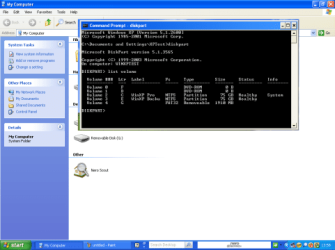
move recovery media files to bootable USB drive

Reboot321

New member
Local time
6:09 PM
Messages
7
Hi there, new here!
Recently, I deleted all my partitions by accident, and I just received my recovery CDs from Acer for my netbook.
I was wondering, is there a way to transfer the content from the recovery CDs and make a bootable USB stick?


Thanks in advance.
 

My Computer My Computer

At a glance

Windows 7 StarterAMD1GB
Computer Manufacturer/Model Number
Acer aspire AO522-BZ623
OS
Windows 7 Starter
CPU
AMD
Memory
1GB
Right now I'm running my desktop with Windows xp , so how can I run the elevated command prompt from there? I assume I can find it on c: > Windows > System 32?
 

My Computer My Computer

At a glance

Windows 7 StarterAMD1GB
Computer Manufacturer/Model Number
Acer aspire AO522-BZ623
OS
Windows 7 Starter
CPU
AMD
Memory
1GB
Hello Reboot321, welcome to Seven Forums!


Type cmd.exe in the Run box.
 

My Computer My Computer

At a glance

W 7 64-bit UltimateIntel Q9550 Yorkfield8GB Dominator 8500C5DATI : XFX 5870
Computer Manufacturer/Model Number
* BFK Customs *
OS
W 7 64-bit Ultimate
CPU
Intel Q9550 Yorkfield
Motherboard
ASUS P5Q Pro
Memory
8GB Dominator 8500C5D
Graphics Card(s)
ATI : XFX 5870
Sound Card
Realtek HD Audio 7-1
Monitor(s) Displays
1x 47" LCD HDMI & 3x 26" LCD HDMI
Screen Resolution
1920x1080P & 1920x1200
Hard Drives
1x 80GB Intel X25-M G2 SSD : 1x 500GB & 1x 640GB WD Caviar Black(s)
PSU
Corsair 620HX
Case
Cooler Master RC-690
Cooling
Tuniq Tower 120, 2x 140mm and 3x 120mm case fans
Keyboard
Microsoft 500
Mouse
Razer Diamondback 3G
Internet Speed
14 Mb/s
Other Info
1x Koutech 3Gb/s SATA HDD Hot Swap Rack
Can someone link me to a tutorial written for Windows xp?
I am currently stuck on step seven.

Thanks in advance.
 

My Computer My Computer

At a glance

Windows 7 StarterAMD1GB
Computer Manufacturer/Model Number
Acer aspire AO522-BZ623
OS
Windows 7 Starter
CPU
AMD
Memory
1GB
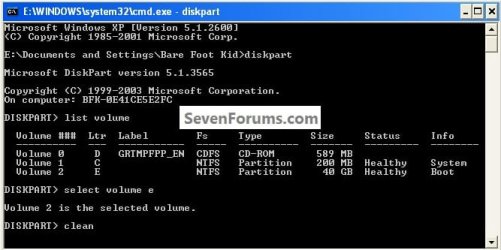
OK here's the commands followed by enter, use your volume number for the USB stick.

click to enlarge
XPdiskpart.jpg
 

My Computer My Computer

At a glance

W 7 64-bit UltimateIntel Q9550 Yorkfield8GB Dominator 8500C5DATI : XFX 5870
Computer Manufacturer/Model Number
* BFK Customs *
OS
W 7 64-bit Ultimate
CPU
Intel Q9550 Yorkfield
Motherboard
ASUS P5Q Pro
Memory
8GB Dominator 8500C5D
Graphics Card(s)
ATI : XFX 5870
Sound Card
Realtek HD Audio 7-1
Monitor(s) Displays
1x 47" LCD HDMI & 3x 26" LCD HDMI
Screen Resolution
1920x1080P & 1920x1200
Hard Drives
1x 80GB Intel X25-M G2 SSD : 1x 500GB & 1x 640GB WD Caviar Black(s)
PSU
Corsair 620HX
Case
Cooler Master RC-690
Cooling
Tuniq Tower 120, 2x 140mm and 3x 120mm case fans
Keyboard
Microsoft 500
Mouse
Razer Diamondback 3G
Internet Speed
14 Mb/s
Other Info
1x Koutech 3Gb/s SATA HDD Hot Swap Rack
OK here's the commands followed by enter, use your volume number for the USB stick.
click to enlarge
View attachment 160234

When I typed "clean" I got:

There is no disk selected.
Please select a disk and try again.

I just want to make sure I followed everything correctly.
I opened the command prompt and I typed "diskpart"
Next, I typed "list volume" and my USB drive showed up on the list.
Next, I typed "select volume g".
Finally, I typed "clean" and I got the above message.


What am I doing wrong?

EDIT: I tried "clean volume g" with no luck.
 

My Computer My Computer

At a glance

Windows 7 StarterAMD1GB
Computer Manufacturer/Model Number
Acer aspire AO522-BZ623
OS
Windows 7 Starter
CPU
AMD
Memory
1GB
If you have a single DVD which contains the Recovery media for the OS reinstall (not the drivers disk - get the latest drivers from the Acer SUpport Downloads webpage for your model) you can use UltraISO trial version to have a graphical picture of what you're doing writing the DVD to flash stick.

On File tab, open DVD. On Bootable tab, write Disk Image. Format flash stick using button. Then Write.
 
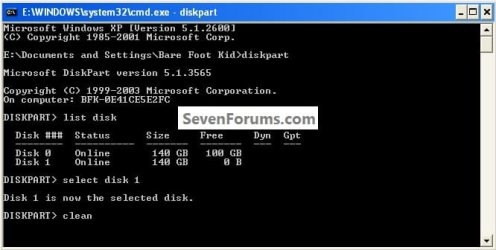
Here use the list disk command, using your disk # for the USB stick instead.


click to enlarge
diskpartXP.jpg
 

My Computer My Computer

At a glance

W 7 64-bit UltimateIntel Q9550 Yorkfield8GB Dominator 8500C5DATI : XFX 5870
Computer Manufacturer/Model Number
* BFK Customs *
OS
W 7 64-bit Ultimate
CPU
Intel Q9550 Yorkfield
Motherboard
ASUS P5Q Pro
Memory
8GB Dominator 8500C5D
Graphics Card(s)
ATI : XFX 5870
Sound Card
Realtek HD Audio 7-1
Monitor(s) Displays
1x 47" LCD HDMI & 3x 26" LCD HDMI
Screen Resolution
1920x1080P & 1920x1200
Hard Drives
1x 80GB Intel X25-M G2 SSD : 1x 500GB & 1x 640GB WD Caviar Black(s)
PSU
Corsair 620HX
Case
Cooler Master RC-690
Cooling
Tuniq Tower 120, 2x 140mm and 3x 120mm case fans
Keyboard
Microsoft 500
Mouse
Razer Diamondback 3G
Internet Speed
14 Mb/s
Other Info
1x Koutech 3Gb/s SATA HDD Hot Swap Rack
If you have a single DVD which contains the Recovery media for the OS reinstall (not the drivers disk - get the latest drivers from the Acer SUpport Downloads webpage for your model) you can use UltraISO trial version to have a graphical picture of what you're doing writing the DVD to flash stick.

On File tab, open DVD. On Bootable tab, write Disk Image. Format flash stick using button. Then Write.

I gave that a try but when I am about to write, I get

"Disk/Image capacity overflow" Error. Does that mean that I am running out of space?
I have a 4GB USB flash Drive (FAT 32) and my recovery CD is 3.38GB I dont understand whats going on. :shock:

I tried formatting the USB again, but I get the same message. Unfortunately, I dont have another USB to try.
 

My Computer My Computer

At a glance

Windows 7 StarterAMD1GB
Computer Manufacturer/Model Number
Acer aspire AO522-BZ623
OS
Windows 7 Starter
CPU
AMD
Memory
1GB
I think the ACER disks will be 2 factory recovery disks.
Generally you insert one then the script asks to insert the second.

As I understand it with with the Windows install disk there is only one and you prepare the USB as per the tutorial and copy one DVD set of files including boot files over to the USB.

Why not just use the disks in the first place? Also, you should be able to use Imgburn to easily make copies of your recovery disks if you want spares.
 

My Computer My Computer

At a glance

Windows 7x64 Home Premium SP1Intel i7 2600kG.Skill Ripjaws (DDR3-1600) 2x4GBNvidia GeForce GTS 450; Intel HD Graphics 300...
Computer type
PC/Desktop
Computer Manufacturer/Model Number
Own build
OS
Windows 7x64 Home Premium SP1
CPU
Intel i7 2600k
Motherboard
ASUS P8Z68 Deluxe
Memory
G.Skill Ripjaws (DDR3-1600) 2x4GB
Graphics Card(s)
Nvidia GeForce GTS 450; Intel HD Graphics 3000(GT2+)
Monitor(s) Displays
Dell Ultrasharp IPS panel U2311H, Samsung SyncMaster P2350
Screen Resolution
1920x1080
Hard Drives
Samsung 850 Pro SSD 256GB, Samsung SSD 840 120GB, Seagates 1TB Barracuda ST31000528AS x2
PSU
Seasonic M12II 520W
Case
Lian Li Lancool PC-K60
Cooling
Case: 1x120mm, 3x140mm CPU: Hyper 212+
Keyboard
Logitech MK520 (wireless)
Mouse
Logitech MK520
Internet Speed
6-7 Mbps
Antivirus
Norton Security Premium, Malwarebytes on 2 (MSE on 3rd PC)
Browser
FireFox
Other Info
Audio: Logitech Z523 2.1
I think the ACER disks will be 2 factory recovery disks.
Generally you insert one then the script asks to insert the second.

As I understand it with with the Windows install disk there is only one and you prepare the USB as per the tutorial and copy one DVD set of files including boot files over to the USB.

Why not just use the disks in the first place? Also, you should be able to use Imgburn to easily make copies of your recovery disks if you want spares.

I think he has a netbook, so it's boggling as to why manufacturers even bundle CD's with them (My mother has CD's with hers, but no drive). If you feel like getting an external USB DVD drive, that could be an option (If the stick doesn't work, that is).

I remember using Win2Flash before, I found it pretty effective as well - WinToFlash - Install Windows from usb - Home page

Hope this helps :)
 

My Computer My Computer

At a glance

Laptop: XP MCE 2005/Windows 7 Ultimate X32 du...AMD Turion MK-36 "Richmond"(Intel Core2Duo E7...1 GB DDR2 PC5300 (6 GB DDR2 PC6400)GeForce Go 6150, 128 MB (Intel G31/G33, 256 MB)
Computer Manufacturer/Model Number
Compaq Presario 6120US Notebook PC (Dell Inspiron 531)
OS
Laptop: XP MCE 2005/Windows 7 Ultimate X32 dual boot (Tower: Windows 7 Ultimate X64)
CPU
AMD Turion MK-36 "Richmond"(Intel Core2Duo E7400 "Wolfdale")
Motherboard
Quanta 30B7
Memory
1 GB DDR2 PC5300 (6 GB DDR2 PC6400)
Graphics Card(s)
GeForce Go 6150, 128 MB (Intel G31/G33, 256 MB)
Sound Card
Conexant HD Audio (Intel HD Audio)
Monitor(s) Displays
15.6" LED (Sanyo 31.5" HDTV)
Screen Resolution
1280x800 (1366x768)
Hard Drives
Toshiba 80 GB 5400 RPM internal SATA (Partitioned as 20 GB for XP, 54.5 GB for Windows 7), Western Digital Essential 80 GB USB, 7200 RPM (Hitachi Deskstar 250 GB 7200 RPM internal)
PSU
65W charger (350 Watt 24 pin)
Case
Presario V6000 series (Dell Inspiron 531/531S series)
Cooling
Heat pipe @ around 55C (Stock air cooling, both cores 41C)
Keyboard
Internal died, USB for now (Logitech wireless desktop)
Mouse
Synaptics Touchpad (Wireless Desktop)
Internet Speed
Time Warner Road Runner, 20 down and 5 up
Other Info
The Dell runs great, the laptop has some issues with locking up randomly, and I need to replace the keyboard and battery (And maybe a bigger internal drive)

6/18/11 EDIT: Tore the lappy apart and rerouted the cabling to the LED and inverter - Smooooooth sailing now! It's a known issue with these V6000's, don't ask how I got my Wifi working again - Involved a teardown, Bic lighter and canned air
I think the ACER disks will be 2 factory recovery disks.
Generally you insert one then the script asks to insert the second.

As I understand it with with the Windows install disk there is only one and you prepare the USB as per the tutorial and copy one DVD set of files including boot files over to the USB.

Why not just use the disks in the first place? Also, you should be able to use Imgburn to easily make copies of your recovery disks if you want spares.

I think he has a netbook, so it's boggling as to why manufacturers even bundle CD's with them (My mother has CD's with hers, but no drive). If you feel like getting an external USB DVD drive, that could be an option (If the stick doesn't work, that is).

I remember using Win2Flash before, I found it pretty effective as well - WinToFlash - Install Windows from usb - Home page

Hope this helps :)
OK - Clear now. "(My mother has CD's with hers, but no drive)" how ridiculous.

I'm wondering how you might make the USB flash drive if you have multiple CD/DVDs? I wouldn't think just copying the contents of each would work?

The other option is to consider a USB DVD rewriter. They are quite cheap and could be generally useful to have.
 

My Computer My Computer

At a glance

Windows 7x64 Home Premium SP1Intel i7 2600kG.Skill Ripjaws (DDR3-1600) 2x4GBNvidia GeForce GTS 450; Intel HD Graphics 300...
Computer type
PC/Desktop
Computer Manufacturer/Model Number
Own build
OS
Windows 7x64 Home Premium SP1
CPU
Intel i7 2600k
Motherboard
ASUS P8Z68 Deluxe
Memory
G.Skill Ripjaws (DDR3-1600) 2x4GB
Graphics Card(s)
Nvidia GeForce GTS 450; Intel HD Graphics 3000(GT2+)
Monitor(s) Displays
Dell Ultrasharp IPS panel U2311H, Samsung SyncMaster P2350
Screen Resolution
1920x1080
Hard Drives
Samsung 850 Pro SSD 256GB, Samsung SSD 840 120GB, Seagates 1TB Barracuda ST31000528AS x2
PSU
Seasonic M12II 520W
Case
Lian Li Lancool PC-K60
Cooling
Case: 1x120mm, 3x140mm CPU: Hyper 212+
Keyboard
Logitech MK520 (wireless)
Mouse
Logitech MK520
Internet Speed
6-7 Mbps
Antivirus
Norton Security Premium, Malwarebytes on 2 (MSE on 3rd PC)
Browser
FireFox
Other Info
Audio: Logitech Z523 2.1
I think the ACER disks will be 2 factory recovery disks.
Generally you insert one then the script asks to insert the second.

As I understand it with with the Windows install disk there is only one and you prepare the USB as per the tutorial and copy one DVD set of files including boot files over to the USB.

Why not just use the disks in the first place? Also, you should be able to use Imgburn to easily make copies of your recovery disks if you want spares.

I have a netbook

I think the ACER disks will be 2 factory recovery disks.
Generally you insert one then the script asks to insert the second.

As I understand it with with the Windows install disk there is only one and you prepare the USB as per the tutorial and copy one DVD set of files including boot files over to the USB.

Why not just use the disks in the first place? Also, you should be able to use Imgburn to easily make copies of your recovery disks if you want spares.

I think he has a netbook, so it's boggling as to why manufacturers even bundle CD's with them (My mother has CD's with hers, but no drive). If you feel like getting an external USB DVD drive, that could be an option (If the stick doesn't work, that is).

I remember using Win2Flash before, I found it pretty effective as well - WinToFlash - Install Windows from usb - Home page

Hope this helps :)

I tried Wintoflash but it does not accept (or recognize) OEM disks:eek:
 

My Computer My Computer

At a glance

Windows 7 StarterAMD1GB
Computer Manufacturer/Model Number
Acer aspire AO522-BZ623
OS
Windows 7 Starter
CPU
AMD
Memory
1GB
You can try UltraISO trial version which uses the iSO from the CD/DVD.

Install Ultra, on File tab Open CD, on Bootable Tab choose Write DIsk Image, Format stick, Write.

If you have two DVD's trying to merge them is not reported successful, so I'd just run the first CD from stick, take it out and write the second CD to stick then plug it back in to see if it takes up as it would with CD.

What does Acer tell you should be done with CD's when there is no CD drive. By now they should have put up a flash stick utility like HP's since providing CD's with no CD drive is intolerable incompetence no maker can defend.
 
Call me lazy - I'd just buy a USB DVD rewriter, especially if I had a Netbook. They are dirt cheap.

PS: Being little portable units they are generally useful to have.
 

My Computer My Computer

At a glance

Windows 7x64 Home Premium SP1Intel i7 2600kG.Skill Ripjaws (DDR3-1600) 2x4GBNvidia GeForce GTS 450; Intel HD Graphics 300...
Computer type
PC/Desktop
Computer Manufacturer/Model Number
Own build
OS
Windows 7x64 Home Premium SP1
CPU
Intel i7 2600k
Motherboard
ASUS P8Z68 Deluxe
Memory
G.Skill Ripjaws (DDR3-1600) 2x4GB
Graphics Card(s)
Nvidia GeForce GTS 450; Intel HD Graphics 3000(GT2+)
Monitor(s) Displays
Dell Ultrasharp IPS panel U2311H, Samsung SyncMaster P2350
Screen Resolution
1920x1080
Hard Drives
Samsung 850 Pro SSD 256GB, Samsung SSD 840 120GB, Seagates 1TB Barracuda ST31000528AS x2
PSU
Seasonic M12II 520W
Case
Lian Li Lancool PC-K60
Cooling
Case: 1x120mm, 3x140mm CPU: Hyper 212+
Keyboard
Logitech MK520 (wireless)
Mouse
Logitech MK520
Internet Speed
6-7 Mbps
Antivirus
Norton Security Premium, Malwarebytes on 2 (MSE on 3rd PC)
Browser
FireFox
Other Info
Audio: Logitech Z523 2.1
Call me lazy - I'd just buy a USB DVD rewriter, especially if I had a Netbook. They are dirt cheap.

PS: Being little portable units they are generally useful to have.

NO, not lazy, easy way go, & the best.
 

My Computer My Computer

At a glance

ME/XP/Vista/Win7
OS
ME/XP/Vista/Win7
Back
Top