- Local time
- 4:42 PM
- Messages
- 661
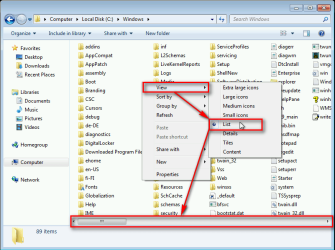
I was scrolling through a folder which contains hundreds of small files when suddenly something I touched on the keyboard caused the scrollbar to move from the bottom of the window to the right-hand side, so that I now have to scroll up and down instead of across. If only Windows had an option to prompt before making such changes, because I now have no idea how to get the scrollbar back to the bottom of the window so that I scroll from left to right again (which is what I am used to). Windows Help is, well, of no help at all.. Can anyone enlighten me please? All I can find on Google is dubious registry hacks, but as the scrollbar changed its position at the accidental touch of a key or two, I presumably can change things back without changing the registry.
All my other folders still scroll across by the way, with the scrollbar at the bottom, so this wasn't a global change - just for this folder. I also tried copying a folder which scrolls horizontally, deleting the files in it and moving the files from the 'nuisance' folder into it, but that causes the folder to change to scrolling vertically!! Infuriating..
Many thanks.
Martin
All my other folders still scroll across by the way, with the scrollbar at the bottom, so this wasn't a global change - just for this folder. I also tried copying a folder which scrolls horizontally, deleting the files in it and moving the files from the 'nuisance' folder into it, but that causes the folder to change to scrolling vertically!! Infuriating..
Many thanks.
Martin
My Computer
At a glance
Windows 7 Home Premium SP1 64-bitIntel Core i7-4790K CPU @ 4.5GHz16GB KINGSTON HYPER-X FURY DUAL-DDR3 1600MHz8GB NVIDIA GEFORCE GTX 1070
- Computer type
- PC/Desktop
- Computer Manufacturer/Model Number
- Custom Build
- OS
- Windows 7 Home Premium SP1 64-bit
- CPU
- Intel Core i7-4790K CPU @ 4.5GHz
- Motherboard
- Asus H97I-PLUS
- Memory
- 16GB KINGSTON HYPER-X FURY DUAL-DDR3 1600MHz
- Graphics Card(s)
- 8GB NVIDIA GEFORCE GTX 1070
- Monitor(s) Displays
- HannsG 28" & Dell 24"
- Screen Resolution
- 1920x1200
- Hard Drives
- 1 x 2TB Samsung Evo 860 SSD
2 x 500GB Samsung Evo 850 SSD
- PSU
- CORSAIR 650W CS SERIES
- Case
- Thermaltake Core V1 Mini ITX Cube
- Cooling
- NOCTUA NH-L12
- Browser
- Firefox
- Other Info
- Custom PC used for X-Plane 11