
FastTurtle
New member
- Local time
- 12:47 PM
- Messages
- 38
I'm Blind and got in a hurry: Sorry
Before we go any further "Backup Your Data"
So what we are going to is very simply to accomplish but also does things in a manner that Microsoft normally hides from us, which is to change the mount point for \users and to do this, we need another drive that's clear of all data. Using the Admin Tools in Control Panel, select Computer Management and Right Click as you need to run as Admin to do this. It will not work without Elevated Privelages.
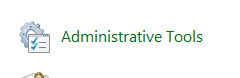
Next is the Computer Management
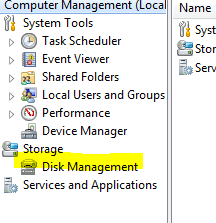
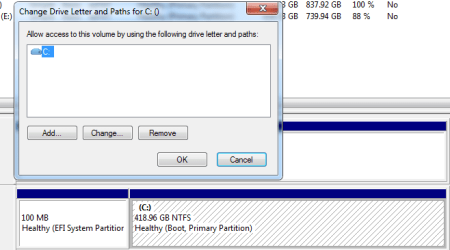
As shown, you need to select Disk Management - No need to request Admin Rights again as you have them. This is how your C drive appears in Disk Management

You need to right click on the Partition you intend to change the mount point for:
Here's the final Step, which is the Selection that's Highlited
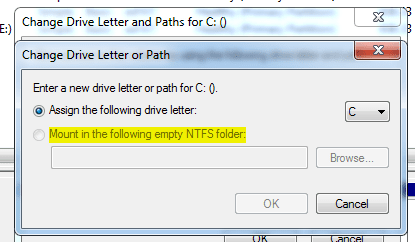
Had to reupload the Computer Management Image and the Preview shows all
Before we go any further "Backup Your Data"
So what we are going to is very simply to accomplish but also does things in a manner that Microsoft normally hides from us, which is to change the mount point for \users and to do this, we need another drive that's clear of all data. Using the Admin Tools in Control Panel, select Computer Management and Right Click as you need to run as Admin to do this. It will not work without Elevated Privelages.
Next is the Computer Management
As shown, you need to select Disk Management - No need to request Admin Rights again as you have them. This is how your C drive appears in Disk Management
You need to right click on the Partition you intend to change the mount point for:
Here's the final Step, which is the Selection that's Highlited
Had to reupload the Computer Management Image and the Preview shows all
Last edited:
My Computer
At a glance
Win7-64/Sp1 UltimateAMD Ryzen 5 160064GBGTX 1060 6GB
- Computer type
- PC/Desktop
- Computer Manufacturer/Model Number
- White Box
- OS
- Win7-64/Sp1 Ultimate
- CPU
- AMD Ryzen 5 1600
- Motherboard
- Asrock B450m Pro
- Memory
- 64GB
- Graphics Card(s)
- GTX 1060 6GB
- Hard Drives
- Boot = Crucial MX500 250GB M2 Sata/AHCI
LSI 9211-8i HBA/IT card
Port1 = 1x Team Group GX2 256GB SSD (boot)
1x Crucial MX500 1TB (Raid 1 storage)
2x Team Group GX2 1TB (storage)
Port2 = 1x Team Group GX2 256GB SSD (boot)
1x Crucial MX500 1TB
- PSU
- EVGA B450
- Keyboard
- 88 key (TKL) mechanical


