
Move Win7 to XP partition

Cassandra

New member
Local time
9:45 AM
Messages
4
I have a 6 year old laptop running XP. I installed Win7 on a logical partition, just to see whether it would be OK on this machine. After locating the right drivers, I now have a basic installation with all updates in place, including SP1. I have made several images using Acronis TrueImage. Now I would like to delete XP and put Win7 on the XP (primary, system) partition.
One way to do it:
- restore my image to the XP partition (this would leave the MBR intact, I suppose)
- delete the first BCD entry with EasyBCD
- change the drive letter of the second BCD entry to C:

Or would it be safer to do a new installation of Win7 on the XP partition, restore the image and delete the first Win7 plus the BCD entry?

Thank you for your thoughts!

See screenshots for EasyBCD and EasusPM output.
 

Attachments
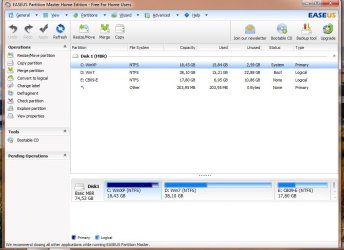
  • EasusPM.jpg
    EasusPM.jpg
    65.6 KB · Views: 10
  • EasyBCD.jpg
    EasyBCD.jpg
    40.8 KB · Views: 5

My Computer My Computer

At a glance

Windows 7 Home Premium 32bitIntel Core 2 Duo 1,87 GHz3 GBNVIDIA GeForce 7500 LE (512 MB)
Computer Manufacturer/Model Number
HP Pavilion M7680
OS
Windows 7 Home Premium 32bit
CPU
Intel Core 2 Duo 1,87 GHz
Motherboard
Asustek
Memory
3 GB
Graphics Card(s)
NVIDIA GeForce 7500 LE (512 MB)
Sound Card
Realtek HD Audio
Monitor(s) Displays
Philips 19"
Hard Drives
Seagate Ide 250 GB
Couldn't you just keep Windows 7 where it is and dump the XP partition?

Then expand the Windows 7 partition to take up the space formerly occupied by the XP partition?

No reinstall. No imaging.
 

My Computer My Computer

At a glance

Windows 7 Home Premium SP1, 64-bitIntel Skylake i5-6600K, not overclocked8 GB HyperX DDR4-2666 (2 x 4 GB)none; graphics are integrated on CPU
Computer type
PC/Desktop
Computer Manufacturer/Model Number
Ignatz Special; 4 speed manual gearbox; factory air conditioning; one of one
OS
Windows 7 Home Premium SP1, 64-bit
CPU
Intel Skylake i5-6600K, not overclocked
Motherboard
AsRock Z170M Extreme 4, micro ATX
Memory
8 GB HyperX DDR4-2666 (2 x 4 GB)
Graphics Card(s)
none; graphics are integrated on CPU
Sound Card
onboard: Realtek ALC1150; external: USB Behringer UF0-202
Monitor(s) Displays
Dell S2340M 23 inch IPS
Screen Resolution
1600 x 900
Hard Drives
System: Crucial MX100 series SSD, 128 GB;
Data: Samsung Spinpoint 103SJ, 1 TB;
Backup: WD Caviar Green WD30EZRX-00D8PB0, 3 TB
PSU
Rosewill SilentNight 500 watt fanless, semi-modular
Case
Antec Solo II
Cooling
Noctua NH-U12S; Noctua F12 intake, Noctua S12A exhaust
Keyboard
Microsoft 200 6JH-00001 USB
Mouse
Dell or Microsoft optical wired; USB
Antivirus
Microsoft Security Essentials and Malwarebytes Premium
Browser
Pale Moon
Other Info
All fans PWM; speeds at idle: CPU circa 500 rpm; intake circa 600 rpm; exhaust circa 600 rpm; CPU temps 27 idle and 47 C load in a warm room (27 C/81 F) when running Intel Extreme Tuning Utility stress test.
Yes, thank you, of course I have considered that. Perhaps for sentimental reasons I like to have my OS on the C: primary partition. And the XP partition is "system", so I think I cannot delete it.
 

My Computer My Computer

At a glance

Windows 7 Home Premium 32bitIntel Core 2 Duo 1,87 GHz3 GBNVIDIA GeForce 7500 LE (512 MB)
Computer Manufacturer/Model Number
HP Pavilion M7680
OS
Windows 7 Home Premium 32bit
CPU
Intel Core 2 Duo 1,87 GHz
Motherboard
Asustek
Memory
3 GB
Graphics Card(s)
NVIDIA GeForce 7500 LE (512 MB)
Sound Card
Realtek HD Audio
Monitor(s) Displays
Philips 19"
Hard Drives
Seagate Ide 250 GB
Yes you can delete XP and recover its space for Win7 although you must first convert the Logical partition to Primary so it will mark Active to receive the System boot files.

However apparently you incorrectly installed Win7 from the XP desktop which locked out the C letter so Win7 could not assume C whenever booted as it does when correctly installed from boot.

If you don't mind running Win7 on D, then rightclick on it using free Partition Wizard
bootable CD to Modify>Set partition to primary, click OK. Video help on how to set partition as Primary or Logical.

Rightclick again on Win7 partition to Modify>Set to Active, OK.

Next click on Win 7 Disk # to highlight it then from Disk tab Select Rebuild MBR, Apply all steps.

Reboot, if Win7 doesn't start on its own boot into Win7 DVD or Repair CD to Startup Repair - Run 3 Separate Times until Win7 starts on it's own and holds the System Active Boot flags.

You can now boot back into PW CD to rightclick XP to Delete, OK. Then rightclick Win7 partition to Resize, slide left border to left to take up deleted XP space, OK, Apply both steps: Partition Wizard Move/Resize Partition Video Help.

Have DVD/CD standing by in case you need to repair after resizing on the boot sector.
 
Thank you, Greg, for your extensive reply. I tried to convert the logical partition to primary with EasusPM, but it refused to do so because it's a boot partition. If Partition Wizard can do it, it would be a simple solution.
I'll let you know what happens.
 

My Computer My Computer

At a glance

Windows 7 Home Premium 32bitIntel Core 2 Duo 1,87 GHz3 GBNVIDIA GeForce 7500 LE (512 MB)
Computer Manufacturer/Model Number
HP Pavilion M7680
OS
Windows 7 Home Premium 32bit
CPU
Intel Core 2 Duo 1,87 GHz
Motherboard
Asustek
Memory
3 GB
Graphics Card(s)
NVIDIA GeForce 7500 LE (512 MB)
Sound Card
Realtek HD Audio
Monitor(s) Displays
Philips 19"
Hard Drives
Seagate Ide 250 GB
I couldn't have been more clear that you need the PW boot disk, even providing a download link and video.

Easeus and all other partition managers can fail - installed or boot disk - while PW boot disk (not its installed version) has never failed in countless thousands of operations we've helped with here.

You cannot convert to Logical the booted Win7 partition while it's running.
 
Actually, you don't need a boot disk. I just "ordered" the conversion to primary, PW asked for a reboot and applied the change before starting Win7. After that I deleted the BCD entry with EasyBCD, formatted C: and all was well. I can even change the drive letters with PW, if I decide to do so. This really is a very good program, thank you for pointing that out to me, and thank you for your help!
 

My Computer My Computer

At a glance

Windows 7 Home Premium 32bitIntel Core 2 Duo 1,87 GHz3 GBNVIDIA GeForce 7500 LE (512 MB)
Computer Manufacturer/Model Number
HP Pavilion M7680
OS
Windows 7 Home Premium 32bit
CPU
Intel Core 2 Duo 1,87 GHz
Motherboard
Asustek
Memory
3 GB
Graphics Card(s)
NVIDIA GeForce 7500 LE (512 MB)
Sound Card
Realtek HD Audio
Monitor(s) Displays
Philips 19"
Hard Drives
Seagate Ide 250 GB
But you need the boot disk if you want to insure against Failure.

As I said in the second paragraph all installed partition managers except Disk Mgmt can fail with catastrophic data loss. Only PW boot disk will not fail.

So you do need a boot disk unless you don't mind working without a net. You were simply lucky.
 
Back
Top