^thx cyanna, but I think Callender has nailed it (w/o need for 3rd party app). Now, if only I can get it to work on my end.
My Computer
Computer type
PC/Desktop
Computer Manufacturer/Model Number
HP (HP-P6212F)
OS
Microsoft Windows 7 Home Premium 64-bit 7601 Multiprocessor Free Service Pack 1
CPU
Pentium(R) Dual-Core CPU E5300 @ 2.60GHz
Motherboard
PEGATRON CORPORATION Benicia
Memory
6.00 GB
Graphics Card(s)
Intel(R) G33/G31 Express Chipset Family
Sound Card
Realtek High Definition Audio
Monitor(s) Displays
24'' HP WS LCD
Screen Resolution
1920 x 1080 x 32 bits (4294967296 colors) @ 60 Hz
Hard Drives
(1) ATA Hitachi HDT72106 SCSI Disk Device (2) Generic- Compact Flash USB Device (3) Generic- MS/MS-Pro USB Device (4) Generic- SD/MMC USB Device (5) Generic- SM/xD-Picture USB Device (6) Verbatim STORE N GO USB Device
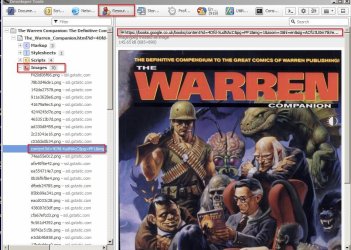
It depends upon your browser. In Opera 12.18 portable (not Opera Chrome) or SlimJet (Chrome variant) you just open the webpage then press [CTRL+SHIFT+I] without clicking on anything and it opens the inspector. Of course you can choose an individual element to inspect but then you will just see script as show in your screenshot.
So in Opera 12.18 once the inspector opens you just swith to "Resources" tab then scroll down to and expand list of images in left pane. Clicking on each gives you the clickable image URL.
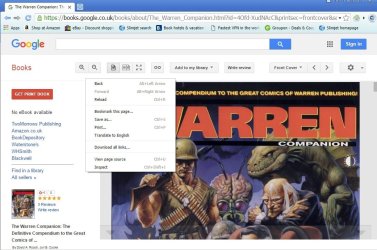
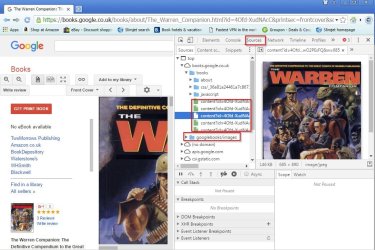
In SlimJet (Chrome) you can use CTRL+SHIFT+I or right click a blank part of the page to get the drop down menu.
Then if you click "Sources" and expand the entries you can find the images and URL's.
If you are using another browser it should be a similar method. Let me know if you can't work it out and post the name of your browser.
My Computer
Computer type
Laptop
Computer Manufacturer/Model Number
ASUS
OS
Microsoft Windows 7 Home Premium 64-bit 7601 Multiprocessor Free Service Pack 1
CPU
AMD C-60 APU with Radeon(tm) HD Graphics
Motherboard
ASUSTeK COMPUTER INC. X501U
Memory
4.00 GB
Graphics Card(s)
AMD Radeon HD 6290 Graphics
Sound Card
(1) AMD High Definition Audio Device (2) Realtek High Defi
It depends upon your browser. ...
If you are using another browser it should be a similar method. Let me know if you can't work it out and post the name of your browser.
The 'inspect element' screen capture I posted earlier (post #19) is courtesy of Internet Explorer.
My Computer
Computer type
PC/Desktop
Computer Manufacturer/Model Number
HP (HP-P6212F)
OS
Microsoft Windows 7 Home Premium 64-bit 7601 Multiprocessor Free Service Pack 1
CPU
Pentium(R) Dual-Core CPU E5300 @ 2.60GHz
Motherboard
PEGATRON CORPORATION Benicia
Memory
6.00 GB
Graphics Card(s)
Intel(R) G33/G31 Express Chipset Family
Sound Card
Realtek High Definition Audio
Monitor(s) Displays
24'' HP WS LCD
Screen Resolution
1920 x 1080 x 32 bits (4294967296 colors) @ 60 Hz
Hard Drives
(1) ATA Hitachi HDT72106 SCSI Disk Device (2) Generic- Compact Flash USB Device (3) Generic- MS/MS-Pro USB Device (4) Generic- SD/MMC USB Device (5) Generic- SM/xD-Picture USB Device (6) Verbatim STORE N GO USB Device
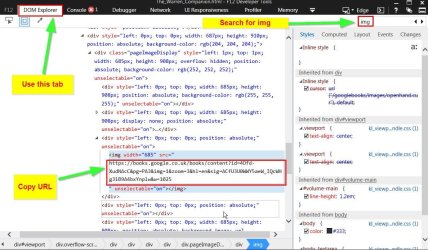
Instructions for using Internet Explorer:[FONT="]
Right [FONT="]c[/FONT]lick on the image whose address you want to copy with the right mouse button[FONT="].
[/FONT][/FONT][FONT="]Select Inspect element from the me[FONT="]n[FONT="]u.
[/FONT][/FONT][/FONT][FONT="]Look for the next <img> tag under DOM Explorer
[/FONT][FONT="]Double-click the URL that appears under the src attribute for that <img> tag.[/FONT][FONT="]
Press Ctrl-C
Paste the URL into the ad[FONT="]dress bar in a new tab.
[/FONT][/FONT]
It works but IE isn't really the best browser for this kind of stuff. I like Opera 12.18 because it actually lists all images with clickable URL's. However I'm not suggesting that you should use it. The above method should work for you.
My Computer
Computer type
Laptop
Computer Manufacturer/Model Number
ASUS
OS
Microsoft Windows 7 Home Premium 64-bit 7601 Multiprocessor Free Service Pack 1
CPU
AMD C-60 APU with Radeon(tm) HD Graphics
Motherboard
ASUSTeK COMPUTER INC. X501U
Memory
4.00 GB
Graphics Card(s)
AMD Radeon HD 6290 Graphics
Sound Card
(1) AMD High Definition Audio Device (2) Realtek High Defi
Microsoft Windows 7 Home Premium 64-bit 7601 Multiprocessor Free Service Pack 1
CPU
Pentium(R) Dual-Core CPU E5300 @ 2.60GHz
Motherboard
PEGATRON CORPORATION Benicia
Memory
6.00 GB
Graphics Card(s)
Intel(R) G33/G31 Express Chipset Family
Sound Card
Realtek High Definition Audio
Monitor(s) Displays
24'' HP WS LCD
Screen Resolution
1920 x 1080 x 32 bits (4294967296 colors) @ 60 Hz
Hard Drives
(1) ATA Hitachi HDT72106 SCSI Disk Device (2) Generic- Compact Flash USB Device (3) Generic- MS/MS-Pro USB Device (4) Generic- SD/MMC USB Device (5) Generic- SM/xD-Picture USB Device (6) Verbatim STORE N GO USB Device