Move Windows 7 from G:\ to C:\

rfmn482

New member
Local time
2:12 PM
Messages
23
I have completed a clean install of Windows 7 to my G:\ Partition and currently dual boot with Windows XP on C:\Partition. I would like to delete XP and have Windows 7 on my C:\ partition and therefore no need for a dual boot. Having gone though all the hard work of a clean install and all my programs now loaded I have made a drive image (Acronis) of my G:\ drive. Can I use this 'image' to 'install' Windows 7 on C:\ and how do I deal with cleaning up G:\ and ensuring successful booting to a single operating system.
 

My Computer My Computer

OS
Windows 7 Ultimate
This is extremely tricky. Just restoring the image to the so called C drive will not make it C. Windows writes the drive letter into the registry as well as the installed applications. I have changed the drive letter in Windows XP a few times and believe me it was no fun. I don't know if there is a software out there that does this?? What I do know is that you have to make the changes booted in another OS to make the change smooth and successful. I have done it with a LIVE OS (booted in the OS and then make the changes) but most of the time it would get really messy real fast and sometimes crashes the machine. You are better off just leaving the drive letter G. It really does not matter, I had a machine like yours that was K (as typical C drive) and it was K until I retired it. Worked perfectly for 7 years.
 

My Computer My Computer

Computer type
PC/Desktop
Computer Manufacturer/Model Number
Dell OP7010
OS
Windows 7 Enterprise (x64); Windows Server 2008 R2 (x64)
Memory
16GB
Monitor(s) Displays
4 Dell 24" LCD
Screen Resolution
1280x1024
Keyboard
Dell
Mouse
Dell Optical
Internet Speed
40meg
Could you post a picture of your disk management window using the snipping tool? From our standpoint, saying partition C: or G: doesn't give much information about you setup. For instance, are C: and G: on the same hard drive?
 

My Computer My Computer

Computer Manufacturer/Model Number
Homebuilt
OS
Windows 7 x64
CPU
i7-2600K
Motherboard
Asus P8Z77-v Pro
Memory
8 G
Graphics Card(s)
GTX 480
Sound Card
Onboard
Monitor(s) Displays
LG W2753V
Screen Resolution
1920x1080
Hard Drives
Crucial M4 128 G SSD
I have completed a clean install of Windows 7 to my G:\ Partition and currently dual boot with Windows XP on C:\Partition. I would like to delete XP and have Windows 7 on my C:\ partition and therefore no need for a dual boot. Having gone though all the hard work of a clean install and all my programs now loaded I have made a drive image (Acronis) of my G:\ drive. Can I use this 'image' to 'install' Windows 7 on C:\ and how do I deal with cleaning up G:\ and ensuring successful booting to a single operating system.
agree with the snip being needed of your disk management. You say you did a clean install a 7 and it calls itself G when you are booted into it?
 

My Computer My Computer

Computer Manufacturer/Model Number
Gateway GT5692
OS
Windows 7 Ulti. x64
CPU
AMD Phenom 8450 triple-core 2.10 ghz
Memory
4GB
Graphics Card(s)
ATI Radion HD 3200
Monitor(s) Displays
Gateway FPD1775W
Screen Resolution
1280x720
Hard Drives
465.6613 Gibibytes
You're not going to get to change the Win7 drive letter unless it decides to change itself, but it makes no difference in performance whatsoever (just cosmetic).

With the Disk management screenshot we can advise you of the exact steps to extract XP and recover the MBR into Win7. Use Snipping tool in Start Menu, attach file with paper clip in reply box.
 
With cloning you can move it - MBR and all. Norton Ghost, Paragon, Acronis and some others can do it. But it must be a clone, not an image.
 

My Computer My Computer

Computer Manufacturer/Model Number
HP, Dell, Gateway, Toshiba - 4 laptops and 2 desktops
OS
Vista, Windows7, Mint Mate, Zorin, Windows 8
CPU
from 1.6GHz Duo to i7
Monitor(s) Displays
2x HP w2207
Hard Drives
5x HDD, 7x SSD, 12x Externals
Keyboard
with trackball - no mices
Mouse
Trackball mice
Internet Speed
DSL 6000
With cloning you can move it - MBR and all. Norton Ghost, Paragon, Acronis and some others can do it. But it must be a clone, not an image.

How can one partition be cloned to another?

Do you know of any good free or trial cloning software?
 
With cloning you can move it - MBR and all. Norton Ghost, Paragon, Acronis and some others can do it. But it must be a clone, not an image.

How can one partition be cloned to another?

Do you know of any good free or trial cloning software?
Clonezilla can do this and it's free.
Clonezilla
 

My Computer My Computer

Computer Manufacturer/Model Number
Asus CG5270
OS
Windows 7 Home Premium
CPU
Intel Core 2 Quad
Memory
8 GB
Monitor(s) Displays
23" Acer Widescreen
I used Ghost - the copy function. I also have Acronis that came with one of my SSDs on a USB stick - but have not used it yet because I did a fresh install. I think there is a free Paragon demo edition: Paragon Drive Backup Personal free download Windows Vista compatible version of Paragon Drive Backup is an easy-to-use software for complete hard disk backup, disk imaging, cloning. The up-to-date hard disk backup image created with it is the best in

PS: just saw someone post Clonezilla - not sure though whether that can really clone or just image (despite the name).
 

My Computer My Computer

Computer Manufacturer/Model Number
HP, Dell, Gateway, Toshiba - 4 laptops and 2 desktops
OS
Vista, Windows7, Mint Mate, Zorin, Windows 8
CPU
from 1.6GHz Duo to i7
Monitor(s) Displays
2x HP w2207
Hard Drives
5x HDD, 7x SSD, 12x Externals
Keyboard
with trackball - no mices
Mouse
Trackball mice
Internet Speed
DSL 6000
I haven't found any that can copy the MBR like a cloning program can.

But restoring MBR only requires running Startup Repair from the Win7 DVD, so might as well use the best partitioning software for Win7 which IMO is free Partition Wizard bootable CD, to do the copying, resizing, converting, etc.

Will try Clonezilla Live CD and Paragon 10 free editions. Thanks!
 
I haven't found any that can copy the MBR like a cloning program can.

But restoring MBR only requires running Startup Repair from the Win7 DVD, so might as well use the best partitioning software for Win7 which IMO is free Partition Wizard bootable CD, to do the copying, resizing, converting, etc.

Will try Clonezilla Live CD and Paragon 10 free editions. Thanks!
The Partition Wizard bootable CD is a great tool, but as far as I know, it will not create an image of an OS.
 

My Computer My Computer

Computer Manufacturer/Model Number
Asus CG5270
OS
Windows 7 Home Premium
CPU
Intel Core 2 Quad
Memory
8 GB
Monitor(s) Displays
23" Acer Widescreen
The Partition Wizard bootable CD is a great tool, but as far as I know, it will not create an image of an OS.

Right, PW will only copy a partition from one place to another.

However, we have used it succesfully to help with many dual-boot extractions here, to copy Win7 into deleted XP/Vista space when blocked by a data partition.

It only requires rewriting the MBR to Win7 using the booted DVD Startup Repair for at least 3 passes with reboot.

After that there is no reported performance hit at all.
 
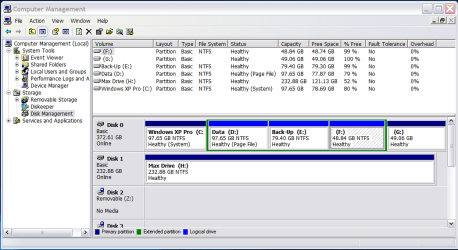
Have attached screenshot showing my partitions. Drive 'H' is an external eSata i use for backing up. I previously ran Vista on the G partition before doing a clean install of Windows 7. hope this info helps.
 

Attachments

  • Disk Management.png
    Disk Management.png
    35.8 KB · Views: 32

My Computer My Computer

OS
Windows 7 Ultimate
The above screenshot was taken from XP and as XP does not recognise G:\ as Windows 7 due to the registry fix (on C:\)that protects system restore points on Windows 7 from being deleted.
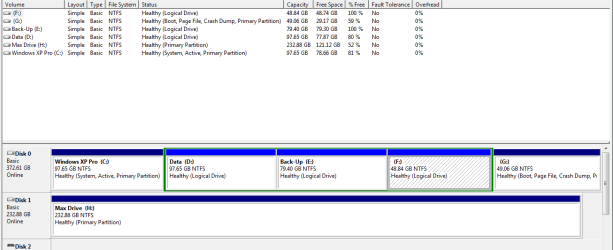
I will try to do another screenshot from Windows 7 as this migh be more helpful, sorry for any confusion.
 

My Computer My Computer

OS
Windows 7 Ultimate
Screenshot from windows 7.
 

Attachments

  • Disk Management.png
    Disk Management.png
    15.7 KB · Views: 33

My Computer My Computer

OS
Windows 7 Ultimate
Make a Win7 backup image of your HD stored externally so you start over as Copy operations can fail.

Boot free Partition Wizard bootable CD , select 1 for screen res, then right click on C:XP to delete, OK.

Now right click G:Win7 to Modify>Set Active, then Copy to the space where C: was.

Next delete old Win7 partition. Apply all steps.

Now boot into Win7 DVD Repair console, click through to Recovery Tools list and run Startup Repair up to 3 separate times with reboots to write the MBR to the newly copied Win7 partition.
 
I went through this same exercise recently but with a dual boot of Vista and W7. Both were on my C drive; Vista on the C partition and W7 on the D partition ON THE SAME DRIVE.
I just did a regular Acronis 2010 backup image of W7 AND Vista. Then I used my Acronis 2010 rescue disk to place the W7 on the Vista partition. At this point Windows 7 would not boot and expressed tremendous anxiety of there being TWO Windows 7's on my computer. I deleted the OLD Windows 7 (possibly by using Gparted - don't remember), then W7 still did not boot but I inserted my W7 disk at bootup and did a repair like on this page Windows 7 Startup Repair - How to Perform a Startup Repair in Windows 7 and then all was well. Some instructions say to do the boot repair from the disk THREE TIMES in a row...I only did it twice and it seemed to work.
I did not have to clone anything at all and I converted my Acronis Vista backup to a vhd file using Acronis 2010 and can play games directly from it (or most everything else) by "attaching" the vhd in Windows 7.
HTH
 

My Computer My Computer

OS
Windows 7
I did not have to clone anything at all

That worksthe way you did it. But if you want to transfer the MBR too, then you have to clone. Not everybody likes to play around with the MBR.
 
Last edited:

My Computer My Computer

Computer Manufacturer/Model Number
HP, Dell, Gateway, Toshiba - 4 laptops and 2 desktops
OS
Vista, Windows7, Mint Mate, Zorin, Windows 8
CPU
from 1.6GHz Duo to i7
Monitor(s) Displays
2x HP w2207
Hard Drives
5x HDD, 7x SSD, 12x Externals
Keyboard
with trackball - no mices
Mouse
Trackball mice
Internet Speed
DSL 6000
The MBR is almost always recoverable by running Startup Repair up to 3 separate times with reboots. It attempts to fix and then rewrites the MBR.

This is providing you have marked Win7 partition active and there are not other complications, e.g. data drives accidentally marked active which have derailed the MBR. But even then the MBR will be recovered to them until you mark them inactive, mark 7 active and run Startup Repair.

You have to really work at messing up your Win7 to make it irreparable by Startup Repair, or bail out of the repair too soon.
 
The automated startup repair was introduced with Vista and improved on 7.

To my surprise, SP2 startup repair appears to have been updated, and is just as good - ( tho. can only be used for Vista , of course )

There is no need to clone - restoring an image to another HD will work just fine.
 

My Computers My Computers

System One System Two

  • Computer type
    PC/Desktop
    OS
    7 X64
    CPU
    i5 8400
    Motherboard
    gigabyte b365m ds3h
    Memory
    2x8gb 3200mhz
    Hard Drives
    various
    PSU
    pure power 11 400w cm
    Case
    Coolermaster
    Cooling
    cryorig m9i
  • Computer type
    PC/Desktop
    OS
    7x64
    CPU
    g5400
    Motherboard
    ga b365m ds3h
    Memory
    8gb ddr4 2400
    PSU
    xfx pro 450w
Back
Top