Moved a HD to new machine, now have permission and ownership problems

EdB

New member
Local time
3:30 PM
Messages
26
I recently bought a new computer. I took a data hard drive out of my old one and installed it in the new. No problems with that. All files are intact.

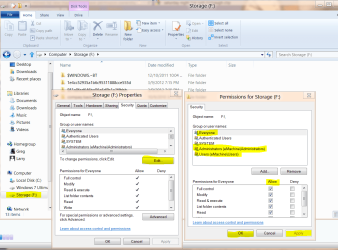
I am having problems with ownership and permissions on the new system. I can change permissions/ownership one one folder at a time, but that will take forever (I'm a photographer).

I've looked up several solutions and can't seem to find one to do all folders (preferably the entire drive) at once. Any suggestions?

Thanks, EdB

Old machine: Windows 7 32 bit.
New machine: Windows 7 64 bit.
Data HD: Seagate SATA 750gb.
 

My Computer My Computer

At a glance

Windows 7
OS
Windows 7
see this link:

Windows XP, Vista, 7, Tips and Tricks

here's an excerpt:

1). Locate the file, folder, or drive which you want to take ownership in windows explorer.
2). Right click on file, folder, or drive and select 'Properties' from Context Menu.
3). Click on 'Security' tab.
4). Click on the 'Advanced' button.
5). Click on the 'Owner' tab.
6). Click on the 'Edit' Button and select a user from the list.
7). Click Ok to apply.
8). Place a check in the box 'Replace owner on subcontainers and objects'.
9). Click Ok when the Windows Security Prompt is displayed.
10. Now click Ok again to exist from Properties window.
 

My Computer My Computer

At a glance

win7 ultimate 32bitcore2 Extreme QX6850-OCd to 3.15 GHz4 GBNVidia 8600 GT
Computer Manufacturer/Model Number
SALEON model 2.2b
OS
win7 ultimate 32bit
CPU
core2 Extreme QX6850-OCd to 3.15 GHz
Motherboard
ASUS P5G41-M LE
Memory
4 GB
Graphics Card(s)
NVidia 8600 GT
Monitor(s) Displays
23" acer
Hard Drives
one SATA 250GB partitioned equally in half
one SATA 160GB-internal storage
PSU
500W Thermaltake
Case
mini tower
Thanks for the replies, but none of the the tricks worked.

While I have access to drive F: (the moved drive) and the main folders, every subfolder I click on gives the message, "You don't currently have permission to access this folder. Click Continue to permanently get access..."

If I do that, then I have access to that folder and its subfolders but when I try and access a picture, I get the message "Windows Photo Viewer can't open this picture because you don't have the correct permissions to access the file location."

These are the same results I got before I posted. Perplexed on what to do next.

Thanks,
EdB
 

My Computer My Computer

At a glance

Windows 7
OS
Windows 7
I finally decided to just move the files and reformat the drive. That worked. Too bad I had to do all that just to move a hard drive though.
 

My Computer My Computer

At a glance

Windows 7
OS
Windows 7
Back
Top