Moved library oddity, any ideas what I might have done?

marco772

New member
Member
Local time
4:34 PM
Messages
41
Hi,

I repartitioned my new laptop last week and then relocated all the library folders to the D drive.

After a few teething problems (which can be read here; http://www.sevenforums.com/customization/220601-moving-library-folder-locations-mistake-help.html) all seemed well.

However I noticed a strange thing today and wondered if there was an explanation and a way to correct it.

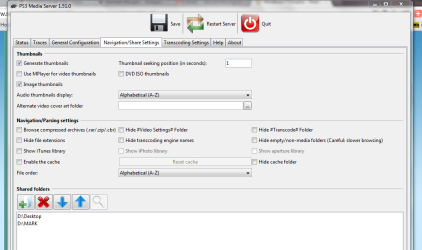
I had downloaded the PS3 Media Server and was setting the shared folders. I included the Desktop and wanted the "My Videos" folder.

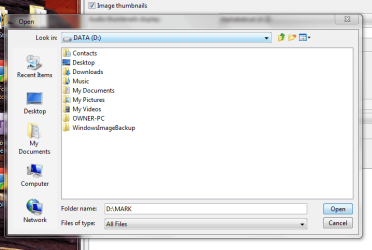
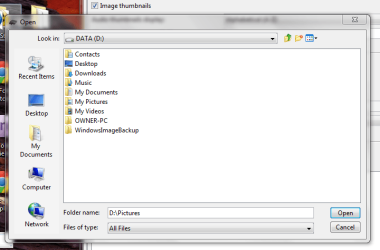
However, when I clicked on the "My Videos" in Explorer it comes up as my name "MARK", it's still the My Videos folder to all practical purposes but I'm a bit baffled as to why it doesn't represent it as so!

When I started moving the libraries (or redirecting them at least) I remember setting up a folder on the empty D Drive called MARK and it's obviously a result of that.

However all of the other libraries come up as they should (please see photos) so I'm unsure as to why just the one comes up as MARK.

When I go into My Computer and then the D Drive, I can't see a folder called MARK at all.

It's just a bit of a niggle really. It might be a big ask but does anyone have an idea what I may have done and, hopefully, a not too complicated way of fixing it!

Many thanks for wading through all that!

Mark
 

Attachments
  • PS3 media.PNG
    PS3 media.PNG
    35.5 KB · Views: 7
  • vid.PNG
    vid.PNG
    28.2 KB · Views: 5
  • correct.PNG
    correct.PNG
    29.4 KB · Views: 5

My Computer My Computer

At a glance

Windows 7 Ultimate4 GB CorsairNVIDIA GT9800
OS
Windows 7 Ultimate
Memory
4 GB Corsair
Graphics Card(s)
NVIDIA GT9800
This Microsoft article suggests (article is about Win CE, but it works for XP, Vista, 7 too):
You can use Desktop.ini to localize or rename directories in your files system. To do this, place a Desktop.ini file in the directory that you want to rename. Before the shell displays the name of a directory, the shell looks for a Desktop.ini file. If it finds one, it displays a redirected name obtained from LocalizedReourceName to the end user. The following code shows and example of a Desktop.ini file.

[.ShellClassInfo]
LocalizedResourceName=@\Window\ceshell.dll,-20483
Basically, during your library movings you might have copied some desktop.ini file to/from some folder(s). That file is hidden and system (more info here).

Nickname can be deleted by deleting JUST LocalizedResourceName line from desktop.ini, other lines are keepers.

You need some third party program to browse those folders to find out their real names, not nicknames desktop.ini gave them.

You can use Winrar, TotalCommander or Altap Salamander, etc. Even trial versions would do.

So, your "OWNER-PC", might turn out to be "Mark" folder.
 

My Computer My Computer

At a glance

Windows 8.1 ; Windows 7 x86 (Dec2008-Jan2013)
Computer type
PC/Desktop
OS
Windows 8.1 ; Windows 7 x86 (Dec2008-Jan2013)
Other Info
"The scale icon at the top right of a post or tutorial is how you can give rep to the member."
Thanks for that. Sounds a little beyond my technical grasp though! Not at all familiar with what an ini is, will have to educate myself I think.
I think I may leave it for now, especially as it's only the Media Server that seems to see the MARK folder (although it opens as the My Videos folder!).
So just a minor niggle that I can live with for now, but may investigate with the third party software if it starts to bother me!

Thanks anyway though, :)

Mark
 

My Computer My Computer

At a glance

Windows 7 Ultimate4 GB CorsairNVIDIA GT9800
OS
Windows 7 Ultimate
Memory
4 GB Corsair
Graphics Card(s)
NVIDIA GT9800

My Computer My Computer

At a glance

Windows 7 Ultimate SP1 64-BitIntel Core i7 870 @ 2.93GHz8Gb Dual-Channel DDR3 @ 664MHznVidia GeForce GTX 460 1024MB dedicated RAM
Computer Manufacturer/Model Number
HP Pavilion Elite 495UK
OS
Windows 7 Ultimate SP1 64-Bit
CPU
Intel Core i7 870 @ 2.93GHz
Motherboard
MSI 2A9C (CPU1)
Memory
8Gb Dual-Channel DDR3 @ 664MHz
Graphics Card(s)
nVidia GeForce GTX 460 1024MB dedicated RAM
Sound Card
Realtek HD Audio
Monitor(s) Displays
HP2310i
Screen Resolution
1920 x 1080
Hard Drives
1x1954GB Hitachi HDS22020ALA 330 (RAID), 1x1954GB Hitachi External for backup and storage
PSU
460W
Case
HP Elite
Cooling
Air cooled
Keyboard
Logitech K750 solar-powered keyboard
Mouse
Logitech Wireless M180 mouse
Internet Speed
2Mb
Other Info
Pure Avanti Flow Internet Radio with iPod Dock, 64Gb iPod, HP USB Speakers, Sony MDR-V500 Headphones, Sony Vaio F-Series Laptop
Hi, yes, I tried that before when I made a different mistake and it worked a treat. Was hoping it'd be a slightly more straightforward fix, but may do that again if it becomes too annoying! :)
 

My Computer My Computer

At a glance

Windows 7 Ultimate4 GB CorsairNVIDIA GT9800
OS
Windows 7 Ultimate
Memory
4 GB Corsair
Graphics Card(s)
NVIDIA GT9800

My Computer My Computer

At a glance

Windows 7 Ultimate SP1 64-BitIntel Core i7 870 @ 2.93GHz8Gb Dual-Channel DDR3 @ 664MHznVidia GeForce GTX 460 1024MB dedicated RAM
Computer Manufacturer/Model Number
HP Pavilion Elite 495UK
OS
Windows 7 Ultimate SP1 64-Bit
CPU
Intel Core i7 870 @ 2.93GHz
Motherboard
MSI 2A9C (CPU1)
Memory
8Gb Dual-Channel DDR3 @ 664MHz
Graphics Card(s)
nVidia GeForce GTX 460 1024MB dedicated RAM
Sound Card
Realtek HD Audio
Monitor(s) Displays
HP2310i
Screen Resolution
1920 x 1080
Hard Drives
1x1954GB Hitachi HDS22020ALA 330 (RAID), 1x1954GB Hitachi External for backup and storage
PSU
460W
Case
HP Elite
Cooling
Air cooled
Keyboard
Logitech K750 solar-powered keyboard
Mouse
Logitech Wireless M180 mouse
Internet Speed
2Mb
Other Info
Pure Avanti Flow Internet Radio with iPod Dock, 64Gb iPod, HP USB Speakers, Sony MDR-V500 Headphones, Sony Vaio F-Series Laptop
Back
Top