Moved or missing files

twar

New member
Local time
2:32 PM
Messages
6
I discovered a week or so ago that some of my desktop images had changed but as weird things tend to happen when using windows I didn't think too much about it until I tried to run one of the games whose icon had changed. A message appeared saying the the file 'something.exe' has moved or is missing and can't be started.
I have searched for the file (which later ended up being files :cry:) using the start menu search and all that appears is the now broken desktop icon. My .exe files are just gone. Unfortunatley a game that I had worked hundreds of hours on modding has also vanished. My entire nwmain.exe file is gone as is countless downloads for the Neverwinter Nights game and expansions. I've done a restore to before this happened but to no avail. Any ideas? Sorry if this has been posted before, I did look but after a while I stopped looking as it didn't look to be a recent problem.
 

My Computer

OS
Windows 7 Pro X64
Have you tried using Windows Explorer and the "Search Libraries" box in the upper right corner to find your missing file? (Search while "Computer" is selected in the left pane)
 

My Computer

Computer type
PC/Desktop
Computer Manufacturer/Model Number
Home Built - Jan 2013
OS
Windows 7 64 Bit Home Premium SP1
CPU
i7-3820
Motherboard
Asus P9X79-PRO - Bios 4608
Memory
GSkill F3-14900CL9Q - 16GB
Graphics Card(s)
EVGA GeForce GTX660 - Driver 352.86
Sound Card
On board Realtek ALC898
Monitor(s) Displays
Acer S271HL
Screen Resolution
1920 x 1080
Hard Drives
#1- Samsung 840 Pro Series
#2- Western Digital WD1002FAEX Sata3 Black
#3- Western Digital WD1002FAEX Sata3 Black
PSU
Corsair CMPSU-850TX-V2 - 850 watt (by Seasonic)
Case
Corsair Obsidian 550D
Cooling
Standard 3 120mm case fans, Cooler Master Hyper 212 EVO
Keyboard
MS KC-0405
Mouse
Intellimouse 5-button
Internet Speed
56 Mbits/Sec (on a good day)
Antivirus
Avast & Malwarebytes
Browser
Firefox
Other Info
Asus DVD - DRW-24B1ST 24X
Hi twar, welcome. :)

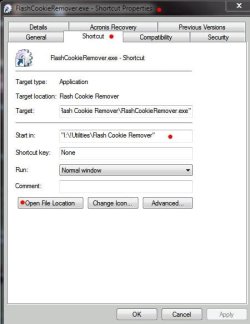
In addition to TVeblen's advice, try right clicking on the shortcut, choose properties, choose Shortcut tab to get the 'path' of the file (as seen in screenshot). You can try clicking on the 'Open file location' button, but it may not have any effect.

Shortcut Properties.JPG

In Windows Explorer, browse to the folder specified in the 'Start In' field. Try this with a number of the shortcuts you have. Are the folders there? Do you see the .exe files in the folder?

If the folders and exe files are there, you may have picked up a virus or malware. You can download the free version of malwarebytes here:

Malwarebytes' Anti-Malware: Malwarebytes

If you don't have a virus program, you can download the free MSE (Microsoft Security Essentials) here:

http://www.microsoft.com/security_essentials/

Do a full scan in both (one at a time). If it is indeed a virus or malware, allow the respective programs to clean up the system. If an infection is found and your exe files still don't work, you may have to repair the associations, but we can cross that bridge as it comes.

Follow TVeblen's advice first, then follow the steps in this post. Please post back when you have resolved the problem so that others may benefit from your experience.

James
 

My Computer

OS
Win7U 64 RTM
CPU
Q9550
Motherboard
GA-EP45-UD3R
Memory
8GB Gskill
Graphics Card(s)
ASUS|EAH4850/HTDI/1GD3/A
Sound Card
xfi Plat
Monitor(s) Displays
Dell 2405fpw
Screen Resolution
1920x1200
Hard Drives
Seagate & WD sata Drives
PSU
Antec
Case
Antec
Keyboard
MS Natural Ergonomic 4000
Mouse
Logitech MX610 USB Cordless
thanks for the welcome and thanks for both posts TVeblen and James Colbert!

I'm responding from my Mac at work so I'll only be able to try your suggestions later tonight but will do so as soon as I can. I'm just glad someone is willing to help. :)
I'll let you know how it goes.
Cheers, twar.
 

My Computer

OS
Windows 7 Pro X64
Give Shadow Explorer a try. It may find a copy for you. Works well on my Pro X64 system.
 

My Computer

Computer type
PC/Desktop
Computer Manufacturer/Model Number
Lenovo IdeaCenter 450
OS
Windows 10 Pro X64
CPU
Intel Quad Core i7-4770 @ 3.4Ghz
Memory
16.0GB PC3-12800 DDR3 SDRAM 1600 MHz
Graphics Card(s)
Intel Integrated HD Graphics
Sound Card
Realtek HD Audio
Monitor(s) Displays
HP 22" LCD
Screen Resolution
1680 x 1050
Hard Drives
250GB Samsung EVO SATA-3 SSD
2TB Seagate ST2000DM001 SATA-2
1.5TB Seagate ST3150041AS SATA
Keyboard
Dell USB
Mouse
Lenovo USB
Internet Speed
Cable via Road Runner 3MB Upload, 30MB Download
Antivirus
Windows Defender, MBAM Pro, MBAE
Browser
Seamonkey
Other Info
UEFI/GPT
PLDS DVD-RW DH16AERSH
Thank you James Colbert!
I got the same problem with
twar.
After I followed your instruction, I fix the problem.
And sign up quickly to post here to express my sincere thanks.:p
 

My Computer

OS
64
I'm thrilled that it worked for you Ailen! Unfortunately I haven't been able to locate the missing .exe files using the methods described above. :( I was hoping for a quick fix lol. I did the scans for malware like you suggested anyways and nothing came up. I do have a couple things in quarantine in my AVG vault however, though when I looked at the files a while back they didn't seem to be from anything to do with the files that are currently missing. I'll take another look. Anything else I should try?
 

My Computer

OS
Windows 7 Pro X64
Is your computer used only by you? Do other people use it?
Is there a possibility that someone using your computer accidentally made changes?

It is unusual for data to go missing so specifically.
 

My Computer

Computer type
PC/Desktop
Computer Manufacturer/Model Number
Home Built - Jan 2013
OS
Windows 7 64 Bit Home Premium SP1
CPU
i7-3820
Motherboard
Asus P9X79-PRO - Bios 4608
Memory
GSkill F3-14900CL9Q - 16GB
Graphics Card(s)
EVGA GeForce GTX660 - Driver 352.86
Sound Card
On board Realtek ALC898
Monitor(s) Displays
Acer S271HL
Screen Resolution
1920 x 1080
Hard Drives
#1- Samsung 840 Pro Series
#2- Western Digital WD1002FAEX Sata3 Black
#3- Western Digital WD1002FAEX Sata3 Black
PSU
Corsair CMPSU-850TX-V2 - 850 watt (by Seasonic)
Case
Corsair Obsidian 550D
Cooling
Standard 3 120mm case fans, Cooler Master Hyper 212 EVO
Keyboard
MS KC-0405
Mouse
Intellimouse 5-button
Internet Speed
56 Mbits/Sec (on a good day)
Antivirus
Avast & Malwarebytes
Browser
Firefox
Other Info
Asus DVD - DRW-24B1ST 24X
It is possible but very unlikely that anything was changed by someone in the house. I have 2 kids that watch youtube videos under pretty strict surveillance in case they start watching something not appropriate or start messing with the computer. My wife wouldn't erase something either.

The fact that 2 program icons changed from actual game icons to windows generic looking icons at the same time and all but the shortcut vanished it seemed really weird to me. It could have been erased by some unknowing hands I guess...

Let's say that is what happened, is there any way to recover those lost files?
 

My Computer

OS
Windows 7 Pro X64
You can "recover" them if you can find them. If they were deleted, or the programs were uninstalled, then not. (Nothing in the Recycle Bin I guess?)

It is not unusual for the desktop shortcuts (icons) to lose the path to the executable file for the program. You can redirect those back. But without the program files to point to this would be "pointless".

Are the games in question listed in the Start > Programs list?
If So you can right click on it and choose Properties and it will show you where the file is.

Are the games in question listed in the Control Panel > Remove A Program list?

Have you done a manual search through both of the C:\Program Files folders?
If you can't find them then they are gone.
 

My Computer

Computer type
PC/Desktop
Computer Manufacturer/Model Number
Home Built - Jan 2013
OS
Windows 7 64 Bit Home Premium SP1
CPU
i7-3820
Motherboard
Asus P9X79-PRO - Bios 4608
Memory
GSkill F3-14900CL9Q - 16GB
Graphics Card(s)
EVGA GeForce GTX660 - Driver 352.86
Sound Card
On board Realtek ALC898
Monitor(s) Displays
Acer S271HL
Screen Resolution
1920 x 1080
Hard Drives
#1- Samsung 840 Pro Series
#2- Western Digital WD1002FAEX Sata3 Black
#3- Western Digital WD1002FAEX Sata3 Black
PSU
Corsair CMPSU-850TX-V2 - 850 watt (by Seasonic)
Case
Corsair Obsidian 550D
Cooling
Standard 3 120mm case fans, Cooler Master Hyper 212 EVO
Keyboard
MS KC-0405
Mouse
Intellimouse 5-button
Internet Speed
56 Mbits/Sec (on a good day)
Antivirus
Avast & Malwarebytes
Browser
Firefox
Other Info
Asus DVD - DRW-24B1ST 24X
Did you try Shadow Explorer as Ztrucker suggested. If you have older restore points, you will find them. BTW: nothing disappears from the system by itself. Someone made a mistake, but that is water under the bridge.
 

My Computer

Computer Manufacturer/Model Number
HP, Dell, Gateway, Toshiba - 4 laptops and 2 desktops
OS
Vista, Windows7, Mint Mate, Zorin, Windows 8
CPU
from 1.6GHz Duo to i7
Monitor(s) Displays
2x HP w2207
Hard Drives
5x HDD, 7x SSD, 12x Externals
Keyboard
with trackball - no mices
Mouse
Trackball mice
Internet Speed
DSL 6000
Thank you James Colbert!
I got the same problem with twar.
After I followed your instruction, I fix the problem.
And sign up quickly to post here to express my sincere thanks.:p

Glad it helped you, if not twar. Thanks fo signing in and letting us know. Welcome to the forums! :geek:

James
 

My Computer

OS
Win7U 64 RTM
CPU
Q9550
Motherboard
GA-EP45-UD3R
Memory
8GB Gskill
Graphics Card(s)
ASUS|EAH4850/HTDI/1GD3/A
Sound Card
xfi Plat
Monitor(s) Displays
Dell 2405fpw
Screen Resolution
1920x1200
Hard Drives
Seagate & WD sata Drives
PSU
Antec
Case
Antec
Keyboard
MS Natural Ergonomic 4000
Mouse
Logitech MX610 USB Cordless
Thanks everyone for the good advice. Nothing helped me find the files but that tells me that someone probably accidentally erased my files. I realized that I had transferred my files from my xp HD to my windows 7 HD so I might not have erased the files from my old (now unused) HD. I hope that is the case. :confused: Thanks again for all the help! It does seem like these forums have some great people! I'll be back for more...

twar
 

My Computer

OS
Windows 7 Pro X64
Back
Top