
Solved Movie Inventory Software

One thing that I have found is that this program does a task that I had hoped for...there is a link in the data window for each movie, which when clicked opens that movie in it's default player, making collectorz the main hub for all video functions. I'm sure that this can only work for movies that have been encoded to a hard drive, so I'm wondering about how to get both methods of movie data collection to work together? Can one add barcoded scans to a database containing movies already scanned by the software located on the hard drive, without one overwriting or interfering with the other? After a movie is entered by barcode scan, can it afterward be linked to a movie file on the hard drive.

I guess that I won't know until I get a scanner, but these two methods seem to be separated from each other.
 

My Computer

Computer Manufacturer/Model Number
DIY
OS
W7x64 Pro, SuSe 12.1/** W7 x64 Pro, XP MCE
CPU
Phenom II 1090T w/Noctua NH-D14 /**4400+ X2 w/CM Hyper TX 3
Motherboard
ASRock 890FX Deluxe 4/**A8N-SLI
Memory
2 x 2GB Patriot PGS34g1600LLKA/**4x1GB Corsair VS
Graphics Card(s)
EVGA GTX460 SC/**EVGA 8800GTS
Sound Card
Asus Xonar D2X/**Xonar D1
Monitor(s) Displays
Acer X233H, Dell E152FPc /**LG M237-WD
Screen Resolution
1920x1080 & 1024x768/**1980x1080
Hard Drives
WDC 2TB, 1.5TB, 1TB, 500GB,Seagate 500GB , Maxtor 80GB /**500GB Seagate & WDC 1TB Black
PSU
CM RS600 w/ APC BX1000G/**Antec 500 TP w/ APC BX1000
Case
HAF922/**Antec 1040IIB
Cooling
3x200mm, 1x140 and 1x120mm/**5x80mm fans
Keyboard
Logitech Media USB/**Saitek Eclipse
Mouse
Cordless Trackman Wheel/**Ditto
Internet Speed
3.3Mbps
Other Info
SB 560 5.1 w/ Sennheiser RS140/**Creative T20 speakers, Dvico FusionHDTV7 Gold RT, Cisco E3000, HP 5510V AIO, Linksys E3000, Belkin F5U237 hub and **F5D8055 adapter
(** = 2nd rig)
One thing that I have found is that this program does a task that I had hoped for...there is a link in the data window for each movie, which when clicked opens that movie in it's default player, making collectorz the main hub for all video functions. I'm sure that this can only work for movies that have been encoded to a hard drive, so I'm wondering about how to get both methods of movie data collection to work together? Can one add barcoded scans to a database containing movies already scanned by the software located on the hard drive, without one overwriting or interfering with the other? After a movie is entered by barcode scan, can it afterward be linked to a movie file on the hard drive.

I guess that I won't know until I get a scanner, but these two methods seem to be separated from each other.

To be honest i never messed around with encoded movies on the hard drive and adding scanned movies. So im not sure but i think it would add them together probably give you an option once scanned.
 

My Computer

Computer Manufacturer/Model Number
Custom
OS
Windows 7 Ultimate x64
CPU
AMD Phenom x4 965 BE
Motherboard
MSI 790FX GD70 Not Wiki
Memory
4gb Gskill
Graphics Card(s)
HD 4850
Sound Card
Onboard Realtek
Monitor(s) Displays
Asus VW246H
Screen Resolution
1920x1080 Native
Hard Drives
2 Seagate Drives Raid 0
PSU
650Watt Corsair
Case
CoolerMaster
Cooling
Air Cooling Stock Heatsink and Fan
Keyboard
Logitech Cordless Duo
Mouse
Logitech Cordless Duo
Internet Speed
24000 KBPS
Hopefully, but I have had a problem with a second manual scan causing double entries in the record, and I have not yet found how to eliminate the problem before or afterward. Therefore, I'm expecting the same of the barcode scans. It may be simple, but simple can be confusing.
 

My Computer

Computer Manufacturer/Model Number
DIY
OS
W7x64 Pro, SuSe 12.1/** W7 x64 Pro, XP MCE
CPU
Phenom II 1090T w/Noctua NH-D14 /**4400+ X2 w/CM Hyper TX 3
Motherboard
ASRock 890FX Deluxe 4/**A8N-SLI
Memory
2 x 2GB Patriot PGS34g1600LLKA/**4x1GB Corsair VS
Graphics Card(s)
EVGA GTX460 SC/**EVGA 8800GTS
Sound Card
Asus Xonar D2X/**Xonar D1
Monitor(s) Displays
Acer X233H, Dell E152FPc /**LG M237-WD
Screen Resolution
1920x1080 & 1024x768/**1980x1080
Hard Drives
WDC 2TB, 1.5TB, 1TB, 500GB,Seagate 500GB , Maxtor 80GB /**500GB Seagate & WDC 1TB Black
PSU
CM RS600 w/ APC BX1000G/**Antec 500 TP w/ APC BX1000
Case
HAF922/**Antec 1040IIB
Cooling
3x200mm, 1x140 and 1x120mm/**5x80mm fans
Keyboard
Logitech Media USB/**Saitek Eclipse
Mouse
Cordless Trackman Wheel/**Ditto
Internet Speed
3.3Mbps
Other Info
SB 560 5.1 w/ Sennheiser RS140/**Creative T20 speakers, Dvico FusionHDTV7 Gold RT, Cisco E3000, HP 5510V AIO, Linksys E3000, Belkin F5U237 hub and **F5D8055 adapter
(** = 2nd rig)

My Computer

Computer Manufacturer/Model Number
DIY
OS
W7x64 Pro, SuSe 12.1/** W7 x64 Pro, XP MCE
CPU
Phenom II 1090T w/Noctua NH-D14 /**4400+ X2 w/CM Hyper TX 3
Motherboard
ASRock 890FX Deluxe 4/**A8N-SLI
Memory
2 x 2GB Patriot PGS34g1600LLKA/**4x1GB Corsair VS
Graphics Card(s)
EVGA GTX460 SC/**EVGA 8800GTS
Sound Card
Asus Xonar D2X/**Xonar D1
Monitor(s) Displays
Acer X233H, Dell E152FPc /**LG M237-WD
Screen Resolution
1920x1080 & 1024x768/**1980x1080
Hard Drives
WDC 2TB, 1.5TB, 1TB, 500GB,Seagate 500GB , Maxtor 80GB /**500GB Seagate & WDC 1TB Black
PSU
CM RS600 w/ APC BX1000G/**Antec 500 TP w/ APC BX1000
Case
HAF922/**Antec 1040IIB
Cooling
3x200mm, 1x140 and 1x120mm/**5x80mm fans
Keyboard
Logitech Media USB/**Saitek Eclipse
Mouse
Cordless Trackman Wheel/**Ditto
Internet Speed
3.3Mbps
Other Info
SB 560 5.1 w/ Sennheiser RS140/**Creative T20 speakers, Dvico FusionHDTV7 Gold RT, Cisco E3000, HP 5510V AIO, Linksys E3000, Belkin F5U237 hub and **F5D8055 adapter
(** = 2nd rig)
My Computer

Computer Manufacturer/Model Number
Custom
OS
Windows 7 Ultimate x64
CPU
AMD Phenom x4 965 BE
Motherboard
MSI 790FX GD70 Not Wiki
Memory
4gb Gskill
Graphics Card(s)
HD 4850
Sound Card
Onboard Realtek
Monitor(s) Displays
Asus VW246H
Screen Resolution
1920x1080 Native
Hard Drives
2 Seagate Drives Raid 0
PSU
650Watt Corsair
Case
CoolerMaster
Cooling
Air Cooling Stock Heatsink and Fan
Keyboard
Logitech Cordless Duo
Mouse
Logitech Cordless Duo
Internet Speed
24000 KBPS
One thing that I don't think that a scanner will fix is that some multiple feature DVDs combine movies into one file. Even with a barcode scanned in, it wouldn't ID each movie, after them being split apart. If they were not split, I don't know how the software would display them?
 

My Computer

Computer Manufacturer/Model Number
DIY
OS
W7x64 Pro, SuSe 12.1/** W7 x64 Pro, XP MCE
CPU
Phenom II 1090T w/Noctua NH-D14 /**4400+ X2 w/CM Hyper TX 3
Motherboard
ASRock 890FX Deluxe 4/**A8N-SLI
Memory
2 x 2GB Patriot PGS34g1600LLKA/**4x1GB Corsair VS
Graphics Card(s)
EVGA GTX460 SC/**EVGA 8800GTS
Sound Card
Asus Xonar D2X/**Xonar D1
Monitor(s) Displays
Acer X233H, Dell E152FPc /**LG M237-WD
Screen Resolution
1920x1080 & 1024x768/**1980x1080
Hard Drives
WDC 2TB, 1.5TB, 1TB, 500GB,Seagate 500GB , Maxtor 80GB /**500GB Seagate & WDC 1TB Black
PSU
CM RS600 w/ APC BX1000G/**Antec 500 TP w/ APC BX1000
Case
HAF922/**Antec 1040IIB
Cooling
3x200mm, 1x140 and 1x120mm/**5x80mm fans
Keyboard
Logitech Media USB/**Saitek Eclipse
Mouse
Cordless Trackman Wheel/**Ditto
Internet Speed
3.3Mbps
Other Info
SB 560 5.1 w/ Sennheiser RS140/**Creative T20 speakers, Dvico FusionHDTV7 Gold RT, Cisco E3000, HP 5510V AIO, Linksys E3000, Belkin F5U237 hub and **F5D8055 adapter
(** = 2nd rig)
One thing that I don't think that a scanner will fix is that some multiple feature DVDs combine movies into one file. Even with a barcode scanned in, it wouldn't ID each movie, after them being split apart. If they were not split, I don't know how the software would display them?


like those movies you get that come with 3 or 4 movies to one case? Im not sure how that would work. Probably something you would have to enter manually, or it would probably show it as it is. 1 case with 3 or 4 movies together. Like if u where to scan a season of something would show it as a season *box set*

EDIT: You know how when you add a movie you search for the appropriate cover for it? I would imagine it would have a cover for the multiple movies in one case. Or you could make one urself.
 

My Computer

Computer Manufacturer/Model Number
Custom
OS
Windows 7 Ultimate x64
CPU
AMD Phenom x4 965 BE
Motherboard
MSI 790FX GD70 Not Wiki
Memory
4gb Gskill
Graphics Card(s)
HD 4850
Sound Card
Onboard Realtek
Monitor(s) Displays
Asus VW246H
Screen Resolution
1920x1080 Native
Hard Drives
2 Seagate Drives Raid 0
PSU
650Watt Corsair
Case
CoolerMaster
Cooling
Air Cooling Stock Heatsink and Fan
Keyboard
Logitech Cordless Duo
Mouse
Logitech Cordless Duo
Internet Speed
24000 KBPS
No, I wasn't thinking about a multiple disk set, but where multiple features are on one disk. Not only on one disk, but instead of that disk containing separate files, all of the videos are in one file. For example, I have one DVD called "Classic Suspense", which contains 9 episodes, not of one program, but 9 different ones. That is the worst case that I have come across, but there are a number of disks with fewer features, which are in one file also. I suspect that I will just have to split the videos and enter them one at a time manually, but I'm hoping that Collectorz is setup better than that.
 

My Computer

Computer Manufacturer/Model Number
DIY
OS
W7x64 Pro, SuSe 12.1/** W7 x64 Pro, XP MCE
CPU
Phenom II 1090T w/Noctua NH-D14 /**4400+ X2 w/CM Hyper TX 3
Motherboard
ASRock 890FX Deluxe 4/**A8N-SLI
Memory
2 x 2GB Patriot PGS34g1600LLKA/**4x1GB Corsair VS
Graphics Card(s)
EVGA GTX460 SC/**EVGA 8800GTS
Sound Card
Asus Xonar D2X/**Xonar D1
Monitor(s) Displays
Acer X233H, Dell E152FPc /**LG M237-WD
Screen Resolution
1920x1080 & 1024x768/**1980x1080
Hard Drives
WDC 2TB, 1.5TB, 1TB, 500GB,Seagate 500GB , Maxtor 80GB /**500GB Seagate & WDC 1TB Black
PSU
CM RS600 w/ APC BX1000G/**Antec 500 TP w/ APC BX1000
Case
HAF922/**Antec 1040IIB
Cooling
3x200mm, 1x140 and 1x120mm/**5x80mm fans
Keyboard
Logitech Media USB/**Saitek Eclipse
Mouse
Cordless Trackman Wheel/**Ditto
Internet Speed
3.3Mbps
Other Info
SB 560 5.1 w/ Sennheiser RS140/**Creative T20 speakers, Dvico FusionHDTV7 Gold RT, Cisco E3000, HP 5510V AIO, Linksys E3000, Belkin F5U237 hub and **F5D8055 adapter
(** = 2nd rig)
No, I wasn't thinking about a multiple disk set, but where multiple features are on one disk. Not only on one disk, but instead of that disk containing separate files, all of the videos are in one file. For example, I have one DVD called "Classic Suspense", which contains 9 episodes, not of one program, but 9 different ones. That is the worst case that I have come across, but there are a number of disks with fewer features, which are in one file also. I suspect that I will just have to split the videos and enter them one at a time manually, but I'm hoping that Collectorz is setup better than that.

So that would be considered a Box set, like a tv show that contains x amount of episodes. If thats the case it will be displayed as that box set containing x number of episodes. But i would think collectorz would be setup correctly for that. Only time will tell.
 

My Computer

Computer Manufacturer/Model Number
Custom
OS
Windows 7 Ultimate x64
CPU
AMD Phenom x4 965 BE
Motherboard
MSI 790FX GD70 Not Wiki
Memory
4gb Gskill
Graphics Card(s)
HD 4850
Sound Card
Onboard Realtek
Monitor(s) Displays
Asus VW246H
Screen Resolution
1920x1080 Native
Hard Drives
2 Seagate Drives Raid 0
PSU
650Watt Corsair
Case
CoolerMaster
Cooling
Air Cooling Stock Heatsink and Fan
Keyboard
Logitech Cordless Duo
Mouse
Logitech Cordless Duo
Internet Speed
24000 KBPS
Since the movies are on an external hard drive, that I intend to move back and forth between computers, I thought that it would be good if I installed collectorz on that drive, instead of the OS drive. However, I'm sure that there are a lot of registry keys that would have to exist on both computers for the program to function properly.

I guess that I could install the program on the other computer, and just move the database from this computer to it, but I'm not certain where that database is, nor if there is any other file necessary, that would not be created by the installation? I just don't want to have to build and maintain two different installations, doubling the work.

EDIT: I just posted this question on the Collectorz Forum, but it is a ghost town (11 people online, of which only 4...counting myself, are logged in). So I hope that someone here has an idea that I can use.
 
Last edited:

My Computer

Computer Manufacturer/Model Number
DIY
OS
W7x64 Pro, SuSe 12.1/** W7 x64 Pro, XP MCE
CPU
Phenom II 1090T w/Noctua NH-D14 /**4400+ X2 w/CM Hyper TX 3
Motherboard
ASRock 890FX Deluxe 4/**A8N-SLI
Memory
2 x 2GB Patriot PGS34g1600LLKA/**4x1GB Corsair VS
Graphics Card(s)
EVGA GTX460 SC/**EVGA 8800GTS
Sound Card
Asus Xonar D2X/**Xonar D1
Monitor(s) Displays
Acer X233H, Dell E152FPc /**LG M237-WD
Screen Resolution
1920x1080 & 1024x768/**1980x1080
Hard Drives
WDC 2TB, 1.5TB, 1TB, 500GB,Seagate 500GB , Maxtor 80GB /**500GB Seagate & WDC 1TB Black
PSU
CM RS600 w/ APC BX1000G/**Antec 500 TP w/ APC BX1000
Case
HAF922/**Antec 1040IIB
Cooling
3x200mm, 1x140 and 1x120mm/**5x80mm fans
Keyboard
Logitech Media USB/**Saitek Eclipse
Mouse
Cordless Trackman Wheel/**Ditto
Internet Speed
3.3Mbps
Other Info
SB 560 5.1 w/ Sennheiser RS140/**Creative T20 speakers, Dvico FusionHDTV7 Gold RT, Cisco E3000, HP 5510V AIO, Linksys E3000, Belkin F5U237 hub and **F5D8055 adapter
(** = 2nd rig)
Since the movies are on an external hard drive, that I intend to move back and forth between computers, I thought that it would be good if I installed collectorz on that drive, instead of the OS drive. However, I'm sure that there are a lot of registry keys that would have to exist on both computers for the program to function properly.

I guess that I could install the program on the other computer, and just move the database from this computer to it, but I'm not certain where that database is, nor if there is any other file necessary, that would not be created by the installation? I just don't want to have to build and maintain two different installations, doubling the work.

EDIT: I just posted this question on the Collectorz Forum, but it is a ghost town (11 people online, of which only 4...counting myself, are logged in). So I hope that someone here has an idea that I can use.

Are you computers not networked? You should be able to scan your movies from all over the network and still have the main database (catalog) of your movies on one PC. Many different options you can do. But i think im some what unsure of your actual Question. - Tony
 

My Computer

Computer Manufacturer/Model Number
Custom
OS
Windows 7 Ultimate x64
CPU
AMD Phenom x4 965 BE
Motherboard
MSI 790FX GD70 Not Wiki
Memory
4gb Gskill
Graphics Card(s)
HD 4850
Sound Card
Onboard Realtek
Monitor(s) Displays
Asus VW246H
Screen Resolution
1920x1080 Native
Hard Drives
2 Seagate Drives Raid 0
PSU
650Watt Corsair
Case
CoolerMaster
Cooling
Air Cooling Stock Heatsink and Fan
Keyboard
Logitech Cordless Duo
Mouse
Logitech Cordless Duo
Internet Speed
24000 KBPS

Attachments

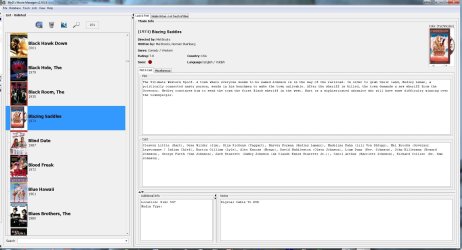
  • Med's Movie Manager.JPG
    Med's Movie Manager.JPG
    173.5 KB · Views: 4

My Computer

Computer Manufacturer/Model Number
Self
OS
Main - Windows 7 Pro SP1 64-Bit; 2nd - Windows Server 2008 R2
CPU
Main - Core i7 2600K; 2nd - Core i7 920
Motherboard
Main - Asus P8Z68-V Pro/Gen3; 2nd - Gigabyte GA-EX58-UDR3
Memory
Main - 16GB Corsair Vengeance; 2nd - 12GB Corsair Vengeance
Graphics Card(s)
Main - XFX Radeon 6870 1GB; 2nd - XFX Radeon 4870 1GB
Sound Card
Both: Onboard Realtek Azalia
Monitor(s) Displays
Main - Hann 25" + I-INC 25" + Acer 23"; 2nd - Upgrading Soon
Screen Resolution
Main - 1920x1080 (All Three Monitors); 2nd - Upgrading Soon
Hard Drives
Main - (1) Crucial M4 128GB (Boot)
Main - (1) Seagate 2TB 64MB Cache (Data)
Main - (1) Seagate 2TB 64MB Cache (Data Backup)
2nd - (1) Intel X25-M SSD 80GB (Boot)
2nd - (3) Seagate 1TB 32MB Cache (Data Backup)
2nd - (1) Seagate 320GB (Because)
PSU
Main - OCZ 600W Modular; 2nd - OCZ 600W
Case
Main - Thermaltake Element G; 2nd - NZXT something or other
Cooling
Main - Corsair H80; 2nd - Prolimatech Megahalems
Keyboard
Main - Razer Reclusa; 2nd - Old MS Keyboard
Mouse
Main - Logitech MX Revolution; 2nd - Old MS Mouse
Internet Speed
20Mbps Time-Warner Cable
Since the movies are on an external hard drive, that I intend to move back and forth between computers, I thought that it would be good if I installed collectorz on that drive, instead of the OS drive. However, I'm sure that there are a lot of registry keys that would have to exist on both computers for the program to function properly.

I guess that I could install the program on the other computer, and just move the database from this computer to it, but I'm not certain where that database is, nor if there is any other file necessary, that would not be created by the installation? I just don't want to have to build and maintain two different installations, doubling the work.

EDIT: I just posted this question on the Collectorz Forum, but it is a ghost town (11 people online, of which only 4...counting myself, are logged in). So I hope that someone here has an idea that I can use.

Are you computers not networked? You should be able to scan your movies from all over the network and still have the main database (catalog) of your movies on one PC. Many different options you can do. But i think im some what unsure of your actual Question. - Tony

They were, but not currently. When I had a hard drive go bad on the secondary computer a while back, I had to do a clean install, and had trouble setting up the network again. The problem was me and my memory, not the computer itself. I really didn't need it, because both computers have internet access directly without a network.

At least for the moment, I just need access to the movies at my primary computer for setup and maintenance, and do almost all of the viewing from the secondary. I have so little experience with networking, that I would feel more confident with simply moving the hard drive back and forth, because I can do that in less than a minute, since the external cases has the drives on trays which interchange.

I got a response from the president of collectorz about my question, on their forum, in which he said that it was not possible, but I do not believe that. I think that his interest was in selling Movie Collectorz Connect, which is for online use. That would not fit my taste at all.

If no one can tell me how to do what I want, then I will just have to figure it out myself.
 

My Computer

Computer Manufacturer/Model Number
DIY
OS
W7x64 Pro, SuSe 12.1/** W7 x64 Pro, XP MCE
CPU
Phenom II 1090T w/Noctua NH-D14 /**4400+ X2 w/CM Hyper TX 3
Motherboard
ASRock 890FX Deluxe 4/**A8N-SLI
Memory
2 x 2GB Patriot PGS34g1600LLKA/**4x1GB Corsair VS
Graphics Card(s)
EVGA GTX460 SC/**EVGA 8800GTS
Sound Card
Asus Xonar D2X/**Xonar D1
Monitor(s) Displays
Acer X233H, Dell E152FPc /**LG M237-WD
Screen Resolution
1920x1080 & 1024x768/**1980x1080
Hard Drives
WDC 2TB, 1.5TB, 1TB, 500GB,Seagate 500GB , Maxtor 80GB /**500GB Seagate & WDC 1TB Black
PSU
CM RS600 w/ APC BX1000G/**Antec 500 TP w/ APC BX1000
Case
HAF922/**Antec 1040IIB
Cooling
3x200mm, 1x140 and 1x120mm/**5x80mm fans
Keyboard
Logitech Media USB/**Saitek Eclipse
Mouse
Cordless Trackman Wheel/**Ditto
Internet Speed
3.3Mbps
Other Info
SB 560 5.1 w/ Sennheiser RS140/**Creative T20 speakers, Dvico FusionHDTV7 Gold RT, Cisco E3000, HP 5510V AIO, Linksys E3000, Belkin F5U237 hub and **F5D8055 adapter
(** = 2nd rig)
Since the movies are on an external hard drive, that I intend to move back and forth between computers, I thought that it would be good if I installed collectorz on that drive, instead of the OS drive. However, I'm sure that there are a lot of registry keys that would have to exist on both computers for the program to function properly.

I guess that I could install the program on the other computer, and just move the database from this computer to it, but I'm not certain where that database is, nor if there is any other file necessary, that would not be created by the installation? I just don't want to have to build and maintain two different installations, doubling the work.

EDIT: I just posted this question on the Collectorz Forum, but it is a ghost town (11 people online, of which only 4...counting myself, are logged in). So I hope that someone here has an idea that I can use.

Are you computers not networked? You should be able to scan your movies from all over the network and still have the main database (catalog) of your movies on one PC. Many different options you can do. But i think im some what unsure of your actual Question. - Tony

They were, but not currently. When I had a hard drive go bad on the secondary computer a while back, I had to do a clean install, and had trouble setting up the network again. The problem was me and my memory, not the computer itself. I really didn't need it, because both computers have internet access directly without a network.

At least for the moment, I just need access to the movies at my primary computer for setup and maintenance, and do almost all of the viewing from the secondary. I have so little experience with networking, that I would feel more confident with simply moving the hard drive back and forth, because I can do that in less than a minute, since the external cases has the drives on trays which interchange.

I got a response from the president of collectorz about my question, on their forum, in which he said that it was not possible, but I do not believe that. I think that his interest was in selling Movie Collectorz Connect, which is for online use. That would not fit my taste at all.

If no one can tell me how to do what I want, then I will just have to figure it out myself.

Yeah i believe your right far as the president trying to sell you something additional. So what exactly is a goal?

Im not quite sure i understand 100%

Do you have movies on 2 different computers and wanna catalog them on ur main pc without transferring all the files to one drive?

If thats the case i would suggest networking the computers and having collectorz scan the files over the network. Or get a large external drive of which u can use to have all the files (media) on. Depending on how you do it.
Im almost positive it would be possible to install the collectorz software on the 2nd pc and just transport the Catalog data itself to the other computer for Simply being able to See what you have in your collection. Networking it would allow you to play the media on both computers. External drive should also allow this to be done by simply plugging it into the 2nd computer.

- Tony
 

My Computer

Computer Manufacturer/Model Number
Custom
OS
Windows 7 Ultimate x64
CPU
AMD Phenom x4 965 BE
Motherboard
MSI 790FX GD70 Not Wiki
Memory
4gb Gskill
Graphics Card(s)
HD 4850
Sound Card
Onboard Realtek
Monitor(s) Displays
Asus VW246H
Screen Resolution
1920x1080 Native
Hard Drives
2 Seagate Drives Raid 0
PSU
650Watt Corsair
Case
CoolerMaster
Cooling
Air Cooling Stock Heatsink and Fan
Keyboard
Logitech Cordless Duo
Mouse
Logitech Cordless Duo
Internet Speed
24000 KBPS
As I said before, all of the movies are on one external drive (there is also another external drive for TV programs). I do not want to place these videos on both computers, that would only waste hard drive space, and make managing the videos more difficult. The idea that I'm working on is to only have one installation of Collectorz, on the same drive as the movies (not sure about the TV drive). The only problem with this is that both computers would need the proper registry keys, and any files that may exist outside of the primary directory on the movie hard drive (I'm not certain that there are any). That way, which ever computer the hard drive is plugged into would already have the necessary gears and cogs to make the program work. I have assigned the same drive letter to the hard drive in both computers, so that should eliminate any confusion in identification.

I have thought about installing the program on a spare external hard drive, assigned the movie drive's drive letter (without the movie drive installed). That would create all necessary keys and files necessary, and then replace the spare drive with the movie drive, so that both systems would point to the same program. Wouldn't that work?

EDIT: The one factor that I'm unclear on is that I'm wondering how Windows identifies the drives, besides the letter assigned, because it seems as though the letter may be recorded on the MBR or MFT. If that is the only means of identification, then it should work, but if there is some other way that it does this, then it is possible that it could discern the difference between two different drives named M.
 
Last edited:

My Computer

Computer Manufacturer/Model Number
DIY
OS
W7x64 Pro, SuSe 12.1/** W7 x64 Pro, XP MCE
CPU
Phenom II 1090T w/Noctua NH-D14 /**4400+ X2 w/CM Hyper TX 3
Motherboard
ASRock 890FX Deluxe 4/**A8N-SLI
Memory
2 x 2GB Patriot PGS34g1600LLKA/**4x1GB Corsair VS
Graphics Card(s)
EVGA GTX460 SC/**EVGA 8800GTS
Sound Card
Asus Xonar D2X/**Xonar D1
Monitor(s) Displays
Acer X233H, Dell E152FPc /**LG M237-WD
Screen Resolution
1920x1080 & 1024x768/**1980x1080
Hard Drives
WDC 2TB, 1.5TB, 1TB, 500GB,Seagate 500GB , Maxtor 80GB /**500GB Seagate & WDC 1TB Black
PSU
CM RS600 w/ APC BX1000G/**Antec 500 TP w/ APC BX1000
Case
HAF922/**Antec 1040IIB
Cooling
3x200mm, 1x140 and 1x120mm/**5x80mm fans
Keyboard
Logitech Media USB/**Saitek Eclipse
Mouse
Cordless Trackman Wheel/**Ditto
Internet Speed
3.3Mbps
Other Info
SB 560 5.1 w/ Sennheiser RS140/**Creative T20 speakers, Dvico FusionHDTV7 Gold RT, Cisco E3000, HP 5510V AIO, Linksys E3000, Belkin F5U237 hub and **F5D8055 adapter
(** = 2nd rig)
As I said before, all of the movies are on one external drive (there is also another external drive for TV programs). I do not want to place these videos on both computers, that would only waste hard drive space, and make managing the videos more difficult. The idea that I'm working on is to only have one installation of Collectorz, on the same drive as the movies (not sure about the TV drive). The only problem with this is that both computers would need the proper registry keys, and any files that may exist outside of the primary directory on the movie hard drive (I'm not certain that there are any). That way, which ever computer the hard drive is plugged into would already have the necessary gears and cogs to make the program work. I have assigned the same drive letter to the hard drive in both computers, so that should eliminate any confusion in identification.

I have thought about installing the program on a spare external hard drive, assigned the movie drive's drive letter (without the movie drive installed). That would create all necessary keys and files necessary, and then replace the spare drive with the movie drive, so that both systems would point to the same program. Wouldn't that work?

EDIT: The one factor that I'm unclear on is that I'm wondering how Windows identifies the drives, besides the letter assigned, because it seems as though the letter may be recorded on the MBR or MFT. If that is the only means of identification, then it should work, but if there is some other way that it does this, then it is possible that it could discern the difference between two different drives named M.


Oh OK, i Understand now. :) To be Honest that may be a trial and error thing, trying different things out to figure out the best way to go about it. But i so believe you can figure something out. I think your on the right track, i wish that i could suggest something, but i have never done anything quite like that before.

Its always a bit tricky with programs. Most of the time its necessary to install the software on both the computers to achieve something like this. But im not gonna sit here and say that it can't be done as i am unsure.

DO keep us informed through your process.

- Tony
 

My Computer

Computer Manufacturer/Model Number
Custom
OS
Windows 7 Ultimate x64
CPU
AMD Phenom x4 965 BE
Motherboard
MSI 790FX GD70 Not Wiki
Memory
4gb Gskill
Graphics Card(s)
HD 4850
Sound Card
Onboard Realtek
Monitor(s) Displays
Asus VW246H
Screen Resolution
1920x1080 Native
Hard Drives
2 Seagate Drives Raid 0
PSU
650Watt Corsair
Case
CoolerMaster
Cooling
Air Cooling Stock Heatsink and Fan
Keyboard
Logitech Cordless Duo
Mouse
Logitech Cordless Duo
Internet Speed
24000 KBPS
It was a shot in the dark, but I went ahead and ordered this scanner:

Hand Held USB CCD Point of Sale PoS Barcode Scanner NEW - eBay (item 120474098769 end time Jan-19-11 17:02:38 PST)

The vender said that it would work fine...for whatever that's worth.

Once you verify it does or does not work, post it up i would be interested in knowing if it does. as the scanner collectorz sales with it they want lots of money for.

Too early for me to really say, but I that scanner arrived yesterday, and I tried it out...without success. I don't know if the problem is the scanner, the Movie Collector or just me? Due to the fact that the scanner is PoS, it has a lot of different codes that it can scan, but needs to be programmed for the one in use. It comes with a user manual, but it is 99% barcodes, which the scanner uses in being programmed. Maybe for someone that knew what they were doing, this would be sufficient, but I am not one of those people.

I sent an email to the seller last night, hoping for help to determine exactly where the problem is, but it is too early to expect an answer yet...maybe tomorrow.
 

My Computer

Computer Manufacturer/Model Number
DIY
OS
W7x64 Pro, SuSe 12.1/** W7 x64 Pro, XP MCE
CPU
Phenom II 1090T w/Noctua NH-D14 /**4400+ X2 w/CM Hyper TX 3
Motherboard
ASRock 890FX Deluxe 4/**A8N-SLI
Memory
2 x 2GB Patriot PGS34g1600LLKA/**4x1GB Corsair VS
Graphics Card(s)
EVGA GTX460 SC/**EVGA 8800GTS
Sound Card
Asus Xonar D2X/**Xonar D1
Monitor(s) Displays
Acer X233H, Dell E152FPc /**LG M237-WD
Screen Resolution
1920x1080 & 1024x768/**1980x1080
Hard Drives
WDC 2TB, 1.5TB, 1TB, 500GB,Seagate 500GB , Maxtor 80GB /**500GB Seagate & WDC 1TB Black
PSU
CM RS600 w/ APC BX1000G/**Antec 500 TP w/ APC BX1000
Case
HAF922/**Antec 1040IIB
Cooling
3x200mm, 1x140 and 1x120mm/**5x80mm fans
Keyboard
Logitech Media USB/**Saitek Eclipse
Mouse
Cordless Trackman Wheel/**Ditto
Internet Speed
3.3Mbps
Other Info
SB 560 5.1 w/ Sennheiser RS140/**Creative T20 speakers, Dvico FusionHDTV7 Gold RT, Cisco E3000, HP 5510V AIO, Linksys E3000, Belkin F5U237 hub and **F5D8055 adapter
(** = 2nd rig)
I just got a response from the seller, and she plead ignorance. She said that all that she had to do was to plug it in and use it without any programming, so I have to assume that the scanner is defective. I don't want to exchange it for another of the same, since I really don't know if it is a defective unit, or something else, so I will be ordering something else.
 

My Computer

Computer Manufacturer/Model Number
DIY
OS
W7x64 Pro, SuSe 12.1/** W7 x64 Pro, XP MCE
CPU
Phenom II 1090T w/Noctua NH-D14 /**4400+ X2 w/CM Hyper TX 3
Motherboard
ASRock 890FX Deluxe 4/**A8N-SLI
Memory
2 x 2GB Patriot PGS34g1600LLKA/**4x1GB Corsair VS
Graphics Card(s)
EVGA GTX460 SC/**EVGA 8800GTS
Sound Card
Asus Xonar D2X/**Xonar D1
Monitor(s) Displays
Acer X233H, Dell E152FPc /**LG M237-WD
Screen Resolution
1920x1080 & 1024x768/**1980x1080
Hard Drives
WDC 2TB, 1.5TB, 1TB, 500GB,Seagate 500GB , Maxtor 80GB /**500GB Seagate & WDC 1TB Black
PSU
CM RS600 w/ APC BX1000G/**Antec 500 TP w/ APC BX1000
Case
HAF922/**Antec 1040IIB
Cooling
3x200mm, 1x140 and 1x120mm/**5x80mm fans
Keyboard
Logitech Media USB/**Saitek Eclipse
Mouse
Cordless Trackman Wheel/**Ditto
Internet Speed
3.3Mbps
Other Info
SB 560 5.1 w/ Sennheiser RS140/**Creative T20 speakers, Dvico FusionHDTV7 Gold RT, Cisco E3000, HP 5510V AIO, Linksys E3000, Belkin F5U237 hub and **F5D8055 adapter
(** = 2nd rig)
In regards to what I said about the president's response to my question about installing Movie Collector on the external drive and using it on both of my computers, I took a closer look at his suggestion of using connect to view movies on both computers. From what I could see, Connect is nothing more than an online database containing a users index of data about the movies, not the movies themselves, and would be of no use at all for my purposes. Since I feel that I was quite clear in my question, as to my goal, I think that his response was either a bunch of flack, or a cheap method to increase his sales. Connect might be of value to some people, who need to reference their collection remotely, but I'm not one of them.

I have not yet experimented with the scheme that I mentioned about dual installations of one database, but I still intend to, once completing encoding, and resolving another issue dealing with the drives themselves.
 

My Computer

Computer Manufacturer/Model Number
DIY
OS
W7x64 Pro, SuSe 12.1/** W7 x64 Pro, XP MCE
CPU
Phenom II 1090T w/Noctua NH-D14 /**4400+ X2 w/CM Hyper TX 3
Motherboard
ASRock 890FX Deluxe 4/**A8N-SLI
Memory
2 x 2GB Patriot PGS34g1600LLKA/**4x1GB Corsair VS
Graphics Card(s)
EVGA GTX460 SC/**EVGA 8800GTS
Sound Card
Asus Xonar D2X/**Xonar D1
Monitor(s) Displays
Acer X233H, Dell E152FPc /**LG M237-WD
Screen Resolution
1920x1080 & 1024x768/**1980x1080
Hard Drives
WDC 2TB, 1.5TB, 1TB, 500GB,Seagate 500GB , Maxtor 80GB /**500GB Seagate & WDC 1TB Black
PSU
CM RS600 w/ APC BX1000G/**Antec 500 TP w/ APC BX1000
Case
HAF922/**Antec 1040IIB
Cooling
3x200mm, 1x140 and 1x120mm/**5x80mm fans
Keyboard
Logitech Media USB/**Saitek Eclipse
Mouse
Cordless Trackman Wheel/**Ditto
Internet Speed
3.3Mbps
Other Info
SB 560 5.1 w/ Sennheiser RS140/**Creative T20 speakers, Dvico FusionHDTV7 Gold RT, Cisco E3000, HP 5510V AIO, Linksys E3000, Belkin F5U237 hub and **F5D8055 adapter
(** = 2nd rig)
I posted a question with Collectorz as to whether there is a way to get their program to detect .ogv video files, and I just received a reply"

I think I haven't heard of the OGV format before. I will make a request for you that our program can detect these files in the future. I'm sorry for any inconvenience caused.
It seems strange to me that people in the business of dealing with video would never have heard of .ogv.
 

My Computer

Computer Manufacturer/Model Number
DIY
OS
W7x64 Pro, SuSe 12.1/** W7 x64 Pro, XP MCE
CPU
Phenom II 1090T w/Noctua NH-D14 /**4400+ X2 w/CM Hyper TX 3
Motherboard
ASRock 890FX Deluxe 4/**A8N-SLI
Memory
2 x 2GB Patriot PGS34g1600LLKA/**4x1GB Corsair VS
Graphics Card(s)
EVGA GTX460 SC/**EVGA 8800GTS
Sound Card
Asus Xonar D2X/**Xonar D1
Monitor(s) Displays
Acer X233H, Dell E152FPc /**LG M237-WD
Screen Resolution
1920x1080 & 1024x768/**1980x1080
Hard Drives
WDC 2TB, 1.5TB, 1TB, 500GB,Seagate 500GB , Maxtor 80GB /**500GB Seagate & WDC 1TB Black
PSU
CM RS600 w/ APC BX1000G/**Antec 500 TP w/ APC BX1000
Case
HAF922/**Antec 1040IIB
Cooling
3x200mm, 1x140 and 1x120mm/**5x80mm fans
Keyboard
Logitech Media USB/**Saitek Eclipse
Mouse
Cordless Trackman Wheel/**Ditto
Internet Speed
3.3Mbps
Other Info
SB 560 5.1 w/ Sennheiser RS140/**Creative T20 speakers, Dvico FusionHDTV7 Gold RT, Cisco E3000, HP 5510V AIO, Linksys E3000, Belkin F5U237 hub and **F5D8055 adapter
(** = 2nd rig)
Back
Top