MechWarrior001
New member
- Local time
- 7:56 AM
- Messages
- 7
Moving bootmanager from "Storage" partition to "System" partition
Hey, whats up? New here.
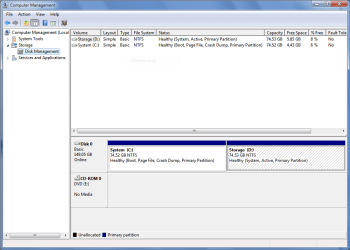
Right now my hard drive is split up into two partitions: System and Storage. However, when installing 7, for some odd reason, the installer put the boot manager (I think it is the boot manager) on my Storage partition, when I want it on the System partition. Is there a way I can non-destructively move the boot manager to the System partition and redirect to boot from there, instead of being located on the Storage partition and booting from the System partition. In essence, I want to move it and tell it to boot from itself. Is there a way to non-destructively do that?
Also, according to this tutorial (http://www.sevenforums.com/tutorials/165472-product-key-number-uninstall-deactivate-windows.html) I can deactivate 7. I was wondering, does that free up the install key for another use or is that use of the key permanently lost even though I deactivated 7?
Hey, whats up? New here.
Right now my hard drive is split up into two partitions: System and Storage. However, when installing 7, for some odd reason, the installer put the boot manager (I think it is the boot manager) on my Storage partition, when I want it on the System partition. Is there a way I can non-destructively move the boot manager to the System partition and redirect to boot from there, instead of being located on the Storage partition and booting from the System partition. In essence, I want to move it and tell it to boot from itself. Is there a way to non-destructively do that?
Also, according to this tutorial (http://www.sevenforums.com/tutorials/165472-product-key-number-uninstall-deactivate-windows.html) I can deactivate 7. I was wondering, does that free up the install key for another use or is that use of the key permanently lost even though I deactivated 7?
My Computer
- Computer Manufacturer/Model Number
- Custom Built
- OS
- Windows 7 Ultimate N x64
- CPU
- AMD Phenom II X4 955
- Motherboard
- MSI 740GM-P25
- Memory
- AMPX DDR3-1333 4GB
- Graphics Card(s)
- Powercolor ATI Radeon HD 4650
- Sound Card
- VIA HD Integrated Audio
- Monitor(s) Displays
- Samsung 932B
- Screen Resolution
- 1280*1024*32@75Hz
- Hard Drives
- Western Digital Caviar 1600JS
- PSU
- Coolmax 600W Power supply
- Case
- Ninja 2
- Cooling
- Standard 80mm fans
- Mouse
- Razer 3500DPI Death Adder
- Internet Speed
- 1.5Mbps ADSL