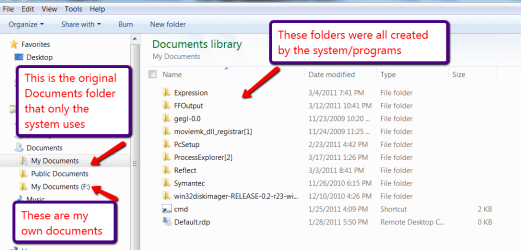
Read a lot about having programs and os on one partition and all user data, files, etc in another partition.
In my windows 7 Home Premium, am I correct that all the non-program, os data that I want to place in the other partition will be contained in users directory? In my case, there is only one user "John", so do I need to move "John" or "Users" to the new location? Any other files?
How do I make the change as described above? Do I just create a new directory called "Users" in the root of the new partition then cut and paste the "John" folder to that directory? If I am using Microsoft Office, do I need to make any changes there?
Finally, how do I handle it if my computer is an iMac and I have Windows 7 running in a partition created by bootcamp? Does running VMWare Fusion 3.12 affect the above in any manner that I should be aware of now?
In my windows 7 Home Premium, am I correct that all the non-program, os data that I want to place in the other partition will be contained in users directory? In my case, there is only one user "John", so do I need to move "John" or "Users" to the new location? Any other files?
How do I make the change as described above? Do I just create a new directory called "Users" in the root of the new partition then cut and paste the "John" folder to that directory? If I am using Microsoft Office, do I need to make any changes there?
Finally, how do I handle it if my computer is an iMac and I have Windows 7 running in a partition created by bootcamp? Does running VMWare Fusion 3.12 affect the above in any manner that I should be aware of now?
My Computer
- OS
- windows 7 Home Premium