Moving Documents

XeRo

Banned
Local time
7:26 PM
Messages
35
So far I have dual 1.5Tb hard drives. I have a 40gig sitting here I want to load WM7 64 bit onto and Raid0 my two 1.5Tb hdd's to. Basically I want to use a small 40gig to run the OS and the dual 1.5Tb raid0 hdd's to house my games/documents/ect..


Is this do-able? if so, how?
 

My Computer

OS
Windows 7RC 64bit build710
CPU
Intel Q9400 Quad: 2.66Ghz, 1333FSB
Motherboard
EVGA 750i SLI FTW
Memory
8 gigs of OCZ
Graphics Card(s)
XFX 9600GT 512GDDR3 700Mhz Overclocked.
Sound Card
Onboard 7.1
Monitor(s) Displays
22" WS Samsung, 19" LG
Screen Resolution
1680X1050 and 1280X1024
Hard Drives
Dual 1.5Tb Seagate Sata2
PSU
Coolmaster 600W
Case
Ultra
Cooling
two 120mm fans at each end, and one 80mm on the case window.
Keyboard
Razer Lycosa
Mouse
Logitech MX Revolution
Internet Speed
AT&T Uverse
Yes it is XeRo.
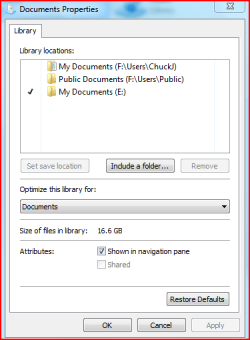
Open your Libraries folder. Right click on one (Documents/Pictures/ect) you'd like to change the Location to, and select Properties.

Youll notice they changed the options a bit, or at least the look of it.
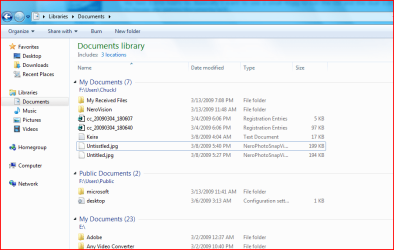
You can now have your Library folders include multiple locations. You can remove them also so only one will show up whenever you open that folder.
Simply click on Include a folder and browse to the hard drive you wish to use (youll have to create the folders on those drives if they are not there already). Once you add it, highlight it and click on "Set save location".

A little different from previous where you could just simply set the location. But its not bad. The other way seemed easier and to the point but this works just fine.
 

Attachments

  • Capture5.PNG
    Capture5.PNG
    10.1 KB · Views: 47
  • Capture6.PNG
    Capture6.PNG
    35.2 KB · Views: 60

My Computer

Computer Manufacturer/Model Number
Built
OS
Windows 7 RTM
CPU
Intel I7 920 2.67 ghz
Motherboard
EVGA X58
Memory
6GB CORSAIR DOMINATOR
Graphics Card(s)
GeForce GTX 260 Core 216 896MB 448-bit GDDR3 PCI Express 2.0
I dont think I mentioned it, but as you can see, you can remove a folder from being apart of that specific library as well.

Simply highlight it and select Remove. Then when you open that folder, only the folders included in that list will show. I prefer to trim it down and just use one. I, like you, point to my larger hard drive to use for my storage.

I dont believe all Windows 7 beta builds had the feature exactly like this but I can not say for certain.
 

My Computer

Computer Manufacturer/Model Number
Built
OS
Windows 7 RTM
CPU
Intel I7 920 2.67 ghz
Motherboard
EVGA X58
Memory
6GB CORSAIR DOMINATOR
Graphics Card(s)
GeForce GTX 260 Core 216 896MB 448-bit GDDR3 PCI Express 2.0
Did that work for you?
 

My Computer

Computer Manufacturer/Model Number
Built
OS
Windows 7 RTM
CPU
Intel I7 920 2.67 ghz
Motherboard
EVGA X58
Memory
6GB CORSAIR DOMINATOR
Graphics Card(s)
GeForce GTX 260 Core 216 896MB 448-bit GDDR3 PCI Express 2.0
Hi,
since yesterday i'm using windows 7 on my netbook. I've got a partition for the OS (25 gb) and one for the documents. In Windows XP you can change the location of my documents - is there a posibility to change the location of your useraccount in win 7?
I know you can use libarys to display music etc... from other partitions, but it would be better if i could change directly the location of foldes like "My Music" oder "Downloads" from C: to D:
Is there any possiblility?
 

My Computer

OS
Windows 7
I dont believe so. I know you could change the location of these folders in Vista and maybe in earlier versions of Win 7 beta, though that last part I can not confirm.
Perhaps someone else here knows a way.
 

My Computer

Computer Manufacturer/Model Number
Built
OS
Windows 7 RTM
CPU
Intel I7 920 2.67 ghz
Motherboard
EVGA X58
Memory
6GB CORSAIR DOMINATOR
Graphics Card(s)
GeForce GTX 260 Core 216 896MB 448-bit GDDR3 PCI Express 2.0
I tried everythin manually, cause i have the same problem, i copied all my documents folders from c: to d: than i went in internet explorer to set my favorites folder is in d: but he blocked that.. I couldn' write anything..
Than i went changing the default save location for pictures and music everything worked fine untill i hitted "go to my pictures" button...


So conclusion... Does anybody please have an idea how to do this wright?
THx
 

My Computer

Computer Manufacturer/Model Number
Acer Aspire 6930G
OS
Windows 7
CPU
Intel centrino duo core
Memory
4 GB
Graphics Card(s)
Nvidia Geforce 9600m
Hard Drives
Sata 320 Gb
Internet Speed
T3
Back
Top