Solved Moving OS from ide to sata drive

Ash55

New member
Member
Local time
8:14 AM
Messages
40
My system has Win7 on an ide drive and one other sata drive as a second drive.

I have just added a larger sata drive and cloned the OS to it from the ide drive using True Image from Western Digital.

My problem is the system will not boot from the new sata drive even if I disconnect the ide drive.

I guessing this a driver issue but how do I fix it?
 

My Computer My Computer

At a glance

Win 7 pro 32 bit
OS
Win 7 pro 32 bit
That looks OK but I don't want to spend any money at present!
 

My Computer My Computer

At a glance

Win 7 pro 32 bit
OS
Win 7 pro 32 bit
I just want something very simple to use:o. According to the Drive Image software info it should have done the job:huh:
 

My Computer My Computer

At a glance

Win 7 pro 32 bit
OS
Win 7 pro 32 bit
Did you clone all partition from the IDE drive?

Try booting the flash drive and running Repair Install, up to 3 times, see if that fixes it.
 

My Computer My Computer

At a glance

Windows 10 Pro X64Intel Quad Core i7-4770 @ 3.4Ghz16.0GB PC3-12800 DDR3 SDRAM 1600 MHzIntel Integrated HD Graphics
Computer type
PC/Desktop
Computer Manufacturer/Model Number
Lenovo IdeaCenter 450
OS
Windows 10 Pro X64
CPU
Intel Quad Core i7-4770 @ 3.4Ghz
Memory
16.0GB PC3-12800 DDR3 SDRAM 1600 MHz
Graphics Card(s)
Intel Integrated HD Graphics
Sound Card
Realtek HD Audio
Monitor(s) Displays
HP 22" LCD
Screen Resolution
1680 x 1050
Hard Drives
250GB Samsung EVO SATA-3 SSD
2TB Seagate ST2000DM001 SATA-2
1.5TB Seagate ST3150041AS SATA
Keyboard
Dell USB
Mouse
Lenovo USB
Internet Speed
Cable via Road Runner 3MB Upload, 30MB Download
Antivirus
Windows Defender, MBAM Pro, MBAE
Browser
Seamonkey
Other Info
UEFI/GPT
PLDS DVD-RW DH16AERSH
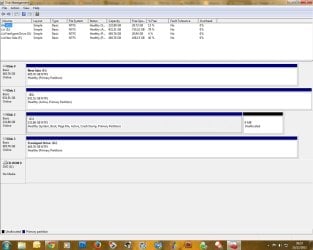
Otherwise, put the IDE drive back in and post a screen capture of a full screen Disk Management window.

To open Disk Management, press Windows key+r, type diskmgmt.msc and press Enter or click GO. Make it full screen.

Vista and Windows 7: How to Use the Snipping Tool in Vista - Vista Forums (says it's for Vista but also works with Win 7/8).

For Sevenforums:
Once you have the image saved, click on the Paperclip Icon next to the Smiley Icon. In the Manage Attachments window, click Browse and navigate to where you saved the image and select it.
Click the Upload button.
Close the Manage Attachments window.
Click on the Paperclip Icon again and select the image you uploaded. It will be placed in your post.
 

My Computer My Computer

At a glance

Windows 10 Pro X64Intel Quad Core i7-4770 @ 3.4Ghz16.0GB PC3-12800 DDR3 SDRAM 1600 MHzIntel Integrated HD Graphics
Computer type
PC/Desktop
Computer Manufacturer/Model Number
Lenovo IdeaCenter 450
OS
Windows 10 Pro X64
CPU
Intel Quad Core i7-4770 @ 3.4Ghz
Memory
16.0GB PC3-12800 DDR3 SDRAM 1600 MHz
Graphics Card(s)
Intel Integrated HD Graphics
Sound Card
Realtek HD Audio
Monitor(s) Displays
HP 22" LCD
Screen Resolution
1680 x 1050
Hard Drives
250GB Samsung EVO SATA-3 SSD
2TB Seagate ST2000DM001 SATA-2
1.5TB Seagate ST3150041AS SATA
Keyboard
Dell USB
Mouse
Lenovo USB
Internet Speed
Cable via Road Runner 3MB Upload, 30MB Download
Antivirus
Windows Defender, MBAM Pro, MBAE
Browser
Seamonkey
Other Info
UEFI/GPT
PLDS DVD-RW DH16AERSH
When you clone or image Win7 to another drive and it won't start, the first thing to try is unplugging all other HDD's and peripherals, confirm that the 100mb System Reserved partition (preferred if you have it) or C is http://www.sevenforums.com/tutorials/71432-partition-mark-active.html, then run http://www.sevenforums.com/tutorials/105541-startup-repair-run-3-separate-times.html until Win7 boots.

When you cloned did you select to include Track 0 and make the 100mb (if you have it) or C Active? These are necessary, but can be handled now with the repairs above.
 
Here we go. I've no idea what flash drive would be involved here :confused:
 

Attachments

  • disks.jpg
    disks.jpg
    113.6 KB · Views: 5

My Computer My Computer

At a glance

Win 7 pro 32 bit
OS
Win 7 pro 32 bit
You did clone C to F... correct? They are both primary.. nice. You forgot to mark F "Active". Mark it ACTIVE. After that disconnect C (old IDE disk) and try to boot. Post results.

Most likely it doesn't boot because it's still pointing to old C. Try startup repair to fix that. Post results.
 

My Computer My Computer

At a glance

Microsoft Windows 7 Home Premium 64-bits 7601...Intel(R) Core(TM) i3 CPU M 370 @ 2.40GHz4,00 GBATI Mobility Radeon HD 5400 Series
Computer type
Laptop
Computer Manufacturer/Model Number
ACER ASPIRE 5742G
OS
Microsoft Windows 7 Home Premium 64-bits 7601 Multiprocessor Free Service Pack 1
CPU
Intel(R) Core(TM) i3 CPU M 370 @ 2.40GHz
Motherboard
Acer Aspire 5742G
Memory
4,00 GB
Graphics Card(s)
ATI Mobility Radeon HD 5400 Series
Sound Card
(1) AMD High Definition Audio Device (2) Realtek High Defi
Screen Resolution
1366 x 768 x 32 bits (4294967296 colors) @ 60 Hz
Hard Drives
WDC WD5000BEVT-22ZAT0
E is the new system drive and that is already set as active as you can see. F has been in use for sometime and is working fine. I've already tried booting from E with C disconnected but no go.

I don't have time until later this week to try the set up repair. I will update this when I can ;)

Thanks for all your help so far :D
 

My Computer My Computer

At a glance

Win 7 pro 32 bit
OS
Win 7 pro 32 bit
Read the whole thread please. It was C that was cloned using Drive Image. What you see now is my system after I reconnected the C ide drive after the new sata drive did not boot from it. I just followed the Drive image info in their software!
 

My Computer My Computer

At a glance

Win 7 pro 32 bit
OS
Win 7 pro 32 bit
No none of that. As I said back in the thread I don't have time to work on this until later this week!
 

My Computer My Computer

At a glance

Win 7 pro 32 bit
OS
Win 7 pro 32 bit
E is the new system drive and that is already set as active as you can see. F has been in use for sometime and is working fine. I've already tried booting from E with C disconnected but no go.

I don't have time until later this week to try the set up repair. I will update this when I can ;)

Thanks for all your help so far :D
What error message do you get if trying to boot from E (with C disconnected)?
What error message do you get if trying to boot from E (with C connected)?
 

My Computer My Computer

At a glance

Microsoft Windows 7 Home Premium 64-bits 7601...Intel(R) Core(TM) i3 CPU M 370 @ 2.40GHz4,00 GBATI Mobility Radeon HD 5400 Series
Computer type
Laptop
Computer Manufacturer/Model Number
ACER ASPIRE 5742G
OS
Microsoft Windows 7 Home Premium 64-bits 7601 Multiprocessor Free Service Pack 1
CPU
Intel(R) Core(TM) i3 CPU M 370 @ 2.40GHz
Motherboard
Acer Aspire 5742G
Memory
4,00 GB
Graphics Card(s)
ATI Mobility Radeon HD 5400 Series
Sound Card
(1) AMD High Definition Audio Device (2) Realtek High Defi
Screen Resolution
1366 x 768 x 32 bits (4294967296 colors) @ 60 Hz
Hard Drives
WDC WD5000BEVT-22ZAT0
Finally got around to looking at this!

I decided to start again and run Drive Image clone again. This time when it had finished I disconnected all the drives except the new Sata drive. Well it booted into Windows OK :D. I then reconnected the other Sata and it wouldn't boot. Just a quick play in the bios with the boot order and all was fine again.

Thanks for all your help guy's
 
Last edited:

My Computer My Computer

At a glance

Win 7 pro 32 bit
OS
Win 7 pro 32 bit
Back
Top