Moving OS to a different drive

spankyham

New member
Local time
10:31 AM
Messages
5
Hi there,
I am currently running Windows 7 on a 60gb hard drive. The OS is taking up too much space so i wish to move it to a larger SSD.

I am running into a few issues trying to do this and would appreciate some help.

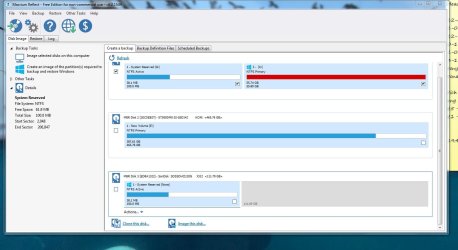
I've set it to boot from the new drive after using 'Macrium Reflect' to clone the drive.

My computer still seems to boot from the original drive, even when i change it in the bios.

If i unplug the original drive, the get the message 'BootMgr is missing', i also got the message..

'The boot selection failed because a required device is inaccessable'

thanks for the help
 

Attachments
  • drives.JPG
    drives.JPG
    134.1 KB · Views: 12

My Computer My Computer

Computer type
PC/Desktop
OS
Windows 7
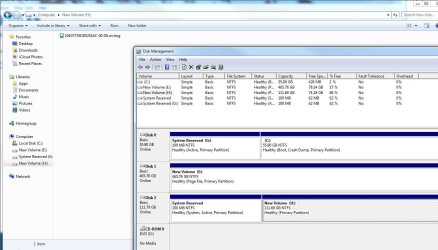
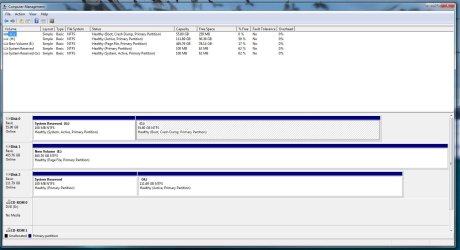
I'm guessing that Disk 2 is the new larger drive. Notice that neither of the partitions on Disk 2 is marked as "system". That's why it won't boot.

Notice that partition G on the old Disk 0 IS marked "system". That's why you can boot if it's connected.

The "system" marker indicates "this partition contains the boot files necessary to boot your PC".

You can most likely fix that by copying the system files from G to the System Reserved partition on Disk 2. You might have to use a third party program like EasyBCD to do that. Or maybe you can do it by disconnecting Disk 2 and running "System Repair".

I think there is an EasyBCD tutorial on this site.

EasyBCD - NeoSmart Technologies

Or---start over and use Macrium imaging rather than Macrium cloning. Be sure to include ALL partitions on Disk 0 when you make the image. You'd have one image file and just need to restore it to the new drive.

Imaging is usually more problem-free than cloning. I don't use cloning at all, but I'm pretty sure you're situation is fixable if you don't want to try imaging instead.

Others can likely give you more precise instructions.
 

My Computer My Computer

Computer type
PC/Desktop
Computer Manufacturer/Model Number
Ignatz Special; 4 speed manual gearbox; factory air conditioning; one of one
OS
Windows 7 Home Premium SP1, 64-bit
CPU
Intel Skylake i5-6600K, not overclocked
Motherboard
AsRock Z170M Extreme 4, micro ATX
Memory
8 GB HyperX DDR4-2666 (2 x 4 GB)
Graphics Card(s)
none; graphics are integrated on CPU
Sound Card
onboard: Realtek ALC1150; external: USB Behringer UF0-202
Monitor(s) Displays
Dell S2340M 23 inch IPS
Screen Resolution
1600 x 900
Hard Drives
System: Crucial MX100 series SSD, 128 GB;
Data: Samsung Spinpoint 103SJ, 1 TB;
Backup: WD Caviar Green WD30EZRX-00D8PB0, 3 TB
PSU
Rosewill SilentNight 500 watt fanless, semi-modular
Case
Antec Solo II
Cooling
Noctua NH-U12S; Noctua F12 intake, Noctua S12A exhaust
Keyboard
Microsoft 200 6JH-00001 USB
Mouse
Dell or Microsoft optical wired; USB
Antivirus
Microsoft Security Essentials and Malwarebytes Premium
Browser
Pale Moon
Other Info
All fans PWM; speeds at idle: CPU circa 500 rpm; intake circa 600 rpm; exhaust circa 600 rpm; CPU temps 27 idle and 47 C load in a warm room (27 C/81 F) when running Intel Extreme Tuning Utility stress test.
Okay would you be able to assist me starting this from scratch?
I will try using 'Image this disk' rather than 'Clone this disk'.
This is how my drive looks currently...


Thanks!
 

Attachments

  • currentdisks.JPG
    currentdisks.JPG
    99.4 KB · Views: 6

My Computer My Computer

Computer type
PC/Desktop
OS
Windows 7
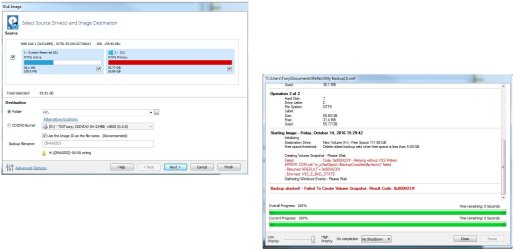
Here is the message i get when i try and do it..
 

Attachments

  • issue.jpg
    issue.jpg
    93.3 KB · Views: 6

My Computer My Computer

Computer type
PC/Desktop
OS
Windows 7
You need to select drive E as the destination for the image.

C and "System Reserved" must be part of that image. I'd select the choice on the left of the Macrium screen that says "create an image of the partitions required to backup and restore Windows". Make sure E is the destination.

That image file should be roughly 20 or 30 gb in size and will fit on E easily.

See if you can get that far--making the image file and storing it on E, and then repost.

The next step after that would be to formally "restore" that image file from E to the new larger drive.

I'm not sure why C is shown in RED. That may be a problem? My guess is that C is red because it is almost completely full.
 

My Computer My Computer

Computer type
PC/Desktop
Computer Manufacturer/Model Number
Ignatz Special; 4 speed manual gearbox; factory air conditioning; one of one
OS
Windows 7 Home Premium SP1, 64-bit
CPU
Intel Skylake i5-6600K, not overclocked
Motherboard
AsRock Z170M Extreme 4, micro ATX
Memory
8 GB HyperX DDR4-2666 (2 x 4 GB)
Graphics Card(s)
none; graphics are integrated on CPU
Sound Card
onboard: Realtek ALC1150; external: USB Behringer UF0-202
Monitor(s) Displays
Dell S2340M 23 inch IPS
Screen Resolution
1600 x 900
Hard Drives
System: Crucial MX100 series SSD, 128 GB;
Data: Samsung Spinpoint 103SJ, 1 TB;
Backup: WD Caviar Green WD30EZRX-00D8PB0, 3 TB
PSU
Rosewill SilentNight 500 watt fanless, semi-modular
Case
Antec Solo II
Cooling
Noctua NH-U12S; Noctua F12 intake, Noctua S12A exhaust
Keyboard
Microsoft 200 6JH-00001 USB
Mouse
Dell or Microsoft optical wired; USB
Antivirus
Microsoft Security Essentials and Malwarebytes Premium
Browser
Pale Moon
Other Info
All fans PWM; speeds at idle: CPU circa 500 rpm; intake circa 600 rpm; exhaust circa 600 rpm; CPU temps 27 idle and 47 C load in a warm room (27 C/81 F) when running Intel Extreme Tuning Utility stress test.
You have a "System Reserved" folder on your G drive. The main purpose of "System Reserved" is to hold the boot files, so they are probably in there (you can look). If so, maybe all you need to do is change "System Reserved" on that drive to be the active partition (in diskmgmt.msc). When there are multiple drives with active partitions, normally the first one will be used to boot from.

edit: Sorry, G was a typo, I meant H. If you make the "System Reserved" partition active on H, it should boot.
 
Last edited:

My Computer My Computer

Computer type
PC/Desktop
Computer Manufacturer/Model Number
Self assembled
OS
Windows 7 64-bit Professional
CPU
Core i5-3570K
Motherboard
Z77X-UD3H
Memory
8 GB
Graphics Card(s)
GTX-1050 Ti
Monitor(s) Displays
42" Sanyo LED TV
Screen Resolution
1920x1080
Hard Drives
Crucial MX200 250 GB
Western Digital Black 2 x 1 TB
PSU
Seasonic
Internet Speed
Cheapest that Comcast sells
Antivirus
What?
Browser
Pale Moon
Ok thank you,
I shall try that and let you know what happens.
I got around the error by starting the 'Volume shadows copy' service.


okay so its completed, i set it to put the file onto the h drive though, will that be an issue? and what should i do next
thanks again for helping
 

Attachments

  • diskhelp.JPG
    diskhelp.JPG
    123.5 KB · Views: 7

My Computer My Computer

Computer type
PC/Desktop
OS
Windows 7
Ok thank you,
I shall try that and let you know what happens.
I got around the error by starting the 'Volume shadows copy' service.


okay so its completed, i set it to put the file onto the h drive though, will that be an issue? and what should i do next
thanks again for helping

Why did you choose H when the instructions were to use E?
 

My Computer My Computer

Computer type
PC/Desktop
Computer Manufacturer/Model Number
Ignatz Special; 4 speed manual gearbox; factory air conditioning; one of one
OS
Windows 7 Home Premium SP1, 64-bit
CPU
Intel Skylake i5-6600K, not overclocked
Motherboard
AsRock Z170M Extreme 4, micro ATX
Memory
8 GB HyperX DDR4-2666 (2 x 4 GB)
Graphics Card(s)
none; graphics are integrated on CPU
Sound Card
onboard: Realtek ALC1150; external: USB Behringer UF0-202
Monitor(s) Displays
Dell S2340M 23 inch IPS
Screen Resolution
1600 x 900
Hard Drives
System: Crucial MX100 series SSD, 128 GB;
Data: Samsung Spinpoint 103SJ, 1 TB;
Backup: WD Caviar Green WD30EZRX-00D8PB0, 3 TB
PSU
Rosewill SilentNight 500 watt fanless, semi-modular
Case
Antec Solo II
Cooling
Noctua NH-U12S; Noctua F12 intake, Noctua S12A exhaust
Keyboard
Microsoft 200 6JH-00001 USB
Mouse
Dell or Microsoft optical wired; USB
Antivirus
Microsoft Security Essentials and Malwarebytes Premium
Browser
Pale Moon
Other Info
All fans PWM; speeds at idle: CPU circa 500 rpm; intake circa 600 rpm; exhaust circa 600 rpm; CPU temps 27 idle and 47 C load in a warm room (27 C/81 F) when running Intel Extreme Tuning Utility stress test.
I've given up, i'll find a cracked version of windows 7 and try installing it to a new drive.

I just have no idea what to do...

If there is a detailed step by step that maybe someone can referencee i can look to using that if the cracked version fails,
cheers
 

My Computer My Computer

Computer type
PC/Desktop
OS
Windows 7
I've given up, i'll find a cracked version of windows 7 and try installing it to a new drive.

I just have no idea what to do...

If there is a detailed step by step that maybe someone can referencee i can look to using that if the cracked version fails,
cheers


We cannot assist you as the rule stated;

http://www.sevenforums.com/misc.php?do=showrules

Your problem is very easy to solve.
 

My Computer My Computer

Computer type
Laptop
Computer Manufacturer/Model Number
Toshiba L630 and L735
OS
Windows 7 x64
Hard Drives
240 GB SSD
If you have a Win 7 COA sticker with a readable key we can help you do a clean install with clean Windows install media.
Here is an example of a Windows COA sticker.
202840d1331785878-clean-reinstall-factory-oem-windows-7-a-coa-stickers.gif
 

My Computer My Computer

Computer type
PC/Desktop
Computer Manufacturer/Model Number
home built
OS
Multi-Boot W7_Pro_x64 W8.1_Pro_x64 W10_Pro_x64 +Linux_VMs +Chromium_VM
CPU
AMD Athlon II x4 620
Motherboard
Gigabyte GA-MA785G-UD3H
Memory
6GB GSkill DDR2 800
Graphics Card(s)
AMD 4670 GPU + AMD 4200 IGP
Sound Card
on board Realtek ALC889A
Monitor(s) Displays
RCA 40" LCD TV, Insignia 32" LCD TV, HP 15" LCD monitor
Screen Resolution
1680 x 1050
Hard Drives
OCZ Vertex 3 120GB,
Samsung F3 1TB (3),
Several others - WD, Seagate, Hitachi, ...
PSU
Corsair 500 W
Case
Rosewill mid tower
Cooling
CM 90mm rifle
Keyboard
Gyration wireless, Logitech wireless, Dell USB wired
Mouse
Gyration wireless, Logitech wireless, V7 USB wired
Internet Speed
Spectrum - 100Mbps D / 10Mbps U
Antivirus
Avast, MBAM3, EMET, WinPatrol
Browser
Pale Moon, Firefox, IE
Other Info
2 multi-boot PC's
Mainly HTPC/Office/Gen purpose (no gaming).
Trendnet USB KVM.
LG DVD burner/Blue Ray Player.
Tray system for removable SATA backup drives.

Not currently OCd, under-volted.
I use Hybrid sleep, rarely re-boot or shutdown.

Hauppauge HD-PVR, Avermedia PCIe TV Tuner, Hauppauge PCI TV Tuner.
Agreed, clean install and save yourself a lot of headaches, get the network drivers first :)

If you don`t have an install dvd, we can help you with that too.

Just let us know what you want ;)
 

My Computer My Computer

Computer type
PC/Desktop
Computer Manufacturer/Model Number
Skylake Special #666
OS
Windows 10 Pro x64
CPU
Intel Core i7 6700K
Motherboard
Asus Sabertooth Z170 Mark 1
Memory
GSkill TridentZ RGB 16GB 3600 16-16-16-36
Graphics Card(s)
EVGA GTX 980 Ti SC x2
Sound Card
Realtek High Definition
Monitor(s) Displays
AOC G2460PG
Screen Resolution
1920 x 1080 144Hz
Hard Drives
Samsung 860 Pro 256GB, Seagate Barracuda 4TB x2
PSU
EVGA 1000 P2, EVGA White Custom Braided Cables
Case
Corsair Vengeance C70 Gunmetal Black
Cooling
Corsair H100i v2, Corsair ML120 x2, Thermal Grizzly Kryonaut
Keyboard
Logitech G910 Orion Spectrum
Mouse
Logitech G700s
Internet Speed
Verizon Fios Quantum Gateway 75/75
Antivirus
Windows Defender, Malwarebytes Free 3.8.3
Browser
Chrome
Other Info
Corsair SP120 x4, LG Blu-ray Drive, Durabrand HT-395 100 Watt Dolby Digital Amp, Corsair H2100 Wireless 7.1 Headset
1) You have your pagefile.sys on E:. I would reduce it to say 2GB and move it back to C:. Make sure you can boot from your original drive. You don't need a large pagefile on an SSD.
2) Then make a system image using "Create an image of the partition(s) to backup and restore Windows".
3) Connect your new SSD to the port your old SSD is connected to and disconnect other drives.
4) Perform a system image restore using the Macrium restore pe CD to your new SSD and check that it boots.
5) Reconnect the HDD and again check that the system boots.

Your old SSD can be used as a disconnected backup or reformat it as you see fit.
 

My Computer My Computer

Computer type
PC/Desktop
Computer Manufacturer/Model Number
Own build
OS
Windows 7x64 Home Premium SP1
CPU
Intel i7 2600k
Motherboard
ASUS P8Z68 Deluxe
Memory
G.Skill Ripjaws (DDR3-1600) 2x4GB
Graphics Card(s)
Nvidia GeForce GTS 450; Intel HD Graphics 3000(GT2+)
Monitor(s) Displays
Dell Ultrasharp IPS panel U2311H, Samsung SyncMaster P2350
Screen Resolution
1920x1080
Hard Drives
Samsung 850 Pro SSD 256GB, Samsung SSD 840 120GB, Seagates 1TB Barracuda ST31000528AS x2
PSU
Seasonic M12II 520W
Case
Lian Li Lancool PC-K60
Cooling
Case: 1x120mm, 3x140mm CPU: Hyper 212+
Keyboard
Logitech MK520 (wireless)
Mouse
Logitech MK520
Internet Speed
6-7 Mbps
Antivirus
Norton Security Premium, Malwarebytes on 2 (MSE on 3rd PC)
Browser
FireFox
Other Info
Audio: Logitech Z523 2.1
Back
Top