
Moving the location of the *users* folders.

saverio

New member
Power User
VIP
Local time
7:37 PM
Messages
178
Hi,

I was wondering if there was a quick way of relocating a user's directory folder to another drive without having to go into all of the individual folders' location tab in properties?
 

My Computer My Computer

At a glance

Windows 7 Professional 64bitIntel Core Quad 955016GB factory installedNVIDIA Quadro K2100M
Computer type
Laptop
Computer Manufacturer/Model Number
Lenovo
OS
Windows 7 Professional 64bit
CPU
Intel Core Quad 9550
Motherboard
Mobile Intel QM87 Express Chipset
Memory
16GB factory installed
Graphics Card(s)
NVIDIA Quadro K2100M
Sound Card
Onboard
Monitor(s) Displays
Apple iMac 27" display
Screen Resolution
2560 x 1440
Hard Drives
160gb factory fitted ssd
512gb pcie m2 2242 ssd
My Computer My Computer

At a glance

Windows 7 64bit RTMIntel Core i7 920 Nehalem Over clocked to 3.5...CORSAIR DOMINATOR 6GB (3 x 2GB) 240-Pin DDR3 ...EVGA 01G-P3-1280-AR GeForce GTX 280 1GB
Computer Manufacturer/Model Number
Custom by me.
OS
Windows 7 64bit RTM
CPU
Intel Core i7 920 Nehalem Over clocked to 3.5 Ghz
Motherboard
EVGA 132-BL-E758-A1 LGA 1366 Intel X58
Memory
CORSAIR DOMINATOR 6GB (3 x 2GB) 240-Pin DDR3 SDRAM DDR3 1600
Graphics Card(s)
EVGA 01G-P3-1280-AR GeForce GTX 280 1GB
Sound Card
Soundblaster X-Fi Fatal1ty
Monitor(s) Displays
2 x 20in Dell Flatpanels 3200x1200
Screen Resolution
3200x1200
Hard Drives
150GB WD Velociraptor(C:), WD 750GB (D:Games), WD 1TB Black (E:Data1), WD 1TB Green (F:Data2)
PSU
CORSAIR HX1000 1000 watt
Case
Desktop
Cooling
Air
Keyboard
Logitech G15
Mouse
Logitech Revolution MX
Internet Speed
25 MB/s
I want to change this folder only c:\users\My username

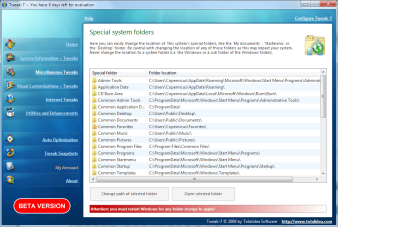
Is there a way to change this folder. I can change the subfolder with windows or with tweak 7. But i can't change my userfolder..:(
 

My Computer My Computer

At a glance

Seven x64
OS
Seven x64
Hi,

I was wondering if there was a quick way of relocating a user's directory folder to another drive without having to go into all of the individual folders' location tab in properties?


yes there is all you have to do is go into the user folder and just move them to the new location.

For example: I keep user files on my D drive. So I go into c:\users\mike in one explorer window then I have a folder d:\Mike I go to that in another explore window. So know I have two explorer windows open I take and right click and drag the user files from the C window to the D window and click MOVE. This will relocate all of your locations to that folder. So like when you go to start and pictures it will change that to the location you moved the folder to. Thats it...


One note I do find that in some users cases it will break IE favorites. So after I do the move I will test it by seeing if I can add a bookmark in each user if I can't then I just move the favorites back to the original location on the C drive. At that point I will create a copy on the D drive.
 

My Computer My Computer

At a glance

Windows 7 X64AMD Turion™ X2 Dual-Core Mobile Processor RM-724GB PC6400 DDR2 SDRAMATI Radeon™ 3100 Graphics
Computer Manufacturer/Model Number
Toshiba L355D-7901
OS
Windows 7 X64
CPU
AMD Turion™ X2 Dual-Core Mobile Processor RM-72
Motherboard
AMD M780G chipset
Memory
4GB PC6400 DDR2 SDRAM
Graphics Card(s)
ATI Radeon™ 3100 Graphics
Sound Card
Realtek High Definition Audio
Monitor(s) Displays
17.0” diagonal widescreen TruBrite® TFT LCD
Screen Resolution
1440x900
Hard Drives
250GB (5400 RPM) Serial ATA
Mouse
Microsoft Bluetooth Notebook Mouse 5000

My Computer My Computer

At a glance

Windows 7 X64AMD Turion™ X2 Dual-Core Mobile Processor RM-724GB PC6400 DDR2 SDRAMATI Radeon™ 3100 Graphics
Computer Manufacturer/Model Number
Toshiba L355D-7901
OS
Windows 7 X64
CPU
AMD Turion™ X2 Dual-Core Mobile Processor RM-72
Motherboard
AMD M780G chipset
Memory
4GB PC6400 DDR2 SDRAM
Graphics Card(s)
ATI Radeon™ 3100 Graphics
Sound Card
Realtek High Definition Audio
Monitor(s) Displays
17.0” diagonal widescreen TruBrite® TFT LCD
Screen Resolution
1440x900
Hard Drives
250GB (5400 RPM) Serial ATA
Mouse
Microsoft Bluetooth Notebook Mouse 5000
copernicus

Nice tip on tweak 7. Its beta but who cares.
+1 rep

Ken
 

My Computer My Computer

At a glance

Win 8 Release candidate 8400[email protected]4 gigsNvidia 9600M
Computer Manufacturer/Model Number
HP Pavillion dv-7 1005 Tx
OS
Win 8 Release candidate 8400
CPU
[email protected]
Memory
4 gigs
Graphics Card(s)
Nvidia 9600M
Sound Card
HD built-in
Monitor(s) Displays
17" Wxga
Screen Resolution
1440x900
Cooling
none
Internet Speed
45Mb down 5Mb up
I personally don't like to use a program for something I can do in about 4 clicks and 20 seconds. To each there own.. at least now you will know how to do it without a program..


BTW zigzag3143 I really like that cat..... man that things getting a work out does it ever stop doing push ups.
 

My Computer My Computer

At a glance

Windows 7 X64AMD Turion™ X2 Dual-Core Mobile Processor RM-724GB PC6400 DDR2 SDRAMATI Radeon™ 3100 Graphics
Computer Manufacturer/Model Number
Toshiba L355D-7901
OS
Windows 7 X64
CPU
AMD Turion™ X2 Dual-Core Mobile Processor RM-72
Motherboard
AMD M780G chipset
Memory
4GB PC6400 DDR2 SDRAM
Graphics Card(s)
ATI Radeon™ 3100 Graphics
Sound Card
Realtek High Definition Audio
Monitor(s) Displays
17.0” diagonal widescreen TruBrite® TFT LCD
Screen Resolution
1440x900
Hard Drives
250GB (5400 RPM) Serial ATA
Mouse
Microsoft Bluetooth Notebook Mouse 5000
You can simply right click and Move most shell folders. I've never tried moving the entire /Users root like that though, because I'm in a single-user environment and I have /Desktop and /Documents folders on one of my data drives that date back to Windows 2000. It's getting silly at this point in time that Windows doesn't have an option to mount that folder to a separate partition on install. I can tell you from the limited research I did when I was interested in this, that the solutions are not pretty and involve hand-editing several reg keys.

What I just do is set up my user account and drag out the shell folders I'm interested in after install, and merge them with the permanent copies on my data partition. This is functionally the same as editing the target in the folder properties. Windows is actually pretty smart about it. The disadvantage of course is that any new users will default to the /Users hierarchy. In my case the only other account is the built in admin that I only use for escalating privilege, so there is no User data of interest anyway.

I also love how they keep flip-flopping between "My [Shell Folder]" and "[Shell Folder]," I'm guessing some mouth-breathing Vista users were confused as to whether a folder belonged to them or not and complained.
 

My Computer My Computer

At a glance

Windows 7 x64 RC
OS
Windows 7 x64 RC
Check this out to move your user folder. I did it after a fresh install this weekend. I think it moved the public too after the first one but the second time I'm not sure.
How to Change User Profile Default Location in Windows 7 | Windows 7 Hacker

It's best to do it after a clean install so anything that is installed will use that location. Everything I installed used it. I didn't change the app data though.
 

My Computer My Computer

At a glance

Windows 7x64 7100QX67008GB 4x2 Gskill DDR2 8002-XFX 8800 GTS XXX
Computer Manufacturer/Model Number
Custom Build
OS
Windows 7x64 7100
CPU
QX6700
Motherboard
EVGA 680i
Memory
8GB 4x2 Gskill DDR2 800
Graphics Card(s)
2-XFX 8800 GTS XXX
Sound Card
X-Fi Platinum Fatal1ty Champion Series
Monitor(s) Displays
Samsung 226BW TV
Screen Resolution
1650x1080
Hard Drives
Over 3TB total
PSU
Corsair 750
Case
Antec 900
Cooling
Air
Keyboard
G15
Mouse
Copperhead
Internet Speed
Comcast Blast up to 16 Mbps
well I did it, but it still left a lot of files in the original C-drive location citing that I had not the permission on my admin account to make the operation possible for certain files.

So, failing this I pressed restore location, and unlike my XP where it just moved the whole lot, because of said unmoved folders it got all confused, the long and short of it is that i've now deleted 10 years worth of images :cry:

Lesson learnt. I've tried to restore using the backup feature, but it only seemed to want to restore application data, and I deleted my easy transfer file! - you know when you get that knotted feeling in the pit of your stomach :sick:

Oh well.... the joys of beta testing!!!

Any chance of a tutorial on the basics of Windows 7 folder structures? I still can't really get my head around the whole libraries and lack of the common shared folder in W7.
 

My Computer My Computer

At a glance

Windows 7 Professional 64bitIntel Core Quad 955016GB factory installedNVIDIA Quadro K2100M
Computer type
Laptop
Computer Manufacturer/Model Number
Lenovo
OS
Windows 7 Professional 64bit
CPU
Intel Core Quad 9550
Motherboard
Mobile Intel QM87 Express Chipset
Memory
16GB factory installed
Graphics Card(s)
NVIDIA Quadro K2100M
Sound Card
Onboard
Monitor(s) Displays
Apple iMac 27" display
Screen Resolution
2560 x 1440
Hard Drives
160gb factory fitted ssd
512gb pcie m2 2242 ssd
Well I don't know what to say like I said before really all you should have needed to do was grab all of the files in your user folder and drag them to the new location. Its really just that easy, Vista and 7 automatically update the new folder locations. I've don't this a zillion times on a zillion different PCs. I know it works. The only issue is other users favorites cannot be moved from the user folder. The only trick really is to right click and drag so you have the option to move. I will say this in Vista you always have to do it twice for some reason in 7 I only have to do it once (right click and drag).

Your only option now is to try and right click on the folder and click restore previous versions and see if you can find your files.
 

My Computer My Computer

At a glance

Windows 7 X64AMD Turion™ X2 Dual-Core Mobile Processor RM-724GB PC6400 DDR2 SDRAMATI Radeon™ 3100 Graphics
Computer Manufacturer/Model Number
Toshiba L355D-7901
OS
Windows 7 X64
CPU
AMD Turion™ X2 Dual-Core Mobile Processor RM-72
Motherboard
AMD M780G chipset
Memory
4GB PC6400 DDR2 SDRAM
Graphics Card(s)
ATI Radeon™ 3100 Graphics
Sound Card
Realtek High Definition Audio
Monitor(s) Displays
17.0” diagonal widescreen TruBrite® TFT LCD
Screen Resolution
1440x900
Hard Drives
250GB (5400 RPM) Serial ATA
Mouse
Microsoft Bluetooth Notebook Mouse 5000

My Computer My Computer

At a glance

Windows 7 Ultimate RTM (Technet)3.00 gigahertz Intel Core2 Duo E84004GBATI Radeon X1950 Pro
Computer Manufacturer/Model Number
Custom
OS
Windows 7 Ultimate RTM (Technet)
CPU
3.00 gigahertz Intel Core2 Duo E8400
Motherboard
ASUSTeK Computer INC. P5K/EPU Rev 1.xx
Memory
4GB
Graphics Card(s)
ATI Radeon X1950 Pro
Sound Card
Built in HD Audio
Monitor(s) Displays
22" Gateway LCD
Screen Resolution
1920 x 1200
Hard Drives
ST3160023A [Hard drive] (160.04 GB) -- drive 0, rev 8.01, ST3500630AS [Hard drive] (500.11 GB) -- drive 2, rev 3.AAK
ST3500630AS [Hard drive] (500.11 GB) -- drive 1, rev 3.AAK
Keyboard
Logitech G11
Mouse
Microsoft Wireless Laser Mouse 5000
Internet Speed
13.44 Mbps
Well I don't know what to say like I said before really all you should have needed to do was grab all of the files in your user folder and drag them to the new location. Its really just that easy, Vista and 7 automatically update the new folder locations. I've don't this a zillion times on a zillion different PCs. I know it works. The only issue is other users favorites cannot be moved from the user folder. The only trick really is to right click and drag so you have the option to move. I will say this in Vista you always have to do it twice for some reason in 7 I only have to do it once (right click and drag).

Your only option now is to try and right click on the folder and click restore previous versions and see if you can find your files.

This is entirely incorrect. Yes, you might be moving files, but the users folder is where user "profiles" reside, and you CANNOT drag and drop them. The article referenced here will tell you how to do it properly:

How to Change User Profile Default Location in Windows 7 | Windows 7 hacker
 

My Computer My Computer

At a glance

Windows 7 Ultimate RTM (Technet)3.00 gigahertz Intel Core2 Duo E84004GBATI Radeon X1950 Pro
Computer Manufacturer/Model Number
Custom
OS
Windows 7 Ultimate RTM (Technet)
CPU
3.00 gigahertz Intel Core2 Duo E8400
Motherboard
ASUSTeK Computer INC. P5K/EPU Rev 1.xx
Memory
4GB
Graphics Card(s)
ATI Radeon X1950 Pro
Sound Card
Built in HD Audio
Monitor(s) Displays
22" Gateway LCD
Screen Resolution
1920 x 1200
Hard Drives
ST3160023A [Hard drive] (160.04 GB) -- drive 0, rev 8.01, ST3500630AS [Hard drive] (500.11 GB) -- drive 2, rev 3.AAK
ST3500630AS [Hard drive] (500.11 GB) -- drive 1, rev 3.AAK
Keyboard
Logitech G11
Mouse
Microsoft Wireless Laser Mouse 5000
Internet Speed
13.44 Mbps
Well I don't know what to say like I said before really all you should have needed to do was grab all of the files in your user folder and drag them to the new location. Its really just that easy, Vista and 7 automatically update the new folder locations. I've don't this a zillion times on a zillion different PCs. I know it works. The only issue is other users favorites cannot be moved from the user folder. The only trick really is to right click and drag so you have the option to move. I will say this in Vista you always have to do it twice for some reason in 7 I only have to do it once (right click and drag).

Your only option now is to try and right click on the folder and click restore previous versions and see if you can find your files.

This is entirely incorrect. Yes, you might be moving files, but the users folder is where user "profiles" reside, and you CANNOT drag and drop them. The article referenced here will tell you how to do it properly:

How to Change User Profile Default Location in Windows 7 | Windows 7 hacker

Thats all fine do what you want I've been doing it my way for years and it works without issue. Maybe you should just try it and see for yourself instead of coming up with some crazy article with a bunch of steps you don't need. I don't know how you can say it doesn't work when I've done it with dozens of machines. Maybe you should try it. YOU CAN TOO.
 

My Computer My Computer

At a glance

Windows 7 X64AMD Turion™ X2 Dual-Core Mobile Processor RM-724GB PC6400 DDR2 SDRAMATI Radeon™ 3100 Graphics
Computer Manufacturer/Model Number
Toshiba L355D-7901
OS
Windows 7 X64
CPU
AMD Turion™ X2 Dual-Core Mobile Processor RM-72
Motherboard
AMD M780G chipset
Memory
4GB PC6400 DDR2 SDRAM
Graphics Card(s)
ATI Radeon™ 3100 Graphics
Sound Card
Realtek High Definition Audio
Monitor(s) Displays
17.0” diagonal widescreen TruBrite® TFT LCD
Screen Resolution
1440x900
Hard Drives
250GB (5400 RPM) Serial ATA
Mouse
Microsoft Bluetooth Notebook Mouse 5000
Back
Top