Moving Win 7 from Drive N to Drive C

nikongreg

New member
Local time
6:51 AM
Messages
2
Initially, i installed Windows 7 in a new partition - N and left Vista in C drive until i was sure i wanted to switch. Does anyone know the proper or workable way to do it.

I'd like to do it in a way that I don't have to reinstall anything.

Is there a solution without a new install of Windows 7 in to C?
 

My Computer My Computer

At a glance

Windwos 7 ProfessionalI712 GBGeForce 240
Computer Manufacturer/Model Number
Dell
OS
Windwos 7 Professional
CPU
I7
Memory
12 GB
Graphics Card(s)
GeForce 240
Monitor(s) Displays
Acer 24"
Hard Drives
1 tb WD
2 TB Hitachi
See: Not really.
 

My Computer My Computer

At a glance

Windows 7 UltimateIntel Q95504x2GB HyperXATI HD3850 512
Computer Manufacturer/Model Number
Asus P5B
OS
Windows 7 Ultimate
CPU
Intel Q9550
Motherboard
Asus P5B
Memory
4x2GB HyperX
Graphics Card(s)
ATI HD3850 512
Sound Card
Creative X-Fi Platinum
Monitor(s) Displays
Samsung 50 / Samsung 24
Screen Resolution
1920*1080 / 1920*1200
Hard Drives
Multiple RAID volumes
PSU
ThermalTake ToughPower
Case
Armor
Cooling
Liquid
Keyboard
$6 2.4 gHz desktop
Internet Speed
Just this side of fast enough.
If you have Vista and Win7 on the same HD, then post back a screenshot of your full Disk management drive map, using Snipping Tool in start menu, attach file using paper clip in Reply box.

We can then advise you how to recover the System Active MBR into Win7, and also to recover the Vista partition space into Win7 if you want that.

If they are on separate HD's, then mark Win7 active, shut down to unplug the Vista HD, boot Win7 DVD Repair console or Repair CD, click through to Recovery Tools list to run Startup Repair up to 3 separate times with reboots to write the MBR to Win7.

Whatever letter Win7 ends up with (likely C if it wasn't installed from Vista desktop) has no bearing whatsoever on its performance
 
Last edited:
Try taking the vista drive out and running a repair install on the windows 7 drive. In therory it should rename the N drive as C and set a new boot record as only having one drive. Back up files first though!
 

My Computer My Computer

At a glance

Windows 7 Ultimate 64-BitIntel(R) Pentium(R) Dual CPU T3400 @ 2.16GHz2GB DDR2Mobile Intel(R) 4 Series Express Chipset
Computer Manufacturer/Model Number
Packard Bell MH36-U300
OS
Windows 7 Ultimate 64-Bit
CPU
Intel(R) Pentium(R) Dual CPU T3400 @ 2.16GHz
Memory
2GB DDR2
Graphics Card(s)
Mobile Intel(R) 4 Series Express Chipset
Sound Card
Realtek High Definition Audio
Monitor(s) Displays
15" LCD
Screen Resolution
1280 x 800
Hard Drives
320GB Western Digital
Case
Notebook
Internet Speed
10Mbps
Isn't the operating system that is currently being used "see" itself as being C:? Meaning, while you're booted into Vista you have Vista on C: and Windows 7 on N:, but when you boot Windows 7, doesn't the "C" drive belong to Windows 7 and the Vista partition would be named as the next available drive letter?

I understood the OP as stating literally that while he is using Vista then the Windows 7 partition is on N:. All the OP would need to do is to boot into Windows 7, right? After boot, Windows 7 would be C:, right?
 

My Computer My Computer

At a glance

Windows 7 Ultimate x64AMD Phenom II X4 940 Black Edition @ 3.4GHz (...Corsair CM2X4096-8500C5 (4 X 2GB)XFX Radeon HD 5770 / Diamond Radeon HD 5770 C...
Computer Manufacturer/Model Number
Rig 1
OS
Windows 7 Ultimate x64
CPU
AMD Phenom II X4 940 Black Edition @ 3.4GHz (AM2+)
Motherboard
Gigabyte GA-MA790X-UD4P (AM2+)
Memory
Corsair CM2X4096-8500C5 (4 X 2GB)
Graphics Card(s)
XFX Radeon HD 5770 / Diamond Radeon HD 5770 CrossFireX
Sound Card
Asus Xonar DS (PCI)
Monitor(s) Displays
Samsung SyncMaster 932bw+ (3)
Screen Resolution
4320x900
Hard Drives
OCZ Vertex 2 80 GB - Windows 7 System --
WD Caviar Black 1TB - Music, Movies, Vids, Pics --
WD Caviar Black 640GB - User Profiles & Games --
WD My Book 320GB external
PSU
Corsair CMPSU-750TX
Case
Cooler Master HAF 932
Cooling
Corsair Hydro Series H50
Keyboard
Logitech Desktop Wave
Mouse
Logitech LX8 Laser
Internet Speed
20 down / 2 up
Other Info
LG GGC-H20L Blu-Ray / HDDVD combo --
Hauppauge HVR-1250 --
Silverstone MFP-51 --
Logitech Webcam C600
Isn't the operating system that is currently being used "see" itself as being C:

Not if he installed it from within Vista, or deliberately set the letters up differently.

My 3 o/s see themselves as C, D and E - just as i like it.
 

My Computers My Computers

  • At a glance

    7 X64i5 84002x8gb 3200mhz
    Computer type
    PC/Desktop
    OS
    7 X64
    CPU
    i5 8400
    Motherboard
    gigabyte b365m ds3h
    Memory
    2x8gb 3200mhz
    Hard Drives
    various
    PSU
    pure power 11 400w cm
    Case
    Coolermaster
    Cooling
    cryorig m9i
  • At a glance

    7x64g54008gb ddr4 2400
    Computer type
    PC/Desktop
    OS
    7x64
    CPU
    g5400
    Motherboard
    ga b365m ds3h
    Memory
    8gb ddr4 2400
    PSU
    xfx pro 450w
My 3 o/s see themselves as C, D and E - just as i like it.

Straighten me out if I'm off base...

For arguement's sake, you have XP, Vista, and Windows 7. In that order, XP is C, Vista is D, and Windows 7 is E.
>So, when you boot into Vista, Vista "sees" itself as D, XP as C, and Windows 7 as E?
>So, when you boot into Windows 7, Windows 7 "sees" itself as E, XP as C, and Vista as D?

If that's the case, how can that be? I thought that the version of Windows that is actually running at any given time would be the C: drive... Hmmm... I'm confused:o:confused::cry: Now my head hurts.

Edit: I think there's a misunderstanding what I was meaning.
Way back when Windows 7 was but an RC, I installed it onto another drive in my Vista PC. Windows 7 RC was installed on the third hard drive, with the other two being C:, the Vista partition/drive; D:, my movies, music, and pics; and E:, the Windows 7 RC. Now, when I ran Vista, the drives/partitions lined up just like that: C-Vista, D-Media, E-Win7. However, when I booted into the Windows 7 RC, Windows 7 was C:, the Vista drive/partition was D:, and the Media drive/partition was E:
That, in its essence, is what I was trying to state--the actively running operating system, in my case was Vista or Windows 7 RC, was the C: drive.

So, pertaining to the OP, in his Vista installation, Vista "sees" the Windows 7 partition as N--which is what he stated. However, all he would need to do is to boot into Windows 7. When Windows 7 is running, Windows 7 would be the C: drive...

 
Last edited:

My Computer My Computer

At a glance

Windows 7 Ultimate x64AMD Phenom II X4 940 Black Edition @ 3.4GHz (...Corsair CM2X4096-8500C5 (4 X 2GB)XFX Radeon HD 5770 / Diamond Radeon HD 5770 C...
Computer Manufacturer/Model Number
Rig 1
OS
Windows 7 Ultimate x64
CPU
AMD Phenom II X4 940 Black Edition @ 3.4GHz (AM2+)
Motherboard
Gigabyte GA-MA790X-UD4P (AM2+)
Memory
Corsair CM2X4096-8500C5 (4 X 2GB)
Graphics Card(s)
XFX Radeon HD 5770 / Diamond Radeon HD 5770 CrossFireX
Sound Card
Asus Xonar DS (PCI)
Monitor(s) Displays
Samsung SyncMaster 932bw+ (3)
Screen Resolution
4320x900
Hard Drives
OCZ Vertex 2 80 GB - Windows 7 System --
WD Caviar Black 1TB - Music, Movies, Vids, Pics --
WD Caviar Black 640GB - User Profiles & Games --
WD My Book 320GB external
PSU
Corsair CMPSU-750TX
Case
Cooler Master HAF 932
Cooling
Corsair Hydro Series H50
Keyboard
Logitech Desktop Wave
Mouse
Logitech LX8 Laser
Internet Speed
20 down / 2 up
Other Info
LG GGC-H20L Blu-Ray / HDDVD combo --
Hauppauge HVR-1250 --
Silverstone MFP-51 --
Logitech Webcam C600
It involves loading the registry during install at the correct moment and making the changes.

A much easier way is to run the install from within an existing o/s ( either run setup .exe or mount the iso in a virtual drive like DT or Poweriso ) - it can't take the letter of the existing o/s - it will take the next available letter.
 

My Computers My Computers

  • At a glance

    7 X64i5 84002x8gb 3200mhz
    Computer type
    PC/Desktop
    OS
    7 X64
    CPU
    i5 8400
    Motherboard
    gigabyte b365m ds3h
    Memory
    2x8gb 3200mhz
    Hard Drives
    various
    PSU
    pure power 11 400w cm
    Case
    Coolermaster
    Cooling
    cryorig m9i
  • At a glance

    7x64g54008gb ddr4 2400
    Computer type
    PC/Desktop
    OS
    7x64
    CPU
    g5400
    Motherboard
    ga b365m ds3h
    Memory
    8gb ddr4 2400
    PSU
    xfx pro 450w
it can't take the letter of the existing o/s - it will take the next available letter.

EXACTLY!

Which falls right into what I tried to state: booting into Windows 7 will make Windows 7--during the time it is actively running--the C: drive. The system can't have two C: drives at the same time. Windows 7 will see the Vista partition as whatever the next free letter that can be assigned to that partition.
 

My Computer My Computer

At a glance

Windows 7 Ultimate x64AMD Phenom II X4 940 Black Edition @ 3.4GHz (...Corsair CM2X4096-8500C5 (4 X 2GB)XFX Radeon HD 5770 / Diamond Radeon HD 5770 C...
Computer Manufacturer/Model Number
Rig 1
OS
Windows 7 Ultimate x64
CPU
AMD Phenom II X4 940 Black Edition @ 3.4GHz (AM2+)
Motherboard
Gigabyte GA-MA790X-UD4P (AM2+)
Memory
Corsair CM2X4096-8500C5 (4 X 2GB)
Graphics Card(s)
XFX Radeon HD 5770 / Diamond Radeon HD 5770 CrossFireX
Sound Card
Asus Xonar DS (PCI)
Monitor(s) Displays
Samsung SyncMaster 932bw+ (3)
Screen Resolution
4320x900
Hard Drives
OCZ Vertex 2 80 GB - Windows 7 System --
WD Caviar Black 1TB - Music, Movies, Vids, Pics --
WD Caviar Black 640GB - User Profiles & Games --
WD My Book 320GB external
PSU
Corsair CMPSU-750TX
Case
Cooler Master HAF 932
Cooling
Corsair Hydro Series H50
Keyboard
Logitech Desktop Wave
Mouse
Logitech LX8 Laser
Internet Speed
20 down / 2 up
Other Info
LG GGC-H20L Blu-Ray / HDDVD combo --
Hauppauge HVR-1250 --
Silverstone MFP-51 --
Logitech Webcam C600
Nope.

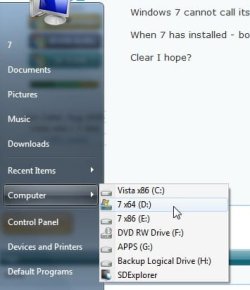
If you are booted into Vista - let's say it already has C for itself in Dos mounted devices - then run setup.exe of the win7 install files while you are still booted into Vista - point the 7 installer at any other partition.

Win7 cannot call itself C - it will take the next available drive letter.

When 7 has installed - boot into it and it will not announce itself as C.

Clear I hope?

Like this:

OSDRIVELETTERS-2010-04-27_025311.jpg

I don't do it that way - but it's the simplest .That's not the same as trying to change a system/boot drive letter after installation.
 

My Computers My Computers

  • At a glance

    7 X64i5 84002x8gb 3200mhz
    Computer type
    PC/Desktop
    OS
    7 X64
    CPU
    i5 8400
    Motherboard
    gigabyte b365m ds3h
    Memory
    2x8gb 3200mhz
    Hard Drives
    various
    PSU
    pure power 11 400w cm
    Case
    Coolermaster
    Cooling
    cryorig m9i
  • At a glance

    7x64g54008gb ddr4 2400
    Computer type
    PC/Desktop
    OS
    7x64
    CPU
    g5400
    Motherboard
    ga b365m ds3h
    Memory
    8gb ddr4 2400
    PSU
    xfx pro 450w
<sarc>
Microsoft should drop the "drive letter" convention already...
</sarc>

Maybe if you try EasyBCD, it might fix you up... But do a system image before trying, OK?

zzz2496
 

My Computer My Computer

At a glance

Windows7 Ultimate 64bitIntel Core 2 Quad Q6600DDR2 Adata 4GBNvidia GeForce GTX 285 1024 and Nvidia GeForc...
Computer Manufacturer/Model Number
Self Built
OS
Windows7 Ultimate 64bit
CPU
Intel Core 2 Quad Q6600
Motherboard
Abit IN9-32X-MMAX
Memory
DDR2 Adata 4GB
Graphics Card(s)
Nvidia GeForce GTX 285 1024 and Nvidia GeForce 8800GT 512
Sound Card
Asus Xonar HDAV 1.3
Monitor(s) Displays
Dell 2407WFP and BenQ 2400v and Philips 150v3
Screen Resolution
3840x1200 and 1024x768
Hard Drives
2 WDC 1TB
1 WDC 1.5TB
1 WDC 640GB
1 WDC 320GB
1 Seagate 200GB
PSU
Corsair TX 850W
Case
Cooler Master HAF932
Cooling
Arctic Cooling Freezer Extreme and plenty of fans...
Keyboard
MicrosoftNaturalKeyboard 4000/Apple Alu keyboard/Dinovo mini
Mouse
Logitech G5/MarbleMouseTrackball/PerformanceMX/SpacePilotPRO
Internet Speed
1.5Mbps down/384Kbps up
Other Info
APC SURT 1000XL
Logitech Z-560
Wiimote
Mikrotik Router
Linksys (now Cisco) SD2008 8 port Gigabit switch
Linksys WRT54G (acting as AP)
Apple wireless Aluminium keyboard
Apple Magic Mouse
Xbox360 wired controller
Nope.

If you are booted into Vista - let's say it already has C for itself in Dos mounted devices - then run setup.exe of the win7 install files while you are still booted into Vista - point the 7 installer at any other partition.

Win7 cannot call itself C - it will take the next available drive letter.

When 7 has installed - boot into it and it will not announce itself as C.

Clear I hope?

Like this:

View attachment 69615

Crystal clear!
I just learned something. Thanks for clearing that up for me.:thumbsup:
 

My Computer My Computer

At a glance

Windows 7 Ultimate x64AMD Phenom II X4 940 Black Edition @ 3.4GHz (...Corsair CM2X4096-8500C5 (4 X 2GB)XFX Radeon HD 5770 / Diamond Radeon HD 5770 C...
Computer Manufacturer/Model Number
Rig 1
OS
Windows 7 Ultimate x64
CPU
AMD Phenom II X4 940 Black Edition @ 3.4GHz (AM2+)
Motherboard
Gigabyte GA-MA790X-UD4P (AM2+)
Memory
Corsair CM2X4096-8500C5 (4 X 2GB)
Graphics Card(s)
XFX Radeon HD 5770 / Diamond Radeon HD 5770 CrossFireX
Sound Card
Asus Xonar DS (PCI)
Monitor(s) Displays
Samsung SyncMaster 932bw+ (3)
Screen Resolution
4320x900
Hard Drives
OCZ Vertex 2 80 GB - Windows 7 System --
WD Caviar Black 1TB - Music, Movies, Vids, Pics --
WD Caviar Black 640GB - User Profiles & Games --
WD My Book 320GB external
PSU
Corsair CMPSU-750TX
Case
Cooler Master HAF 932
Cooling
Corsair Hydro Series H50
Keyboard
Logitech Desktop Wave
Mouse
Logitech LX8 Laser
Internet Speed
20 down / 2 up
Other Info
LG GGC-H20L Blu-Ray / HDDVD combo --
Hauppauge HVR-1250 --
Silverstone MFP-51 --
Logitech Webcam C600
Back
Top