Hi
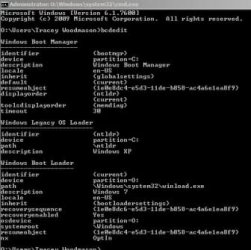
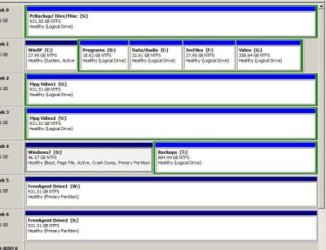
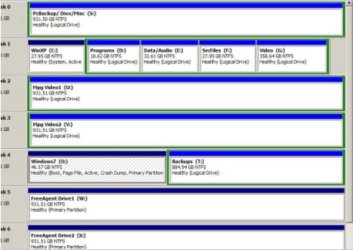
I am using Win7 Home Premium N and XP Home on a dual-boot system but I want to move my Win7 partition from one drive to another but am not sure how to do it. Currently XP is on partition C: and Win7 on partition O: and essentially, what I want to do is to move partition O: to my main drive where space is already available for this to be done.
I have seven drives on my system amounting to 6.5Tb (2Tb on external drives) and currently Win7 is on a partition on one of the internal 1Tb drives. However, I would like to free up the space being used and place Win7 in a separate 50Gb partition at the end of my main drive (500Gb). Since I pre-partitioned the current Win7 partition before installation, I do not have the 'hidden' partition I've read so much about.
I have an old DOS version of Ghost on a boot CD and can readily back up the current Win7 partition ready for recovering to the prepared partition on my main drive. Once transferred I then want to delete the current Win7 partition. However, I know there is more to it than this! I am quite happy to reletter the partition to drive O: since I have software installed on the Win7 partition which is referred to in the registry. All this I'm fairly confident about doing - but it is operations involving the boot manager that I am completely unsure of. How does the system know where the boot info is located? What points it to the right partition/drive? Does it refer to the drive and/or partition? Is there anything else I just may have overlooked? Finally, should I perhaps just leave it where it is until I'm ready to do a reinstall on the appropriate partition?
A lot of questions I'm afraid but I would appreciate some help as I'm fairly new to the question of dual-boot systems and boot management. Thanks very much.
Tracey Woodmason
PS I have been looking for info on this in all sorts of places but have not so far found the answers to my questions. Sorry for any inconvenience if the info I'm looking for is already on this, or another, site. It's just that I've not found the info so far and any help being pointed in the right direction would be appreciated. Thanks. I also trust this is the right forum for this message.
I am using Win7 Home Premium N and XP Home on a dual-boot system but I want to move my Win7 partition from one drive to another but am not sure how to do it. Currently XP is on partition C: and Win7 on partition O: and essentially, what I want to do is to move partition O: to my main drive where space is already available for this to be done.
I have seven drives on my system amounting to 6.5Tb (2Tb on external drives) and currently Win7 is on a partition on one of the internal 1Tb drives. However, I would like to free up the space being used and place Win7 in a separate 50Gb partition at the end of my main drive (500Gb). Since I pre-partitioned the current Win7 partition before installation, I do not have the 'hidden' partition I've read so much about.
I have an old DOS version of Ghost on a boot CD and can readily back up the current Win7 partition ready for recovering to the prepared partition on my main drive. Once transferred I then want to delete the current Win7 partition. However, I know there is more to it than this! I am quite happy to reletter the partition to drive O: since I have software installed on the Win7 partition which is referred to in the registry. All this I'm fairly confident about doing - but it is operations involving the boot manager that I am completely unsure of. How does the system know where the boot info is located? What points it to the right partition/drive? Does it refer to the drive and/or partition? Is there anything else I just may have overlooked? Finally, should I perhaps just leave it where it is until I'm ready to do a reinstall on the appropriate partition?
A lot of questions I'm afraid but I would appreciate some help as I'm fairly new to the question of dual-boot systems and boot management. Thanks very much.
Tracey Woodmason
PS I have been looking for info on this in all sorts of places but have not so far found the answers to my questions. Sorry for any inconvenience if the info I'm looking for is already on this, or another, site. It's just that I've not found the info so far and any help being pointed in the right direction would be appreciated. Thanks. I also trust this is the right forum for this message.
My Computer
- Computer type
- PC/Desktop
- Computer Manufacturer/Model Number
- Self built
- OS
- Windows 7 Home Premium 64-bit and Window 10 Pro (dual boot)
- CPU
- Intel i5-4690K
- Motherboard
- Gigabyte Z97P-D3
- Memory
- 8Gb Vengeance
- Graphics Card(s)
- Nvidia GTX760
- Sound Card
- Integrated with Mobo (Realtek 887)
- Monitor(s) Displays
- Iiyama E2407HDS (x2)
- Screen Resolution
- 1920 x 1080
- Hard Drives
- 1 x 240GB Kingston (System disk)
1 x 256GB Samsung SSD
1 x 1TB Samsung hard disk (internal)
1 x 3TB WD My Book (external)
- PSU
- Atrix 500W
- Case
- Antec One
- Cooling
- Corsair H80i
- Keyboard
- Logitech wireless
- Mouse
- Logitech wireless
- Internet Speed
- Up to 24Mb
- Antivirus
- Avast! Free antivirus
- Browser
- Opera, Firefox, Chrome
- Other Info
- Wacom Bamboo Tablet


 but I can quite easily create that space again.