Mozilla Firefox, problems with downloading files.

broxxar

New member
Local time
4:11 AM
Messages
1
Hello forum :D

After recently buying a new custom PC, I've yet to find big flaws in the system.
Yet now I found one that is pretty annoying!

I'm not able to download any files (while using Firefox). After a download is ready in the 'download'-tab, it's not openable. The 'open' and 'open file location' buttons are greyed out. So I can't find the file I download nor open it.
This is proving to be a severe problem, since I'd like to install certain programs and download addons for WoW.

Already tried using Internet Explorer, yet when downloading anything it gives me the message: 'Your current security settings do not allow you to download this file' ( or something along these lines ).

Any idea's? I'd like to reinstall Firefox to see if that helps, but I got no current browers who is capable of downloading the files needed!

system:
Windows 7 Home Premium 64 bit

Cheers in advance!
 

My Computer

OS
Windows 7 Home Premium 64bit
CPU
Intel Core i3-540, 3.06GHz, 4MB, GPU, S1156
Graphics Card(s)
Colorful Geforce GTS450 1GB
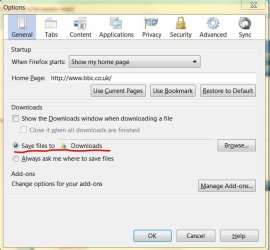
Hello Broxxar, I may be stating the obvious to you but do you have your 'Options' set correctly in Firefox?
I've attached a graphic of the 'Option's in the 'General Tab' and you should nominate where to save your downloaded files to. In Windows 7 it defaults to 'Downloads', however you can 'browse' to a different location that you may prefer. You will also see that you can 'tick' the box to 'Show the Downloads Window when downloading a file should you wish. I don't and a pop-up appears on your Taskbar to show download completed. I only hope this helps.
Regards.
 

Attachments

  • Capture.JPG
    Capture.JPG
    53.8 KB · Views: 44

My Computer

OS
Windows 7
In the IE Options: IE > Security > Click "Internet" and then click "Reset All zones to default level". While the Internet zone is still selected, click "Custom Level" and scroll down until you see the option "Launching Applications and unsafe files". If this option is set to "disable", you won't be able to download .EXE files in both FF and IE. While FF will seem to start the .EXE file download and complete, you will always end up with an .EXE file that is about 100 bytes in size (invalid file.) Make sure that "Launching Applications and unsafe files" is set to "Prompt".

If the above does not solve your Firefox problem you may also try temporarily disable Firefox's built in file scanner to see if the download completes with it disabled. This web page says how: Disable Automatic Virus Scan in Firefox 3 [How To] | Software Guides | Windows Tools, Help & Guides

Hello forum :D

After recently buying a new custom PC, I've yet to find big flaws in the system.
Yet now I found one that is pretty annoying!

I'm not able to download any files (while using Firefox). After a download is ready in the 'download'-tab, it's not openable. The 'open' and 'open file location' buttons are greyed out. So I can't find the file I download nor open it.
This is proving to be a severe problem, since I'd like to install certain programs and download addons for WoW.

Already tried using Internet Explorer, yet when downloading anything it gives me the message: 'Your current security settings do not allow you to download this file' ( or something along these lines ).

Any idea's? I'd like to reinstall Firefox to see if that helps, but I got no current browers who is capable of downloading the files needed!

system:
Windows 7 Home Premium 64 bit

Cheers in advance!
 

My Computer

Computer Manufacturer/Model Number
HP DV6 1330sa
OS
Windows 7 Professional 64 Bit SP1
CPU
INTEL DUAL CORE 2.1Ghz
Motherboard
N/A
Memory
4GB DDR3
Graphics Card(s)
INTEL
Sound Card
LAPTOP
Monitor(s) Displays
2
Screen Resolution
3200x1080
Hard Drives
250GB
PSU
LAPTOP
Case
LAPTOP
Cooling
LAPTOP
Keyboard
SOLID YEAR 260U
Mouse
USB
Internet Speed
20 MB/S
Back
Top