Solved Mozilla Thunderbird & Change File Type

TVeblen

Building Stuff
Guru
Gold Member
VIP
Local time
1:03 AM
Messages
6,239
Location
In The Woods
****************
EDIT:
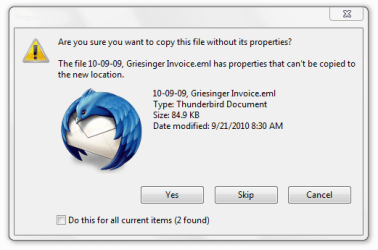
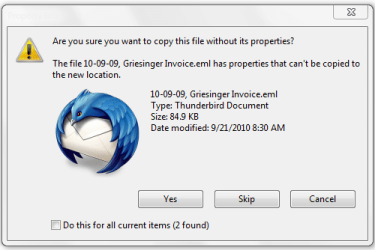
This thread should have been titled: Error Message copying files - "Are You sure you want to copy this file without it's properties?"

A prime example of what happens when you assume you know wherein the problem lies. After a wild goose chase the answer was discovered only after realizing that Thunderbird had nothing to do with it. Post #17
*****************

I use Thunderbird. I save email as files in various folders for business purposes.

Thunderbird has an annoying property: when you choose "Save As" to save an email, the default file type is "All Files". I have to remember to manually choose "Mail Files" from the drop down list to save the files in the with the correct file type/attribute. Doesn't always happen - too distracted.

So I've got a lot of .eml files on my hard drive with "All Files" Properties. This is not a severe problem, as the files open in Thunderbird when executed.

The issue is that when I move, copy, or backup the files I get a Stop and warning about files having no file properties, and "do I want to proceed"? Annoying and inefficient.

Is there a way to find and change the file properties of multiple files found all over a partition en masse?
 
Last edited:

My Computer

Computer type
PC/Desktop
Computer Manufacturer/Model Number
Home Built - Jan 2013
OS
Windows 7 64 Bit Home Premium SP1
CPU
i7-3820
Motherboard
Asus P9X79-PRO - Bios 4608
Memory
GSkill F3-14900CL9Q - 16GB
Graphics Card(s)
EVGA GeForce GTX660 - Driver 352.86
Sound Card
On board Realtek ALC898
Monitor(s) Displays
Acer S271HL
Screen Resolution
1920 x 1080
Hard Drives
#1- Samsung 840 Pro Series
#2- Western Digital WD1002FAEX Sata3 Black
#3- Western Digital WD1002FAEX Sata3 Black
PSU
Corsair CMPSU-850TX-V2 - 850 watt (by Seasonic)
Case
Corsair Obsidian 550D
Cooling
Standard 3 120mm case fans, Cooler Master Hyper 212 EVO
Keyboard
MS KC-0405
Mouse
Intellimouse 5-button
Internet Speed
56 Mbits/Sec (on a good day)
Antivirus
Avast & Malwarebytes
Browser
Firefox
Other Info
Asus DVD - DRW-24B1ST 24X

My Computer

Computer Manufacturer/Model Number
Insane hobo technologies. ;-)
OS
Windows 7 x64
CPU
Intel i7 2600k
Motherboard
Asrock z68 extreme 4 gen 3
Memory
G.skill Ripjaw 16gigs @ 1866
Graphics Card(s)
Nvidia gtx580 (evga)
Sound Card
Integrated HD audio + hdmi
Monitor(s) Displays
24" ASUS widescreen + 42" insignia
Screen Resolution
1080p (1920x1080)
Hard Drives
128 Samsung 830
256 Samsung 840
3 x 1tb storage drive (various)
1 western digital 1tb (eSATA)
1 Seagate 1tb (eSATA)
PSU
1 kilowatt SLI/Crossfire rated Silverstone modular
Case
NZXT Phantom + additional 220 fan
Cooling
Zalmann
Keyboard
Microsoft wireless 3000 (v2)
Mouse
MS - wireless 5000 (bluetrack)
Internet Speed
depends on if you ask me or my provider.
Other Info
The above information is provided as is, and the author assumes no responsibility for issues it may cause with your sanity or fanboyism.
Use "Everything" filter for the file ending you want and exclude the Thunderbird folders.

Select all found files, right click, and rename the extension.

Regards....Mike Connor
 

My Computer

OS
Several, including Windows 7 x64 Ultimate
Ah. But there is the rub.
All the files have the correct extension: .eml

it is the "All Files" file type properties that is the problem.

I Get This:

l
 

Attachments

  • Properties.PNG
    Properties.PNG
    14.5 KB · Views: 6

My Computer

Computer type
PC/Desktop
Computer Manufacturer/Model Number
Home Built - Jan 2013
OS
Windows 7 64 Bit Home Premium SP1
CPU
i7-3820
Motherboard
Asus P9X79-PRO - Bios 4608
Memory
GSkill F3-14900CL9Q - 16GB
Graphics Card(s)
EVGA GeForce GTX660 - Driver 352.86
Sound Card
On board Realtek ALC898
Monitor(s) Displays
Acer S271HL
Screen Resolution
1920 x 1080
Hard Drives
#1- Samsung 840 Pro Series
#2- Western Digital WD1002FAEX Sata3 Black
#3- Western Digital WD1002FAEX Sata3 Black
PSU
Corsair CMPSU-850TX-V2 - 850 watt (by Seasonic)
Case
Corsair Obsidian 550D
Cooling
Standard 3 120mm case fans, Cooler Master Hyper 212 EVO
Keyboard
MS KC-0405
Mouse
Intellimouse 5-button
Internet Speed
56 Mbits/Sec (on a good day)
Antivirus
Avast & Malwarebytes
Browser
Firefox
Other Info
Asus DVD - DRW-24B1ST 24X
the 'all files' file type is no file type it automatically appends the default for that application, or it allows you to manually write it in before saving.
I don't really understand where you issue is arising from that statement.
 

My Computer

Computer Manufacturer/Model Number
Insane hobo technologies. ;-)
OS
Windows 7 x64
CPU
Intel i7 2600k
Motherboard
Asrock z68 extreme 4 gen 3
Memory
G.skill Ripjaw 16gigs @ 1866
Graphics Card(s)
Nvidia gtx580 (evga)
Sound Card
Integrated HD audio + hdmi
Monitor(s) Displays
24" ASUS widescreen + 42" insignia
Screen Resolution
1080p (1920x1080)
Hard Drives
128 Samsung 830
256 Samsung 840
3 x 1tb storage drive (various)
1 western digital 1tb (eSATA)
1 Seagate 1tb (eSATA)
PSU
1 kilowatt SLI/Crossfire rated Silverstone modular
Case
NZXT Phantom + additional 220 fan
Cooling
Zalmann
Keyboard
Microsoft wireless 3000 (v2)
Mouse
MS - wireless 5000 (bluetrack)
Internet Speed
depends on if you ask me or my provider.
Other Info
The above information is provided as is, and the author assumes no responsibility for issues it may cause with your sanity or fanboyism.
Ah. But there is the rub.
All the files have the correct extension: .eml

it is the "All Files" file type properties that is the problem.

I Get This:

l

"All Files" just uses the default. I can save any file as text etc, and immediately open it in any supporting program. No idea why you can't;


Regards....Mike Connor
 

My Computer

OS
Several, including Windows 7 x64 Ultimate
When I am copying files or doing a backup of files the backup process stops with the attached message about file properties showing up. I have to answer YES to proceed. It means the backup process must be watched.

If I could change the properties of all the files that were saved without the "Mail Files" properties I could eliminate this annoyance.

Or if I could get the files to copy without stopping to warn me, that would be an acceptable solution also.
 

My Computer

Computer type
PC/Desktop
Computer Manufacturer/Model Number
Home Built - Jan 2013
OS
Windows 7 64 Bit Home Premium SP1
CPU
i7-3820
Motherboard
Asus P9X79-PRO - Bios 4608
Memory
GSkill F3-14900CL9Q - 16GB
Graphics Card(s)
EVGA GeForce GTX660 - Driver 352.86
Sound Card
On board Realtek ALC898
Monitor(s) Displays
Acer S271HL
Screen Resolution
1920 x 1080
Hard Drives
#1- Samsung 840 Pro Series
#2- Western Digital WD1002FAEX Sata3 Black
#3- Western Digital WD1002FAEX Sata3 Black
PSU
Corsair CMPSU-850TX-V2 - 850 watt (by Seasonic)
Case
Corsair Obsidian 550D
Cooling
Standard 3 120mm case fans, Cooler Master Hyper 212 EVO
Keyboard
MS KC-0405
Mouse
Intellimouse 5-button
Internet Speed
56 Mbits/Sec (on a good day)
Antivirus
Avast & Malwarebytes
Browser
Firefox
Other Info
Asus DVD - DRW-24B1ST 24X
When I am copying files or doing a backup of files the backup process stops with the attached message about file properties showing up. I have to answer YES to proceed. It means the backup process must be watched.

If I could change the properties of all the files that were saved without the "Mail Files" properties I could eliminate this annoyance.

Or if I could get the files to copy without stopping to warn me, that would be an acceptable solution also.

That is what renaming the extension will do. I just did it, found some *.eml files with everything, renamed them to *.txt and now I can open them with any text editor.

Most text editors will also simply open the .eml files anyway.

I am still not entirely sure what you mean. If you want a backup, just use Mozback. If you want to collate files from somewhere on your discs that have the extension .eml, do so with "Everything" and either back them up directly, or as text etc. You can also do that with any system commands, it is just quicker with "everything" and you have full visual control.


I don't get any errors or pop-ups when I do that. I don't see any problems?

Regards....Mike Connor
 

My Computer

OS
Several, including Windows 7 x64 Ultimate

My Computer

Computer Manufacturer/Model Number
Insane hobo technologies. ;-)
OS
Windows 7 x64
CPU
Intel i7 2600k
Motherboard
Asrock z68 extreme 4 gen 3
Memory
G.skill Ripjaw 16gigs @ 1866
Graphics Card(s)
Nvidia gtx580 (evga)
Sound Card
Integrated HD audio + hdmi
Monitor(s) Displays
24" ASUS widescreen + 42" insignia
Screen Resolution
1080p (1920x1080)
Hard Drives
128 Samsung 830
256 Samsung 840
3 x 1tb storage drive (various)
1 western digital 1tb (eSATA)
1 Seagate 1tb (eSATA)
PSU
1 kilowatt SLI/Crossfire rated Silverstone modular
Case
NZXT Phantom + additional 220 fan
Cooling
Zalmann
Keyboard
Microsoft wireless 3000 (v2)
Mouse
MS - wireless 5000 (bluetrack)
Internet Speed
depends on if you ask me or my provider.
Other Info
The above information is provided as is, and the author assumes no responsibility for issues it may cause with your sanity or fanboyism.
Yes I am. I cut my teeth in DOS.
A batch file could accomplish the task, but it's not the direction I'm trying to go.

I'm really interested in finding and changing the file properties. Quickly and easily if possible.
 

My Computer

Computer type
PC/Desktop
Computer Manufacturer/Model Number
Home Built - Jan 2013
OS
Windows 7 64 Bit Home Premium SP1
CPU
i7-3820
Motherboard
Asus P9X79-PRO - Bios 4608
Memory
GSkill F3-14900CL9Q - 16GB
Graphics Card(s)
EVGA GeForce GTX660 - Driver 352.86
Sound Card
On board Realtek ALC898
Monitor(s) Displays
Acer S271HL
Screen Resolution
1920 x 1080
Hard Drives
#1- Samsung 840 Pro Series
#2- Western Digital WD1002FAEX Sata3 Black
#3- Western Digital WD1002FAEX Sata3 Black
PSU
Corsair CMPSU-850TX-V2 - 850 watt (by Seasonic)
Case
Corsair Obsidian 550D
Cooling
Standard 3 120mm case fans, Cooler Master Hyper 212 EVO
Keyboard
MS KC-0405
Mouse
Intellimouse 5-button
Internet Speed
56 Mbits/Sec (on a good day)
Antivirus
Avast & Malwarebytes
Browser
Firefox
Other Info
Asus DVD - DRW-24B1ST 24X
Yes I am. I cut my teeth in DOS.
A batch file could accomplish the task, but it's not the direction I'm trying to go.

I'm really interested in finding and changing the file properties. Quickly and easily if possible.

That is what changing the extension does.

If you change the extension, you change the default properties. Instead of opening with Thunderbird as the default, the file opens with whatever is the default for the extension, or you can change the default program for the extension.

You can open .eml files in any text editor.


Changing the extension automatically modifies the properties. If you find various .eml files somewhere on your disc except in the Thunderbird folder, you can back them up immediately to wherever you like just by selecting them, and "save as".

If you don't want them to open in Thunderbird, just change the file extension to .txt, and you can open them in any text editor, or .html editor or whatever.

You can also specify what programs can open what by using ;

http://defaultprogramseditor.com/

Hmmm... after reading all this through again, I have either missed something, or I fear that for some reason I am unable to grasp what you want to do.

Regards....Mike Connor
 

My Computer

OS
Several, including Windows 7 x64 Ultimate
Hey Mike. First, I want to thank you and Maguscreed for taking the time to look at this.

As I was preparing information for a better explaination of my issue I discovered something important.

Windows is throwing up this message ("Are you sure you want to copy this file without it's properties?") for ALL Thunderbird email (.eml) files, regardless of what "File Type" is chosen when it is saved. That was a red herring, sorry.

The best way to see what I am talking about is to do a test:

  • Open Thunderbird and choose an email
  • Right click the email > Save As
  • Save the file to a folder on your hard drive
  • Now cut or copy the eml file from that folder and try to paste it onto a USB thumb drive.
Do you get this message?:
l
 

Attachments

  • AreSure.PNG
    AreSure.PNG
    14.1 KB · Views: 3

My Computer

Computer type
PC/Desktop
Computer Manufacturer/Model Number
Home Built - Jan 2013
OS
Windows 7 64 Bit Home Premium SP1
CPU
i7-3820
Motherboard
Asus P9X79-PRO - Bios 4608
Memory
GSkill F3-14900CL9Q - 16GB
Graphics Card(s)
EVGA GeForce GTX660 - Driver 352.86
Sound Card
On board Realtek ALC898
Monitor(s) Displays
Acer S271HL
Screen Resolution
1920 x 1080
Hard Drives
#1- Samsung 840 Pro Series
#2- Western Digital WD1002FAEX Sata3 Black
#3- Western Digital WD1002FAEX Sata3 Black
PSU
Corsair CMPSU-850TX-V2 - 850 watt (by Seasonic)
Case
Corsair Obsidian 550D
Cooling
Standard 3 120mm case fans, Cooler Master Hyper 212 EVO
Keyboard
MS KC-0405
Mouse
Intellimouse 5-button
Internet Speed
56 Mbits/Sec (on a good day)
Antivirus
Avast & Malwarebytes
Browser
Firefox
Other Info
Asus DVD - DRW-24B1ST 24X
And just to clarify further:

In my business there is a lot of email communication and most of it is of a contractual nature. So it is important that I can save and archive these communications for easy access at any time on any computer.

To do this I save the emails as files in the client's job folder, not in Thunderbird. Current projects are on the PC's hard disk but finished projects are archived (backed-up) to external media. Recent projects go on external drives, Archive projects go on DVD.

These "back-ups" are simple Copy & Paste operations, no third party programs or compressed files. This process should not to be confused with "Computer Backups" of my hard drive. That is another chore.

Normally I can Copy and Paste the files and folders to the external media and walk away to make coffee or whatever and when I come back the process has completed and I can move on.

But with this properties message popping up throughout the process it has chained me to the desk. I would love to find a solution.

Thanks guys
 

My Computer

Computer type
PC/Desktop
Computer Manufacturer/Model Number
Home Built - Jan 2013
OS
Windows 7 64 Bit Home Premium SP1
CPU
i7-3820
Motherboard
Asus P9X79-PRO - Bios 4608
Memory
GSkill F3-14900CL9Q - 16GB
Graphics Card(s)
EVGA GeForce GTX660 - Driver 352.86
Sound Card
On board Realtek ALC898
Monitor(s) Displays
Acer S271HL
Screen Resolution
1920 x 1080
Hard Drives
#1- Samsung 840 Pro Series
#2- Western Digital WD1002FAEX Sata3 Black
#3- Western Digital WD1002FAEX Sata3 Black
PSU
Corsair CMPSU-850TX-V2 - 850 watt (by Seasonic)
Case
Corsair Obsidian 550D
Cooling
Standard 3 120mm case fans, Cooler Master Hyper 212 EVO
Keyboard
MS KC-0405
Mouse
Intellimouse 5-button
Internet Speed
56 Mbits/Sec (on a good day)
Antivirus
Avast & Malwarebytes
Browser
Firefox
Other Info
Asus DVD - DRW-24B1ST 24X
Hey Mike. First, I want to thank you and Maguscreed for taking the time to look at this.

As I was preparing information for a better explaination of my issue I discovered something important.

Windows is throwing up this message ("Are you sure you want to copy this file without it's properties?") for ALL Thunderbird email (.eml) files, regardless of what "File Type" is chosen when it is saved. That was a red herring, sorry.

The best way to see what I am talking about is to do a test:

  • Open Thunderbird and choose an email
  • Right click the email > Save As
  • Save the file to a folder on your hard drive
  • Now cut or copy the eml file from that folder and try to paste it onto a USB thumb drive.
Do you get this message?:
l


No, I don't get that message. I tried it half a dozen times with up to a hundred files, copied them from the Thunderbird folder to a test-folder, then copied them from there to a USB drive, and it just copies them to my USB drive without any messages at all. EDIT: Have now tried it on three separate machines, same result!

I tried a few other things as well, no matter what I do, I don't get that message. In point of fact, I have never seen that message before on any machine. I can only conclude that you have some e-mails with some sort of "special" properties, or some other error. The message says that it can not copy to the location chosen, so maybe the location you have chosen has properties which prevent the file being copied there automatically and it is not the file properties as such which are preventing the copy?

Regards....Mike Connor
 
Last edited:

My Computer

OS
Several, including Windows 7 x64 Ultimate
Thanks for checking that Mike. It is "good" to know that the issue is confined to my machine and not a global problem with Thunderbird or Windows in general. I will try some more things on this end.

Thing is, the files do copy (when I say Yes) and do open normally with the correct association. And it does this on various drives. Strange.
 

My Computer

Computer type
PC/Desktop
Computer Manufacturer/Model Number
Home Built - Jan 2013
OS
Windows 7 64 Bit Home Premium SP1
CPU
i7-3820
Motherboard
Asus P9X79-PRO - Bios 4608
Memory
GSkill F3-14900CL9Q - 16GB
Graphics Card(s)
EVGA GeForce GTX660 - Driver 352.86
Sound Card
On board Realtek ALC898
Monitor(s) Displays
Acer S271HL
Screen Resolution
1920 x 1080
Hard Drives
#1- Samsung 840 Pro Series
#2- Western Digital WD1002FAEX Sata3 Black
#3- Western Digital WD1002FAEX Sata3 Black
PSU
Corsair CMPSU-850TX-V2 - 850 watt (by Seasonic)
Case
Corsair Obsidian 550D
Cooling
Standard 3 120mm case fans, Cooler Master Hyper 212 EVO
Keyboard
MS KC-0405
Mouse
Intellimouse 5-button
Internet Speed
56 Mbits/Sec (on a good day)
Antivirus
Avast & Malwarebytes
Browser
Firefox
Other Info
Asus DVD - DRW-24B1ST 24X
one thing just occurred to me, are all the drives involved in this equation formatted ntfs?
(this can be checked by right clicking the drive icon and choosing properties in my computer)
 

My Computer

Computer Manufacturer/Model Number
Insane hobo technologies. ;-)
OS
Windows 7 x64
CPU
Intel i7 2600k
Motherboard
Asrock z68 extreme 4 gen 3
Memory
G.skill Ripjaw 16gigs @ 1866
Graphics Card(s)
Nvidia gtx580 (evga)
Sound Card
Integrated HD audio + hdmi
Monitor(s) Displays
24" ASUS widescreen + 42" insignia
Screen Resolution
1080p (1920x1080)
Hard Drives
128 Samsung 830
256 Samsung 840
3 x 1tb storage drive (various)
1 western digital 1tb (eSATA)
1 Seagate 1tb (eSATA)
PSU
1 kilowatt SLI/Crossfire rated Silverstone modular
Case
NZXT Phantom + additional 220 fan
Cooling
Zalmann
Keyboard
Microsoft wireless 3000 (v2)
Mouse
MS - wireless 5000 (bluetrack)
Internet Speed
depends on if you ask me or my provider.
Other Info
The above information is provided as is, and the author assumes no responsibility for issues it may cause with your sanity or fanboyism.
Mike- Are the external drives you are copying the eml files to all formatted NTFS?

I found this on VistaForums:

Re: Are you sure you want to copy this file without it's properties?

"The message indicates that the file system on the external drive is not
NTFS and doesn't support all of the meta data for the file that NTFS
has. An example of this would be your any permissions, security
attributes or encryption that may have been applied to the file.
--
Tom Porterfield"

My thumb drives are FAT32. It could be it!
 

My Computer

Computer type
PC/Desktop
Computer Manufacturer/Model Number
Home Built - Jan 2013
OS
Windows 7 64 Bit Home Premium SP1
CPU
i7-3820
Motherboard
Asus P9X79-PRO - Bios 4608
Memory
GSkill F3-14900CL9Q - 16GB
Graphics Card(s)
EVGA GeForce GTX660 - Driver 352.86
Sound Card
On board Realtek ALC898
Monitor(s) Displays
Acer S271HL
Screen Resolution
1920 x 1080
Hard Drives
#1- Samsung 840 Pro Series
#2- Western Digital WD1002FAEX Sata3 Black
#3- Western Digital WD1002FAEX Sata3 Black
PSU
Corsair CMPSU-850TX-V2 - 850 watt (by Seasonic)
Case
Corsair Obsidian 550D
Cooling
Standard 3 120mm case fans, Cooler Master Hyper 212 EVO
Keyboard
MS KC-0405
Mouse
Intellimouse 5-button
Internet Speed
56 Mbits/Sec (on a good day)
Antivirus
Avast & Malwarebytes
Browser
Firefox
Other Info
Asus DVD - DRW-24B1ST 24X
You can format them to ntfs, the only drawback will be compatibility with mac
all my flash drives are formatted ntfs.
I'm kind of embarrassed I just posted that without looking above, but it just came to me out of nowhere,
I'm sure it's safe to say it is the source of your issue.
 

My Computer

Computer Manufacturer/Model Number
Insane hobo technologies. ;-)
OS
Windows 7 x64
CPU
Intel i7 2600k
Motherboard
Asrock z68 extreme 4 gen 3
Memory
G.skill Ripjaw 16gigs @ 1866
Graphics Card(s)
Nvidia gtx580 (evga)
Sound Card
Integrated HD audio + hdmi
Monitor(s) Displays
24" ASUS widescreen + 42" insignia
Screen Resolution
1080p (1920x1080)
Hard Drives
128 Samsung 830
256 Samsung 840
3 x 1tb storage drive (various)
1 western digital 1tb (eSATA)
1 Seagate 1tb (eSATA)
PSU
1 kilowatt SLI/Crossfire rated Silverstone modular
Case
NZXT Phantom + additional 220 fan
Cooling
Zalmann
Keyboard
Microsoft wireless 3000 (v2)
Mouse
MS - wireless 5000 (bluetrack)
Internet Speed
depends on if you ask me or my provider.
Other Info
The above information is provided as is, and the author assumes no responsibility for issues it may cause with your sanity or fanboyism.
Mac? Who's Mac?:sarc:;)

Yes, I'm feeling pretty sure that's it. I've got to move some files around before I test it, and that's going to be later - because it's drinking time here now!

Thanks for looking guys. I'd rep you both but I've got to spread some love around.
 

My Computer

Computer type
PC/Desktop
Computer Manufacturer/Model Number
Home Built - Jan 2013
OS
Windows 7 64 Bit Home Premium SP1
CPU
i7-3820
Motherboard
Asus P9X79-PRO - Bios 4608
Memory
GSkill F3-14900CL9Q - 16GB
Graphics Card(s)
EVGA GeForce GTX660 - Driver 352.86
Sound Card
On board Realtek ALC898
Monitor(s) Displays
Acer S271HL
Screen Resolution
1920 x 1080
Hard Drives
#1- Samsung 840 Pro Series
#2- Western Digital WD1002FAEX Sata3 Black
#3- Western Digital WD1002FAEX Sata3 Black
PSU
Corsair CMPSU-850TX-V2 - 850 watt (by Seasonic)
Case
Corsair Obsidian 550D
Cooling
Standard 3 120mm case fans, Cooler Master Hyper 212 EVO
Keyboard
MS KC-0405
Mouse
Intellimouse 5-button
Internet Speed
56 Mbits/Sec (on a good day)
Antivirus
Avast & Malwarebytes
Browser
Firefox
Other Info
Asus DVD - DRW-24B1ST 24X

Thanks for looking guys. I'd rep you both but I've got to spread some love around.


Yes, all formatted NTFS. Looks like you found the problem! :)

I don't care about rep, and apropos of "Mac", mine's a Macallan :)

Macallan - Scotch malt whisky distillery profile

Regards....Mike Connor

( also often referred to as "Mac", due to my initials, not to my propensity for imbibing Scotch! At least I hope so!!! : ) )
 
Last edited:

My Computer

OS
Several, including Windows 7 x64 Ultimate
Back
Top