MP3 'Details' Font resolution is too light...

jelbogen

New member
Local time
9:50 PM
Messages
2
Hi...

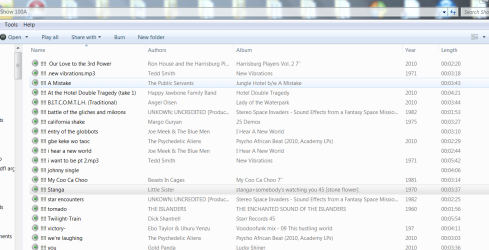
So, when I 'View Details' in a folder full of MP3's, the font of the MP3 filename has really clear and dark resolution, but the 'details' (i.e. 'Contributing Artists', 'Year', and 'Album') are in a very very ghostly, faint font that I have trouble seeing. Does anyone know if it is possible to have the various chosen 'Details' appear with the same crisp, dark font resolution as the filename itself?

Thanks,
J
 

My Computer My Computer

At a glance

Windows 7
OS
Windows 7
Not sure what you are talking about. Please if you can give us a screen shot of the problem, and what program you are using.

Also if you could please go into your cp and put in your system specs (they will show up in the "my system specs" so others may be able to help you should you come across other problems you may need help with.

Also, "Welcome to the Seven Forums.". . .:thumbsup:

Just went in to Explorer (file manager), and found what you are talking about. This is the way MS set Explorer to work. They may be someone here on the forums that might know a way around this by making registry changes (not always a good idea).
 

My Computer My Computer

At a glance

Win 7 Pro x64, VM Win XP, Win7 Pro Sandbox, K...AMD Athlon(tm) II X4 640 @ 3.0 Gbz12GB 1066MHz DDR3 SDRAM - 2x4GB, 2x2GBATI Radeon HD 4350 HD Graphics/Audio with 512MB
Computer Manufacturer/Model Number
HP Pavilion a4302f
OS
Win 7 Pro x64, VM Win XP, Win7 Pro Sandbox, Kubuntu 11
CPU
AMD Athlon(tm) II X4 640 @ 3.0 Gbz
Memory
12GB 1066MHz DDR3 SDRAM - 2x4GB, 2x2GB
Graphics Card(s)
ATI Radeon HD 4350 HD Graphics/Audio with 512MB
Sound Card
Realtek High Definition Audio
Monitor(s) Displays
1. Dell 23" SP2307, 2. Mitsublishi 40" HDTV, Hannspree 25"
Screen Resolution
1. 2048x1152, 2. 1920-1080, 3. 1920x1200
Hard Drives
Int: 1 120 Gig SSD i
1 - 2.5" 500 USB External HDD
1 -1 Tb USB External HDD
Case
Mid Tower
Cooling
Standard Fans - 5 fans (very quiet)
Keyboard
Microsoft Wireless 2000
Mouse
Microsoft Wireless Mouse 5000
Internet Speed
10 Mbit (realistically 500 Kbit - 1.2 Mbit)
Other Info
Speakers - Bose Desktop (Excellent Sound)
1 external CD|DVD\Blue-ray Recorders/Players (Sony)
screen shot

So, I uploaded a screenshot as an attachment (sorry I couldn't figure out how to cut and paste it in the message). As you'll see, the filename is in a much darker font than the ghostly 'Authors' and 'Album Name'...

screenshot mp3.PNG

It seems like there should be some easier way than registry changes--something in 'Display' (which I toyed around with for an hour), but I'm no expert (thus this thread I started).

Thanks...
 

My Computer My Computer

At a glance

Windows 7
OS
Windows 7
Back
Top