

Hi there
I'm fairly new to all this "Digital Music" stuff so excuse if this seems a trivial problem for a lot of users.
I've ripped my CD's and now I'm trying to create some sort of decent library system.
I'm using mp3tag v245a and it shows me the data I want to export to EXCEL (as a CSV file) - no problems with this
However when I run the export it copies ALL the headings not just the ones I want - and because some of the tags are missing the EXCEL import gets some data in the wrong columns.
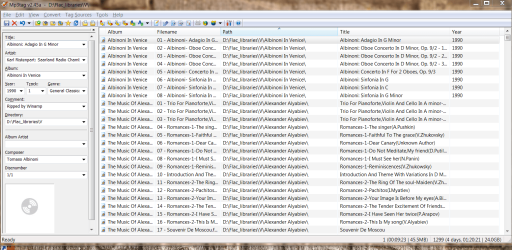
All I want is just ALBUM, File Name (this is the ripped file name prefixed by a number), Path (I'm going to link this to a MySQL DB for streaming later on) Track title from the tag.
Enc screen from mp3tag v245a.
The windows normal Cut and Paste doesn't seem to work either
I'm sure loads of you must have used this program for getting data into a spreadsheet.
Here's the screenshot for example of the columns I need to export
Any of you Music Gurus who can sort me out with this.
Cheers
jimbo
I'm fairly new to all this "Digital Music" stuff so excuse if this seems a trivial problem for a lot of users.
I've ripped my CD's and now I'm trying to create some sort of decent library system.
I'm using mp3tag v245a and it shows me the data I want to export to EXCEL (as a CSV file) - no problems with this
However when I run the export it copies ALL the headings not just the ones I want - and because some of the tags are missing the EXCEL import gets some data in the wrong columns.
All I want is just ALBUM, File Name (this is the ripped file name prefixed by a number), Path (I'm going to link this to a MySQL DB for streaming later on) Track title from the tag.
Enc screen from mp3tag v245a.
The windows normal Cut and Paste doesn't seem to work either
I'm sure loads of you must have used this program for getting data into a spreadsheet.
Here's the screenshot for example of the columns I need to export
Any of you Music Gurus who can sort me out with this.
Cheers
jimbo
Attachments
My Computer
- Computer type
- PC/Desktop
- Computer Manufacturer/Model Number
- Custom built, several laptops HP/ASUS
- OS
- Linux CENTOS 7 / various Windows OS'es and servers
- CPU
- Intel i7 Intel i5
- Memory
- 8GB, 16GB
- Graphics Card(s)
- On Motherboard
- Sound Card
- Realtek HD audio
- Monitor(s) Displays
- Apple Cinema display, Samsung LCD
- Screen Resolution
- 1920 X 1080
- Hard Drives
- 4 X 1TB SATA
- Mouse
- Toshiba wireless laser
- Internet Speed
- > 20MB up

