Mp4 playback

Tews

Professional Lurker
Guru
Gold Member
SF Team
Local time
1:08 AM
Messages
11,468
Location
The Southern Hinterlands
I have sharks windows7 codecs installed and have set the file associations to use WMP as the default player for all videos, but when I select a mp4 file, I get an error stating that wmp can not play this file... Am I doing something wrong here... Help!
 

My Computer

Computer type
PC/Desktop
Computer Manufacturer/Model Number
LENOVO K450 @3.0GHZ
OS
64-bit Windows 8.1 Pro
CPU
Core(TM) i5 CPU 4330 Haswell @ 3.20GHz
Motherboard
LENOVO
Memory
12.00 GB
Graphics Card(s)
Intel(R) HD Graphics
Sound Card
Intel HD integtrated
Monitor(s) Displays
HP 25' ISP Monitor
Screen Resolution
1900/1020
Hard Drives
(1) ST1000DM003-1CH162 (2) Generic STORAGE DEVICE USB Device (3) Generic STORAGE DEVICE USB Device
Internet Speed
100mb down/10mb up
What type of MP4 videos are they?

meaning do you know which video & audio codec they use?


I use sharks package as well, but configured it to use FFDshow. So far no issues this way.

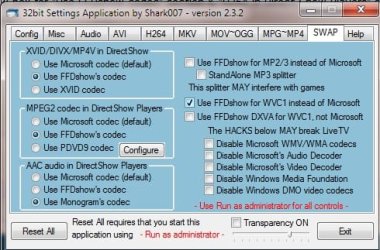
For AAC audio in Direct show you may want to try Monogram rather than FFDshow..
reason is: If its stereo AAC then its OK, but if its 5.1 AAC FFDshow will crash WMP. (at least in the 32bit player. WMC is fine
Monogram works well.

((Unless this was fixed in newest update of FFDshow.. seen Shark updated it just havent tested yet))

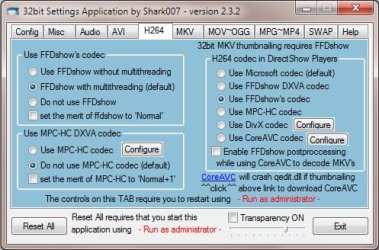
Try these settings to see if helps you: (if you havent already)
 

Attachments

  • 1.jpg
    1.jpg
    43.8 KB · Views: 34
  • 2.jpg
    2.jpg
    44.8 KB · Views: 26

My Computer

Computer Manufacturer/Model Number
Custom (Self Build)
OS
Windows 7 Home Premium 64bit
CPU
Intel Core i7 2700k
Motherboard
eVGA P67 SLI
Memory
8GB Mushkin Redline Ridgebacks @1866
Graphics Card(s)
EVGA GTX570 SC
Sound Card
XiFi Titanium HD
Monitor(s) Displays
LG W2453V
Screen Resolution
1920x1080
Hard Drives
Intel 320 80GB -- Intel X25-V 40GB --WD Black 1TB x2 -- WD Blue 640GB
PSU
Seasonic x750
Case
Corsair 600T SE White
Cooling
eVGA Superclocked CPU Cooler
Keyboard
Saitek Cyborg
Antivirus
Kaspersky
Browser
IE
Other Info
LG BD/DVD
Thanks for the quick reply...I have set the options as shown, but still no joy...I can use VLC for H264 files if need be, but would rather not if I dont have to... any other ideas?
 

My Computer

Computer type
PC/Desktop
Computer Manufacturer/Model Number
LENOVO K450 @3.0GHZ
OS
64-bit Windows 8.1 Pro
CPU
Core(TM) i5 CPU 4330 Haswell @ 3.20GHz
Motherboard
LENOVO
Memory
12.00 GB
Graphics Card(s)
Intel(R) HD Graphics
Sound Card
Intel HD integtrated
Monitor(s) Displays
HP 25' ISP Monitor
Screen Resolution
1900/1020
Hard Drives
(1) ST1000DM003-1CH162 (2) Generic STORAGE DEVICE USB Device (3) Generic STORAGE DEVICE USB Device
Internet Speed
100mb down/10mb up
You have both the 32bit and the 64bit add-on (if your running 64bit)
It should work with those settings. Bit odd it isn't.
In fact, WMP should be able to play MP4s without the codec pack (even tho FFDshow looks & sounds better IMO) it should play none-the-less :-/

Unless the file is corrupt, I dont know what else to suggest. :(

Other than under MP4 TAB:
You may want to try swithching the splitter from the default Gabest to haali .. Not sure if that would help though.
 

My Computer

Computer Manufacturer/Model Number
Custom (Self Build)
OS
Windows 7 Home Premium 64bit
CPU
Intel Core i7 2700k
Motherboard
eVGA P67 SLI
Memory
8GB Mushkin Redline Ridgebacks @1866
Graphics Card(s)
EVGA GTX570 SC
Sound Card
XiFi Titanium HD
Monitor(s) Displays
LG W2453V
Screen Resolution
1920x1080
Hard Drives
Intel 320 80GB -- Intel X25-V 40GB --WD Black 1TB x2 -- WD Blue 640GB
PSU
Seasonic x750
Case
Corsair 600T SE White
Cooling
eVGA Superclocked CPU Cooler
Keyboard
Saitek Cyborg
Antivirus
Kaspersky
Browser
IE
Other Info
LG BD/DVD
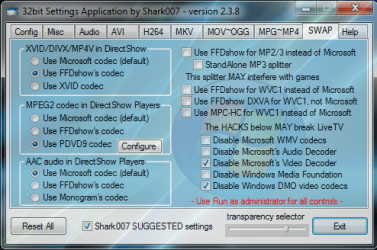
As advertised, a default installation of my codecs does not mess with the native decoding.
MP4 is a native filetype handled by the Windows 7 Operating System.

The only way to defeat this and actually use my codecs for the filetype,
is to choose to disable the Microsoft Video decoder on the SWAP TAB.

I also recommend using the suggested settings at the bottom.
Most all of your avi and h264 files will play in the Windows players if choosing this selection.
If an avi has multiple audio tracks, choosing the haali splitter on the avi tab will handle these types best.
avi files that are somewhat damaged can still be played by choosing to use gabests splitter.
 

Attachments

  • settings.png
    settings.png
    64.1 KB · Views: 38
Last edited:

My Computer

Computer Manufacturer/Model Number
Selfbuilt
OS
Windows 7 Ultimate 64bit
CPU
i7 2600k
Motherboard
asus P8Z68-V LE
Memory
16GB (4x4) corsair vengeance
Graphics Card(s)
Intel HD3000 iGPU / AMD HD6870 1024MB
Sound Card
bitstreamed to an Onkyo 609
Monitor(s) Displays
Asus VE278 27" LED / Bravia EX7 60" LED
Screen Resolution
native 1080p x2
Hard Drives
4x 2TB int. + 2x 2TB external and a SSD for the boot drive.
PSU
650w Antec
Case
NZXT tempest evo
Cooling
air/stock
Keyboard
Dell
Mouse
logitech m505
Internet Speed
dual: cable/blackberry tether for travel use
Other Info
BD re-writer //
asus notebook G73Jw
Back
Top