
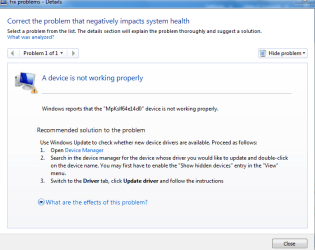
I have TuneUp Utilities on my computer and its saying that there is a faulty plugin that needs to be updated in device manager called MpKslf64e14d0. I got onto device manager and I went to the "view" menu , clicked "show hidden devices" just as the program told me to. This plugin is under the "non-plug and play drivers". However, when I right clicked it, there was no "update" option like the rest of the drivers have. I even checked the plugins properties for " update" but could not find it. The only options that I have are
"Uninstall", "Scan for Hardware Changes", and "Properties". Tune-up utilities said I should update it, but since I can't find that, I would think uninstalling would be the next best thing. But before I do that, I want to know if I am doing something that I won't regret.
Thank you
"Uninstall", "Scan for Hardware Changes", and "Properties". Tune-up utilities said I should update it, but since I can't find that, I would think uninstalling would be the next best thing. But before I do that, I want to know if I am doing something that I won't regret.
Thank you
Attachments

My Computer
- Computer Manufacturer/Model Number
- HP Pavilion dv2700 Notebook PC
- OS
- Windows 7 Ultimate 32 bit SP1
- CPU
- AMD Turion 64 X2 TL-60, 2000 MHz , 2 Cores
- Memory
- Total Physical Memory:3.00 GB, Total Virtual Memory:5.87 GB
- Graphics Card(s)
- NVIDIA GeForce 7150M / nForce 630M


