
buckscaper
New member
- Local time
- 9:36 PM
- Messages
- 19
Hi there,
I just installed a new HDD to an HP Pavilion (removed old HDD w/Vista) and installed Win7 Home Premium SP1.
I also installed Avast and Threatfire prior to connecting the machine to the internet. All was fine.
I connected to the internet and clicked windows update and there were 29 important updates that downloaded but had not yet installed. I wanted to make sure the system was up to date before I started loading software so I clicked to install the updates. Nothing seemed to happen so I opened windows update again and told it to install but it said it couldn't do anything because it was in the process of installing updates. That seemed weird (since there was no indication at all that anything was happening).
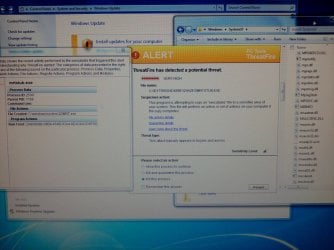
So I left it alone and came back later and saw an alert from Threatfire about a file named MRTSTUB.EXE trying to create a file called MRT.EXE.
See attachment for screen cap showing alert (center window), "details" (left window) and Windows Explorer showing that the file isn't where it says it is.
I researched the alert and came up with 50/50 "it's malware" vs "it's part of windows" (the Windows Software Removal Tool to be exact). Not helpful at all.
The last few posts in the forum thread at the following link sums up the situation.
mrtstub.exe????? - Wilders Security Forums
The advice to check the properties of the file seemed great, except as you can see in the screen cap, the MRTSTUB.EXE file isn't where it says it is and I can't find a folder with the name (long string) shown in the details pane in the left window of the screen cap. So I can't check the properties of the file.
So THAT leads me to believe that it really is something nasty. But I can't figure out how it could be there if it didn't come in directly through windows update. I have a secure, wired router/network, it's a brand new OS that's never been used (Windows Update is the first thing I did after installing the OS). And I didn't do any web surfing or install anything else. Everything done with this new pristine system is listed above.
So I'm clueless.
I let Threatfire kill the process and quarantine the file.
Not sure what to do next. I would like to still use the Windows Software Removal Tool but I'm a bit gun shy now and to top it off, I'm not sure if I may have damaged anything or put myself at risk by killing and quarantining a process or file that SHOULD be running. I'm also not sure if the WSRT is on the machine or not at this point.
Any ideas?
Thanks
I just installed a new HDD to an HP Pavilion (removed old HDD w/Vista) and installed Win7 Home Premium SP1.
I also installed Avast and Threatfire prior to connecting the machine to the internet. All was fine.
I connected to the internet and clicked windows update and there were 29 important updates that downloaded but had not yet installed. I wanted to make sure the system was up to date before I started loading software so I clicked to install the updates. Nothing seemed to happen so I opened windows update again and told it to install but it said it couldn't do anything because it was in the process of installing updates. That seemed weird (since there was no indication at all that anything was happening).
So I left it alone and came back later and saw an alert from Threatfire about a file named MRTSTUB.EXE trying to create a file called MRT.EXE.
See attachment for screen cap showing alert (center window), "details" (left window) and Windows Explorer showing that the file isn't where it says it is.
I researched the alert and came up with 50/50 "it's malware" vs "it's part of windows" (the Windows Software Removal Tool to be exact). Not helpful at all.
The last few posts in the forum thread at the following link sums up the situation.
mrtstub.exe????? - Wilders Security Forums
The advice to check the properties of the file seemed great, except as you can see in the screen cap, the MRTSTUB.EXE file isn't where it says it is and I can't find a folder with the name (long string) shown in the details pane in the left window of the screen cap. So I can't check the properties of the file.
So THAT leads me to believe that it really is something nasty. But I can't figure out how it could be there if it didn't come in directly through windows update. I have a secure, wired router/network, it's a brand new OS that's never been used (Windows Update is the first thing I did after installing the OS). And I didn't do any web surfing or install anything else. Everything done with this new pristine system is listed above.
So I'm clueless.
I let Threatfire kill the process and quarantine the file.
Not sure what to do next. I would like to still use the Windows Software Removal Tool but I'm a bit gun shy now and to top it off, I'm not sure if I may have damaged anything or put myself at risk by killing and quarantining a process or file that SHOULD be running. I'm also not sure if the WSRT is on the machine or not at this point.
Any ideas?
Thanks
Attachments
My Computer
At a glance
Win7 Home Premium SP1 32bitcore 2 quad
- Computer Manufacturer/Model Number
- HP Pavilion
- OS
- Win7 Home Premium SP1 32bit
- CPU
- core 2 quad
- Hard Drives
- WD Black 1Tb
