I posted in an Office forum and was encouraged to post here.
The subject line says it all...almost.
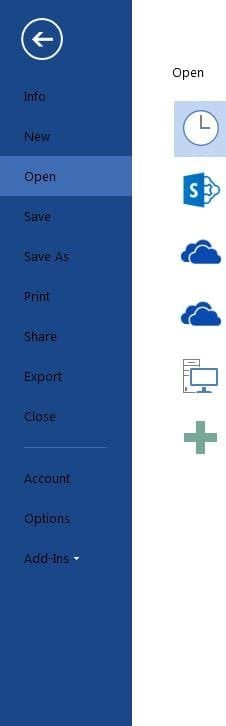
I can see online that the file menus have white fonts. I've played with various graphic settings and nothing helps. This is the ONLY application I am having trouble with. All my other color schemes and applications look correct.
Oddity: About a month ago an Office 2010 update came through (I don't literally have v.2010 but the naming convention for Office eludes me anyway). After that the fonts went white. No kidding. For a couple of days...then it was back to black. There were a lot of the usual Windows updates at around the same time so I can't be absolutely certain what happened...all I know is that it happened and didn't last.
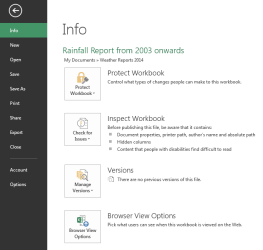
I have Office Pro 2013 & the File menu is black background with a white font colour. What colour is your File menu & what colour are your fonts. I don't know of any way to change the File menu colour. See attached screen shot.
Office names run in year of introduction order, so there is Office, 2003, 2007, 2010 & currently 2013. There were earlier versions as well, but these are the later ones.
They can also be identified by numbers so Office 2013 is version 15, 2010 is version 14 etc..
Last edited:
My Computer
At a glance
Windows 7 Home Premium 64 bit sp1Intel i5 3570 3.4Ghz Ivy Bridge SKT 1155 quad...G-Skill Rip Jaws 16Gb (8x2) DDR3 -1600 PC3 12...Gigabyte NVIDIA GT610 1Gb DDR3 810/1200 PCI-E...
My Word 2013 File menu on Win8.1 is blue with white lettering.
A note: the versions of Office for Mac OS X are 2008 and 2011, comparable with Office 2007 and 2010 respectively [don't know about earlier earlier versions]. Files created are compatible.
My Computer
At a glance
Windows 7 Ultimate 64-bit, Windows 8.1 64-bit...
Computer type
PC/Desktop
Computer Manufacturer/Model Number
Customs, Dell, Gateway, HP, Toshiba, Acer, ASUS
OS
Windows 7 Ultimate 64-bit, Windows 8.1 64-bit, Mac OS X 10.10, Linux Mint 17, Windows 10 Pro TP
In my Office all the File main colours are Black background with White text. Where your screen shot shows a Dark Blue background & Black text, with a Light Blue bar on an item, my item one shows different colours for each Office application.
See my screen in Post #2 when the item is Green, which is my Excel File.
The only thing I can suggest is to experiment with the main Windows colour schemes. I use Windows Aero for Windows 7. To change your main Windows colour schemes open Control Panel & select Personalisation.
My Computer
At a glance
Windows 7 Home Premium 64 bit sp1Intel i5 3570 3.4Ghz Ivy Bridge SKT 1155 quad...G-Skill Rip Jaws 16Gb (8x2) DDR3 -1600 PC3 12...Gigabyte NVIDIA GT610 1Gb DDR3 810/1200 PCI-E...