MS Office 2013 won't install, thinks I'm running WinXP

enxio27

New member
Member
Local time
4:28 PM
Messages
41
I recently had to do a clean install of Win7 (Pro 64-bit SP1) onto a new hard drive, and now I'm trying to reinstall Windows. The Office 2013 installer refuses, telling me I need to "upgrade" to Windows 7 or higher. The "details" section of the error window tells me it thinks I'm running WinXP. At first I thought that perhaps it was complaining that I hadn't reactivated Windows, but it's still giving me the same error after Windows reactivation.

My company offers Office 2016, which is what I was using before, but that refuses to install, telling me only that "Microsoft 365 and Office has stopped working." The problem seems to be with the kernelbase.dll file.

I've run out of ideas. Any help?
 

My Computer My Computer

At a glance

Win7 Professional 64-bit SP1AMD A10-8700P Radeon R616 GiB
Computer type
Laptop
Computer Manufacturer/Model Number
HP ProBook
OS
Win7 Professional 64-bit SP1
CPU
AMD A10-8700P Radeon R6
Memory
16 GiB
image.png

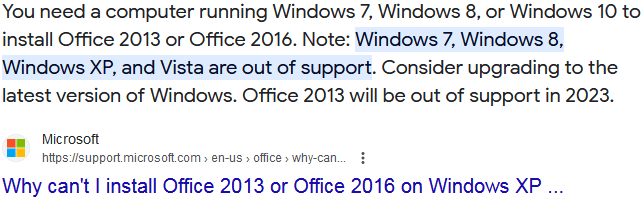
i.e. you have to move to Windows 7, at least.
 

My Computers My Computers

  • At a glance

    Windows 7 Pro 64-bitI7-970032 GB
    Computer type
    PC/Desktop
    Computer Manufacturer/Model Number
    HP Elite 800 G5
    OS
    Windows 7 Pro 64-bit
    CPU
    I7-9700
    Memory
    32 GB
  • At a glance

    Windows 7 Pro 64-bit
    Computer type
    Laptop
    System Manufacturer/Model Number
    ASUS UX305C
    OS
    Windows 7 Pro 64-bit
i.e. you have to move to Windows 7, at least.

Yes, that's the point. I'm ALREADY running Windows 7, but the installer insists I'm running XP.
 

My Computer My Computer

At a glance

Win7 Professional 64-bit SP1AMD A10-8700P Radeon R616 GiB
Computer type
Laptop
Computer Manufacturer/Model Number
HP ProBook
OS
Win7 Professional 64-bit SP1
CPU
AMD A10-8700P Radeon R6
Memory
16 GiB
you can run a test, clean-install.

If it's ok, then you know the solution.

If still no go, my guess is at MSFT side. Office2013 is (1st) cloud-based Office, Microsoft can control what it please. In contrast, Office 2010 is last non-Cloud-based Office. you may try Office2010.

as I know, Office2013 authentication is verified every time online. When I changed job, old company's Office2013 wouldn't work once online. however, if Offline, it's running fine.
 

My Computers My Computers

  • At a glance

    Windows 7 Pro 64-bitI7-970032 GB
    Computer type
    PC/Desktop
    Computer Manufacturer/Model Number
    HP Elite 800 G5
    OS
    Windows 7 Pro 64-bit
    CPU
    I7-9700
    Memory
    32 GB
  • At a glance

    Windows 7 Pro 64-bit
    Computer type
    Laptop
    System Manufacturer/Model Number
    ASUS UX305C
    OS
    Windows 7 Pro 64-bit
I'm not sure what you're referring to in your suggestion of a clean-install.

I had BOTH 2013 and 2016 installed (in succession) under Windows 7 before I upgraded my hard drive, so I'm not sure why it's balking now. I did do a complete Simplix update, and now the error message for Office 2016 installation is slightly different, but the Office 2013 installer still thinks I'm running Windows XP. I have a physical install disk for Office 2010 so went with that. I tried again to install 2013 and 2016 over it (hoping they would simply upgrade from 2010, but no joy. If I didn't HAVE to use the "real" Office/365 suite for work, I would ditch it altogether and go with LibreOffice.
 

My Computer My Computer

At a glance

Win7 Professional 64-bit SP1AMD A10-8700P Radeon R616 GiB
Computer type
Laptop
Computer Manufacturer/Model Number
HP ProBook
OS
Win7 Professional 64-bit SP1
CPU
AMD A10-8700P Radeon R6
Memory
16 GiB
To reiterate, I was running Office 365 under Windows 7 (64-bit Pro SP1) before I upgraded my hard drive, but now it won't reinstall (from the same installation files I used before the upgrade). The Office 2013 installer claims (incorrectly) that I'm running WinXP, and the Office 365 installer simply gives me an error message telling me only that "Microsoft 365 and Office has stopped working." No other information.

Any other ideas? I really need to get Office 365 working on my laptop.
 

My Computer My Computer

At a glance

Win7 Professional 64-bit SP1AMD A10-8700P Radeon R616 GiB
Computer type
Laptop
Computer Manufacturer/Model Number
HP ProBook
OS
Win7 Professional 64-bit SP1
CPU
AMD A10-8700P Radeon R6
Memory
16 GiB
You can install MS Office 2010, or you can try to copy KERNELBASE.DLL from Windows 7 into the office's folder in Program Files (In the folder that *.EXE file located)
 

My Computers My Computers

  • At a glance

    Windows 7 Ultimate x64AMD Ryzen 7 2700x16GB
    Computer type
    PC/Desktop
    OS
    Windows 7 Ultimate x64
    CPU
    AMD Ryzen 7 2700x
    Motherboard
    GIGABYTE B450M DS3H
    Memory
    16GB
  • Computer type
    PC/Desktop
Back
Top