MS Office - Icon Errors

Jeenyus

New member
Local time
5:57 AM
Messages
7
Hey People.

Having a problem with some stuff on my work laptop. The problem is with some office icons.

Basically Excel icons for desktop and task bar are working. But Word and PowerPoint have like the 'can't find icon' looking icon. I'll zip some screen shots so its clear what I mean.

I tried rebuilding the icon cache and it didn't do much.

Strange thing is for the task bar icons they show as blank, but if I pin it to the task bar and then unpin it, the icon comes back? Very weird, just doesn't stay on next startup.

If anyone has any ideas it would be great, it's not affecting the functioning of the programs but its really annoying.

Thanks,
Liam
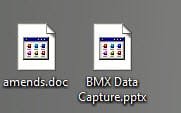
Desktop.jpgTaskbar.jpg
 
Last edited by a moderator:

My Computer

OS
Windows 7 Enterprise x64
Two thoughts:

1. You might have used some registry cleaner, which could delete some parameters.

2. You might have deleted exe files in folder
Code:
C:\Windows\Installer\{90140000-0011-0000-0000-0000000FF1CE}
Files in this folder are the only official icons for Office (wordicon.exe for Word, pptico.exe for PowerPoint etc). Numbers in the folder name might be different.


Update: Just saw similar problem in this thread. Might be something else...
 

My Computer

Computer type
PC/Desktop
OS
Windows 8.1 ; Windows 7 x86 (Dec2008-Jan2013)
Other Info
"The scale icon at the top right of a post or tutorial is how you can give rep to the member."

My Computer

Computer Manufacturer/Model Number
HP, Dell, Gateway, Toshiba - 4 laptops and 2 desktops
OS
Vista, Windows7, Mint Mate, Zorin, Windows 8
CPU
from 1.6GHz Duo to i7
Monitor(s) Displays
2x HP w2207
Hard Drives
5x HDD, 7x SSD, 12x Externals
Keyboard
with trackball - no mices
Mouse
Trackball mice
Internet Speed
DSL 6000
Two thoughts:

1. You might have used some registry cleaner, which could delete some parameters.

2. You might have deleted exe files in folder
Code:
C:\Windows\Installer\{90140000-0011-0000-0000-0000000FF1CE}
Files in this folder are the only official icons for Office (wordicon.exe for Word, pptico.exe for PowerPoint etc). Numbers in the folder name might be different.


Update: Just saw similar problem in this thread. Might be something else...

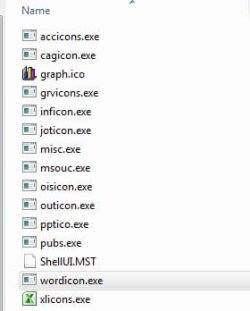
Thanks for the reply dude. That file location you have specified, I tried going there and I see this (see screenshot).

They are blank in there too although Excel is alright. Maybe there is a way to re-add them?
 

Attachments

  • 10-20-2011 8-40-05 AM.jpg
    10-20-2011 8-40-05 AM.jpg
    10.9 KB · Views: 6

My Computer

OS
Windows 7 Enterprise x64
You can try to repair installation.
Control Panel - Programs and Features - Microsoft Office 2010 - Right click - Change - Repair
 

My Computer

Computer type
PC/Desktop
OS
Windows 8.1 ; Windows 7 x86 (Dec2008-Jan2013)
Other Info
"The scale icon at the top right of a post or tutorial is how you can give rep to the member."
You can try to repair installation.
Control Panel - Programs and Features - Microsoft Office 2010 - Right click - Change - Repair

Thanks dude I'll give that a try! Thing is this is a work Laptop so my profile is in another country on some servers :)

I cannot see office in control panel - I could probably fix it myself if I had admin :D

I'll relay that to helpdesk and some croney will control my PC and hopefully it will work :)
 

My Computer

OS
Windows 7 Enterprise x64
Back
Top