Solved MS Security Essentials not enabling protection, explorer freezes

retainer55

New member
Local time
3:04 AM
Messages
18
Hello,

I'm not sure what is wrong but every time I boot win 7 home premium 64 bit now, Microsoft Security Essentials won't enable the real time protection (when I go to turn it on it gives me error code 0x800705b4), and everything in the task bar is becomes frozen. After about 10 -15 minutes (every time) windows explorer pops up and says its not working, restarts, and then everything works normally from there on out. Malwarebytes also fails to load until this time as well. When I boot in safe mode, I do not experience these problems, and when I check the event viewer it tells me there are Service Control Manager errors and MS Antimalware errors. I uninstalled and reinstalled MS Security Essentials, and even recovered the system to a previous time, but to no avail. How can I fix these issues at startup?

Thanks,

Brian
 

My Computer My Computer

Computer Manufacturer/Model Number
eMachines e725 Laptop
OS
Windows 7 Home Premium 64bit
CPU
Pentium Dual-Core T4400 @ 2.20GHz
Hi Brian,

You could try to run a sfc /scannow from an elevated command prompt to check for system file errors.

Steps:
1. Click Start Orb, in search box type cmd
2. Right-click on cmd, and choose "Run as administrator"
3. In the cmd window, type sfc /scannow

Copy and paste the output here so we can have a look at it for you.

Regards,
Golden
 

My Computer My Computer

Computer type
PC/Desktop
Computer Manufacturer/Model Number
Golden Mk. I.4
OS
Windows 10 Pro x64 ; Xubuntu x64
CPU
Intel i7 860 @ 2.80 GHz O/C'ed to 4.0GHz
Motherboard
Gigabyte P55A-UD3R Rev.1. Award BIOS F13
Memory
16GB Corsair Vengance DDR3 @ 661 MHz Dual Channel (9-9-9-24)
Graphics Card(s)
EVGA NVidia GTX 560 1024MB
Sound Card
Realtek Integrated
Monitor(s) Displays
Dual Samsung SyncMaster 2494HS
Screen Resolution
1920*1080 and 1920*1080
Hard Drives
1*Samsung 840 EVO 120GB SSD;
1*OCZ Vertex 2 60GB SSD;
2*Samsung F3 SpinPoint 1TB in RAID0;
1*Samsung F1 SpinPoint 1TB;
2*Western Digital 1TB External USB 3.0
1*Western Digital 500GB External USB 3.0
1*Seagate 500GB External USB 2.0
PSU
Thermaltake ToughPower QFan 750W
Case
Thermaltake Element S VK60001W2Z
Cooling
Corsair H60 Water Cooling, 2*230mm and 2*80mm case fans
Keyboard
Logitech G110
Mouse
Logitech MX518
Hi Brian,

You could try to run a sfc /scannow from an elevated command prompt to check for system file errors.

Steps:
1. Click Start Orb, in search box type cmd
2. Right-click on cmd, and choose "Run as administrator"
3. In the cmd window, type sfc /scannow

Copy and paste the output here so we can have a look at it for you.

Regards,
Golden

Hi, welcome to the forums :)

As well as the above, I would recommend downloading MalwareBytes and perform a full system scan. I have seen similar behavior on infected machines so it's well worth running it.


OS
 

My Computer My Computer

Computer Manufacturer/Model Number
Compaq Desktop
OS
Windows 7 Ultimate x64
CPU
AMD Sempron Dual Core
Memory
3GB
Graphics Card(s)
NVIDIA GeForce 6150SE nForce 430
Screen Resolution
1024x768
Hard Drives
150GB Sata
Hi guys, and thanks for responding.

I have already tried a full system scan with Malwarebytes a day ago (with the paid version and found nothing wrong), and prior to my initial posting I read how to do the sfc/scannow and /verifyonly utility. I ran them both twice and each time there said that there was nothing wrong and nothing to repair.

I'd be happy to try again and post the results for you when I get back home which should be around 6:30pm Mountain Time today.

I should probably also mention that everything was working fine until I tried to turn off MS Security Essentials from the Services list when I tried to install HP printer Drivers. I think I turned off security client user interface or something to that effect, but when I turned it back on that's when all the problems started.
 

My Computer My Computer

Computer Manufacturer/Model Number
eMachines e725 Laptop
OS
Windows 7 Home Premium 64bit
CPU
Pentium Dual-Core T4400 @ 2.20GHz
I'd try uninstalling MSE and then reinstall.

http://www.microsoft.com/security_essentials/

As a general rule of thumb it's better to just turn off real-time protection rather than messing with services. (MSE dashboard > settings tab > real time protection)
 

My Computer My Computer

Computer type
Laptop
Computer Manufacturer/Model Number
Sony Vaio VPCEB47GM Laptop
OS
Win 7 Pro 64-bit
CPU
Intel i5 2.4 Ghz
Memory
8GB DDR3
Graphics Card(s)
Intel HD 3000
Sound Card
IDT High Definition
Monitor(s) Displays
15.6 WGXA Anti-Glare LED
Screen Resolution
1280x800
Hard Drives
640Gb 7200rpm
Antivirus
MSE
Browser
Opera (primary) with IE9 backup
I'd try uninstalling MSE and then reinstall.

http://www.microsoft.com/security_essentials/

As a general rule of thumb it's better to just turn off real-time protection rather than messing with services. (MSE dashboard > settings tab > real time protection)


I've actually done this twice but to no avail. Of course I figured out how to turn off MSE through the dashboard after I screwed everything up.
 

My Computer My Computer

Computer Manufacturer/Model Number
eMachines e725 Laptop
OS
Windows 7 Home Premium 64bit
CPU
Pentium Dual-Core T4400 @ 2.20GHz
Have you had any other Anti-x software installed? If so make sure it is completely uninstalled, You might need to check the software vendor and see if they provide uninstall tools, (example Norton Removal Tool )


You said you bought a copy Malware Bytes, I believe that paid software has the real-time protection, disable the real-time protection. Also disable/uninstall any other Anti-x software that has real-time protection.
  • Uninstall MSE
  • Check your PC clock and make sure it is synced to the correct date and time.
  • Make sure Windows Defender is disabled in Windows 7
  • Check for Windows Updates (Like Service Pack 1)
  • After you have checked the above suggestions restart the computer and try to install MSE again.
See if the above suggestions help..

Ryan
 

My Computer My Computer

Computer Manufacturer/Model Number
HP Pavilion dv5 Notebook PC
OS
Windows Seven x64
CPU
2.2 GHz Dual Core
Motherboard
Quanta 3600
Memory
4GB
Graphics Card(s)
ATI Mobility RADEON HD 3470
Sound Card
ATI
Monitor(s) Displays
Laptop
Hard Drives
ATA Hitachi HTS543215 (5400RPM)
Case
Laptop
Cooling
Fan
Internet Speed
Basic DSL 1.5 up and Down
Hi Ryan,

I did everything you suggested in order and I am still getting the following issues:

- during re-installation of MSE windows explorer stopped working, clicked restart, and it began to work again.
- when I initially reboot, still I am getting the same problem, the wifi strength meter (the one that's part of the oem network and sharing app) stays frozen with the little blue circle as if its thinking.
- when I right click on "open network and sharing center", a blank window opens and the mouse changes to the blue circle again for about 14 minutes until windows explorer crashes again, reboots, and then everything works fine thereafter
- Firefox freezes, but does not show that it is not responding both in upper right part of the app itself, as well in the task manager.
- again all of the problems seem to resolve themselves after about 14-15 minutes after booting, but manifest every time for those first 14-15 after I restart the computer.
 

My Computer My Computer

Computer Manufacturer/Model Number
eMachines e725 Laptop
OS
Windows 7 Home Premium 64bit
CPU
Pentium Dual-Core T4400 @ 2.20GHz
Does this only happen when MSE is installed?

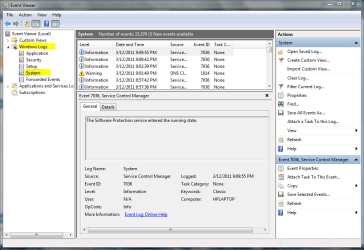
Let's check the if there are any errors in the event viewer.

Click start and type Event Viewer, start the application
Click on Windows Logs arrow and select System.

Event View.PNG

Look for any errors that happen when the computer is started and any errors that you think might helps us solve this issue. Double-Click on the error or errors and hit copy and paste them to a notepad file and attach them.

Ryan
 

My Computer My Computer

Computer Manufacturer/Model Number
HP Pavilion dv5 Notebook PC
OS
Windows Seven x64
CPU
2.2 GHz Dual Core
Motherboard
Quanta 3600
Memory
4GB
Graphics Card(s)
ATI Mobility RADEON HD 3470
Sound Card
ATI
Monitor(s) Displays
Laptop
Hard Drives
ATA Hitachi HTS543215 (5400RPM)
Case
Laptop
Cooling
Fan
Internet Speed
Basic DSL 1.5 up and Down
The problem was occuring without MSE installed as well...

Ok..........so I probably should have mentioned this before, but I now think the problem was just the crappy HP printer driver for Win 7 I installed to begin with.

I uninstalled several HP programs (all for the printer) and now the problems seem to be resolved. The only issue now seem to be trying to get rid of ALL the crappy HP files it installed when I tried to set up the printer and make it work wirelessly over the home network. I should have known but didn't suspect it because the printer was working.

Thank you to everyone that tried to help. I feel pretty dumb now. I'm going to search for ways to get rid of the rest of this HP crap now...:zip::haha:
 

My Computer My Computer

Computer Manufacturer/Model Number
eMachines e725 Laptop
OS
Windows 7 Home Premium 64bit
CPU
Pentium Dual-Core T4400 @ 2.20GHz
Does this only happen when MSE is installed?

Let's check the if there are any errors in the event viewer.

Click start and type Event Viewer, start the application
Click on Windows Logs arrow and select System.

View attachment 143271

Look for any errors that happen when the computer is started and any errors that you think might helps us solve this issue. Double-Click on the error or errors and hit copy and paste them to a notepad file and attach them.

Ryan

ok so now the only error I seem to be getting is this:

Log Name: System
Source: Microsoft Antimalware
Date: 3/12/2011 10:00:22 PM
Event ID: 3002
Task Category: None
Level: Error
Keywords: Classic
User: N/A
Computer: Craptop9000
Description:
Microsoft Antimalware Real-Time Protection feature has encountered an error and failed.
Feature: Behavior Monitoring
Error Code: 0x80004005
Error description: Unspecified error
Reason: The filter driver requires an up-to-date engine in order to function. You must install the latest definition updates in order to enable real-time protection.
Event Xml:
<Event xmlns="http://schemas.microsoft.com/win/2004/08/events/event">
<System>
<Provider Name="Microsoft Antimalware" />
<EventID Qualifiers="0">3002</EventID>
<Level>2</Level>
<Task>0</Task>
<Keywords>0x80000000000000</Keywords>
<TimeCreated SystemTime="2011-03-13T05:00:22.000000000Z" />
<EventRecordID>12250</EventRecordID>
<Channel>System</Channel>
<Computer>Craptop9000</Computer>
<Security />
</System>
<EventData>
<Data>%%860</Data>
<Data>3.0.8107.0</Data>
<Data>%%835</Data>
<Data>%%842</Data>
<Data>0x80004005</Data>
<Data>Unspecified error </Data>
<Data>5</Data>
</EventData>
</Event>
 

My Computer My Computer

Computer Manufacturer/Model Number
eMachines e725 Laptop
OS
Windows 7 Home Premium 64bit
CPU
Pentium Dual-Core T4400 @ 2.20GHz
I have heard of this error before, most of the time it is easily fixed by making sure MSE is up to date by checking for updates manually, along with making sure that Windows is also up to date..

Since you probably re-installed MSE it might have older virus definitions which is causing the error.

Another possible issue is you have another Anti-x program installed and running, like Norton, McAfee, AVG etc. Uninstall this software.

Earlier you said you have MalwareBytes the paid version. I believe that version has the real-time protection, disable the real-time protection on MalwareBytes.

Hope this Helps,
Ryan
 

My Computer My Computer

Computer Manufacturer/Model Number
HP Pavilion dv5 Notebook PC
OS
Windows Seven x64
CPU
2.2 GHz Dual Core
Motherboard
Quanta 3600
Memory
4GB
Graphics Card(s)
ATI Mobility RADEON HD 3470
Sound Card
ATI
Monitor(s) Displays
Laptop
Hard Drives
ATA Hitachi HTS543215 (5400RPM)
Case
Laptop
Cooling
Fan
Internet Speed
Basic DSL 1.5 up and Down
I ran all updates and that one final problem still persists...

I never installed any other Anti-x ware but checked just now to make sure. I will reboot without malwarebytes in real-time protection and see if that helps, but wouldn't that be the preferred protection to use over MS Antimalware?

EDIT - you were right, that eliminated the error, but which real time protection do you recommend I use? Malwarebytes or MS Antimalware?
 

My Computer My Computer

Computer Manufacturer/Model Number
eMachines e725 Laptop
OS
Windows 7 Home Premium 64bit
CPU
Pentium Dual-Core T4400 @ 2.20GHz
Reatainer55,
Sorry for the late reply

I would use MSE for the real-time protection, and use Malwarebytes has just a scanner and not a real-time protection although you paid for it. Sorry :(

Malwarebytes is only focused on Malware, and there is a lot of other things out there that Malwarebytes won't detect. That's why we need a good Anti-x software like MSE.

Sometimes you can get away with more then one real-time scanner, but not always and it can slow down your machine down like we noticed here.

I hope this helps and I am glad we were able to solve your issue, please let us know if you have any more questions.

Ryan
 

My Computer My Computer

Computer Manufacturer/Model Number
HP Pavilion dv5 Notebook PC
OS
Windows Seven x64
CPU
2.2 GHz Dual Core
Motherboard
Quanta 3600
Memory
4GB
Graphics Card(s)
ATI Mobility RADEON HD 3470
Sound Card
ATI
Monitor(s) Displays
Laptop
Hard Drives
ATA Hitachi HTS543215 (5400RPM)
Case
Laptop
Cooling
Fan
Internet Speed
Basic DSL 1.5 up and Down
I would use MSE for the real-time protection, and use Malwarebytes has just a scanner and not a real-time protection although you paid for it. Sorry :(

Hi,

You can use BOTH for real-time protection, without any conflicts. Many here, including myself, use MSE and MBAM as resident/real-time without any conflicts or system slow-down.

Regards,
Golden
 

My Computer My Computer

Computer type
PC/Desktop
Computer Manufacturer/Model Number
Golden Mk. I.4
OS
Windows 10 Pro x64 ; Xubuntu x64
CPU
Intel i7 860 @ 2.80 GHz O/C'ed to 4.0GHz
Motherboard
Gigabyte P55A-UD3R Rev.1. Award BIOS F13
Memory
16GB Corsair Vengance DDR3 @ 661 MHz Dual Channel (9-9-9-24)
Graphics Card(s)
EVGA NVidia GTX 560 1024MB
Sound Card
Realtek Integrated
Monitor(s) Displays
Dual Samsung SyncMaster 2494HS
Screen Resolution
1920*1080 and 1920*1080
Hard Drives
1*Samsung 840 EVO 120GB SSD;
1*OCZ Vertex 2 60GB SSD;
2*Samsung F3 SpinPoint 1TB in RAID0;
1*Samsung F1 SpinPoint 1TB;
2*Western Digital 1TB External USB 3.0
1*Western Digital 500GB External USB 3.0
1*Seagate 500GB External USB 2.0
PSU
Thermaltake ToughPower QFan 750W
Case
Thermaltake Element S VK60001W2Z
Cooling
Corsair H60 Water Cooling, 2*230mm and 2*80mm case fans
Keyboard
Logitech G110
Mouse
Logitech MX518
Thanks for the help guys I appreciate it. I'm going to start a new thread now about how to effectively remove all the old hp software now.
 

My Computer My Computer

Computer Manufacturer/Model Number
eMachines e725 Laptop
OS
Windows 7 Home Premium 64bit
CPU
Pentium Dual-Core T4400 @ 2.20GHz
I would install Revo Uninstaller to get rid of the HP stuff. It will do a very good job. You could start with the Safe mode, then move up the level of removal if any is still left behind.
 

My Computer My Computer

Computer type
Laptop
Computer Manufacturer/Model Number
Panasonic Toughbook CF54
OS
W7 Pro
CPU
Intel Core i-5300U
Motherboard
America MegaTrends
Memory
16Gb DDR3
Graphics Card(s)
Intel HD Graphics 5500
Sound Card
SoundMax
Monitor(s) Displays
DFP W/CircularPolarization 1000 Nit Touch
Screen Resolution
1920X1080
Hard Drives
Samsung SSD 850 Pro 512Gb
PSU
N/A
Case
Magnesium
Cooling
Passive
Keyboard
Emissive
Internet Speed
U-Verse Extreme 21MBPS,
Antivirus
MSE, Malwarebytes Professional
Back
Top