MS Security Updates and Network?

hazel m

New member
Local time
3:35 PM
Messages
92
This morning I had a notice of updates ready. Also, there was a large window that said "This computer is connected to a Network." "Select a location for Network 5 network."

My computer is not - or should not be - connected to any network. I only have one computer. And (having read the choices) I never take a huge desk top to a public place.

Please explain. Can I ignore this? Thank you.
 

My Computer

Computer type
PC/Desktop
Computer Manufacturer/Model Number
Dell
OS
Windows 7 Inspiron x 64
CPU
Dell
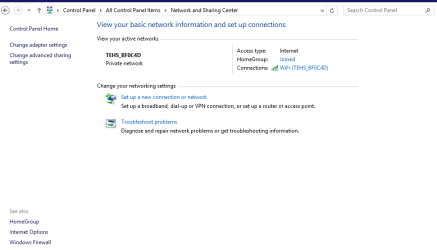
Hazel go to the Network and Sharing centre and open it up and see what is says in there.

In my pic it tells me I am just on the one connection it might be slightly different in your machine as this laptop is on 8 but you should get a readout of what is connected where.

Yes it is ridiculous to have this showing on a desktop so let us know what you have.
 

Attachments

  • NETWORK1.PNG
    NETWORK1.PNG
    24.4 KB · Views: 1

My Computer

Computer type
PC/Desktop
Computer Manufacturer/Model Number
Own build (new) Desk1 / Asus ROG Win 7 / Desk2 1st build
OS
Desk1 7 Home Prem / Desk2 10 Pro / Main lap Asus ROG 10 Pro 2 laptop Toshiba 7 Pro Asus P2520 7 & 10
CPU
Desk1 i5 3750K / Laptop i7 GTX 860M / Desk2 i5 2500
Motherboard
Desk1 Asus P877-V / Desk2 Gigabyte H67 UD3H / Laptop ?
Memory
Desk1 8GB (1866) / Desk2 16GB (1333) / Laptop 8Gb DDR3
Graphics Card(s)
Desk 1& 2NVidia GTX 650 & Laptops on board Intel
Sound Card
Desk 1 & 2 -XONAR DG Realtek High Def audio Laptop
Monitor(s) Displays
Desk 1 Benq HD 2450 / Desk2 Philips 24" / Laptop 17.5"
Screen Resolution
1920x1080 D1 & D2 & Laptop 1
Hard Drives
Desk1 Samsung 120GB 830 SSD
Asus ROG 256GB 850 Pro SSD
Desk2 Samsung 840 256 SSD
Toshiba 120GB EVO
PSU
Desk 1 Corsair HX 1050/ Laptop ? / Desk 2 Corsair HX 650
Case
Desk 1 Cooler HAF XM ? Toshiba laptop / Desk2 Coolermaster
Cooling
Fans on all Desk1 -2 Desk2 - all Coolermasters 5 Laptop ?
Keyboard
Desk 1 MS Sidewinder X6 Desk 2 MS Sidewinder X 4
Mouse
Desk 1&2 - Gigabyte MS 900 gamer - laptop - Logitec wireless
Internet Speed
ADSL2+
Other Info
One other Desktop (tester) and spare Toshba laptop both with SSD's
Running Kaspersky 2016 ISS on all machines config'd identically
Logitec audio stereo systems on each machine (x3)
Canon MG5250MFC
Router/modem TP-Link running WPA2SK
Hazel go to the Network and Sharing centre and open it up and see what is says in there.

In my pic it tells me I am just on the one connection it might be slightly different in your machine as this laptop is on 8 but you should get a readout of what is connected where.

Yes it is ridiculous to have this showing on a desktop so let us know what you have.

All right. I did go there. First I did Status and Tasks. It showed Network 5 Public Network; Access Type: Internet; Connections: Local Area Connection.

I then went to View your active network connections and got a long list. Most had a number and "wire" and a number. A couple had "Net Gear. Then something else.

Of all those, I remember always having "Local Area Connections" on previous computers. That came from whatever ISP I was using.

Should I call my ISP? Or, Dell? The people who took care of my computer have gone out of business and I'm "up a creek without a paddle".

Please tell me this. Can this be just a natural way of setting things up? Or, can it be more shenanigans by that online IT company that changed my virus scanner program. Can they have set up some kind of access to my computer? Or am I just being unduly suspicious?

Thank you for some answers.
 

My Computer

Computer type
PC/Desktop
Computer Manufacturer/Model Number
Dell
OS
Windows 7 Inspiron x 64
CPU
Dell
Local Area Connection normally refers to a category cable (Ethernet Cable) locally connected to the machine. Do you have any network cables in the back? Do you have any bluetooth connectivity at all? Are you using any mobile broadband based connectivity?

Unless you physically connect a NIC (Network Interface Card) into the machine it should not be connected to anything as it physically can't.

Josh :cool:
 

My Computer

Computer type
PC/Desktop
Computer Manufacturer/Model Number
Custom Built
OS
Windows 7 Professional x64 SP1 ; Windows Server 2012 R2 Standard
CPU
Intel Core i5 2400 @ 3.10GHz
Motherboard
Foxconn H67MP-S/-V/H67MP
Memory
8.0GB DDR3 @ 665MHz (2GBx4)
Graphics Card(s)
AMD Radeon HD 6870
Sound Card
Realtek High Definition Audio
Monitor(s) Displays
AOC 2243W & SMB1930NW
Screen Resolution
1440x900 & 1920x1080
Hard Drives
977GB Seagate ST31000524AS ATA Drive (SATA)
250GB WD iSCSI attached Drive
PSU
750W Gaming PSU
Case
Novatech Night
Cooling
Fan
Keyboard
Dell Standard PS/2 Keyboard
Mouse
R.A.T 07 Gaming Mouse
Internet Speed
Download: 10 Mbps Ping: 30ms Upload: 0.81 Mbps
Browser
Google Chrome
Other Info
Optiarc DVD RW AD-5260S ATA Device

My Computer

Computer type
PC/Desktop
Computer Manufacturer/Model Number
Own build (new) Desk1 / Asus ROG Win 7 / Desk2 1st build
OS
Desk1 7 Home Prem / Desk2 10 Pro / Main lap Asus ROG 10 Pro 2 laptop Toshiba 7 Pro Asus P2520 7 & 10
CPU
Desk1 i5 3750K / Laptop i7 GTX 860M / Desk2 i5 2500
Motherboard
Desk1 Asus P877-V / Desk2 Gigabyte H67 UD3H / Laptop ?
Memory
Desk1 8GB (1866) / Desk2 16GB (1333) / Laptop 8Gb DDR3
Graphics Card(s)
Desk 1& 2NVidia GTX 650 & Laptops on board Intel
Sound Card
Desk 1 & 2 -XONAR DG Realtek High Def audio Laptop
Monitor(s) Displays
Desk 1 Benq HD 2450 / Desk2 Philips 24" / Laptop 17.5"
Screen Resolution
1920x1080 D1 & D2 & Laptop 1
Hard Drives
Desk1 Samsung 120GB 830 SSD
Asus ROG 256GB 850 Pro SSD
Desk2 Samsung 840 256 SSD
Toshiba 120GB EVO
PSU
Desk 1 Corsair HX 1050/ Laptop ? / Desk 2 Corsair HX 650
Case
Desk 1 Cooler HAF XM ? Toshiba laptop / Desk2 Coolermaster
Cooling
Fans on all Desk1 -2 Desk2 - all Coolermasters 5 Laptop ?
Keyboard
Desk 1 MS Sidewinder X6 Desk 2 MS Sidewinder X 4
Mouse
Desk 1&2 - Gigabyte MS 900 gamer - laptop - Logitec wireless
Internet Speed
ADSL2+
Other Info
One other Desktop (tester) and spare Toshba laptop both with SSD's
Running Kaspersky 2016 ISS on all machines config'd identically
Logitec audio stereo systems on each machine (x3)
Canon MG5250MFC
Router/modem TP-Link running WPA2SK
If you are using a wireless connection you may be picking up some new people in your area, just choose to connect to your own WiFi router.

What all did the "IT Company" put on your laptop?
 

My Computer

Computer type
PC/Desktop
Computer Manufacturer/Model Number
Home Built Desktop By DataTech
OS
Windows 7 Ultimate X64 SP1
CPU
Intel i5-2550K, Differing ~4.4-4.8GHz No built in GPU
Motherboard
ASUS P8Z68-V PRO/GEN3
Memory
16GB G.Skill Sniper 1866MHz @ 2133MHz 2x8GB
Graphics Card(s)
ASUS GTX650TIB-DC2OC-2GD5, (650TI Boost)
Sound Card
Onboard Realtek 5-1
Monitor(s) Displays
Samsung P2570HD
Screen Resolution
1920x1080
Hard Drives
Samsung 840 Pro 256GB SSD for OS, 500GB Seagate Constellation (Enterprise drive) for Data
PSU
Corsair HX650W
Case
Inwin Dragon Rider
Cooling
Hyper 212 EVO w/two Noctua fans, push-pull, @1300 RPM
Keyboard
E-Z Eyes, bright yellow keys with large characters
Mouse
steelseries SENSEI Laser Pro Gaming
Internet Speed
48-51Mbs Mbs down, 11 Mbs up Xfinity Cable
Antivirus
Norton Internet Security 2013
Browser
IE 10, Opera, Pale Moon if needed
Other Info
4 case fans, LG BluRay-RE, ASUS DVD-RW, Mr. Fusion power supply, 1.21 gigawatts.
Local Area Connection normally refers to a category cable (Ethernet Cable) locally connected to the machine. Do you have any network cables in the back? Do you have any bluetooth connectivity at all? Are you using any mobile broadband based connectivity?

Unless you physically connect a NIC (Network Interface Card) into the machine it should not be connected to anything as it physically can't.

Josh :cool:

Josh, there is an Ethernet cable attached to my modem. My ISP would have done that. I made a card about them so I'd know what they were talking about if I was on the phone with them. My modem has three cables: Power cable, Ethernet cable and the cable to the outside of the building. I think those are normal, aren't they?

As for your other questions, I've not put any kind of card in here. It does have to be physically doen, doesn't it? You can do a "virtual" card, can you? This is all "greek" to me. Sorry.
 

My Computer

Computer type
PC/Desktop
Computer Manufacturer/Model Number
Dell
OS
Windows 7 Inspiron x 64
CPU
Dell
If you are using a wireless connection you may be picking up some new people in your area, just choose to connect to your own WiFi router.

What all did the "IT Company" put on your laptop?

I wish I knew what all they did. I have no idea. As for WiFi, I have no way to even use WiFi so far as I know. I just use a plain, old-fashioned cable hookup.

I have a feeling - tell me what you think - that I should call Dell and let them do a complete cleanup for a fresh start. That is if they'd even do it. My warrenty has apparently run out - if I ever had one. .

More and more, I thoroughly dislike computers! So many things can go wrong. Then I have someone work on one and can't be sure of what they did! I'm whining? :cry:
 

My Computer

Computer type
PC/Desktop
Computer Manufacturer/Model Number
Dell
OS
Windows 7 Inspiron x 64
CPU
Dell
Can you post a snip of the network window you mentioned?

This is the preferred, best way to upload an image or a file to a post.

http://www.sevenforums.com/tutorials/9733-screenshots-files-upload-post-seven-forums.html#post93869

Press the ALT and PrntScrn keys at the same time, this will capture only the active window to use in Paint or your preferred graphics editor.


You may also upload a photo or image you already have on your PC,as you would a file, without using the Snipping tool.


If you'd like to do a full fresh install we can help with that, or anything else, no need to go to some fly-by-night pseudo-techs.
 

My Computer

Computer type
PC/Desktop
Computer Manufacturer/Model Number
Home Built Desktop By DataTech
OS
Windows 7 Ultimate X64 SP1
CPU
Intel i5-2550K, Differing ~4.4-4.8GHz No built in GPU
Motherboard
ASUS P8Z68-V PRO/GEN3
Memory
16GB G.Skill Sniper 1866MHz @ 2133MHz 2x8GB
Graphics Card(s)
ASUS GTX650TIB-DC2OC-2GD5, (650TI Boost)
Sound Card
Onboard Realtek 5-1
Monitor(s) Displays
Samsung P2570HD
Screen Resolution
1920x1080
Hard Drives
Samsung 840 Pro 256GB SSD for OS, 500GB Seagate Constellation (Enterprise drive) for Data
PSU
Corsair HX650W
Case
Inwin Dragon Rider
Cooling
Hyper 212 EVO w/two Noctua fans, push-pull, @1300 RPM
Keyboard
E-Z Eyes, bright yellow keys with large characters
Mouse
steelseries SENSEI Laser Pro Gaming
Internet Speed
48-51Mbs Mbs down, 11 Mbs up Xfinity Cable
Antivirus
Norton Internet Security 2013
Browser
IE 10, Opera, Pale Moon if needed
Other Info
4 case fans, LG BluRay-RE, ASUS DVD-RW, Mr. Fusion power supply, 1.21 gigawatts.
Yep as Britton asks hazel a bit like my bit on snipping it would be good to see that view.

Now just an alternative and only if you are up for it you could do a clean install using the activation code on the machine's sticker that would give you a real clean start and get rid of the Dell bloatware.
See this http://www.sevenforums.com/tutorials/219487-clean-reinstall-factory-oem-windows-7-a.html#post1839164
However you must back up all the data you want to keep first or even image it using this
http://www.sevenforums.com/tutorials/73828-imaging-free-macrium.html
 

My Computer

Computer type
PC/Desktop
Computer Manufacturer/Model Number
Own build (new) Desk1 / Asus ROG Win 7 / Desk2 1st build
OS
Desk1 7 Home Prem / Desk2 10 Pro / Main lap Asus ROG 10 Pro 2 laptop Toshiba 7 Pro Asus P2520 7 & 10
CPU
Desk1 i5 3750K / Laptop i7 GTX 860M / Desk2 i5 2500
Motherboard
Desk1 Asus P877-V / Desk2 Gigabyte H67 UD3H / Laptop ?
Memory
Desk1 8GB (1866) / Desk2 16GB (1333) / Laptop 8Gb DDR3
Graphics Card(s)
Desk 1& 2NVidia GTX 650 & Laptops on board Intel
Sound Card
Desk 1 & 2 -XONAR DG Realtek High Def audio Laptop
Monitor(s) Displays
Desk 1 Benq HD 2450 / Desk2 Philips 24" / Laptop 17.5"
Screen Resolution
1920x1080 D1 & D2 & Laptop 1
Hard Drives
Desk1 Samsung 120GB 830 SSD
Asus ROG 256GB 850 Pro SSD
Desk2 Samsung 840 256 SSD
Toshiba 120GB EVO
PSU
Desk 1 Corsair HX 1050/ Laptop ? / Desk 2 Corsair HX 650
Case
Desk 1 Cooler HAF XM ? Toshiba laptop / Desk2 Coolermaster
Cooling
Fans on all Desk1 -2 Desk2 - all Coolermasters 5 Laptop ?
Keyboard
Desk 1 MS Sidewinder X6 Desk 2 MS Sidewinder X 4
Mouse
Desk 1&2 - Gigabyte MS 900 gamer - laptop - Logitec wireless
Internet Speed
ADSL2+
Other Info
One other Desktop (tester) and spare Toshba laptop both with SSD's
Running Kaspersky 2016 ISS on all machines config'd identically
Logitec audio stereo systems on each machine (x3)
Canon MG5250MFC
Router/modem TP-Link running WPA2SK
Can you post a snip of the network window you mentioned?

This is the preferred, best way to upload an image or a file to a post.

http://www.sevenforums.com/tutorials/9733-screenshots-files-upload-post-seven-forums.html#post93869

Press the ALT and PrntScrn keys at the same time, this will capture only the active window to use in Paint or your preferred graphics editor.


You may also upload a photo or image you already have on your PC,as you would a file, without using the Snipping tool.


If you'd like to do a full fresh install we can help with that, or anything else, no need to go to some fly-by-night pseudo-techs.

I don't know which window you are talking about. And I've never done this sort of thing. I'm not sure I wouldn't just mess up. If you want to see a particular window, I can try to follow your instructions and copy/paste. No harm in learning how.

However, I do have a bit of news. I called my ISP to ask if they could have put that there. I'll probably not tell this exactly right - didn't write it down - but, yes, when they hook up the modem and no setup is indicated, it is possible that Network 5 was automatically chosen. So, this may have come from my ISP although I do wonder why I've never heard of it before.

That said, I just managed to find a gentleman who used to work on my computer and he is coming out to give it a good cleaning. We can get rid of Network 5 if it isn't necessary. I suppose it will depend on my Charter hookup and how I download mail to Mozilla Thunderbird.

I do thank you all for helping me find that so I could make sense. Good that you are here.
 

My Computer

Computer type
PC/Desktop
Computer Manufacturer/Model Number
Dell
OS
Windows 7 Inspiron x 64
CPU
Dell
This morning I had a notice of updates ready. Also, there was a large window that said "This computer is connected to a Network." "Select a location for Network 5 network."

My computer is not - or should not be - connected to any network. I only have one computer. And (having read the choices) I never take a huge desk top to a public place.

Please explain. Can I ignore this? Thank you.
This window. Click the blue text, they are links to full directions.
 

My Computer

Computer type
PC/Desktop
Computer Manufacturer/Model Number
Home Built Desktop By DataTech
OS
Windows 7 Ultimate X64 SP1
CPU
Intel i5-2550K, Differing ~4.4-4.8GHz No built in GPU
Motherboard
ASUS P8Z68-V PRO/GEN3
Memory
16GB G.Skill Sniper 1866MHz @ 2133MHz 2x8GB
Graphics Card(s)
ASUS GTX650TIB-DC2OC-2GD5, (650TI Boost)
Sound Card
Onboard Realtek 5-1
Monitor(s) Displays
Samsung P2570HD
Screen Resolution
1920x1080
Hard Drives
Samsung 840 Pro 256GB SSD for OS, 500GB Seagate Constellation (Enterprise drive) for Data
PSU
Corsair HX650W
Case
Inwin Dragon Rider
Cooling
Hyper 212 EVO w/two Noctua fans, push-pull, @1300 RPM
Keyboard
E-Z Eyes, bright yellow keys with large characters
Mouse
steelseries SENSEI Laser Pro Gaming
Internet Speed
48-51Mbs Mbs down, 11 Mbs up Xfinity Cable
Antivirus
Norton Internet Security 2013
Browser
IE 10, Opera, Pale Moon if needed
Other Info
4 case fans, LG BluRay-RE, ASUS DVD-RW, Mr. Fusion power supply, 1.21 gigawatts.
This morning I had a notice of updates ready. Also, there was a large window that said "This computer is connected to a Network." "Select a location for Network 5 network."

My computer is not - or should not be - connected to any network. I only have one computer. And (having read the choices) I never take a huge desk top to a public place.

Please explain. Can I ignore this? Thank you.
This window. Click the blue text, they are links to full directions.

Ah, I'm sorry. I no longer have that. It came with the update notice and left when I closed it and went to do the updates. I've not seen it since. I shall, though, make a note about how this is done in case I need to try it another time. Thank you.
 

My Computer

Computer type
PC/Desktop
Computer Manufacturer/Model Number
Dell
OS
Windows 7 Inspiron x 64
CPU
Dell
It is probably an ethernet connection a wired connection. But would need confirmation of that.

Open a command(cmd)prompt:

Click on start>programs>accessories> cmd prompt type: ipconfig /all press enter. Right click on the screen choose select all and right click in your reply box and choose paste.
 

My Computer

Computer Manufacturer/Model Number
HP Compaq 6715B
OS
Windows 7 Ultimate x64
CPU
AMD turion 64x2 TL-64 2.2Ghz
Motherboard
HC030
Memory
Sodimm DDR2 4GB
Graphics Card(s)
ATI Radeon 1250 128MB IGP
Hard Drives
Fujitsu Siemens 500GB sata 3.0 Gb/s
It is probably an ethernet connection a wired connection. But would need confirmation of that.

Open a command(cmd)prompt:

Click on start>programs>accessories> cmd prompt type: ipconfig /all press enter. Right click on the screen choose select all and right click in your reply box and choose paste.

I got as far as cmd prompt but see no place to type anything.

Not to worry. I have someone coming to check it out That is safer than me doing it. :-)
 

My Computer

Computer type
PC/Desktop
Computer Manufacturer/Model Number
Dell
OS
Windows 7 Inspiron x 64
CPU
Dell
Microsoft Windows [Version 6.2.9200]
(c) 2012 Microsoft Corporation. All rights reserved.

C:\Users\YourUsername here>

Did you not see that?
 

My Computer

Computer Manufacturer/Model Number
HP Compaq 6715B
OS
Windows 7 Ultimate x64
CPU
AMD turion 64x2 TL-64 2.2Ghz
Motherboard
HC030
Memory
Sodimm DDR2 4GB
Graphics Card(s)
ATI Radeon 1250 128MB IGP
Hard Drives
Fujitsu Siemens 500GB sata 3.0 Gb/s
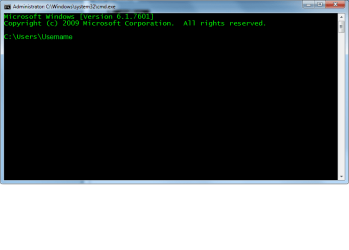
Put you cursor in this window, click and type.

CMD.png
 

My Computer

Computer type
PC/Desktop
Computer Manufacturer/Model Number
Home Built Desktop By DataTech
OS
Windows 7 Ultimate X64 SP1
CPU
Intel i5-2550K, Differing ~4.4-4.8GHz No built in GPU
Motherboard
ASUS P8Z68-V PRO/GEN3
Memory
16GB G.Skill Sniper 1866MHz @ 2133MHz 2x8GB
Graphics Card(s)
ASUS GTX650TIB-DC2OC-2GD5, (650TI Boost)
Sound Card
Onboard Realtek 5-1
Monitor(s) Displays
Samsung P2570HD
Screen Resolution
1920x1080
Hard Drives
Samsung 840 Pro 256GB SSD for OS, 500GB Seagate Constellation (Enterprise drive) for Data
PSU
Corsair HX650W
Case
Inwin Dragon Rider
Cooling
Hyper 212 EVO w/two Noctua fans, push-pull, @1300 RPM
Keyboard
E-Z Eyes, bright yellow keys with large characters
Mouse
steelseries SENSEI Laser Pro Gaming
Internet Speed
48-51Mbs Mbs down, 11 Mbs up Xfinity Cable
Antivirus
Norton Internet Security 2013
Browser
IE 10, Opera, Pale Moon if needed
Other Info
4 case fans, LG BluRay-RE, ASUS DVD-RW, Mr. Fusion power supply, 1.21 gigawatts.
Put you cursor in this window, click and type.

I don't think this is what I got the first time. I should maybe do it over but no time now. Thanks for this experience.

View attachment 317796
Microsoft Windows [Version 6.1.7601]
Copyright (c) 2009 Microsoft Corporation. All rights reserved.
C:\Users\Hazel M White>ipconfig/all
Windows IP Configuration
Host Name . . . . . . . . . . . . : HazelMWhite-PC
Primary Dns Suffix . . . . . . . :
Node Type . . . . . . . . . . . . : Hybrid
IP Routing Enabled. . . . . . . . : No
WINS Proxy Enabled. . . . . . . . : No
Wireless LAN adapter Wireless Network Connection:
Media State . . . . . . . . . . . : Media disconnected
Connection-specific DNS Suffix . :
Description . . . . . . . . . . . : Dell Wireless 1506 802.11b/g/n (2.4GHz)
Physical Address. . . . . . . . . : B8-76-3F-01-42-A5
DHCP Enabled. . . . . . . . . . . : Yes
Autoconfiguration Enabled . . . . : Yes
Ethernet adapter Local Area Connection:
Connection-specific DNS Suffix . :
Description . . . . . . . . . . . : Realtek PCIe GBE Family Controller
Physical Address. . . . . . . . . : A4-1F-72-58-CE-A5
DHCP Enabled. . . . . . . . . . . : Yes
Autoconfiguration Enabled . . . . : Yes
Link-local IPv6 Address . . . . . : fe80::b8c0:8719:7e57:4091%11(Preferred)
IPv4 Address. . . . . . . . . . . : 71.81.147.231(Preferred)
Subnet Mask . . . . . . . . . . . : 255.255.248.0
Lease Obtained. . . . . . . . . . : Wednesday, May 14, 2014 05:00:06
Lease Expires . . . . . . . . . . : Wednesday, May 14, 2014 09:00:27
Default Gateway . . . . . . . . . : 71.81.144.1
DHCP Server . . . . . . . . . . . : 68.114.37.12
DHCPv6 IAID . . . . . . . . . . . : 245636978
DHCPv6 Client DUID. . . . . . . . : 00-01-00-01-18-CA-A0-F3-A4-1F-72-58-CE-A5
DNS Servers . . . . . . . . . . . : 24.217.0.5
24.217.201.67
24.247.15.53
NetBIOS over Tcpip. . . . . . . . : Enabled
Tunnel adapter isatap.{5B84AF77-7480-463F-A504-0AD0278E8951}:
Media State . . . . . . . . . . . : Media disconnected
Connection-specific DNS Suffix . :
Description . . . . . . . . . . . : Microsoft ISATAP Adapter
Physical Address. . . . . . . . . : 00-00-00-00-00-00-00-E0
DHCP Enabled. . . . . . . . . . . : No
Autoconfiguration Enabled . . . . : Yes
Tunnel adapter 6TO4 Adapter:
Connection-specific DNS Suffix . :
Description . . . . . . . . . . . : Microsoft 6to4 Adapter
Physical Address. . . . . . . . . : 00-00-00-00-00-00-00-E0
DHCP Enabled. . . . . . . . . . . : No
Autoconfiguration Enabled . . . . : Yes
IPv6 Address. . . . . . . . . . . : 2002:4751:93e7::4751:93e7(Preferred)
Default Gateway . . . . . . . . . : 2002:c058:6301::1
DNS Servers . . . . . . . . . . . : 24.217.0.5
24.217.201.67
24.247.15.53
NetBIOS over Tcpip. . . . . . . . : Disabled
Tunnel adapter isatap.{1EB055BF-9BCB-4C10-9C0A-CED35D8B4CC9}:
Media State . . . . . . . . . . . : Media disconnected
Connection-specific DNS Suffix . :
Description . . . . . . . . . . . : Microsoft ISATAP Adapter #2
Physical Address. . . . . . . . . : 00-00-00-00-00-00-00-E0
DHCP Enabled. . . . . . . . . . . : No
Autoconfiguration Enabled . . . . : Yes
Tunnel adapter Teredo Tunneling Pseudo-Interface:
Connection-specific DNS Suffix . :
Description . . . . . . . . . . . : Teredo Tunneling Pseudo-Interface
Physical Address. . . . . . . . . : 00-00-00-00-00-00-00-E0
DHCP Enabled. . . . . . . . . . . : No
Autoconfiguration Enabled . . . . : Yes
IPv6 Address. . . . . . . . . . . : 2001:0:9d38:6abd:3c4b:791:b8ae:6c18(Prefe
rred)
Link-local IPv6 Address . . . . . : fe80::3c4b:791:b8ae:6c18%16(Preferred)
Default Gateway . . . . . . . . . :
NetBIOS over Tcpip. . . . . . . . : Disabled
C:\Users\Hazel M White>

 

My Computer

Computer type
PC/Desktop
Computer Manufacturer/Model Number
Dell
OS
Windows 7 Inspiron x 64
CPU
Dell
You have wired ethernet connection there you are connected direct to a modem you are directly exposed to the internet hope you got a good anti-virus and firewall.

Look for a wire bit thicker coming from your computer to the modem.

A router connected to the modem would be best it will give you a measure of protection with its own firewall SPI and DOS protection along with NAT all your ports wont be exposed with a router finances bearing up of course.
 

My Computer

Computer Manufacturer/Model Number
HP Compaq 6715B
OS
Windows 7 Ultimate x64
CPU
AMD turion 64x2 TL-64 2.2Ghz
Motherboard
HC030
Memory
Sodimm DDR2 4GB
Graphics Card(s)
ATI Radeon 1250 128MB IGP
Hard Drives
Fujitsu Siemens 500GB sata 3.0 Gb/s
It is all fixed and thank you all for teaching me a few things about what is inside my computer. I confess that I don't try too hard to play around with it. I'm so afraid of really messing it up. I do leave it to the experts. They have their skills; I have mine and "never the twain shall meet".

Nos dawch. Good night. Hazel M
 

My Computer

Computer type
PC/Desktop
Computer Manufacturer/Model Number
Dell
OS
Windows 7 Inspiron x 64
CPU
Dell
Back
Top