MS Tinker: How to

Fajita3053

New member
Local time
5:40 PM
Messages
15
Location
Binghamton, NY
So many people are trying to play MS Tinker on 7. Here's how... Download:

Tinker.part1.rar
Tinker.part2.rar

Put the Tinker folder that comes in this rar file into C:\Program Files\Microsoft games

Then, change the compatibility mode for Tinker.exe to Windows Vista and check the 'Run as Administrator' box. Wallah! ;)

Windows7.jpg
 
Last edited:

My Computer

Computer Manufacturer/Model Number
Fajita™
OS
Microsoft Windows 7 RC (Build 7100)
CPU
Intel Core 2 Quad 3.0 ghZ
Memory
16GB DDR2
Graphics Card(s)
Sapphire ATI 2.0GB PCI Express 2.0 x16
Sound Card
7.1 channel digital
Monitor(s) Displays
104" 1080p, 436" 480p
Screen Resolution
LOL
Hard Drives
6TB SATA 3.0gb/s RAID
Cooling
©Interkool
Keyboard
WOW 7 stroke
Internet Speed
T1
Other Info
http://www.myspace.com/blazinlrides420
Actually if you are dual booting you just need to put a shortcut from that folder on your desktop and play in compatibility mode for Vista.
 

My Computer

Computer Manufacturer/Model Number
Home Brew
OS
Windows 7 Ultimate Vista Ultimate x64
CPU
Core 2 Duo E8500 3.16Ghz @ 3.8Ghz
Motherboard
eVGA 750i FTW
Memory
2x2Gigs Patriot PC2-6400 LL
Graphics Card(s)
Inno3D GeForce GTX260 216 SP
Monitor(s) Displays
ASUS VW222U 22" 2ms Response time
Screen Resolution
1680x1050
Hard Drives
SATA 150GB
SATA II 250GB
USB IDE 750GB Ext.
PSU
HYTEC 600W & Thermaltake 650W Toughpower Power Exp
Case
Thermaltake Armor LCS (Liquid Cooling System)
Cooling
Liquid Cooling System
Keyboard
Logitech G15 Gaming Keyboard
Mouse
Logitech G9 Gaming Mouse
correct, but there are many retarded people out there that are booting only Windows 7. this thread is for them.
 

My Computer

Computer Manufacturer/Model Number
Fajita™
OS
Microsoft Windows 7 RC (Build 7100)
CPU
Intel Core 2 Quad 3.0 ghZ
Memory
16GB DDR2
Graphics Card(s)
Sapphire ATI 2.0GB PCI Express 2.0 x16
Sound Card
7.1 channel digital
Monitor(s) Displays
104" 1080p, 436" 480p
Screen Resolution
LOL
Hard Drives
6TB SATA 3.0gb/s RAID
Cooling
©Interkool
Keyboard
WOW 7 stroke
Internet Speed
T1
Other Info
http://www.myspace.com/blazinlrides420
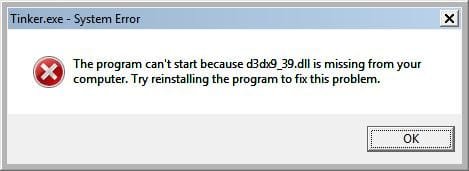
I did the transfer of files and compatability thing but I get an error when I try to start Tinker as shown in figure 1.

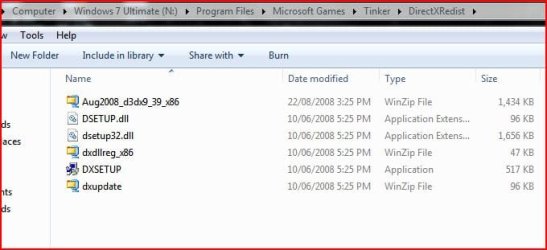
See also figure 2, is this something to do with it?
 

Attachments

  • tinker.jpg
    tinker.jpg
    10.9 KB · Views: 190
  • dxredist.JPG
    dxredist.JPG
    35.4 KB · Views: 241

My Computer

Computer type
PC/Desktop
Computer Manufacturer/Model Number
Alienware® ALX X58
OS
Win 7 Ult SP1/Win 10 Pro (all x64)
CPU
Intel® Core™ i7-975 Extreme O/C to 4.02 GHz, 8MB Cache
Motherboard
Asus® P6T Deluxe V2 X58 LGA1366
Memory
24GB Corsair Vengeance DDR3 SDRAM at 1600MHz - 6 x 4096MB
Graphics Card(s)
1792 MB NVIDIA® GeForce® GTX 295 Dual Core
Sound Card
Onboard Soundmax® High-Definition 7.1 Performance Audio
Monitor(s) Displays
Samsung XL2370 LED backlit 23" W/S 2ms response time
Screen Resolution
1920 X 1080
Hard Drives
2 x 500gb SATA II
1 x 1TB SATA II
1 external eSATA LaCie 3TB
(Non-RAID)
PSU
Alienware® 1200 Watt Multi-GPU
Case
Alienware® P2 ALX Chassis with AlienIce™ 3.0 Video Cooling
Cooling
Alienware® High-Perf. Liquid Cooling + Acoustic Dampening
Keyboard
Microsoft® Wireless Entertainment 8000 + Logitech® G15 Wired
Mouse
Microsoft® Wireless Laser 8000 + Logitech® G9 Wired
Internet Speed
1Gb/s
Antivirus
McAfee LiveSafe
Browser
Firefox - latest
Other Info
Using non-RAID on purpose as I find RAID to be too temperamental.
Now set to AHCI
Looks like you haven't updated your DirectX, you need to do to Microsoft and find the latest redistributable which is November.
 

My Computer

Computer Manufacturer/Model Number
Home Brew
OS
Windows 7 Ultimate Vista Ultimate x64
CPU
Core 2 Duo E8500 3.16Ghz @ 3.8Ghz
Motherboard
eVGA 750i FTW
Memory
2x2Gigs Patriot PC2-6400 LL
Graphics Card(s)
Inno3D GeForce GTX260 216 SP
Monitor(s) Displays
ASUS VW222U 22" 2ms Response time
Screen Resolution
1680x1050
Hard Drives
SATA 150GB
SATA II 250GB
USB IDE 750GB Ext.
PSU
HYTEC 600W & Thermaltake 650W Toughpower Power Exp
Case
Thermaltake Armor LCS (Liquid Cooling System)
Cooling
Liquid Cooling System
Keyboard
Logitech G15 Gaming Keyboard
Mouse
Logitech G9 Gaming Mouse
Looks like you haven't updated your DirectX, you need to do to Microsoft and find the latest redistributable which is November.

Didn't realize that I would have to manually check that...expected WU to do that for me. I assume too much I guess.
 

My Computer

Computer type
PC/Desktop
Computer Manufacturer/Model Number
Alienware® ALX X58
OS
Win 7 Ult SP1/Win 10 Pro (all x64)
CPU
Intel® Core™ i7-975 Extreme O/C to 4.02 GHz, 8MB Cache
Motherboard
Asus® P6T Deluxe V2 X58 LGA1366
Memory
24GB Corsair Vengeance DDR3 SDRAM at 1600MHz - 6 x 4096MB
Graphics Card(s)
1792 MB NVIDIA® GeForce® GTX 295 Dual Core
Sound Card
Onboard Soundmax® High-Definition 7.1 Performance Audio
Monitor(s) Displays
Samsung XL2370 LED backlit 23" W/S 2ms response time
Screen Resolution
1920 X 1080
Hard Drives
2 x 500gb SATA II
1 x 1TB SATA II
1 external eSATA LaCie 3TB
(Non-RAID)
PSU
Alienware® 1200 Watt Multi-GPU
Case
Alienware® P2 ALX Chassis with AlienIce™ 3.0 Video Cooling
Cooling
Alienware® High-Perf. Liquid Cooling + Acoustic Dampening
Keyboard
Microsoft® Wireless Entertainment 8000 + Logitech® G15 Wired
Mouse
Microsoft® Wireless Laser 8000 + Logitech® G9 Wired
Internet Speed
1Gb/s
Antivirus
McAfee LiveSafe
Browser
Firefox - latest
Other Info
Using non-RAID on purpose as I find RAID to be too temperamental.
Now set to AHCI
Just one snag...the available downloads are for 9.0c and I have 11. How can I be out of date considering I only just installed this beta from MS?
 

My Computer

Computer type
PC/Desktop
Computer Manufacturer/Model Number
Alienware® ALX X58
OS
Win 7 Ult SP1/Win 10 Pro (all x64)
CPU
Intel® Core™ i7-975 Extreme O/C to 4.02 GHz, 8MB Cache
Motherboard
Asus® P6T Deluxe V2 X58 LGA1366
Memory
24GB Corsair Vengeance DDR3 SDRAM at 1600MHz - 6 x 4096MB
Graphics Card(s)
1792 MB NVIDIA® GeForce® GTX 295 Dual Core
Sound Card
Onboard Soundmax® High-Definition 7.1 Performance Audio
Monitor(s) Displays
Samsung XL2370 LED backlit 23" W/S 2ms response time
Screen Resolution
1920 X 1080
Hard Drives
2 x 500gb SATA II
1 x 1TB SATA II
1 external eSATA LaCie 3TB
(Non-RAID)
PSU
Alienware® 1200 Watt Multi-GPU
Case
Alienware® P2 ALX Chassis with AlienIce™ 3.0 Video Cooling
Cooling
Alienware® High-Perf. Liquid Cooling + Acoustic Dampening
Keyboard
Microsoft® Wireless Entertainment 8000 + Logitech® G15 Wired
Mouse
Microsoft® Wireless Laser 8000 + Logitech® G9 Wired
Internet Speed
1Gb/s
Antivirus
McAfee LiveSafe
Browser
Firefox - latest
Other Info
Using non-RAID on purpose as I find RAID to be too temperamental.
Now set to AHCI

My Computer

Computer Manufacturer/Model Number
Fajita™
OS
Microsoft Windows 7 RC (Build 7100)
CPU
Intel Core 2 Quad 3.0 ghZ
Memory
16GB DDR2
Graphics Card(s)
Sapphire ATI 2.0GB PCI Express 2.0 x16
Sound Card
7.1 channel digital
Monitor(s) Displays
104" 1080p, 436" 480p
Screen Resolution
LOL
Hard Drives
6TB SATA 3.0gb/s RAID
Cooling
©Interkool
Keyboard
WOW 7 stroke
Internet Speed
T1
Other Info
http://www.myspace.com/blazinlrides420
You are saying that I should download a version that is 2 levels less than I have now?
I just want to be sure that's what is intended here.
 

My Computer

Computer type
PC/Desktop
Computer Manufacturer/Model Number
Alienware® ALX X58
OS
Win 7 Ult SP1/Win 10 Pro (all x64)
CPU
Intel® Core™ i7-975 Extreme O/C to 4.02 GHz, 8MB Cache
Motherboard
Asus® P6T Deluxe V2 X58 LGA1366
Memory
24GB Corsair Vengeance DDR3 SDRAM at 1600MHz - 6 x 4096MB
Graphics Card(s)
1792 MB NVIDIA® GeForce® GTX 295 Dual Core
Sound Card
Onboard Soundmax® High-Definition 7.1 Performance Audio
Monitor(s) Displays
Samsung XL2370 LED backlit 23" W/S 2ms response time
Screen Resolution
1920 X 1080
Hard Drives
2 x 500gb SATA II
1 x 1TB SATA II
1 external eSATA LaCie 3TB
(Non-RAID)
PSU
Alienware® 1200 Watt Multi-GPU
Case
Alienware® P2 ALX Chassis with AlienIce™ 3.0 Video Cooling
Cooling
Alienware® High-Perf. Liquid Cooling + Acoustic Dampening
Keyboard
Microsoft® Wireless Entertainment 8000 + Logitech® G15 Wired
Mouse
Microsoft® Wireless Laser 8000 + Logitech® G9 Wired
Internet Speed
1Gb/s
Antivirus
McAfee LiveSafe
Browser
Firefox - latest
Other Info
Using non-RAID on purpose as I find RAID to be too temperamental.
Now set to AHCI
One question parts 1 and 2 should be combined into one folder I assume?

Addendum: Part 2 still fails..
Extracting Tinker\Tinker.dat Error: CRC mismatch in file "Tinker\Tinker.dat" in the archive "N:\Users\Peter\Downloads\Tinker.part2.rar"

Will try the other way again...transferring the files from Vista.
 

My Computer

Computer type
PC/Desktop
Computer Manufacturer/Model Number
Alienware® ALX X58
OS
Win 7 Ult SP1/Win 10 Pro (all x64)
CPU
Intel® Core™ i7-975 Extreme O/C to 4.02 GHz, 8MB Cache
Motherboard
Asus® P6T Deluxe V2 X58 LGA1366
Memory
24GB Corsair Vengeance DDR3 SDRAM at 1600MHz - 6 x 4096MB
Graphics Card(s)
1792 MB NVIDIA® GeForce® GTX 295 Dual Core
Sound Card
Onboard Soundmax® High-Definition 7.1 Performance Audio
Monitor(s) Displays
Samsung XL2370 LED backlit 23" W/S 2ms response time
Screen Resolution
1920 X 1080
Hard Drives
2 x 500gb SATA II
1 x 1TB SATA II
1 external eSATA LaCie 3TB
(Non-RAID)
PSU
Alienware® 1200 Watt Multi-GPU
Case
Alienware® P2 ALX Chassis with AlienIce™ 3.0 Video Cooling
Cooling
Alienware® High-Perf. Liquid Cooling + Acoustic Dampening
Keyboard
Microsoft® Wireless Entertainment 8000 + Logitech® G15 Wired
Mouse
Microsoft® Wireless Laser 8000 + Logitech® G9 Wired
Internet Speed
1Gb/s
Antivirus
McAfee LiveSafe
Browser
Firefox - latest
Other Info
Using non-RAID on purpose as I find RAID to be too temperamental.
Now set to AHCI
heh

if you're transfering data from vista, makesure you go to c:\windows\system32 and copy the missing direct x dll.
but i personally failed to start the tinker.exe... its not looking for any version of windows, it looks specifically for vista ultimate as it is an ultimate extra... well to the briliant minds (mind me, i'm one of these *retards*) how do you go about running this game?

for those without the d3dx9_39.dll, just download the dll from many dll download sites. don't have to download the 480mb sdk. the poster is a non retarded person with huge hard disk space. one more thing, to run the game in full screen, make a shortcut to the exe and go to shortcut properties, add -mce after the .exe. (with a space) you should know what i'm talking about... (open chess titans' program directory and check for its shortcut with MCE... to undrstand better)

thanks, that's all from a retard...
 

Attachments

Last edited:

My Computer

OS
win7(7k), VistaULT(SP2BETA), BACKTRACK3(slax,linux)
Screen Resolution
1024x600
I also went through the laborious task of taking ownership and giving me permissions on each object as well as making tinker.exe and tinkereditor.exe run an Admin and in compat mode with Vista, then I transferred that dll and it works, albeit slow to boot up.
 

My Computer

Computer type
PC/Desktop
Computer Manufacturer/Model Number
Alienware® ALX X58
OS
Win 7 Ult SP1/Win 10 Pro (all x64)
CPU
Intel® Core™ i7-975 Extreme O/C to 4.02 GHz, 8MB Cache
Motherboard
Asus® P6T Deluxe V2 X58 LGA1366
Memory
24GB Corsair Vengeance DDR3 SDRAM at 1600MHz - 6 x 4096MB
Graphics Card(s)
1792 MB NVIDIA® GeForce® GTX 295 Dual Core
Sound Card
Onboard Soundmax® High-Definition 7.1 Performance Audio
Monitor(s) Displays
Samsung XL2370 LED backlit 23" W/S 2ms response time
Screen Resolution
1920 X 1080
Hard Drives
2 x 500gb SATA II
1 x 1TB SATA II
1 external eSATA LaCie 3TB
(Non-RAID)
PSU
Alienware® 1200 Watt Multi-GPU
Case
Alienware® P2 ALX Chassis with AlienIce™ 3.0 Video Cooling
Cooling
Alienware® High-Perf. Liquid Cooling + Acoustic Dampening
Keyboard
Microsoft® Wireless Entertainment 8000 + Logitech® G15 Wired
Mouse
Microsoft® Wireless Laser 8000 + Logitech® G9 Wired
Internet Speed
1Gb/s
Antivirus
McAfee LiveSafe
Browser
Firefox - latest
Other Info
Using non-RAID on purpose as I find RAID to be too temperamental.
Now set to AHCI
Obviously the above download is a crack or something, not exactly legal.

Such downloads are many times infected with viruses, trojans etc. A site one can upload files to check them with multiple antivirus engines is jotti.org and a fine (and free for home use) antivirus is AVAST

Regarding the DirectX issue, each major DirectX version can coexist with previous ones. Which interface(s) a game supports depends on its designers. The game can ask for DX10 and if it doesn't find it can fallback to DX9 etc. Maybe Windows7 doesn't have DX9 preinstalled to cut some space and need to install it manually getting DirectX Runtime installer from download.microsoft.com

BTW, it's very sad Ultimate Extras aren't available for Windows7 Ultimate. No DreamScene and no Tinker? Were very nice stuff in my opinion (they were the wow factor in the Ultimate version)
 
Hello birbilis,

Welcome to the Seven Forums.

Hope you enjoy your stay.

Gary
 

My Computer

Computer Manufacturer/Model Number
Dell XPS420
OS
Vista Ult 64 bit Seven Ult RTM x64
CPU
Intel Core2 Quad Q6600 2.40 gigahertz
Memory
Crucial Ballistix 4x2GB PC2 6400
Graphics Card(s)
NVIDIA GeForce 8600 GTS 256 MB
Sound Card
Creative SB X-Fi audio
Monitor(s) Displays
HP w2207 + HPvs15
Screen Resolution
1680x1050 + 1024x768
Hard Drives
2-WD5000AAKS-500 GB
WD5000AAV-500 GB external
Keyboard
Microsoft Comfort Curve
Mouse
MX Revolution
Other Info
Wacom Intuos 2 Graphics Tablet
Experience Index=5.5
Thx. But not working for me :( I put the dx9 file in windows\system32 and it still throws up the error that this file is missing?

Any ideas?
 

My Computer

OS
XP
Why don't you try installing the DirectX runtime? It's a web installer that brings only needed stuff. If it still won't work, download the DirectX redistributable for developers which has all the previous DirectX stuff in it and installs them all (a big download)
 
Why don't you try installing the DirectX runtime? It's a web installer that brings only needed stuff. If it still won't work, download the DirectX redistributable for developers which has all the previous DirectX stuff in it and installs them all (a big download)

Thx. I'll give it a shot :)

Seems funny I would need to do that though, as the error only states one file missing, i.e. the file above?
 

My Computer

OS
XP
this DLL may be linked to other DLLs and need them in order to load, also the DLL may be a COM server (hosting COM objects) and thus may need to register it with the system (using %windows%\system32\regsvr32.exe "path-of-dll-to-register" from the command line, or using Open With on the DLL and opening it with regsvr32 or drag-dropping on that .exe the .dll [if it registers it it lets you know]). However the correct thing is to use the installer (if you want to see what the installer does, grab the free FileMon and RegMon tools from www.sysinternals.com [they're now a part of Microsoft])
 
Back
Top