[MS Word 2010] Problem in numbering the heading

XcL

New member
Local time
8:37 PM
Messages
14
Hi all,

I have again a problem with my word. I am using quick style headers. And i am adding new topic title with number. In Main title, there is no problem about numbering but when i come to sub-titles, numbers become 1.1, 1.1.1, etc instead of 2.1, 2.1.1.. I tried to modify it but it doesn't work. So how can i get rid of this problem?

3lxh8.png
 

My Computer My Computer

OS
Windows 7 home premium X64
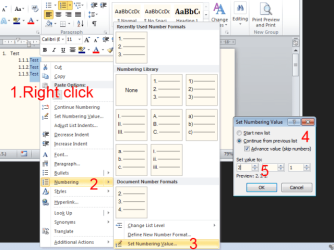
Highlight that paragraph, Right click - Numbering - Set numbering value - Continue from previous list - Advanced value (if required)
 

Attachments

  • numbering.png
    numbering.png
    36.2 KB · Views: 148

My Computer My Computer

Computer type
PC/Desktop
OS
Windows 8.1 ; Windows 7 x86 (Dec2008-Jan2013)
Other Info
"The scale icon at the top right of a post or tutorial is how you can give rep to the member."
Thanks for answering but i also tried it but i dont have samething like you. Also İ dont want to change numbering always when i make a new title. I have MS 2007 in my second pc and numbering is working correctly, but not in this pc with MS 2010. You can say "use your second pc" but i cant use it because there is no patran program installed in 2nd pc.


3m45l.png
 

My Computer My Computer

OS
Windows 7 home premium X64
You need to increase level of numbering - Right click on item - Numbering - Change list level.
In your case - Numaralandırma - Liste Düzeyini Değiştir

To change quick style for Caption - right click it in Styles tab - Modify.
 

My Computer My Computer

Computer type
PC/Desktop
OS
Windows 8.1 ; Windows 7 x86 (Dec2008-Jan2013)
Other Info
"The scale icon at the top right of a post or tutorial is how you can give rep to the member."
Hehe. Man,no need to translate it to turkish ;). But about problem, it is still continue. when i make 2.1.1, then rest becomes 3.1.1 and so on although i dont use main title.
 

My Computer My Computer

OS
Windows 7 home premium X64
When I type 1.1.1 Text and hit Enter, 1.1.2 pops up on a new line.
If I hit Enter twice 1.2 pops up, if three times - 2 pops up.

Are you trying to number them post factum?
 

My Computer My Computer

Computer type
PC/Desktop
OS
Windows 8.1 ; Windows 7 x86 (Dec2008-Jan2013)
Other Info
"The scale icon at the top right of a post or tutorial is how you can give rep to the member."
ı am not, but there can be some problem with word now coz it is so strange now. I even lost all title number. Now i just write my report and then try to find out the solution. Thanks for your help.
 

My Computer My Computer

OS
Windows 7 home premium X64
Neutron, i have the same problem as Xcl, would it be possible if i send you my word file? u sound like a guy who knows what he's doing.. i've tried the steps u mentioned above but still it wont work.. my headings go from

5
5.1
5.1.1
6.1.1 instead of 5.1.2!!!

help me :(
 

My Computer My Computer

OS
windows 7 ultimate 32bit
maybe it's because i never used 3rd level headings in this document before, could this be the problem ?
 

My Computer My Computer

OS
windows 7 ultimate 32bit
skoraden2, welcome to sevenforums!

As soon as word does 6.1.1 instead 5.1.2 press TAB key on your keyboard.
Pressing Tab will get it level deeper.
 

My Computer My Computer

Computer type
PC/Desktop
OS
Windows 8.1 ; Windows 7 x86 (Dec2008-Jan2013)
Other Info
"The scale icon at the top right of a post or tutorial is how you can give rep to the member."
wow! it works, you're the BOSS! Thanks man, you just saved me a lot of time and trouble ;) thumbs up :geek:
 

My Computer My Computer

OS
windows 7 ultimate 32bit
Back
Top