Robbie77
New member
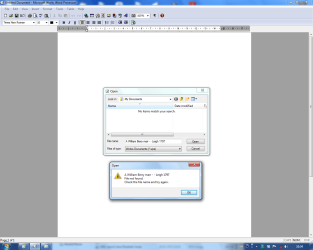
I have just done a clean install of W7 Ultimate 64 bit on 2 different Desktops. One is a Fujitsu Siemens Esprimo 5905P the other originally an HP Pavillion which now has an Asrock Mobo. I have reinstalled all my programs--no problems there. I use MS Works 8 Word Processor. This worked fine on both DT's under XP. However, it now works only on the Fujitsu, but not on the HP. The problem is it doesn't find the Files in My Documents. With Word Processor open, when I try to open a Document, the My Documents window comes up, with the message No Files found---there is no list of Files shown---though all files are in place in My Docs Folder. They can all be opened by individual clicking in that Folder---they just don't appear in Word! I have repaired Word Processor---I have uninstalled it and reinstalled from original CD. I have even cleared My Docs Folder and reloaded all Files---makes no difference.
I don't like MS Office---so who can tell me how to get this to work--as it does in the other PC---and as it did on both machines under XP SP3!
I get no error messages of any kind.
Thanks, Robbie
I don't like MS Office---so who can tell me how to get this to work--as it does in the other PC---and as it did on both machines under XP SP3!
I get no error messages of any kind.
Thanks, Robbie
Last edited by a moderator:
My Computer
- Computer type
- PC/Desktop
- Computer Manufacturer/Model Number
- Fujitsu-Siemens --Esprimo P
- OS
- Windows 7 Ultimate SP1 x64 build 7601
- CPU
- 2.8 Intel Pentium D 820
- Motherboard
- Fujitsu Siemens D2151-A1 S26361-D2151-A1
- Memory
- 2 Gb
- Graphics Card(s)
- Intel GMA 950 onboard Graphics
- Hard Drives
- Seagate 80Gb
- Antivirus
- AVG Free2014
- Browser
- IE10