MSE beta survey #1

mxosder16

New member
Power User
Local time
9:30 AM
Messages
1,160
Hi guys,
As the title says.
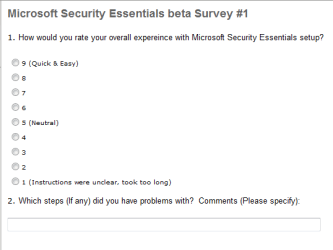
I got an email today asking to fill out a quick survey for Microsoft Security Essentials.
It was very quick and basic (2 questions, lol)

Capture.PNG


What do you guys think MS could do to improve their product at this point in beta testing?
 

My Computer

Computer Manufacturer/Model Number
Dell Vostro 1000
OS
Windows 7 Ultimate x86
CPU
AMD Sempron 3600+
Graphics Card(s)
ATI Radeon Xpress 1150
Monitor(s) Displays
Generic PnP Monitor
Screen Resolution
1200 x 800
Hard Drives
WD Scorpio Blue 500 GB (WD5000BEVT)
Mouse
Logitech V320 Cordless Optical Mouse
Hi guys,
As the title says.
I got an email today asking to fill out a quick survey for Microsoft Security Essentials.
It was very quick and basic (2 questions, lol)

What do you guys think MS could do to improve their product at this point in beta testing?
.
I noticed two problematic behaviors which hopefully will be eliminated in the final version. One is MSE would drive my CPU to 100% for a minute or two when I first booted and logged into the desktop. The other is MSE would go into a disabled state (orange alert icon) and cause the Action Center to throw up an alert saying MSE was turned OFF during signature updates. This was annoying enough that I went back to Avast. I don't know how common this behavior is though.
 

My Computer

Computer type
PC/Desktop
OS
Windows 7 x64
CPU
Intel Core2 Extreme Q6850 3.00GHz
Motherboard
EVGA 132-CK-NF79
Memory
8 GB
Graphics Card(s)
Radeon R7 260X
Sound Card
Xonar DS
Hard Drives
Hitachi Deskstar 1 tb
Hi Victek,
Are you an official beta tester and thusly be able to send your feedback to MS?
 

My Computer

Computer Manufacturer/Model Number
Dell Vostro 1000
OS
Windows 7 Ultimate x86
CPU
AMD Sempron 3600+
Graphics Card(s)
ATI Radeon Xpress 1150
Monitor(s) Displays
Generic PnP Monitor
Screen Resolution
1200 x 800
Hard Drives
WD Scorpio Blue 500 GB (WD5000BEVT)
Mouse
Logitech V320 Cordless Optical Mouse
.
I noticed two problematic behaviors which hopefully will be eliminated in the final version. One is MSE would drive my CPU to 100% for a minute or two when I first booted and logged into the desktop. The other is MSE would go into a disabled state (orange alert icon) and cause the Action Center to throw up an alert saying MSE was turned OFF during signature updates. This was annoying enough that I went back to Avast. I don't know how common this behavior is though.

I haven't had either of those issues. My startup is just as fast as it was while I was running Avast instead of MSE. The only thing I've seen during MSE updates is the Windows Update icon for a few seconds. MSE's icon hasn't changed at all.
 

My Computer

Computer Manufacturer/Model Number
HP Pavillion dv2550se
OS
Windows 7 Build 7229 x64
CPU
Intel Core2 Duo T5250 @ 1.50GHz
Memory
2GB DDR2
Graphics Card(s)
Moble Intel 965 Express
Screen Resolution
1280x800
Hard Drives
160GB
750GB External
I've had no problems at all and consequently checked box 9 of my survey. My only comments were that for a beta product, it performed quite well.
 

My Computer

Computer type
PC/Desktop
Computer Manufacturer/Model Number
Dell: XPS 420 (2), XPS M1330 (several), XPS 14z, Mini 9, Mini 10v
OS
W8 Pro, W7 Ultimate, XP Pro x64, Vista x64, Ubuntu
CPU
Q6600, Q6700, T7500, T7500, N270, N270
Motherboard
Dell
Memory
8GB, 8GB, 4GB, 4GB, 2GB, 2GB
Graphics Card(s)
ATI, nVidia, nVidia, nVidia, Intel, Intel
Monitor(s) Displays
Dell 2408WFP
Hard Drives
A drawer full. OCZ Vertex's in RAID 0. Vertex 3's, Vertex 4, Samsung 830's, Samsung 840's, Intel 330. Don't use dino drives any more except for servers.
Keyboard
Logitech Wave
Internet Speed
29 Mbps DL / .95 Mbps UL
Other Info
New project(2013)...Another low power server. Zotac H67ITX, i3-2100T, Windows Server 2012 Essentials on Samsung SSD.
Previous project...Low power (38-40 watts using Kill-a-Watt) Windows Home Server. Zotac ION (Atom 330, GeForce9400), 4GB RAM, 2x2TB WD Green, IN WIM miniITX Case. Fits on a shelf in laundry closet, practically silent.
I have had no problems and i checked box 7 (didn't want MS to get too cocky ;))
 

My Computer

Computer Manufacturer/Model Number
Dell Vostro 1000
OS
Windows 7 Ultimate x86
CPU
AMD Sempron 3600+
Graphics Card(s)
ATI Radeon Xpress 1150
Monitor(s) Displays
Generic PnP Monitor
Screen Resolution
1200 x 800
Hard Drives
WD Scorpio Blue 500 GB (WD5000BEVT)
Mouse
Logitech V320 Cordless Optical Mouse
I have had no problems and i checked box 7 (didn't want MS to get too cocky ;))

I had that same thought exactly. I guess I was in a generous mood or something.
 

My Computer

Computer type
PC/Desktop
Computer Manufacturer/Model Number
Dell: XPS 420 (2), XPS M1330 (several), XPS 14z, Mini 9, Mini 10v
OS
W8 Pro, W7 Ultimate, XP Pro x64, Vista x64, Ubuntu
CPU
Q6600, Q6700, T7500, T7500, N270, N270
Motherboard
Dell
Memory
8GB, 8GB, 4GB, 4GB, 2GB, 2GB
Graphics Card(s)
ATI, nVidia, nVidia, nVidia, Intel, Intel
Monitor(s) Displays
Dell 2408WFP
Hard Drives
A drawer full. OCZ Vertex's in RAID 0. Vertex 3's, Vertex 4, Samsung 830's, Samsung 840's, Intel 330. Don't use dino drives any more except for servers.
Keyboard
Logitech Wave
Internet Speed
29 Mbps DL / .95 Mbps UL
Other Info
New project(2013)...Another low power server. Zotac H67ITX, i3-2100T, Windows Server 2012 Essentials on Samsung SSD.
Previous project...Low power (38-40 watts using Kill-a-Watt) Windows Home Server. Zotac ION (Atom 330, GeForce9400), 4GB RAM, 2x2TB WD Green, IN WIM miniITX Case. Fits on a shelf in laundry closet, practically silent.
7/10.
 

My Computer

Computer Manufacturer/Model Number
Samsung NP530U4B-S02IN
OS
Windows® 8 Pro (64-bit)
CPU
Intel® Core™ i5 Processor 2467M (1.60GHz, 3MB L3 Cache)
Motherboard
Samsung Electronics
Memory
6GB DDR3 System Memory at 1,333MHz (on BD 4GB + 2GB x 1)
Graphics Card(s)
AMD Radeon™ HD7550M 1GB DDR3 (Ext. Graphic)
Sound Card
Realtek High Definition Audio
Monitor(s) Displays
35.56cm (14.0) SuperBright 300nit HD LED Display
Screen Resolution
1366x768
Hard Drives
1TB S-ATA II Hard Drive (5400RPM) with ExpressCache 16GB SSD
Internet Speed
sucks
Antivirus
Microsoft Security Essentials
Browser
Google Chrome (Sync enabled)
MSE

seven of 10. great minds to think alike

Ken
 

My Computer

Computer Manufacturer/Model Number
HP Pavillion dv-7 1005 Tx
OS
Win 8 Release candidate 8400
CPU
[email protected]
Memory
4 gigs
Graphics Card(s)
Nvidia 9600M
Sound Card
HD built-in
Monitor(s) Displays
17" Wxga
Screen Resolution
1440x900
Cooling
none
Internet Speed
45Mb down 5Mb up
I gave it full mark's, quick and easy and well integrated, haven't had to touch it since install and you don't even notice it's there.

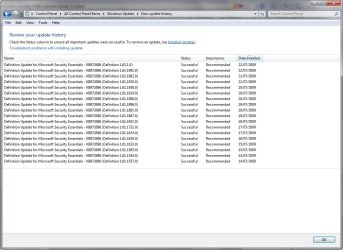
Another thing I noticed is the amount of updates, I get 1-3 updates a day, I don't know of any other virus software that keeps itself that up to date, well done Microsoft.

2009-07-22_213536.jpg
 

My Computer

Computer Manufacturer/Model Number
Home Brew
OS
Windows 7 Ultimate Vista Ultimate x64
CPU
Core 2 Duo E8500 3.16Ghz @ 3.8Ghz
Motherboard
eVGA 750i FTW
Memory
2x2Gigs Patriot PC2-6400 LL
Graphics Card(s)
Inno3D GeForce GTX260 216 SP
Monitor(s) Displays
ASUS VW222U 22" 2ms Response time
Screen Resolution
1680x1050
Hard Drives
SATA 150GB
SATA II 250GB
USB IDE 750GB Ext.
PSU
HYTEC 600W & Thermaltake 650W Toughpower Power Exp
Case
Thermaltake Armor LCS (Liquid Cooling System)
Cooling
Liquid Cooling System
Keyboard
Logitech G15 Gaming Keyboard
Mouse
Logitech G9 Gaming Mouse
Another thing I noticed is the amount of updates, I get 1-3 updates a day, I don't know of any other virus software that keeps itself that up to date, well done Microsoft.
eset updates 3-4 times a day.
 

My Computer

Computer Manufacturer/Model Number
Samsung NP530U4B-S02IN
OS
Windows® 8 Pro (64-bit)
CPU
Intel® Core™ i5 Processor 2467M (1.60GHz, 3MB L3 Cache)
Motherboard
Samsung Electronics
Memory
6GB DDR3 System Memory at 1,333MHz (on BD 4GB + 2GB x 1)
Graphics Card(s)
AMD Radeon™ HD7550M 1GB DDR3 (Ext. Graphic)
Sound Card
Realtek High Definition Audio
Monitor(s) Displays
35.56cm (14.0) SuperBright 300nit HD LED Display
Screen Resolution
1366x768
Hard Drives
1TB S-ATA II Hard Drive (5400RPM) with ExpressCache 16GB SSD
Internet Speed
sucks
Antivirus
Microsoft Security Essentials
Browser
Google Chrome (Sync enabled)
.
I noticed two problematic behaviors which hopefully will be eliminated in the final version. One is MSE would drive my CPU to 100% for a minute or two when I first booted and logged into the desktop. The other is MSE would go into a disabled state (orange alert icon) and cause the Action Center to throw up an alert saying MSE was turned OFF during signature updates. This was annoying enough that I went back to Avast. I don't know how common this behavior is though.

Wow ... you really found it THAT annoying?! Not having that issue here, BTW.

I have had no problems and i checked box 7 (didn't want MS to get too cocky ;))

That's a really weird reason. The survey was about the SETUP/INSTALLATION experience, which was lightning fast and easy. I gave it full marks.

I gave it full mark's, quick and easy and well integrated, haven't had to touch it since install and you don't even notice it's there.

Another thing I noticed is the amount of updates, I get 1-3 updates a day, I don't know of any other virus software that keeps itself that up to date, well done Microsoft.

View attachment 19438

Kaspersky updates more than that I think, but yeah the constant definitions are great!
 

My Computer

Computer Manufacturer/Model Number
Alienware X51
OS
Windows 7 Home Premium x64
CPU
Intel Core i7-2600 @3.40GHz
Memory
8.00GB DDR3
Graphics Card(s)
NVIDIA GeForce GTX 555 w/1.0GB RAM
Monitor(s) Displays
BenQ XL2420TX
Screen Resolution
1920x1080@120Hz
Hard Drives
1TB
PSU
330-watt
Keyboard
Logitech Wireless Illuminated Keyboard K800
Mouse
Razer Orochi
Internet Speed
Campus Internet
I think it may base updates around your internet usage. I've seen the updates listed when checking Windows Update a few times, but typically it runs itself. Perhaps if you're using a certain amount of bandwidth it will hold off on updating until your usage goes down.

I haven't actually tested this, though. But it's the only reason I can think of for the updates to even show up on Windows Update (without searching for updates) if you have it set to automatically update itself.
 

My Computer

Computer Manufacturer/Model Number
HP Pavillion dv2550se
OS
Windows 7 Build 7229 x64
CPU
Intel Core2 Duo T5250 @ 1.50GHz
Memory
2GB DDR2
Graphics Card(s)
Moble Intel 965 Express
Screen Resolution
1280x800
Hard Drives
160GB
750GB External
I gave it a 10. No problem with setup at all.
 

My Computer

Computer type
PC/Desktop
Computer Manufacturer/Model Number
Bruce ... somewhere in his 40's
OS
Windows 7 Ultimate 32bit SP1
CPU
Intel(R) Core(TM)2 Quad CPU @ 2.40GHz, 2400 MHz
Motherboard
INTEL/D975XBX2
Memory
4 GB
Graphics Card(s)
ATI Radeon HD 2600 Pro
Monitor(s) Displays
Samsung SyncMaster 914v
Screen Resolution
1280 x 1024
Hard Drives
2/500GB each ... ST3500630AS ATA Device.
One is not connected
PSU
Rocketfish 700 W
Case
G.Skill Gigabyte Chassis
Keyboard
Standard PS/2 Keyboard
Mouse
Microsoft PS/2 Mouse
Internet Speed
DSL
Antivirus
Avira Internet Security
Browser
IE 11
Other Info
ATI HDMI Audio
Hi guys,
As the title says.
I got an email today asking to fill out a quick survey for Microsoft Security Essentials.
It was very quick and basic (2 questions, lol)

View attachment 19387


What do you guys think MS could do to improve their product at this point in beta testing?

As mentioned by more than a few people, this is about the setup of the program, not of the operation of the program. I had 0 issues installing this program, so I would give it full marks just as Grim did.

.
I noticed two problematic behaviors which hopefully will be eliminated in the final version. One is MSE would drive my CPU to 100% for a minute or two when I first booted and logged into the desktop. The other is MSE would go into a disabled state (orange alert icon) and cause the Action Center to throw up an alert saying MSE was turned OFF during signature updates. This was annoying enough that I went back to Avast. I don't know how common this behavior is though.

Never had either of those problems, but with Avast! Free I could never get the system to let go of UFDs that were inserted, no matter how long I waited. As soon as I got rid of Avast! (which was my AV of choice since I started testing Windows 7 as SEP was not compatible) my issue went away - I click remove device and it removes the device, no questions asked, notifying me with the standard "It is now safe to remove ...."

I haven't had either of those issues. My startup is just as fast as it was while I was running Avast instead of MSE. The only thing I've seen during MSE updates is the Windows Update icon for a few seconds. MSE's icon hasn't changed at all.

Agreed.

I've had no problems at all and consequently checked box 9 of my survey. My only comments were that for a beta product, it performed quite well.

I fail to see how no problems at all equates to a 9 - not trying to be a jerk, but what does it take to be a 10, when the survey is about the installation?
(redacted by me - obviously the first thing it takes is for there to be a rating of 10 to assign!)

I have had no problems and i checked box 7 (didn't want MS to get too cocky ;))

I had that same thought exactly. I guess I was in a generous mood or something.

That makes no sense. Deliberately skewing the results when you admit no issues seems a bit ... vindictive.

I gave it full mark's, quick and easy and well integrated, haven't had to touch it since install and you don't even notice it's there.

Another thing I noticed is the amount of updates, I get 1-3 updates a day, I don't know of any other virus software that keeps itself that up to date, well done Microsoft.

View attachment 19438

Agreed with the full marks, but disagree with the 1-3 updates - Avast! updated more than twice a day (annoyed me enough to turn off the stupid "Virus Database has been updated" audio notification as it was loud, SEP was continuous updating (in reality sometimes as often as 8 times a day, but mostly 1-2 times a day) and as Dinesh states below, ESET is 3-4 / day. MBAM is another that you have to really watch - they are updating constantly....

eset updates 3-4 times a day.

I think it may base updates around your internet usage. I've seen the updates listed when checking Windows Update a few times, but typically it runs itself. Perhaps if you're using a certain amount of bandwidth it will hold off on updating until your usage goes down.

I haven't actually tested this, though. But it's the only reason I can think of for the updates to even show up on Windows Update (without searching for updates) if you have it set to automatically update itself.

The only issue I have run into is that I was just about to restart, and I saw updates are waiting - so I went to WU and did a check - 2 updates were found, one for M$SE - well, as I tried to run WU it failed b/c "One of the updates is already being installed" - yup, you guessed it, M$SE was already updating itself. I cannot put the blame squarely on M$SEs shoulders, though, as it was WU that told me the updated needed to be applied, without verifying that the updated was in fact already being applied, until *after* it had downloaded it.

 

My Computers

System One System Two

  • Computer type
    PC/Desktop
    Computer Manufacturer/Model Number
    The Beast Model A (homebrew)
    OS
    Windows 11 21H2 Current build
    CPU
    AMD Ryzen 9 3950X
    Motherboard
    MSI MEG X570 GODLIKE
    Memory
    4 * 32 GB - Corsair Vengeance 3600 MHz
    Graphics Card(s)
    EVGA GeForce RTX 3080 Ti XC3 ULTRA GAMING (12G-P5-3955-KR)
    Sound Card
    Realtek® ALC1220 Codec
    Monitor(s) Displays
    2x Eve Spectrum ES07D03 4K Gaming Monitor (Matte) | Eve Spec
    Screen Resolution
    3x 3840 x 2160
    Hard Drives
    3x Samsung 980 Pro NVMe PCIe 4 M.2 2 TB SSD (MZ-V8P2T0B/AM) } 3x Sabrent Rocket NVMe 4.0 1 TB SSD
    PSU
    PC Power & Cooling’s Silencer Series 1050 Watt, 80 Plus Plat
    Case
    Fractal Design Define 7 XL Dark ATX Full Tower Case
    Cooling
    SteelSeries Apex Pro Wired Gaming Keyboard
    Keyboard
    SteelSeries Apex Pro
    Mouse
    Logitech MX Master 3S | MX Master 3 for business
    Internet Speed
    AT&T LightSpeed Gigabit Duplex Ftth
    Antivirus
    Windows Defender + MB 3
    Browser
    Nightly (default) + Firefox (stable),Chrome, Edge
  • Computer type
    PC/Desktop
    System Manufacturer/Model Number
    Dell Latitude E5470
    OS
    ChromeOS Flex Dev Channel (current)
    CPU
    Intel(R) Core(TM) i5-6300U CPU @ 2.40GHz, 2501 Mhz, 2 Core(s), 4 Logical Processor(s)
    Motherboard
    Dell
    Memory
    16 GB
    Graphics Card(s)
    Intel(R) HD Graphics 520
    Sound Card
    Intel(R) HD Graphics 520 + RealTek Audio
    Monitor(s) Displays
    Dell laptop display 15"
    Screen Resolution
    1920 * 1080
    Hard Drives
    Toshiba 128GB M.2 22300 drive
    INTEL Cherryville 520 Series SSDSC2CW180A 180 GB SATA III SSD
    PSU
    Dell
    Case
    Dell
    Cooling
    Dell
    Keyboard
    Dell
    Mouse
    Logitech MX Master 3S (shared w. Sys 1) | Dell TouchPad
    Internet Speed
    AT&T LightSpeed Gigabit Duplex Ftth
I fail to see how no problems at all equates to a 9 - not trying to be a jerk, but what does it take to be a 10, when the survey is about the installation?

John,
I gave it a 9 because that's as high as the rating sheet goes. There is no 10.
Tom
 

My Computer

Computer type
PC/Desktop
Computer Manufacturer/Model Number
Dell: XPS 420 (2), XPS M1330 (several), XPS 14z, Mini 9, Mini 10v
OS
W8 Pro, W7 Ultimate, XP Pro x64, Vista x64, Ubuntu
CPU
Q6600, Q6700, T7500, T7500, N270, N270
Motherboard
Dell
Memory
8GB, 8GB, 4GB, 4GB, 2GB, 2GB
Graphics Card(s)
ATI, nVidia, nVidia, nVidia, Intel, Intel
Monitor(s) Displays
Dell 2408WFP
Hard Drives
A drawer full. OCZ Vertex's in RAID 0. Vertex 3's, Vertex 4, Samsung 830's, Samsung 840's, Intel 330. Don't use dino drives any more except for servers.
Keyboard
Logitech Wave
Internet Speed
29 Mbps DL / .95 Mbps UL
Other Info
New project(2013)...Another low power server. Zotac H67ITX, i3-2100T, Windows Server 2012 Essentials on Samsung SSD.
Previous project...Low power (38-40 watts using Kill-a-Watt) Windows Home Server. Zotac ION (Atom 330, GeForce9400), 4GB RAM, 2x2TB WD Green, IN WIM miniITX Case. Fits on a shelf in laundry closet, practically silent.
My bad lol - I forgot it was only 9. :o
 

My Computers

System One System Two

  • Computer type
    PC/Desktop
    Computer Manufacturer/Model Number
    The Beast Model A (homebrew)
    OS
    Windows 11 21H2 Current build
    CPU
    AMD Ryzen 9 3950X
    Motherboard
    MSI MEG X570 GODLIKE
    Memory
    4 * 32 GB - Corsair Vengeance 3600 MHz
    Graphics Card(s)
    EVGA GeForce RTX 3080 Ti XC3 ULTRA GAMING (12G-P5-3955-KR)
    Sound Card
    Realtek® ALC1220 Codec
    Monitor(s) Displays
    2x Eve Spectrum ES07D03 4K Gaming Monitor (Matte) | Eve Spec
    Screen Resolution
    3x 3840 x 2160
    Hard Drives
    3x Samsung 980 Pro NVMe PCIe 4 M.2 2 TB SSD (MZ-V8P2T0B/AM) } 3x Sabrent Rocket NVMe 4.0 1 TB SSD
    PSU
    PC Power & Cooling’s Silencer Series 1050 Watt, 80 Plus Plat
    Case
    Fractal Design Define 7 XL Dark ATX Full Tower Case
    Cooling
    SteelSeries Apex Pro Wired Gaming Keyboard
    Keyboard
    SteelSeries Apex Pro
    Mouse
    Logitech MX Master 3S | MX Master 3 for business
    Internet Speed
    AT&T LightSpeed Gigabit Duplex Ftth
    Antivirus
    Windows Defender + MB 3
    Browser
    Nightly (default) + Firefox (stable),Chrome, Edge
  • Computer type
    PC/Desktop
    System Manufacturer/Model Number
    Dell Latitude E5470
    OS
    ChromeOS Flex Dev Channel (current)
    CPU
    Intel(R) Core(TM) i5-6300U CPU @ 2.40GHz, 2501 Mhz, 2 Core(s), 4 Logical Processor(s)
    Motherboard
    Dell
    Memory
    16 GB
    Graphics Card(s)
    Intel(R) HD Graphics 520
    Sound Card
    Intel(R) HD Graphics 520 + RealTek Audio
    Monitor(s) Displays
    Dell laptop display 15"
    Screen Resolution
    1920 * 1080
    Hard Drives
    Toshiba 128GB M.2 22300 drive
    INTEL Cherryville 520 Series SSDSC2CW180A 180 GB SATA III SSD
    PSU
    Dell
    Case
    Dell
    Cooling
    Dell
    Keyboard
    Dell
    Mouse
    Logitech MX Master 3S (shared w. Sys 1) | Dell TouchPad
    Internet Speed
    AT&T LightSpeed Gigabit Duplex Ftth
I gave it a 10. No problem with setup at all.
It only allowed up to a 9. :shock:
The only issue I have run into is that I was just about to restart, and I saw updates are waiting - so I went to WU and did a check - 2 updates were found, one for M$SE - well, as I tried to run WU it failed b/c "One of the updates is already being installed" - yup, you guessed it, M$SE was already updating itself. I cannot put the blame squarely on M$SEs shoulders, though, as it was WU that told me the updated needed to be applied, without verifying that the updated was in fact already being applied, until *after* it had downloaded it.

I forgot about that, I've had that happen a few times. It doesn't bother me much, though, since it doesn't happen often and I know what it is.
 

My Computer

Computer Manufacturer/Model Number
HP Pavillion dv2550se
OS
Windows 7 Build 7229 x64
CPU
Intel Core2 Duo T5250 @ 1.50GHz
Memory
2GB DDR2
Graphics Card(s)
Moble Intel 965 Express
Screen Resolution
1280x800
Hard Drives
160GB
750GB External
I gave this a 9. Very easy installation and on a side note, it's very easy to use and has caught everything I've thrown at it.
 

My Computer

Computer Manufacturer/Model Number
Dell Inspiron 14R N4110
OS
Windows 7 Home Premium x64
CPU
Intel Core i5-2410M Quad Core CPU @ 2.30 GHz
Memory
8 GB Shared Channel DDR3 Memory
Graphics Card(s)
Intel HD Graphics 3000, AMD Radeon HD 6470M
Sound Card
Intel Display Audio, Realtek High Definition Audio
Monitor(s) Displays
14" HD 720p LED Display
Screen Resolution
1366x768
Hard Drives
500 GB 5400 RPM SATA Hard Drive
Mouse
Microsoft USB IntelliMouse Explorer 3.0
Back
Top