
Solved MSE corrupted

MSE won't run unless you have a legal OS ... if your OS is legal, then you might need to call Microsoft to get your key validated.

My OS is legal, I think this is just a file corruption issue.
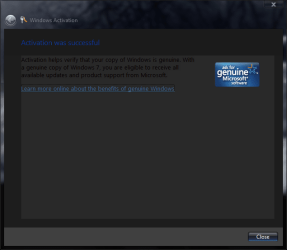
Windows Activation.PNG
My MSE lost track of at least one of its files, msse.msi, which is its installer, and it cannot update its definitions (possibly caused by a second, different file missing/corrupted).

PS... Restore got my internet back. Yay! Now if I need to do a clean install, at least I can put it off until the weekend. Whew!
 

Attachments

  • MSE Update Fail.PNG
    MSE Update Fail.PNG
    34.8 KB · Views: 44

My Computer

Computer Manufacturer/Model Number
me / #1
OS
windows 7 x64 Home Premium
CPU
intel q6600
Motherboard
gigbyte ga ep45 ud3l
Memory
g.skill 8gb ddr2 1066 (pc2 8500)
Graphics Card(s)
evga geforce 9800 gtx 512 mb
Screen Resolution
1680 x 1050
Hard Drives
wd caviar black 500 gb
wd caviar black 1tb
wd elements 1tb external hd x2
PSU
raidmax 500w
Case
smilodon (yes, t'was the pretty blue lites that got me!)

My Computer

Computer Manufacturer/Model Number
me / #1
OS
windows 7 x64 Home Premium
CPU
intel q6600
Motherboard
gigbyte ga ep45 ud3l
Memory
g.skill 8gb ddr2 1066 (pc2 8500)
Graphics Card(s)
evga geforce 9800 gtx 512 mb
Screen Resolution
1680 x 1050
Hard Drives
wd caviar black 500 gb
wd caviar black 1tb
wd elements 1tb external hd x2
PSU
raidmax 500w
Case
smilodon (yes, t'was the pretty blue lites that got me!)
I had high hopes for that, but it didn't help. I guess resetting to default settings doesn't help when a file is missing or corrupt. I'll see if I can find msse.msi somewhere in my backups.


It won't be a direct file you just find lying around, you have to run the MSE .exe installer, and it wil extract into your temp files, then run from your temp files to install MSE.
 

My Computer

Computer Manufacturer/Model Number
Custom Build
OS
W7 RTM Ultimate x64
CPU
Intel Q8400 @ 2.66GHZ
Motherboard
Gigabyte GA-EG45M-UD2H
Memory
4GB DDR2-800
Graphics Card(s)
Gainward GTS 450 GLH 1GB Edition
Sound Card
Integrated 8 Channel
Monitor(s) Displays
AOC 23.6 Inch Widescreen LCD
Screen Resolution
1920x1080
Hard Drives
Seagate 500GB Internal
Western Digital 1TB Internal

Hitachi 1TB External
PSU
Apevia Java Power 500W
Case
Cooler Master HAF 922 Black
Cooling
Stock Intel CPU Fan
Keyboard
HP SK-2960 Multimedia Keyboard
Mouse
Logitech M350 Wireless Gaming Mouse
Internet Speed
1.5MB
It won't be a direct file you just find lying around, you have to run the MSE .exe installer, and it wil extract into your temp files, then run from your temp files to install MSE.

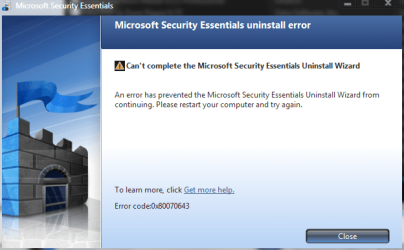
I found the file in my backup, and copied it to my desktop. The uninstall ran a bit more, but it stalled again, looking for a second file, "mp_ambits_msi". So I scurried back to the backup and copied that file to desktop. The uninstall charged forward like a champ until it hit the final step, and it gave me this message:
MSE Unistall Error.PNG
So I rebooted... and it looks like MSE is gone! No desktop icon, not listed in "programs"...

I think your idea worked!
 

My Computer

Computer Manufacturer/Model Number
me / #1
OS
windows 7 x64 Home Premium
CPU
intel q6600
Motherboard
gigbyte ga ep45 ud3l
Memory
g.skill 8gb ddr2 1066 (pc2 8500)
Graphics Card(s)
evga geforce 9800 gtx 512 mb
Screen Resolution
1680 x 1050
Hard Drives
wd caviar black 500 gb
wd caviar black 1tb
wd elements 1tb external hd x2
PSU
raidmax 500w
Case
smilodon (yes, t'was the pretty blue lites that got me!)
Bahahaha, go me :D

Are you planning to reinstall it?

Or changing due to the hair loss because you ripped it all out trying to get rid of it?

:)
 

My Computer

Computer Manufacturer/Model Number
Custom Build
OS
W7 RTM Ultimate x64
CPU
Intel Q8400 @ 2.66GHZ
Motherboard
Gigabyte GA-EG45M-UD2H
Memory
4GB DDR2-800
Graphics Card(s)
Gainward GTS 450 GLH 1GB Edition
Sound Card
Integrated 8 Channel
Monitor(s) Displays
AOC 23.6 Inch Widescreen LCD
Screen Resolution
1920x1080
Hard Drives
Seagate 500GB Internal
Western Digital 1TB Internal

Hitachi 1TB External
PSU
Apevia Java Power 500W
Case
Cooler Master HAF 922 Black
Cooling
Stock Intel CPU Fan
Keyboard
HP SK-2960 Multimedia Keyboard
Mouse
Logitech M350 Wireless Gaming Mouse
Internet Speed
1.5MB
Bahahaha, go me :D

Are you planning to reinstall it?

Or changing due to the hair loss because you ripped it all out trying to get rid of it?

:)
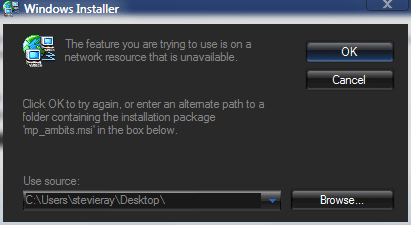
I'd like to install it again, but it won't install. I downloaded a brand new MSE installer, but when I try to run it, it can't find its one of its own files!
MSE Install problem.PNG
That is one of the files it couldn't find for the uninstall, and I copied it to my desktop during the uninstall. Now the new installer is looking for the file on my desktop (because that's where it was last time?) instead of looking inside itself!

I tried the "browse" function so I could redirect the installer back to itself, but I can't find the installer on my desktop when I "browse" there!
 

My Computer

Computer Manufacturer/Model Number
me / #1
OS
windows 7 x64 Home Premium
CPU
intel q6600
Motherboard
gigbyte ga ep45 ud3l
Memory
g.skill 8gb ddr2 1066 (pc2 8500)
Graphics Card(s)
evga geforce 9800 gtx 512 mb
Screen Resolution
1680 x 1050
Hard Drives
wd caviar black 500 gb
wd caviar black 1tb
wd elements 1tb external hd x2
PSU
raidmax 500w
Case
smilodon (yes, t'was the pretty blue lites that got me!)
MSE's giving you a hard time. Looks like your going in circles..

Extract it again, and see if it will accept the missing file..
 

My Computer

Computer Manufacturer/Model Number
Custom Build
OS
W7 RTM Ultimate x64
CPU
Intel Q8400 @ 2.66GHZ
Motherboard
Gigabyte GA-EG45M-UD2H
Memory
4GB DDR2-800
Graphics Card(s)
Gainward GTS 450 GLH 1GB Edition
Sound Card
Integrated 8 Channel
Monitor(s) Displays
AOC 23.6 Inch Widescreen LCD
Screen Resolution
1920x1080
Hard Drives
Seagate 500GB Internal
Western Digital 1TB Internal

Hitachi 1TB External
PSU
Apevia Java Power 500W
Case
Cooler Master HAF 922 Black
Cooling
Stock Intel CPU Fan
Keyboard
HP SK-2960 Multimedia Keyboard
Mouse
Logitech M350 Wireless Gaming Mouse
Internet Speed
1.5MB

My Computer

Computer Manufacturer/Model Number
Apple - MBP 5,4
OS
Win 7 64, OSX Snow Leopard
CPU
Intel Core 2 Duo P8700
Memory
4 GB 1066 MHz DDR3
Graphics Card(s)
nVidia 9400 M
Screen Resolution
1440x900
Hard Drives
WD Caviar Black 500GB 7200RPM
Bahahaha, go me :D

Are you planning to reinstall it?

Or changing due to the hair loss because you ripped it all out trying to get rid of it?

:)
I'd like to install it again, but it won't install. I downloaded a brand new MSE installer, but when I try to run it, it can't find its one of its own files!
View attachment 40003
That is one of the files it couldn't find for the uninstall, and I copied it to my desktop during the uninstall. Now the new installer is looking for the file on my desktop (because that's where it was last time?) instead of looking inside itself!

I tried the "browse" function so I could redirect the installer back to itself, but I can't find the installer on my desktop when I "browse" there!
If you are going to do a clean install Stevie make sure this time that you also don't run the universal patcher on your system (from a different thread...). Run UxStyle on it
 

My Computer

Computer Manufacturer/Model Number
Compal JFT02 (Custom Build Laptop)
OS
Windows 7 Home Premium x64 - Mac OS X 10.6.4 x64
CPU
Intel Core 2 Duo T9300 2.5 GHz
Motherboard
JFT02
Memory
4GB Kingston DDR2-800
Graphics Card(s)
NVIDIA Geforce 8600M GT (512MB Model)
Sound Card
Realtek HD Audio
Monitor(s) Displays
WUXGA Standard Laptop Display
Screen Resolution
1680*1050
Hard Drives
Toshiba 320GB 5400RPM Laptop HD
PSU
Standard Laptop Power Supply
Case
Standard Laptop Case
Cooling
Standard Laptop Cooling
Keyboard
Standard Laptop 105 Key-Keyboard
Mouse
Synaptics Touchpad
Internet Speed
Verizion Online DSL 3360/864 kbs (dl/up)
Download and install Windows Installer Cleanup Utility from Microsoft website

Direct Link: http://download.microsoft.com/downlo...bd/msicuu2.exe

If that link is broken use this page: Description of the Windows Installer CleanUp Utility

Install it, run it from its start menu shortcut. Select MSE (or all the MSE stuff there) -> Click Remove. Done, Exit the tool. Reboot, reinstall MSE.

My Windows Installer is not working again. Something I did while uninstalling MSE broke it, so I can't install the Installer repair utility. I can install zipped files with no problem -- just extract and install -- but files that need Windows Installer to run? No go.

Its things like this that make me question MS's intelligence. Why would an Installer repair utility be dependent on the Windows Installer to install? Does anybody else see the problem there? Why not offer it in multiple forms with multiple installation options, so the people that need it can actually run it? Am I the crazy one here?
 

My Computer

Computer Manufacturer/Model Number
me / #1
OS
windows 7 x64 Home Premium
CPU
intel q6600
Motherboard
gigbyte ga ep45 ud3l
Memory
g.skill 8gb ddr2 1066 (pc2 8500)
Graphics Card(s)
evga geforce 9800 gtx 512 mb
Screen Resolution
1680 x 1050
Hard Drives
wd caviar black 500 gb
wd caviar black 1tb
wd elements 1tb external hd x2
PSU
raidmax 500w
Case
smilodon (yes, t'was the pretty blue lites that got me!)
MSE's giving you a hard time. Looks like your going in circles..

Extract it again, and see if it will accept the missing file..
Its not MSE, its my Windows Installer... it broke again, I'm getting the 2203 error once again. Add to that, now I'm getting all kinds of "access denied" messages... my permissions are all messed up. Folders that I could access earlier today are now off limits.

This installation has been buggy since the beginning, things I could do with ease in the RC I cannot do at all (or without a fight) in the RTM. Looks like a clean install is my best bet... I want the smooth, bug-free experience I had a few months ago.
 

My Computer

Computer Manufacturer/Model Number
me / #1
OS
windows 7 x64 Home Premium
CPU
intel q6600
Motherboard
gigbyte ga ep45 ud3l
Memory
g.skill 8gb ddr2 1066 (pc2 8500)
Graphics Card(s)
evga geforce 9800 gtx 512 mb
Screen Resolution
1680 x 1050
Hard Drives
wd caviar black 500 gb
wd caviar black 1tb
wd elements 1tb external hd x2
PSU
raidmax 500w
Case
smilodon (yes, t'was the pretty blue lites that got me!)
Just blow alway the installation and start anew. Whatever you did (and yes, you did do something), your entire installation is just broken beyond repair. So start fresh and leave messing with system files alone for the time being.
 

My Computer

Computer type
PC/Desktop
Computer Manufacturer/Model Number
Alienware Aurora ALX R4
OS
Windows 10 Pro (x64)
CPU
Intel Core i7-3930K (3.2GHz - 4.5GHz)
Motherboard
Alienware Aurora-R4 x79
Memory
4x Samsung 4GB PC3-12800 DDR3 (16GB 1600MHz)
Graphics Card(s)
Nvidia Geforce GTX 690
Sound Card
SteelSeries Siberia Elite
Monitor(s) Displays
Dell UltraSharp U3011
Screen Resolution
2560x1600
Hard Drives
Samsung 850 Pro 256 GB, Seagate 1TB Desktop Hybrid HDD, 2x Western Digital 4TB Green HDD
PSU
875W Some Dell PSU <.<
Case
Alienware Aurora ALX
Cooling
Custom Liquid Cooling (EK CPU & GPU blocks) dual EK 480RAD
Keyboard
Logitech G710+ Mechanical
Mouse
Logitech G700s
Internet Speed
Verizon Fios (50 mbps average)
Other Info
Server: Intel NUC D54250WYK: i5-4250U, 16GB, 256 GB mSATA, Windows Server 2012 R2
Just blow alway the installation and start anew. Whatever you did (and yes, you did do something), your entire installation is just broken beyond repair. So start fresh and leave messing with system files alone for the time being.
Exactly my point...I mentioned in a post above that he needs to not modify the system files in the new installation...just run UxStyle Beta for the custom themes...

No matter the experience in the past...UxStyle works fine on Win7. Just follow my tutorial to the "T" and you should be fine
 

My Computer

Computer Manufacturer/Model Number
Compal JFT02 (Custom Build Laptop)
OS
Windows 7 Home Premium x64 - Mac OS X 10.6.4 x64
CPU
Intel Core 2 Duo T9300 2.5 GHz
Motherboard
JFT02
Memory
4GB Kingston DDR2-800
Graphics Card(s)
NVIDIA Geforce 8600M GT (512MB Model)
Sound Card
Realtek HD Audio
Monitor(s) Displays
WUXGA Standard Laptop Display
Screen Resolution
1680*1050
Hard Drives
Toshiba 320GB 5400RPM Laptop HD
PSU
Standard Laptop Power Supply
Case
Standard Laptop Case
Cooling
Standard Laptop Cooling
Keyboard
Standard Laptop 105 Key-Keyboard
Mouse
Synaptics Touchpad
Internet Speed
Verizion Online DSL 3360/864 kbs (dl/up)
Exactly my point...I mentioned in a post above that he needs to not modify the system files in the new installation...just run UxStyle Beta for the custom themes...

No matter the experience in the past...UxStyle works fine on Win7. Just follow my tutorial to the "T" and you should be fine

Hey... it worked this time. Thanks Zidane! I guess whatever was at the root of the problems was also preventing UxStyles from working right. Now it works fine... including the taskbar (which wouldn't render correctly before).
 

My Computer

Computer Manufacturer/Model Number
me / #1
OS
windows 7 x64 Home Premium
CPU
intel q6600
Motherboard
gigbyte ga ep45 ud3l
Memory
g.skill 8gb ddr2 1066 (pc2 8500)
Graphics Card(s)
evga geforce 9800 gtx 512 mb
Screen Resolution
1680 x 1050
Hard Drives
wd caviar black 500 gb
wd caviar black 1tb
wd elements 1tb external hd x2
PSU
raidmax 500w
Case
smilodon (yes, t'was the pretty blue lites that got me!)
Back
Top