
MSE detects a threat in Avast folder!

kimouette

New member
Local time
10:29 PM
Messages
40
Hi everyone,

I currently use 3 free security programs : Avast 6, Microsoft security essentials and Malwarebytes.

I just ran a quick computer scan with Avast and just when the scan completed I got an alert from microsoft security essentials :
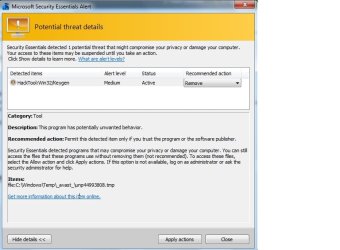
mse-alert.jpg
Does this mean that there's a virus located in my Avast temp folder? Or maybe MSE doesn't get along too well with Avast??

I wont remove the file until I get an answer cuz I'm affraid this could de-activate Avast!

Please help!
 

My Computer My Computer

Computer Manufacturer/Model Number
Lenovo 3000 N200 (0769)
OS
Windows 7 Ultimate 32-bit SP1
CPU
Intel(R) Pentium(R) Dual CPU T2370 @ 1.73GHz
Motherboard
Lenovo IEL10
Memory
4096 MBytes (2X2 Gb)
Graphics Card(s)
Generic PnP Monitor on Mobile Intel 965 Express Chipset Fami
Sound Card
High Definition Audio Device
Monitor(s) Displays
Generic PnP Monitor on Mobile Intel 965 Express Chipset Fami
Screen Resolution
1280x800 pixels
Hard Drives
Internal : Western Digital Mobile/WD Scorpio®, 7200 RPM with 16 MB cache, Capacity : 488GB
It's generally not advised to run multiple Anti-virus at the same time. They don't agree with each other, resulting in a lot of conflicts with virus removal as well as a multitude of other things.

For example, they could both latch onto the same infected file and try to delete it. Obviously, this doesn't work very well, usually ending in a terribly slow computer. Similar problems occur if one AV quarantines a file while the other AV tries to delete it. I once had BitDefender and Trend Micro installed on the same computer. My computer was so slow, it was barely usable.

Most AV software nowadays attempts to detect and remove other competitors at installation. it's probably for the best as having more than one AV will probably cause you more problems than do you good. If there's any AV software you prefer, I recommend keeping it and uninstalling the others. Malwarebytes in my opinion, is great. You should be able to use it in conjunction with avast! or MSE though as it doesn't offer real-time protection. Though in the end, it really comes down to what you feel more comfortable with. Alternatively, you may have to set exclusions for the related file folders in order to avoid any complications.
 

My Computer My Computer

Computer Manufacturer/Model Number
Custom Build
OS
Windows 7 Ultimate x64/Windows 8 Consumer Preview x64/Ubuntu 11.04
CPU
Intel Pentium Dual Core E6700 3.2GHz
Motherboard
ASUS P5G41T-M LX
Memory
Strontium 8192MB DDR3 1333Mhz
Graphics Card(s)
msi GeForce N560GTX-M2D1GD5 1GB
Sound Card
Realtek HD Audio
Monitor(s) Displays
CHIMEI CMV 221D 22"
Screen Resolution
1680x1050
Hard Drives
Seagate Barracuda LP Green 3.5'' 2TB Internal HDD 5900RPM + WD Elements Desktop 1TB External HDD 7200RPM
PSU
SHAW Viper-1500w Gaming PSU
Case
Black eMaxx ATX Mini Tower Case
Keyboard
Microsoft Wireless Keyboard 1000
Mouse
Microsoft Wireless Optical Mouse 2000
Internet Speed
100GB @ 4.76Mbps
Hi,

Interesting - I don't think I've seen that before. Does that .tmp file exist in that location?

A few questions:

1. Is your Avast 6 a legitimate version?
2. Were you perhaps running an Avast scan at the same time as MSE?
3. What is currently in your Avast quarantine folder?

Regards,
Golden
 

My Computer My Computer

Computer type
PC/Desktop
Computer Manufacturer/Model Number
Golden Mk. I.4
OS
Windows 10 Pro x64 ; Xubuntu x64
CPU
Intel i7 860 @ 2.80 GHz O/C'ed to 4.0GHz
Motherboard
Gigabyte P55A-UD3R Rev.1. Award BIOS F13
Memory
16GB Corsair Vengance DDR3 @ 661 MHz Dual Channel (9-9-9-24)
Graphics Card(s)
EVGA NVidia GTX 560 1024MB
Sound Card
Realtek Integrated
Monitor(s) Displays
Dual Samsung SyncMaster 2494HS
Screen Resolution
1920*1080 and 1920*1080
Hard Drives
1*Samsung 840 EVO 120GB SSD;
1*OCZ Vertex 2 60GB SSD;
2*Samsung F3 SpinPoint 1TB in RAID0;
1*Samsung F1 SpinPoint 1TB;
2*Western Digital 1TB External USB 3.0
1*Western Digital 500GB External USB 3.0
1*Seagate 500GB External USB 2.0
PSU
Thermaltake ToughPower QFan 750W
Case
Thermaltake Element S VK60001W2Z
Cooling
Corsair H60 Water Cooling, 2*230mm and 2*80mm case fans
Keyboard
Logitech G110
Mouse
Logitech MX518
MSE just detected what avast has unpacked into its temp folder. This may happen if you're using two resident AVs without excluding certain locations from each other. Read this:

Two anti-virus

Please make up your mind which AV you want to use and uninstall the other. MBAM free version is fine because its not real time.
 

My Computer My Computer

Computer Manufacturer/Model Number
Too many to describe...
OS
Windows 7 x64 pro/ Windows 7 x86 Pro/ XP SP3 x86
Wow that was fast! Thanks guys for the quick replies.

Ok I agree, maybe I should uninstall one of the 2 apps (AVS or MSE) but I will keep Malwarebytes for sure!

Does that .tmp file exist in that location?
I dont see it!

1. Is your Avast 6 a legitimate version?
2. Were you perhaps running an Avast scan at the same time as MSE?
3. What is currently in your Avast quarantine folder?
1. Yes, it's the free version i downloaded from their official website then I registered it.
2.I was running a scan with Avast, but MSE was just working "in background", I mean, I did not run TWO scans at the same time, I just didn't completely close MSE before running a scan with Avast.
3. You're talking about the virus chest right? If so, well there's nothing in there
 

My Computer My Computer

Computer Manufacturer/Model Number
Lenovo 3000 N200 (0769)
OS
Windows 7 Ultimate 32-bit SP1
CPU
Intel(R) Pentium(R) Dual CPU T2370 @ 1.73GHz
Motherboard
Lenovo IEL10
Memory
4096 MBytes (2X2 Gb)
Graphics Card(s)
Generic PnP Monitor on Mobile Intel 965 Express Chipset Fami
Sound Card
High Definition Audio Device
Monitor(s) Displays
Generic PnP Monitor on Mobile Intel 965 Express Chipset Fami
Screen Resolution
1280x800 pixels
Hard Drives
Internal : Western Digital Mobile/WD Scorpio®, 7200 RPM with 16 MB cache, Capacity : 488GB
I'm sorry, who in their right mind has 2 antivirus software running at the same time. Why stop there, why not 2 firewalls, 2 anti-malware, etc? What do you do that makes you so afraid??
 

My Computer My Computer

OS
Windows 7 Professional 64bit
Ok preiius, I'm stupid
There I said it
 

My Computer My Computer

Computer Manufacturer/Model Number
Lenovo 3000 N200 (0769)
OS
Windows 7 Ultimate 32-bit SP1
CPU
Intel(R) Pentium(R) Dual CPU T2370 @ 1.73GHz
Motherboard
Lenovo IEL10
Memory
4096 MBytes (2X2 Gb)
Graphics Card(s)
Generic PnP Monitor on Mobile Intel 965 Express Chipset Fami
Sound Card
High Definition Audio Device
Monitor(s) Displays
Generic PnP Monitor on Mobile Intel 965 Express Chipset Fami
Screen Resolution
1280x800 pixels
Hard Drives
Internal : Western Digital Mobile/WD Scorpio®, 7200 RPM with 16 MB cache, Capacity : 488GB
preiius, please do not be discourteous to other users. Kindly read the forum rules over here again for tips on social interaction in the forum:
Windows 7 Forums - Forum Rules

Thanks! :-)

kimouette: You're not stupid - do not get discouraged by the remark. Installing two realtime antivirus programs is a mistake loads of people make, and we all have to start somewhere :-) As suggested by the previous posters, one realtime antivirus program and one non-realtime program (the free version of Malwarebytes which you've already got installed is highly popular) is the recommended setup :-)
 

My Computer My Computer

OS
-
It is a bad idea to have more than one AV program installed and running at the same time. This can cause lots of false positives, as each will be scanning the others database and flagging up warnings about what it finds.

It is perfectly fine to have MBAM running in realtime with other AV programs, such as Avast!, AVG, etc.
 

My Computer My Computer

Computer type
PC/Desktop
Computer Manufacturer/Model Number
Dwarf Dwf/11/2012 r09/2013
OS
Windows 8.1 Pro RTM x64
CPU
Intel Core-i5-3570K 4-core @ 3.4GHz (Ivy Bridge) (OC 4.4GHz)
Motherboard
ASRock Z77 Extreme4-M
Memory
4 x 4GB DDR3-1600 Corsair Vengeance CMZ8GX3M2A1600C9B (16GB)
Graphics Card(s)
MSI GeForce GTX770 Gaming OC 2GB
Sound Card
Realtek High Definition on board solution (ALC 898)
Monitor(s) Displays
ViewSonic VA1912w Widescreen (VGA)
Screen Resolution
1440x900
Hard Drives
OCZ Agility 3 SSD 120GB SATA III x2 (RAID 0)
Samsung HD501LJ 500GB SATA II x2
Hitachi HDS721010CLA332 1TB SATA II
Iomega 1.5TB Ext USB 2.0
WD 2.0TB Ext USB 3.0
PSU
XFX Pro Series 850W Semi-Modular
Case
Gigabyte IF233
Cooling
1 x 120mm Front Inlet 1 x 120mm Rear Exhaust
Keyboard
Microsoft Comfort Curve Keyboard 3000 (USB)
Mouse
Microsoft Comfort Mouse 3000 for Business (USB)
Internet Speed
NetGear DG834Gv3 ADSL Modem/Router (Ethernet) ~4.0 Mb/s (O2)
Antivirus
Avast! 8.0.1497
Browser
IE 11
Other Info
Optical Drive: HL-DT-ST BD-RE BH10LS30 SATA Bluray
Lexmark S305 Printer/Scanner/Copier (USB)
WEI Score: 8.1/8.1/8.5/8.5/8.25
Asus Eee PC 1011PX Netbook (Windows 7 x86 Starter)
@kimouette, no, you're not stupid, because you picked this forum to ask and learn! Stupid ppl are ones who are ignorant but too proud to ask.

Just don't visit any more dodgy sites.
 

My Computer My Computer

OS
Windows 7 Professional 64bit
i also stand with everybody here that is never run two AV simultaneously. One more thing windows add remove known to keep leftover of ununstalled software and AV's go very deep to the OS so when uninstalling AV always follow the guideline given by the vendor how to remove them properly because only they know how to remove them properly don't even use 3rd party uninstaller like revo to uninstall AV.

Removal instraction for MSE
How to manually uninstall Microsoft Security Essentials 2.0.1963 if you cannot uninstall it by using the Add or Remove Programs item

Removal instraction for Avast
avast! Uninstall Utility
 

My Computer My Computer

Computer Manufacturer/Model Number
Compaq CQ 40- 330 TU laptop
OS
windows 7 ultimate 32 bit
CPU
Intel core 2 duo T6400 @ 2.00 GHz
Motherboard
Compal model 3607
Memory
2048 MB DDR 2 399.0 MHz
kimouette in the screenie of the MSE error, that hacktool keygen is something used to by pass the normal registration of a software product. Where ever it came from likely came a bot or trojan as well. not saying you are dishonest, but warez and hack sites are well know for drive-by downloads.
 

My Computer My Computer

Computer type
PC/Desktop
Computer Manufacturer/Model Number
Home Built Desktop By DataTech
OS
Windows 7 Ultimate X64 SP1
CPU
Intel i5-2550K, Differing ~4.4-4.8GHz No built in GPU
Motherboard
ASUS P8Z68-V PRO/GEN3
Memory
16GB G.Skill Sniper 1866MHz @ 2133MHz 2x8GB
Graphics Card(s)
ASUS GTX650TIB-DC2OC-2GD5, (650TI Boost)
Sound Card
Onboard Realtek 5-1
Monitor(s) Displays
Samsung P2570HD
Screen Resolution
1920x1080
Hard Drives
Samsung 840 Pro 256GB SSD for OS, 500GB Seagate Constellation (Enterprise drive) for Data
PSU
Corsair HX650W
Case
Inwin Dragon Rider
Cooling
Hyper 212 EVO w/two Noctua fans, push-pull, @1300 RPM
Keyboard
E-Z Eyes, bright yellow keys with large characters
Mouse
steelseries SENSEI Laser Pro Gaming
Internet Speed
48-51Mbs Mbs down, 11 Mbs up Xfinity Cable
Antivirus
Norton Internet Security 2013
Browser
IE 10, Opera, Pale Moon if needed
Other Info
4 case fans, LG BluRay-RE, ASUS DVD-RW, Mr. Fusion power supply, 1.21 gigawatts.
@ kimouette, download CKScanner by askey127 from HERE
Important - Save it to your desktop.
Right click CKScanner.exe to run as Administrator, and click Search For Files.
After a very short time, when the cursor hourglass disappears, click "Save List To File".
A message box will verify the file saved.
Double-click the CKFiles.txt icon on your desktop and copy/paste the contents in your next reply.
 

My Computer My Computer

Computer type
PC/Desktop
Computer Manufacturer/Model Number
Bruce ... somewhere in his 40's
OS
Windows 7 Ultimate 32bit SP1
CPU
Intel(R) Core(TM)2 Quad CPU @ 2.40GHz, 2400 MHz
Motherboard
INTEL/D975XBX2
Memory
4 GB
Graphics Card(s)
ATI Radeon HD 2600 Pro
Monitor(s) Displays
Samsung SyncMaster 914v
Screen Resolution
1280 x 1024
Hard Drives
2/500GB each ... ST3500630AS ATA Device.
One is not connected
PSU
Rocketfish 700 W
Case
G.Skill Gigabyte Chassis
Keyboard
Standard PS/2 Keyboard
Mouse
Microsoft PS/2 Mouse
Internet Speed
DSL
Antivirus
Avira Internet Security
Browser
IE 11
Other Info
ATI HDMI Audio
Back
Top