MSE Trojan Cleanup Prompt

Thanks borg. Here's where I'm at with the two remaining programs.

TDSS:

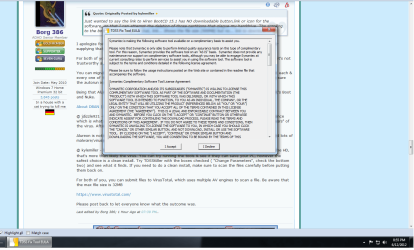
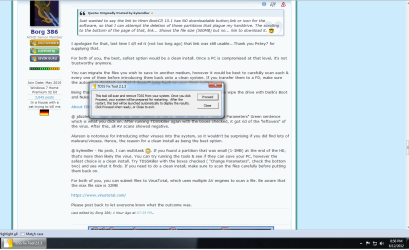
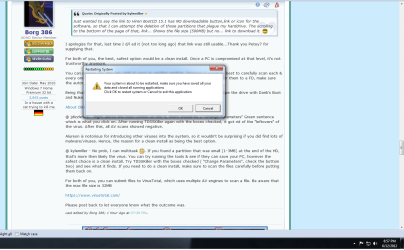
I went back and tried doing the process over a couple more times and I couldn't find the 'Change Parameters' option. I attached the screenshots of what I have when using the program.

Step1: Accept the usual license agreement
Step2: Given the option to either Proceed or Close
Step3: Prompts for the reboot of my comp.

Is it possible that maybe the version petey linked is a different version than the one you originally suggested?


Hiren:

This I'm a bit stuck at as this is what I've done so far.
1. Downloaded it on my clean laptop.
2. Used the BurntoCDCC.exe option to write an image to my CD/DVD on the clean laptop.
3. Inserted the DVD back into my infected desktop.
4. Tried using all the remaining files to start up the scanner with no success so far.

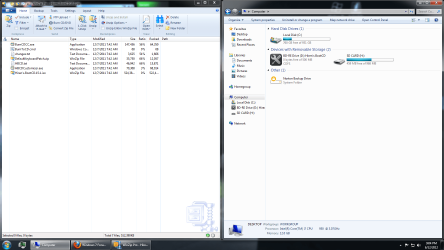
I've attached a screenshot of the available options I have, as well as my disk drive where I currently have the DVD in my computer.


Am I close? :D
 

Attachments

  • TDSSscreen1.png
    TDSSscreen1.png
    76.9 KB · Views: 16
  • TDSSscreen2.png
    TDSSscreen2.png
    64 KB · Views: 9
  • TDSSscreen3.png
    TDSSscreen3.png
    62.5 KB · Views: 9
  • HirenScreenShots.png
    HirenScreenShots.png
    105.6 KB · Views: 15

My Computer My Computer

At a glance

Windows 7 Professional 64 bitIntel (R) Core (TM) i7 CPU 950 @ 3.07 GHz24.0 GBAMD Radeon HD 6800 Series
OS
Windows 7 Professional 64 bit
CPU
Intel (R) Core (TM) i7 CPU 950 @ 3.07 GHz
Motherboard
ASUSTeK Computer INC. SABERTOOTH X58
Memory
24.0 GB
Graphics Card(s)
AMD Radeon HD 6800 Series
Sound Card
(1) AMD High Definition Audio Device (2) Realtek High Defi
Hard Drives
Samsung 128gb SSD, WDC 1TB HDD, Hitachi 1TB HDD,
Case
Cooler Master
Just wondering here... Did you boot from the CD/DVD you just created?
 

My Computer My Computer

At a glance

Win 10 Pro x64Intel I5-2500K @3.3GHz16GB G.Skill Ripjaws X (4x4GB)EVGA GeForce 750 Ti SC 2GB
Computer type
PC/Desktop
Computer Manufacturer/Model Number
Self Built
OS
Win 10 Pro x64
CPU
Intel I5-2500K @3.3GHz
Motherboard
Asrock P67 Extreme4
Memory
16GB G.Skill Ripjaws X (4x4GB)
Graphics Card(s)
EVGA GeForce 750 Ti SC 2GB
Sound Card
ASUS Xonar DG 5.1 Channels 24-bit 96KHz PCI Interface Sound
Monitor(s) Displays
auria eq2367
Screen Resolution
1920 x 1080
Hard Drives
250GB Samsung 850 EVO SSD
1TB WD Blue
1TB Hitachi
PSU
SeaSonic X 650W 80 Plus Gold
Case
Corsair Obsidian 750D
Cooling
Corsair H60, Three 140mm case fans
Keyboard
Logitech Wireless Keyboard K520
Mouse
Logitech Wireless Mouse M310
Internet Speed
Wave Broadband ~ 100 dn 5 up
Antivirus
Windows Defender, Malwarebytes Premium
Browser
Edge, IE11, Chrome
Other Info
Laptop specs: HP g7-1365dx /
CPU: AMD A6-3420M APU with Radeon(tm) HD Graphics /
RAM: Crucial 8Gb (2x4Gb) /
SSD: Crucial M4-CT128M4SSD2 ATA Device/ FW 000F /
GFX: AMD Radeon HD 6520G /
OS: Windows 10 Pro x64
homer-simpson-doh.gif


I knew I was forgetting something simple. :o
------------------------------------------
Here are the options I have...

PAGE #1

Boot from Hard Drive (Windows Vista/7/2008/XP)
Mini Windows XP
DOS Programs
Linux Based Rescue Environment (Parted Magic 6.7)
Windows Memory Diagnostic
MemTest 86+
Offline NT/2000/XP/Vista/7 Password Changes
Kon-Boot
Seagate Disc Wizard (Powered by Acronis TrueImage)
PLoP Boot Manager
Smart Boot Manager 3.7.1
Fix "NTLDR is Missing"
Dariks Boot and Nuke (Hard Disk Eraser)
Custom Menu....(Use HBCD Customizer to add your files)
More.....

PAGE #2

DOS Programs (Alternative Boot Method)

Boot HDD 1 MBR
Boot HDD 1 Partition 1
Boot HDD 1 Partition 2
Boot HDD 1 Partition 3
Boot HDD 1 Partition 4

Boot HDD 2 MBR
Boot HDD 2 Partition 1
Boot HDD 2 Partition 2
Boot HDD 2 Partition 3
Boot HDD 2 Partition 4

Boot HDD 3 MBR
Boot HDD 3 Partition 1
Boot HDD 3 Partition 2
Boot HDD 3 Partition 3
Boot HDD 3 Partition 4

More....

PAGE #3

Boot Windows XP (NTLDR) From Hard Drive
Boot Windows Vista/7 (BOOTMGR) from Hard Drive
Chainload isolinux.bin
==============================================================

I assume I boot starting with "Boot HDD 1 MBR'' and go down the line from there doing each partition and each MBR for every HDD?

Once I get in there, is there a certain scan I should run?
-----------------------------------------------------------------------------------------


EDIT/UPDATE #1

I've been booting up each option and running the scan with Malwarebytes and HitmanPro. Here's what I have so far...

HDD 1 MBR:
MalByte: Nothing
Hitman: Removed 15 'Tracking Cookies'

HDD 1 Partition 1:
Nothing with either scan.

HDD 1 Partition 2:
Error 22: No such partition

HDD 1 Partition 3:
No Such Partition

HDD 1 Partition 4:
No such partition
-----------------------

HDD 2 MBR;
Nothing found wither either scan.

HDD 2 Partition 1:
Nothing found with either scan.

HDD 2 Partition 2:
Error 21: Selected disk does not exist.

HDD 2 Partition 3;
Error 21: Selected disk does not exist.

HDD 2 Partition 4:
Error 21: Selected disk does not exist.
-------------------------

HDD 3 MBR:
Error 21: Selected disk does not exist.

HDD 3 Partition 1:
Error 21: Selected disk does not exist.

HDD 3 Partition 2:
Error 21: Selected disk does not exist.

HDD 3 Partition 3:
Error 21: Selected disk does not exist.

HDD 3 Partition 4:
Error 21: Selected disk does not exist.

Essentially half of HDD 2 and all the HDD 3 components do not exist.
 
Last edited:

My Computer My Computer

At a glance

Windows 7 Professional 64 bitIntel (R) Core (TM) i7 CPU 950 @ 3.07 GHz24.0 GBAMD Radeon HD 6800 Series
OS
Windows 7 Professional 64 bit
CPU
Intel (R) Core (TM) i7 CPU 950 @ 3.07 GHz
Motherboard
ASUSTeK Computer INC. SABERTOOTH X58
Memory
24.0 GB
Graphics Card(s)
AMD Radeon HD 6800 Series
Sound Card
(1) AMD High Definition Audio Device (2) Realtek High Defi
Hard Drives
Samsung 128gb SSD, WDC 1TB HDD, Hitachi 1TB HDD,
Case
Cooler Master
OK, I see what's going on. You're using the Norton Tool.

Go ahead & d/l Kaspersky TDSSKiller

Anti-rootkit utility TDSSKiller

This is the tool where you'll find the settings I described ('Change Parameters'). Click the two lower boxes. Go ahead & run that, if anything is left it'll inform you, follow the prompts. If it finds/cleans anything, reboot & I think you already have a copy of Windows Defender Offline, go ahead & run that to clean out any other viruses.

Try this tool 1st as it is the easiest and generally does the job.

If this yields no results, you'll probably have to use Hiren's & manually delete the partition, have a look here, post #8. There is a picture showing what you are looking for, a hidden partition. If in doubt, post a picture of what you see.

http://www.sevenforums.com/system-s...artition3-type-17-alureon-e-virus-trojan.html
 
Last edited:

My Computer My Computer

At a glance

Win 7 32 Home Premium, Win 7 64 Pro, Win 8.1,...Intel Core 2 Duo 2.93GHzNot much with my ADHDATI Radeon HD 4350
Computer type
PC/Desktop
Computer Manufacturer/Model Number
Dell Hell oh Well
OS
Win 7 32 Home Premium, Win 7 64 Pro, Win 8.1, Win 10
CPU
Intel Core 2 Duo 2.93GHz
Memory
Not much with my ADHD
Graphics Card(s)
ATI Radeon HD 4350
Monitor(s) Displays
24" HDTV/Monitor
Screen Resolution
Blurry after a Scotch or 2
Hard Drives
1 HDD 250 GB, 1 HDD 1 TB, 3 - 1 TB Externals
Case
Don't get on my case...man :D
Cooling
I have an Air Conditioner & Diet Pepsi
Keyboard
Saitek Cyborg
Mouse
10 yr old MS optical mouse that still works
Internet Speed
Never fast enough
Antivirus
Various
Browser
Various
Thanks for the link borg.

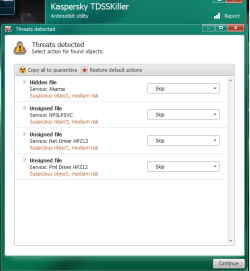
I've got the scanner all downloaded, and here is the results of the first scan. (Attached green photo)

I chose to Delete all four and about to to my reboot, then another reboot using Windows defender.
-----------------------------------------------------------------------

Edit #1: Also, upon start up, I now get this dialog box prompting the install of 'Solution Center'. I didn't install anything like that, so I'm a bit perplexed where it's coming from.
(Attached 2nd photo)
-------------------------------------------------------------------------

Edit #2: I've got the scans with both Windows defender all finished up, nothing detected/removed.
I'm going to go ahead with the HiRen's and see what I can turn up.

I do have a quick question about the HiRens process though. I checked out post #8 on the other page and see he was able to screencap and paste his results into Excel. When my HiRen boot is running it keeps me at the normal boot screen where I have all the partition options I listed a couple posts up.

When I go to select a partition, nothing of that nature showing the 'File System', 'Label', 'Size', 'Used', etc. shows up for me. All that happens is my computer starts to boot back up again.

Am I selecting the wrong partition perhaps? I copied and pasted my HiRen boot options from my previous post below:

PAGE #1

Boot from Hard Drive (Windows Vista/7/2008/XP)
Mini Windows XP
DOS Programs
Linux Based Rescue Environment (Parted Magic 6.7)
Windows Memory Diagnostic
MemTest 86+
Offline NT/2000/XP/Vista/7 Password Changes
Kon-Boot
Seagate Disc Wizard (Powered by Acronis TrueImage)
PLoP Boot Manager
Smart Boot Manager 3.7.1
Fix "NTLDR is Missing"
Dariks Boot and Nuke (Hard Disk Eraser)
Custom Menu....(Use HBCD Customizer to add your files)
More.....

PAGE #2

DOS Programs (Alternative Boot Method)

Boot HDD 1 MBR
Boot HDD 1 Partition 1
Boot HDD 1 Partition 2
Boot HDD 1 Partition 3
Boot HDD 1 Partition 4

Boot HDD 2 MBR
Boot HDD 2 Partition 1
Boot HDD 2 Partition 2
Boot HDD 2 Partition 3
Boot HDD 2 Partition 4

Boot HDD 3 MBR
Boot HDD 3 Partition 1
Boot HDD 3 Partition 2
Boot HDD 3 Partition 3
Boot HDD 3 Partition 4

More....

PAGE #3

Boot Windows XP (NTLDR) From Hard Drive
Boot Windows Vista/7 (BOOTMGR) from Hard Drive
Chainload isolinux.bin
=======================================================================


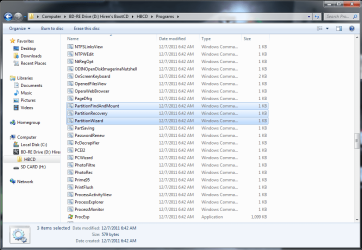
Edit: #3: I did some more searching around the HiRen's when just inserted into my disc drive and found these three partition related programs in the 'Programs' folder.

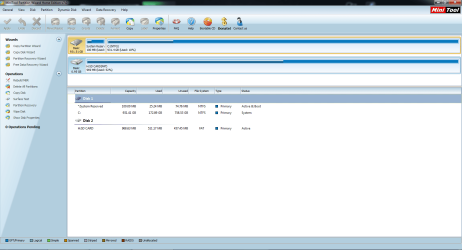
I tried all three and the 'Partition Wizard' is the only one that will open. (Error on "PartitionFindandMount', and dead end on 'PartitionRecovery')

Am I on the right track with Partition Wizard? Attached is the screen it displays once opened....
 

Attachments

  • TDSSKiller1.png
    TDSSKiller1.png
    31 KB · Views: 13
  • SoltnCntr1.png
    SoltnCntr1.png
    23 KB · Views: 9
  • HiRenPrograms1.png
    HiRenPrograms1.png
    50.6 KB · Views: 11
  • PartnWizard1.png
    PartnWizard1.png
    62.1 KB · Views: 17
Last edited:

My Computer My Computer

At a glance

Windows 7 Professional 64 bitIntel (R) Core (TM) i7 CPU 950 @ 3.07 GHz24.0 GBAMD Radeon HD 6800 Series
OS
Windows 7 Professional 64 bit
CPU
Intel (R) Core (TM) i7 CPU 950 @ 3.07 GHz
Motherboard
ASUSTeK Computer INC. SABERTOOTH X58
Memory
24.0 GB
Graphics Card(s)
AMD Radeon HD 6800 Series
Sound Card
(1) AMD High Definition Audio Device (2) Realtek High Defi
Hard Drives
Samsung 128gb SSD, WDC 1TB HDD, Hitachi 1TB HDD,
Case
Cooler Master
Here is the utility to use, insert Hirens Boot Disk & launch GParted.

When it Launches "do not touch keymap" should be highlighted by default, hit enter.

On the next prompt, choose your language, then press enter.

Press enter again and the the GUI screen will launch.

Look for a small partition, marked as unknown or hidden. (See picture below).

This is the one you need to delete. Highlight it, hit the delete button on top and confirm the actions. If the partition is marked as Unallocated, then it has already been deleted by TDSSKiller.

If you're having problems accessing GParted on Hiren's disk, you can d/l it directly here:

GParted - Browse Files at SourceForge.net

From what I'm seeing it looks like TDSSKiller flagged the HP Solution Center files as suspicious. Those are easily restored, provided you use that service.

Still, the best & safest option would be to do a clean install. Like I mentioned, once a PC is compromised at that level, it's hard to know if it'll ever be safe again.

I notice you have an SD card, this too could have been infected by the virus. Hopefully you've disabled auto run.

Here is a suggested program for you d/l

http://labs.bitdefender.com/projects/usb-immunizer/overview/

And be sure to contact your banks and change your log in passwords on other sites from a clean computer. Alureon steals personal information.
 
Last edited:

My Computer My Computer

At a glance

Win 7 32 Home Premium, Win 7 64 Pro, Win 8.1,...Intel Core 2 Duo 2.93GHzNot much with my ADHDATI Radeon HD 4350
Computer type
PC/Desktop
Computer Manufacturer/Model Number
Dell Hell oh Well
OS
Win 7 32 Home Premium, Win 7 64 Pro, Win 8.1, Win 10
CPU
Intel Core 2 Duo 2.93GHz
Memory
Not much with my ADHD
Graphics Card(s)
ATI Radeon HD 4350
Monitor(s) Displays
24" HDTV/Monitor
Screen Resolution
Blurry after a Scotch or 2
Hard Drives
1 HDD 250 GB, 1 HDD 1 TB, 3 - 1 TB Externals
Case
Don't get on my case...man :D
Cooling
I have an Air Conditioner & Diet Pepsi
Keyboard
Saitek Cyborg
Mouse
10 yr old MS optical mouse that still works
Internet Speed
Never fast enough
Antivirus
Various
Browser
Various
I've got GParted downloaded (It wasn't on the HiRen disk) however it won't install/open the scanner for some odd reason. I opened up the website link and downloaded using the 'Looking for the Latest Version' link, as well as trying the 'gparted-live-stable' version as well.

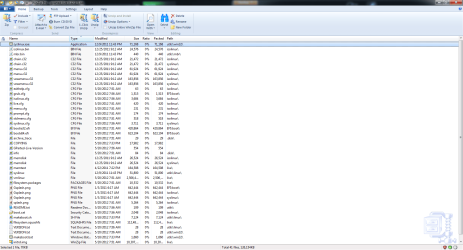
I attached a screenshot of what I have when viewing the file with WinZip.

The only .exe file is at the top and when I click on it and hit 'Run' the box disappears, then reappears. The second time I click it, I get a quick flash of what looks like a black command prompt screen, and then I'm back to square one.

For the Autoplay, I disabled that using the SevenForums link you posted on page 2 but I did a large majority of my downloading and transferring of the 'clean downloaded' AV scanners using that card.

Should I just keep using that card for these last few steps if I need to transfer over another AV scanner? Or just download everything from here on the infected desktop?
-----------------------------------------------------------------------------

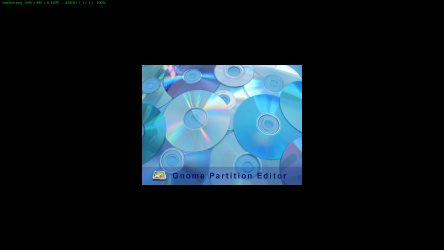
Edit#1: I also tried downloading it on my laptop and burning it to a disc with no success. After looking around on the disk, it seems as if this program is called 'Gnome' instead of GParted. I attached a screenshot of one of the PNG files in the 'boot' folder...
 

Attachments

  • GParted1.png
    GParted1.png
    89.1 KB · Views: 11
  • Gnome1.png
    Gnome1.png
    149 KB · Views: 9
Last edited:

My Computer My Computer

At a glance

Windows 7 Professional 64 bitIntel (R) Core (TM) i7 CPU 950 @ 3.07 GHz24.0 GBAMD Radeon HD 6800 Series
OS
Windows 7 Professional 64 bit
CPU
Intel (R) Core (TM) i7 CPU 950 @ 3.07 GHz
Motherboard
ASUSTeK Computer INC. SABERTOOTH X58
Memory
24.0 GB
Graphics Card(s)
AMD Radeon HD 6800 Series
Sound Card
(1) AMD High Definition Audio Device (2) Realtek High Defi
Hard Drives
Samsung 128gb SSD, WDC 1TB HDD, Hitachi 1TB HDD,
Case
Cooler Master
You have the right file, Gparted is a boot disk, once it's burned, insert it into your drive, reboot your PC & it will run. Then follow the directions above.

The file is an ISO, once d/l ed, double click on the file & your burning software should take over & burn it. If you d/l ed the zip, just extract it on your PC & burn it to disk.

Since you disabled the auto run, go ahead & keep using the card. You should however, scan it thoroughly with MSE & Malwarebytes

Have you run a virus scan with any AV on the PC since running TDSSKiller? I'm just curious if the virus is indeed still present. Before you run GParted, run a scan with Malwarebytes or MSE. If it shows there is still an infection, go ahead & run GParted.

If nothing shows up on the AV scans, that would indicate that TDSSKiller got the bug.
 

My Computer My Computer

At a glance

Win 7 32 Home Premium, Win 7 64 Pro, Win 8.1,...Intel Core 2 Duo 2.93GHzNot much with my ADHDATI Radeon HD 4350
Computer type
PC/Desktop
Computer Manufacturer/Model Number
Dell Hell oh Well
OS
Win 7 32 Home Premium, Win 7 64 Pro, Win 8.1, Win 10
CPU
Intel Core 2 Duo 2.93GHz
Memory
Not much with my ADHD
Graphics Card(s)
ATI Radeon HD 4350
Monitor(s) Displays
24" HDTV/Monitor
Screen Resolution
Blurry after a Scotch or 2
Hard Drives
1 HDD 250 GB, 1 HDD 1 TB, 3 - 1 TB Externals
Case
Don't get on my case...man :D
Cooling
I have an Air Conditioner & Diet Pepsi
Keyboard
Saitek Cyborg
Mouse
10 yr old MS optical mouse that still works
Internet Speed
Never fast enough
Antivirus
Various
Browser
Various
I apologize for the delay borg. Anyways, here's what I've got at the moment.

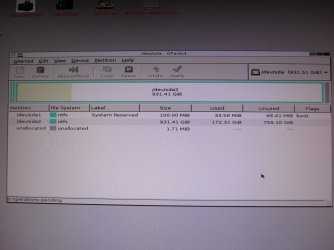
I got the GParted disc all burned and did the re-boot with the program. I wasn't able to screen cap so I took a photo of the screen instead. :geek:

It didn't seem like there was anything suspicious or a partition titled 'unknown' like in the case a couple posts above, so I didn't delete anything as I wanted to double check with you first.

As for the other virus scans, Malwarebytes doesn't have anything showing up on any of it's scans I'm doing and nor does MSE.
 

Attachments

  • IMG_1178.JPG
    IMG_1178.JPG
    328.4 KB · Views: 22

My Computer My Computer

At a glance

Windows 7 Professional 64 bitIntel (R) Core (TM) i7 CPU 950 @ 3.07 GHz24.0 GBAMD Radeon HD 6800 Series
OS
Windows 7 Professional 64 bit
CPU
Intel (R) Core (TM) i7 CPU 950 @ 3.07 GHz
Motherboard
ASUSTeK Computer INC. SABERTOOTH X58
Memory
24.0 GB
Graphics Card(s)
AMD Radeon HD 6800 Series
Sound Card
(1) AMD High Definition Audio Device (2) Realtek High Defi
Hard Drives
Samsung 128gb SSD, WDC 1TB HDD, Hitachi 1TB HDD,
Case
Cooler Master
No problems on the delay. It looks like you got it, I see the small partition there (typical of Alureon) and it's unallocated.

You may want to run TDSSKiller one more time to be double sure.

Run a scan with MS Defender Offline (Boot Disk) to make sure no other viruses are left, then boot to windows & run a full system scan with Malwarebytes, MSE & SuperAntiSpyware.

Keep a close eye on your PC & it's behaviors. Anything suspicious actions should be investigated immediately. You may want to take this opportunity to back up your personal files. And make sure to run a scan on your SD card with all of the AV's.

Hopefully, your PC is clean. As I mentioned earlier, the safest thing would be a clean install, but you can do that down the road if you choose, once you have your files backed up. If after all these actions taken, you find your PC still has problems, a clean install is the only option left to thoroughly rid it of the problem.

As for the Solution Center, that's your choice to re-install or not. If you don't use it for anything, then you might want to consider uninstalling it all the way.

Also, consider running a SFC in case any files need to be fixed.

http://www.sevenforums.com/tutorials/1538-sfc-scannow-command-system-file-checker.html

It's recommended that you run it 3 times as it doesn't always fix everything on the first pass.

Something else you may wish to look at, this will save you a lot of problems down the road should something like this happen again:

http://www.sevenforums.com/tutorials/663-backup-complete-computer-create-image-backup.html
 
Last edited:

My Computer My Computer

At a glance

Win 7 32 Home Premium, Win 7 64 Pro, Win 8.1,...Intel Core 2 Duo 2.93GHzNot much with my ADHDATI Radeon HD 4350
Computer type
PC/Desktop
Computer Manufacturer/Model Number
Dell Hell oh Well
OS
Win 7 32 Home Premium, Win 7 64 Pro, Win 8.1, Win 10
CPU
Intel Core 2 Duo 2.93GHz
Memory
Not much with my ADHD
Graphics Card(s)
ATI Radeon HD 4350
Monitor(s) Displays
24" HDTV/Monitor
Screen Resolution
Blurry after a Scotch or 2
Hard Drives
1 HDD 250 GB, 1 HDD 1 TB, 3 - 1 TB Externals
Case
Don't get on my case...man :D
Cooling
I have an Air Conditioner & Diet Pepsi
Keyboard
Saitek Cyborg
Mouse
10 yr old MS optical mouse that still works
Internet Speed
Never fast enough
Antivirus
Various
Browser
Various
Back
Top