
Solved MSE update error

netadict

New member
Member
VIP
Local time
12:16 AM
Messages
155
Location
Egypt
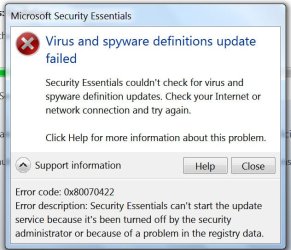
I installed MSE yesterday and it updated normally. Today when I tried to update I got the error message in the attached image. How do I switch the update on again?

Thanks in advance
 

Attachments

  • error.jpg
    error.jpg
    83.1 KB · Views: 5

My Computer

Computer Manufacturer/Model Number
HP Compaq dc7600 Convertible Minitower PC
OS
Windows 7 Professional 32 bit
CPU
Pentium D 3.4 GHYz
Motherboard
original that came with the PC
Memory
4GB
Graphics Card(s)
Nvidia GE Force 9600 GT
Sound Card
intergrated on the motherboard
Monitor(s) Displays
Samsung SyncMaster 713N
Screen Resolution
1280X1024
Hard Drives
Maxtor 6V160E0 ATA
Case
mini tower
Keyboard
standard PS/2
Mouse
PS/2 compatible
Internet Speed
2 M/s ADSL
Hello netadict and welcome to Seven Forums.

I'd uninstall MSE and then run a system file checker scan from an elevated command prompt (option two) to make sure I didn't have any damaged or corrupt system files. If the scan show any problems, run the scan 3 times rebooting in between each scan. Then I'd reinstall MSE and see what happens. Perhaps someone else will jump in with a better suggestion.

http://www.sevenforums.com/tutorials/1538-sfc-scannow-command-system-file-checker.html
 

My Computer

Computer type
Laptop
Computer Manufacturer/Model Number
Sony Vaio VPCEB47GM Laptop
OS
Win 7 Pro 64-bit
CPU
Intel i5 2.4 Ghz
Memory
8GB DDR3
Graphics Card(s)
Intel HD 3000
Sound Card
IDT High Definition
Monitor(s) Displays
15.6 WGXA Anti-Glare LED
Screen Resolution
1280x800
Hard Drives
640Gb 7200rpm
Antivirus
MSE
Browser
Opera (primary) with IE9 backup
I've solved it simply by enabling Windows updates whichI had previously disabled.
 

My Computer

Computer Manufacturer/Model Number
HP Compaq dc7600 Convertible Minitower PC
OS
Windows 7 Professional 32 bit
CPU
Pentium D 3.4 GHYz
Motherboard
original that came with the PC
Memory
4GB
Graphics Card(s)
Nvidia GE Force 9600 GT
Sound Card
intergrated on the motherboard
Monitor(s) Displays
Samsung SyncMaster 713N
Screen Resolution
1280X1024
Hard Drives
Maxtor 6V160E0 ATA
Case
mini tower
Keyboard
standard PS/2
Mouse
PS/2 compatible
Internet Speed
2 M/s ADSL
I've solved it simply by enabling Windows updates whichI had previously disabled.


:what: :doh: :roflmao: :thumbsup:

Glad it was such an easy fix! Thanks for posting back.
 

My Computer

Computer type
Laptop
Computer Manufacturer/Model Number
Sony Vaio VPCEB47GM Laptop
OS
Win 7 Pro 64-bit
CPU
Intel i5 2.4 Ghz
Memory
8GB DDR3
Graphics Card(s)
Intel HD 3000
Sound Card
IDT High Definition
Monitor(s) Displays
15.6 WGXA Anti-Glare LED
Screen Resolution
1280x800
Hard Drives
640Gb 7200rpm
Antivirus
MSE
Browser
Opera (primary) with IE9 backup
Back
Top