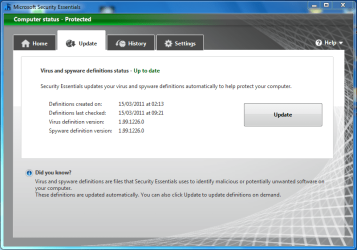
MSE Update Settings

Seven8nine

Banned
Local time
2:32 AM
Messages
51
Well after many, many years of using avast! anti-virus, I've finally come to the conclusion that I do not like where they are headed and quite frankly do not trust the way they seem to be intruding upon the Windows OS by adding silly little items and menus that I declined to install in the first place.

Other standard features of Windows such as media player, Exlporer, and IE are being corrupted in the registry in order to influence the use of needless trinkets such as WebRep and needless gadgets which really only mess up the web and Windows standard train of thought process to be clear.

Anyhow. I've added MSE to this PC and have noticed that it doesn't really update like it should. Usually, I have to do a manual Windows Update (Microsoft Update now) and the definitions update is there upon doing so however, the box is not ticked as if it is not considered an important update.

Now, I'm not too keen on automatically downloading and installing updates because I'm not com pletely so trusting in the fact that they won't just install a bunch of fodder that I don't really need. It is set to do so now though. I just don't know the best alternative to ensure updates regularly to MSE.

I guess I'm wondering if there is a preferred method of setting up Windows Update after installing MSE. I don't have anything special as far as programs. Just the OS and the MSE.

I've spent considerable time deciding upon a replacement of avast! and with other security measures I've taken on this PC I think that MSE would do well to remain.

All in all, it's not bad and am especially comfortable that such third party software like avast! that has really just become fanboyish can no longer reconfigure the OS to conform to it's own bottom line.

I figure Microsoft knows how to play best with Windows so I may as well stay with it.

Really have to get a grasp on this update thing though.
 

My Computer

Computer Manufacturer/Model Number
Hewlett-Packard
OS
Windows 7 Home Premium 64bit
Memory
3.00GB
Also set the scanner to run daily at 12:00 AM. 12AM came and nothing happened.:sarc:

Of course, I had just run a full scan an hour prior to that so maybe thats why?

If I told it to scan at a certain time it should do that, right?:sarc:
 

My Computer

Computer Manufacturer/Model Number
Hewlett-Packard
OS
Windows 7 Home Premium 64bit
Memory
3.00GB

My Computer

Computer type
PC/Desktop
Computer Manufacturer/Model Number
Golden Mk. I.4
OS
Windows 10 Pro x64 ; Xubuntu x64
CPU
Intel i7 860 @ 2.80 GHz O/C'ed to 4.0GHz
Motherboard
Gigabyte P55A-UD3R Rev.1. Award BIOS F13
Memory
16GB Corsair Vengance DDR3 @ 661 MHz Dual Channel (9-9-9-24)
Graphics Card(s)
EVGA NVidia GTX 560 1024MB
Sound Card
Realtek Integrated
Monitor(s) Displays
Dual Samsung SyncMaster 2494HS
Screen Resolution
1920*1080 and 1920*1080
Hard Drives
1*Samsung 840 EVO 120GB SSD;
1*OCZ Vertex 2 60GB SSD;
2*Samsung F3 SpinPoint 1TB in RAID0;
1*Samsung F1 SpinPoint 1TB;
2*Western Digital 1TB External USB 3.0
1*Western Digital 500GB External USB 3.0
1*Seagate 500GB External USB 2.0
PSU
Thermaltake ToughPower QFan 750W
Case
Thermaltake Element S VK60001W2Z
Cooling
Corsair H60 Water Cooling, 2*230mm and 2*80mm case fans
Keyboard
Logitech G110
Mouse
Logitech MX518
Hi,

MSE does in fact run it's own independant check for updates.

MSE Update.PNG

The above was checked transparently and as there was no definition update available it didn't update ;)


OS
 

My Computer

Computer Manufacturer/Model Number
Compaq Desktop
OS
Windows 7 Ultimate x64
CPU
AMD Sempron Dual Core
Memory
3GB
Graphics Card(s)
NVIDIA GeForce 6150SE nForce 430
Screen Resolution
1024x768
Hard Drives
150GB Sata

I had actually read that thread prior to posting this one. That thread didn't really address my particular question unfortunately.

here is a prime example of my confusion. WU is set to automatically download and install updates and is ticked also to check via the Microsoft update that gets reconfigured once installing MSE.

So. I just now opened up WU and it reported that there were 4 optional updates. None of these updates were the definitions for MSE. Well, then I hit the back button and ran the update check manually. Of course then the definitions update ws listed but it was an "optional" update and was not ticked.

Do you see where I'm coming from now? It just doesn't make sense.

Even if I tick the box that says to give me recommended updates in the same manner as important ones ( which I then unticked because I don't want to do that either) it still doesn't list the definitions update BUT it does offer some updates that were NOT in the list when the receive recommended updated the same way I receive important updates is unticked.

As it is now, MSE reports a definitions file dated for the 14th. There is an update available today, the 15th, after discovering it through a manual WU even though it's set to do download and install updates automatically but failed to do so.

I don't know. I think somethings screwy with WU.
 

My Computer

Computer Manufacturer/Model Number
Hewlett-Packard
OS
Windows 7 Home Premium 64bit
Memory
3.00GB
Hi 789,

From what I understand, MSE updates are picked up from within MSE, and not WU. I have seen MSE get updates, when there weren't any updates (critical or optional) in WU at all.

Does that make sense?

Regards,
Golden
 

My Computer

Computer type
PC/Desktop
Computer Manufacturer/Model Number
Golden Mk. I.4
OS
Windows 10 Pro x64 ; Xubuntu x64
CPU
Intel i7 860 @ 2.80 GHz O/C'ed to 4.0GHz
Motherboard
Gigabyte P55A-UD3R Rev.1. Award BIOS F13
Memory
16GB Corsair Vengance DDR3 @ 661 MHz Dual Channel (9-9-9-24)
Graphics Card(s)
EVGA NVidia GTX 560 1024MB
Sound Card
Realtek Integrated
Monitor(s) Displays
Dual Samsung SyncMaster 2494HS
Screen Resolution
1920*1080 and 1920*1080
Hard Drives
1*Samsung 840 EVO 120GB SSD;
1*OCZ Vertex 2 60GB SSD;
2*Samsung F3 SpinPoint 1TB in RAID0;
1*Samsung F1 SpinPoint 1TB;
2*Western Digital 1TB External USB 3.0
1*Western Digital 500GB External USB 3.0
1*Seagate 500GB External USB 2.0
PSU
Thermaltake ToughPower QFan 750W
Case
Thermaltake Element S VK60001W2Z
Cooling
Corsair H60 Water Cooling, 2*230mm and 2*80mm case fans
Keyboard
Logitech G110
Mouse
Logitech MX518
No auto UD

My friend is running MSE and Windows updates are set to auto (recommended) everyday and it still pops up a message that all / any updates are available.

Also the MSE updates have to be done through the GUI or the updates site regardless as to the settings in the main updates window.

Now I did an update for MSE for him this am after booting up (no UD on boot) through the GUI only to be followed by another that came as optional!! after a x64 systems UD.

Does anyone know what is going on as there are refs to UD on boot, through the GUI, and now I find a message saying one for definitions is OPTIONAL - are they kidding??.

Now a security definitions UD in my mind is not really an option - or is it?? I was always under the impression that one had to have them or else risk getting malware.

Seems a bit of a shambles at the moment and am considering getting him onto a different free malware suite - shame because MSE is turning out to be really good.
 

My Computer

Computer type
PC/Desktop
Computer Manufacturer/Model Number
Own build (new) Desk1 / Asus ROG Win 7 / Desk2 1st build
OS
Desk1 7 Home Prem / Desk2 10 Pro / Main lap Asus ROG 10 Pro 2 laptop Toshiba 7 Pro Asus P2520 7 & 10
CPU
Desk1 i5 3750K / Laptop i7 GTX 860M / Desk2 i5 2500
Motherboard
Desk1 Asus P877-V / Desk2 Gigabyte H67 UD3H / Laptop ?
Memory
Desk1 8GB (1866) / Desk2 16GB (1333) / Laptop 8Gb DDR3
Graphics Card(s)
Desk 1& 2NVidia GTX 650 & Laptops on board Intel
Sound Card
Desk 1 & 2 -XONAR DG Realtek High Def audio Laptop
Monitor(s) Displays
Desk 1 Benq HD 2450 / Desk2 Philips 24" / Laptop 17.5"
Screen Resolution
1920x1080 D1 & D2 & Laptop 1
Hard Drives
Desk1 Samsung 120GB 830 SSD
Asus ROG 256GB 850 Pro SSD
Desk2 Samsung 840 256 SSD
Toshiba 120GB EVO
PSU
Desk 1 Corsair HX 1050/ Laptop ? / Desk 2 Corsair HX 650
Case
Desk 1 Cooler HAF XM ? Toshiba laptop / Desk2 Coolermaster
Cooling
Fans on all Desk1 -2 Desk2 - all Coolermasters 5 Laptop ?
Keyboard
Desk 1 MS Sidewinder X6 Desk 2 MS Sidewinder X 4
Mouse
Desk 1&2 - Gigabyte MS 900 gamer - laptop - Logitec wireless
Internet Speed
ADSL2+
Other Info
One other Desktop (tester) and spare Toshba laptop both with SSD's
Running Kaspersky 2016 ISS on all machines config'd identically
Logitec audio stereo systems on each machine (x3)
Canon MG5250MFC
Router/modem TP-Link running WPA2SK
Hi 789,

From what I understand, MSE updates are picked up from within MSE, and not WU. I have seen MSE get updates, when there weren't any updates (critical or optional) in WU at all.

Does that make sense?

Regards,
Golden

Well, I never did manually do an update through windows update just to see if MSE would do it by itself and it appears that after reviewing the definitions status through the gui of MSE that it did indeed update itself while I was out and about at around 9:00 PM. Also when I saw that, I also did a manual windows update check and it didn't show the previous update that was unticked that I had mentioned for the 15th.

So, MSE did actually update itself without windows update.

It's still screwy if you ask me though. I think they just want to feed me updates for other Microsoft software and maybe they are using MSE to change the windows update setting to do just that.

Whatever....

So, the issue appears to be understood by me now. solved as well in this particular regard.

But still screwy:sarc:

On a side note, wasn't IE9 supposed to be introduced through WU on the 14th? I haven't seen hide nor hair of it yet by means of WU/Microsoft Update....
 

My Computer

Computer Manufacturer/Model Number
Hewlett-Packard
OS
Windows 7 Home Premium 64bit
Memory
3.00GB
Here is my setup:

WU set to Check for important updates, but let me choose when to install them.

WU "give me recommended updates in the same way as important updates" is NOT checked.

I generally go to WU monthly or so for general purposes and hand pick which updates I want, but NEVER get my MSE updates while at the WU website.

MSE set to run a scheduled scan once a week.

MSE set to check for the latest definitions before running a scheduled scan

Under these settings, this is what happens:

MSE gets updates automatically every 24 to 48 hours, with NO input from me.

I always let MSE retrieve the updated definitions at its own chosen speed. I NEVER manually ask for them.

About every 2 weeks, I get a warning in my sys tray about a lack of scans, so I poke the scan button to get back to green status. This is true despite the fact that I have a weekly auto scan scheduled. I don't think that is happening.

At one time, MSE got quite confused. I uninstalled it with Revo and then reinstalled. The confusion disappeared.

I'm generally satisfied. It isn't perfect, but seems to protect me fine. Earlier versions did NOT complain about not having scanned. I don't care about doing scans, but am willing to do one manually every couple of weeks to keep the peace.
 

My Computer

Computer type
PC/Desktop
Computer Manufacturer/Model Number
Ignatz Special; 4 speed manual gearbox; factory air conditioning; one of one
OS
Windows 7 Home Premium SP1, 64-bit
CPU
Intel Skylake i5-6600K, not overclocked
Motherboard
AsRock Z170M Extreme 4, micro ATX
Memory
8 GB HyperX DDR4-2666 (2 x 4 GB)
Graphics Card(s)
none; graphics are integrated on CPU
Sound Card
onboard: Realtek ALC1150; external: USB Behringer UF0-202
Monitor(s) Displays
Dell S2340M 23 inch IPS
Screen Resolution
1600 x 900
Hard Drives
System: Crucial MX100 series SSD, 128 GB;
Data: Samsung Spinpoint 103SJ, 1 TB;
Backup: WD Caviar Green WD30EZRX-00D8PB0, 3 TB
PSU
Rosewill SilentNight 500 watt fanless, semi-modular
Case
Antec Solo II
Cooling
Noctua NH-U12S; Noctua F12 intake, Noctua S12A exhaust
Keyboard
Microsoft 200 6JH-00001 USB
Mouse
Dell or Microsoft optical wired; USB
Antivirus
Microsoft Security Essentials and Malwarebytes Premium
Browser
Pale Moon
Other Info
All fans PWM; speeds at idle: CPU circa 500 rpm; intake circa 600 rpm; exhaust circa 600 rpm; CPU temps 27 idle and 47 C load in a warm room (27 C/81 F) when running Intel Extreme Tuning Utility stress test.
Here is my setup:

WU set to Check for important updates, but let me choose when to install them.

WU "give me recommended updates in the same way as important updates" is NOT checked.

I generally go to WU monthly or so for general purposes and hand pick which updates I want, but NEVER get my MSE updates while at the WU website.

MSE set to run a scheduled scan once a week.

MSE set to check for the latest definitions before running a scheduled scan

Under these settings, this is what happens:

MSE gets updates automatically every 24 to 48 hours, with NO input from me.

I always let MSE retrieve the updated definitions at its own chosen speed. I NEVER manually ask for them.

About every 2 weeks, I get a warning in my sys tray about a lack of scans, so I poke the scan button to get back to green status. This is true despite the fact that I have a weekly auto scan scheduled. I don't think that is happening.

At one time, MSE got quite confused. I uninstalled it with Revo and then reinstalled. The confusion disappeared.

I'm generally satisfied. It isn't perfect, but seems to protect me fine. Earlier versions did NOT complain about not having scanned. I don't care about doing scans, but am willing to do one manually every couple of weeks to keep the peace.

Now that i've figured out how the thing actually thinks, I've set mine to notify but let me install as well. Also with "give me recommended updates in the same way as important updates" NOT checked.

I'm still set for a daily quick scan at 12AM which didn't happen like was expected last night so will stay up and see if it actually does what I asked it to do tonight.:sleepy:


Edit-- Apparently the thing did a quickscan as it was asked to do. I forgot about it though while I was reading through these threads and just remembered. I checked MSE status and it reports that it did do the scheduled quickscan. Must not have consumed too many resources because I didn't even notice the thing working. Of course it's set to 20% cpu usage but still. ...
 
Last edited:

My Computer

Computer Manufacturer/Model Number
Hewlett-Packard
OS
Windows 7 Home Premium 64bit
Memory
3.00GB
Back
Top