MSE wont update? What is this error code...

JohnnyScience

New member
Power User
Local time
5:01 PM
Messages
889
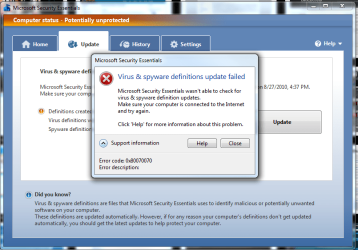
For some reason MSE wont update right now & I'm getting the following error code, any idea what it is?
 

Attachments

  • Untitled.png
    Untitled.png
    146.5 KB · Views: 60

My Computer

Computer Manufacturer/Model Number
Built it myself
OS
Windows 7 64 & Ubuntu 64
CPU
Intel Quad Core Q6600 2.40GHz
Motherboard
Asus
Memory
8g
Graphics Card(s)
Nvidia 9600 GT & 9800 GT
Sound Card
Turtle Beach 5.1
Monitor(s) Displays
Three 19" Dell's & one 46" Samsung 750
For some reason MSE wont update right now & I'm getting the following error code, any idea what it is?


Yep, it is either out of memory (ram) or out of space HD


Google it for more info
\

Ken
 

My Computer

Computer Manufacturer/Model Number
HP Pavillion dv-7 1005 Tx
OS
Win 8 Release candidate 8400
CPU
[email protected]
Memory
4 gigs
Graphics Card(s)
Nvidia 9600M
Sound Card
HD built-in
Monitor(s) Displays
17" Wxga
Screen Resolution
1440x900
Cooling
none
Internet Speed
45Mb down 5Mb up
If the above suggestion does not work, Go back with system restore and see if that helps
 

My Computer

Computer type
PC/Desktop
Computer Manufacturer/Model Number
Dell XPS 420
OS
Windows 10, Home Clean Install
CPU
Intel Core2 processsor Q8200(2.33Ghz 1333FSB) Quad Core Tech
Motherboard
Dell
Memory
6 gb
Graphics Card(s)
ATI Radeon 256MB HD3650
Sound Card
Intergrated 7.1 Channel Audio
Monitor(s) Displays
Dell SP2009W 20"
Hard Drives
640 GB Serial ATA Hard drive
Cooling
Fan
Keyboard
Dell USB Keyboard
Mouse
Dell Premium Optical USB
Internet Speed
DSL 2.85
Ahh thats what is is, out of memory on my HD. I've got an 80g for my OS that is totally full & a 500g media that only has a few gigs left.

I'm getting ready to upgrade to a 2T HDD for my media & then the OS will have the 500g... but until then I'm kind of screwed.
 

My Computer

Computer Manufacturer/Model Number
Built it myself
OS
Windows 7 64 & Ubuntu 64
CPU
Intel Quad Core Q6600 2.40GHz
Motherboard
Asus
Memory
8g
Graphics Card(s)
Nvidia 9600 GT & 9800 GT
Sound Card
Turtle Beach 5.1
Monitor(s) Displays
Three 19" Dell's & one 46" Samsung 750
Try to delete the temporary files , turn off hibernate.
 

My Computer

OS
Windows 7
Maintenance

Hi JohnnyScience,

MSE won't update because of insufficient hard disk space. To free your hard disk from unnecessary files, use CCleaner.

1. Download CCleaner
2. Install CCleaner (uncheck the Yahoo! Toolbar option)
3. Open CCleaner
4. In the 'Windows' tab, check everything except Wipe Free Space as this will slow down the clean up process
5. In the 'Applications' tab, check everything
6. Click 'Analyze' and wait until the results are shown
7. Once the results are shown, click 'Run Cleaner'.

After using CCleaner, defragment your computer using Defraggler.

1. Download Defraggler
2. Install Defraggler (again, do not install that Yahoo! Toolbar)
3. Open Defraggler
4. Select your drive(s)
5. It's better to analyze these drives first so click 'Analyze'.
6. Click 'Defrag'
7. Close Defraggler after the defragmentation process

Alternatively, you can always use Disk Cleanup and Disk Defragmenter on Windows.

How to Open and Use Disk Cleanup in Windows 7
How to Use Windows 7 Disk Defragmenter

That's it. After maintenance, try to update MSE.
 
Last edited:

My Computer

Computer type
PC/Desktop
Computer Manufacturer/Model Number
Custom Built
OS
Windows 7 Ultimate x64
CPU
Intel(R) Core(TM) 2 Quad Q8200 @ 2.33 GHz
Motherboard
Asus P5KPL-AM SE Motherboard
Memory
2x2GB Kingston DDR2
Graphics Card(s)
1GB AMD Radeon HD 5450
Sound Card
VIA Technologies High Definition Audio Device
Monitor(s) Displays
Samsung SyncMaster 733NW
Screen Resolution
1440x900
Hard Drives
SEAGATE 320GB Barracuda® 7200.12, SATA 3 Gb/s, 7200 RPM, 16MB cache x 2
Case
Custom Casing
Cooling
Ice cubes from the freezer ;)
Keyboard
Generic Plug & Play Keyboard
Mouse
Optical Mouse
Internet Speed
Very slow
Hi all
With ANY problem the SIMPLEST solution is likely to be the correct one -- not always 100% but often enough.

STOP MSE -- then do your Windows update and then START it again.

Sometimes programs can't be updated while the previous version is currently running.

(If you really don't have enough disk space to update MSE --it's a TINY program) then you are in BIG trouble anyway -- back up your system and data, get GPARTED, Boot from bootable GPARTED media, re-format disk, create SENSIBLE size partitions and restore your image and data).

Cheers
jimbo
 

My Computer

Computer type
PC/Desktop
Computer Manufacturer/Model Number
Custom built, several laptops HP/ASUS
OS
Linux CENTOS 7 / various Windows OS'es and servers
CPU
Intel i7 Intel i5
Memory
8GB, 16GB
Graphics Card(s)
On Motherboard
Sound Card
Realtek HD audio
Monitor(s) Displays
Apple Cinema display, Samsung LCD
Screen Resolution
1920 X 1080
Hard Drives
4 X 1TB SATA
Mouse
Toshiba wireless laser
Internet Speed
> 20MB up
Johnny,
First follow the advice regarding running CCleaner and turning off hibernate.
Go to a command prompt and type POWERCFG -H off

With Win Explorer open up C: (assuming that's where Win 7 is) and in that long address bar at the top type in %temp%
Use Ctrl + A to select all and then right-click on any one of the files and choose delete to deleter them all. You may get a notice that it can't delete a file so just choose skip on that one.

Here's a tutorial on using Disk Cleanup.
http://www.sevenforums.com/tutorials/818-disk-cleanup-open-use.html

After you've gotten over the hump, then post a snapshot of the maximized output of Disk Management.
WIN | type DISKMGMT.MSC | ENTER

You can use the snipping tool to make the snapshot.
WIN | type SNIP | ENTER

http://www.sevenforums.com/tutorials/9733-how-post-screenshot-seven-forums.html

The following will help you in filling in some of the blanks in your system specs:
________________________________________
SPECCY- System Information Tool
Speccy - System Information - Free Download

FREE. Operating System, CPU and Temp, Ram, Motherboard, Graphics, Hard Drives, Optical Drives, Audio, Peripherals, Network info.
Simply put—this is the best and it’s free!

 

My Computer

Computer Manufacturer/Model Number
Toshiba Satellite S875D-S7239 laptop
OS
MS Windows 7 Ultimate SP1 64-bit
CPU
AMD A10-4600M
Motherboard
AMD Pumori (Socket FT1)
Memory
6.00 GB Dual-Channel DDR3 @ 798MHz (11-11-12-28)
Graphics Card(s)
AMD Radeon HD 7660G
Sound Card
High Definition Audio Device
Monitor(s) Displays
Generic PnP Monitor (1600x900@60Hz)
Screen Resolution
1600x900@60Hz
Hard Drives
SSD 119GB Corsair CSSD-V128GB2 ATA Device
Keyboard
Standard PS/2 Keyboard
Mouse
HP Wireless Optical Mobile Mouse Model FHA-3410
Internet Speed
What the local pub, local coffee shop offers.
Other Info
Optical Drive:MATSHITA BD-CMB UJ160B ATA Device


Also have an Asus ha1002xp netbook with Win 7 Ultimate installed.
Back
Top