
msmpeng thrashing hdd when idle, also on a 2nd system hdd usage

chrysalis

New member
Power User
VIP
Local time
1:33 PM
Messages
529
Location
Leics, UK
HDD usages reduces life and uses power, its defenitly I dont want to see on my laptop. Am I right this is MSE, and why is it doing a scan everytime its idle? can I disable idle scanning?

scheduled scan is sunday 2am, today isnt sunday and its not 2am.

In addition if I run a quick scan its done in a minute, this hdd thrashing will go on for hours but then stops when I move the mouse pointer.

On my main desktop its more an annoyance than a big problem but I want to get the bottom of it.

My hdd light flickers roughly every second doing something, resource monitor shows the 'system' process. It does it even when no foreground apps opened at bootup.

Background apps are.

Logitech game profiler.
7 taskbar tweaker
nod32
pidgin
windows 7 firewall control
dumeter
proximitron

and usual system services

there is more background apps which I start after bootup but they excluded as it happens before I start them. My 2 chief suspects are du meter since I think it logs usage frequently and windows 7 firewall control which I believe polls the windows firewall log. If I hammer the windows key on this system so the menu comes on and off it generates hdd activity as if nothing is cached, my laptop doesnt do such a thing, this desktop has 16 gig of ram as well.

so 2 problems in one post.
 

My Computer My Computer

At a glance

windows 8.1 Pro x64intel i5 4670k @ 4.3ghz16 gig ram ddr3 @ 1600 corsair vengeanceevga 970 GTX 4 GIG FTW ACX 2.0
Computer type
PC/Desktop
Computer Manufacturer/Model Number
home built
OS
windows 8.1 Pro x64
CPU
intel i5 4670k @ 4.3ghz
Motherboard
asus z87-plus
Memory
16 gig ram ddr3 @ 1600 corsair vengeance
Graphics Card(s)
evga 970 GTX 4 GIG FTW ACX 2.0
Sound Card
asus xonar D2X
Monitor(s) Displays
benq gw2765ht
Screen Resolution
2560x1440
Hard Drives
Samsung 850 pro SSD 512gig - boot device wooosh
WD black cavalier 640gig WD6401AALS
Seagate 500gig ST3500630AS
WD 2TB Green WDC20EARS
2 x WD Red 3TB WD30EFRX
Samsung 750gig HD753LG - on asmedia controller
PSU
coolermaster silent pro 600watt modular
Case
fractal define R4
Cooling
artic freezer i30, 3 case fans
Keyboard
microsoft business ps2 keyboard
Mouse
microsoft optical black mouse
Internet Speed
80/20 FTTC SkyBB
Antivirus
Nod32 AV v8, HitmanProAlert, SRP, System Hardening
Browser
Chrome x64
Other Info
Intel controller is in AHCI mode currently using IaSTOR 12.8.0.1016 drivers
For the msmpeng issue, try a clean boot via msconfig. If the issue goes away, it indicates a conflict with one of the programs/services you disabled.

As far as the desktop machine is concerned, how long has this HD activity been going on? You can open Resource Monitor to see what's being read/written to.
 

My Computer My Computer

At a glance

Windows 7 Ultimate x64
OS
Windows 7 Ultimate x64
on the 2nd machine as I already said I already opened resource monitor and its the 'system' process.

I think I resolved the laptop, it turns out if a full scan is never been done MSE will keep trying to do one when its idle. After I did a full scan its now staying quiet when the screen is off.
 

My Computer My Computer

At a glance

windows 8.1 Pro x64intel i5 4670k @ 4.3ghz16 gig ram ddr3 @ 1600 corsair vengeanceevga 970 GTX 4 GIG FTW ACX 2.0
Computer type
PC/Desktop
Computer Manufacturer/Model Number
home built
OS
windows 8.1 Pro x64
CPU
intel i5 4670k @ 4.3ghz
Motherboard
asus z87-plus
Memory
16 gig ram ddr3 @ 1600 corsair vengeance
Graphics Card(s)
evga 970 GTX 4 GIG FTW ACX 2.0
Sound Card
asus xonar D2X
Monitor(s) Displays
benq gw2765ht
Screen Resolution
2560x1440
Hard Drives
Samsung 850 pro SSD 512gig - boot device wooosh
WD black cavalier 640gig WD6401AALS
Seagate 500gig ST3500630AS
WD 2TB Green WDC20EARS
2 x WD Red 3TB WD30EFRX
Samsung 750gig HD753LG - on asmedia controller
PSU
coolermaster silent pro 600watt modular
Case
fractal define R4
Cooling
artic freezer i30, 3 case fans
Keyboard
microsoft business ps2 keyboard
Mouse
microsoft optical black mouse
Internet Speed
80/20 FTTC SkyBB
Antivirus
Nod32 AV v8, HitmanProAlert, SRP, System Hardening
Browser
Chrome x64
Other Info
Intel controller is in AHCI mode currently using IaSTOR 12.8.0.1016 drivers
Check in scheduled tasks
select "view hidden files"
Disable the scan of msmpeng in properties

Then you need to manually run a full scan of your PC using MSE...then the scheduled scan listed in scheduled tasks disappears.

I had this issue as well. It usually occurs when you update the client version of MSE.
 

My Computer My Computer

At a glance

win 7 home premium 64 bitcore i5 7606 gbati 5450
Computer Manufacturer/Model Number
hp pavilion 6680t
OS
win 7 home premium 64 bit
CPU
core i5 760
Motherboard
iona (from MSI)
Memory
6 gb
Graphics Card(s)
ati 5450
Sound Card
real tek 888
on the 2nd machine as I already said I already opened resource monitor and its the 'system' process.

No, I meant use Resource Monitor to see which files are being read from/written to. Seeing which files are being accessed may give a clue as to what's doing it.
 

My Computer My Computer

At a glance

Windows 7 Ultimate x64
OS
Windows 7 Ultimate x64
ok the top 2 files which add up to roughly the system process are.

c:\$logfile (ntfs volume log)
c:\$extend\$usnjrnl:$j

thee is about 10 other files accessed under the system PID as well but those top 2 files account for 95% of the i/o rate.
 

My Computer My Computer

At a glance

windows 8.1 Pro x64intel i5 4670k @ 4.3ghz16 gig ram ddr3 @ 1600 corsair vengeanceevga 970 GTX 4 GIG FTW ACX 2.0
Computer type
PC/Desktop
Computer Manufacturer/Model Number
home built
OS
windows 8.1 Pro x64
CPU
intel i5 4670k @ 4.3ghz
Motherboard
asus z87-plus
Memory
16 gig ram ddr3 @ 1600 corsair vengeance
Graphics Card(s)
evga 970 GTX 4 GIG FTW ACX 2.0
Sound Card
asus xonar D2X
Monitor(s) Displays
benq gw2765ht
Screen Resolution
2560x1440
Hard Drives
Samsung 850 pro SSD 512gig - boot device wooosh
WD black cavalier 640gig WD6401AALS
Seagate 500gig ST3500630AS
WD 2TB Green WDC20EARS
2 x WD Red 3TB WD30EFRX
Samsung 750gig HD753LG - on asmedia controller
PSU
coolermaster silent pro 600watt modular
Case
fractal define R4
Cooling
artic freezer i30, 3 case fans
Keyboard
microsoft business ps2 keyboard
Mouse
microsoft optical black mouse
Internet Speed
80/20 FTTC SkyBB
Antivirus
Nod32 AV v8, HitmanProAlert, SRP, System Hardening
Browser
Chrome x64
Other Info
Intel controller is in AHCI mode currently using IaSTOR 12.8.0.1016 drivers
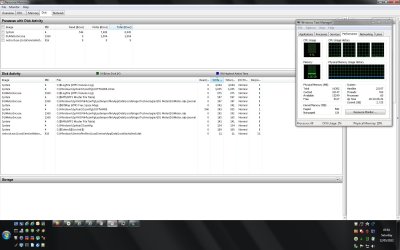
Might be useful to post a screen shot of more than just those two active files. Those are just NTFS metadata files. They will almost always be listed when there is disk activity. If all you see is just those two in the list it's usually not even enough to light the LED (cached, I guess?).

Make sure all columns are added to your screenshot.
 

My Computer My Computer

At a glance

Windows 7 Ultimate x64
OS
Windows 7 Ultimate x64
pic
 

Attachments

  • io.jpg
    io.jpg
    155.8 KB · Views: 57

My Computer My Computer

At a glance

windows 8.1 Pro x64intel i5 4670k @ 4.3ghz16 gig ram ddr3 @ 1600 corsair vengeanceevga 970 GTX 4 GIG FTW ACX 2.0
Computer type
PC/Desktop
Computer Manufacturer/Model Number
home built
OS
windows 8.1 Pro x64
CPU
intel i5 4670k @ 4.3ghz
Motherboard
asus z87-plus
Memory
16 gig ram ddr3 @ 1600 corsair vengeance
Graphics Card(s)
evga 970 GTX 4 GIG FTW ACX 2.0
Sound Card
asus xonar D2X
Monitor(s) Displays
benq gw2765ht
Screen Resolution
2560x1440
Hard Drives
Samsung 850 pro SSD 512gig - boot device wooosh
WD black cavalier 640gig WD6401AALS
Seagate 500gig ST3500630AS
WD 2TB Green WDC20EARS
2 x WD Red 3TB WD30EFRX
Samsung 750gig HD753LG - on asmedia controller
PSU
coolermaster silent pro 600watt modular
Case
fractal define R4
Cooling
artic freezer i30, 3 case fans
Keyboard
microsoft business ps2 keyboard
Mouse
microsoft optical black mouse
Internet Speed
80/20 FTTC SkyBB
Antivirus
Nod32 AV v8, HitmanProAlert, SRP, System Hardening
Browser
Chrome x64
Other Info
Intel controller is in AHCI mode currently using IaSTOR 12.8.0.1016 drivers
Although it appears DUmeter is responsible for most of the activity, the overall list doesn't seem to be enough to even illuminate the access LED. What happens when you disable DUmeter?
 

My Computer My Computer

At a glance

Windows 7 Ultimate x64
OS
Windows 7 Ultimate x64
Back
Top